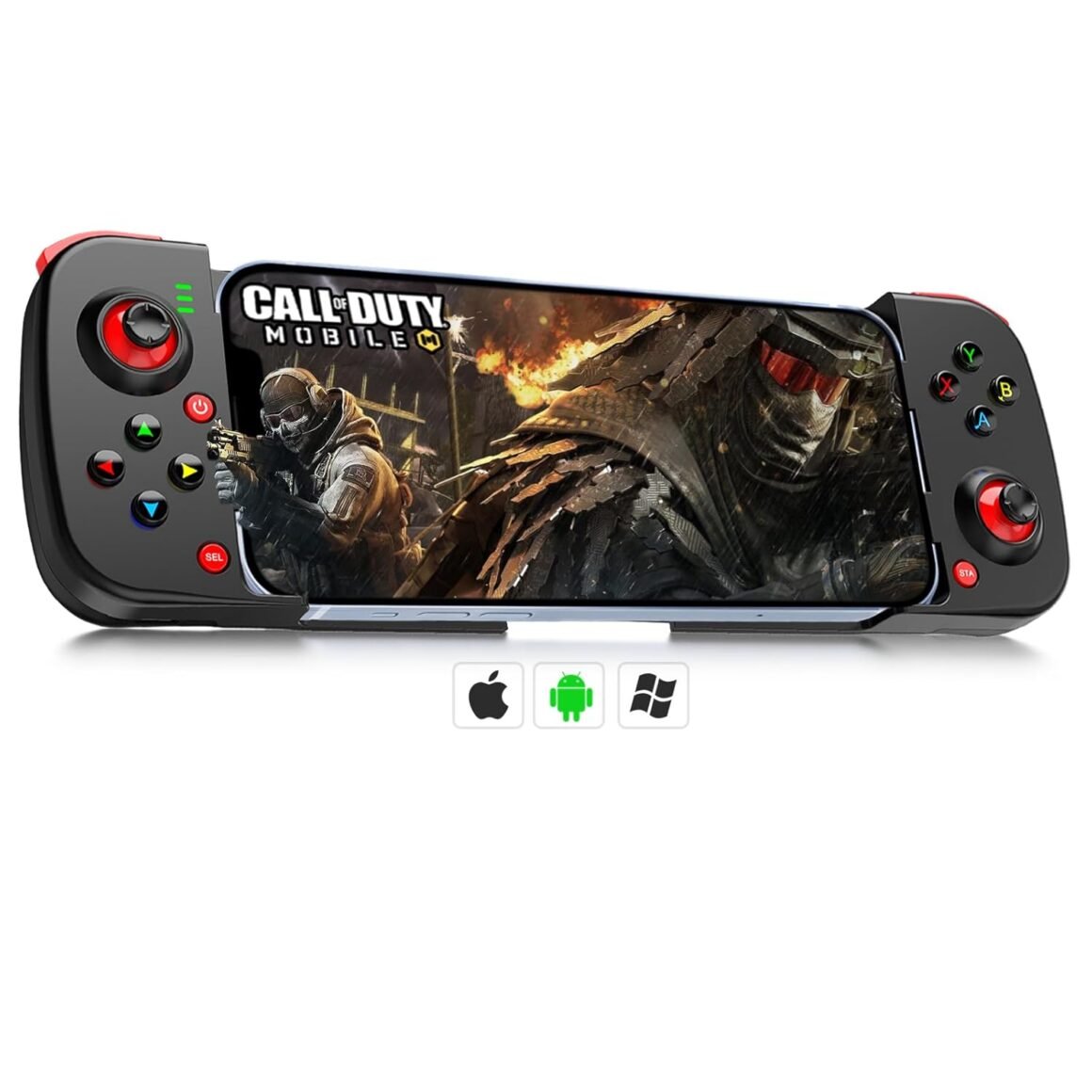
“arVin Wireless Gaming Controller: Bluetooth Gamepad for iPhone iOS Android PC, Back Button Included”: Available now at [price_with_discount]

Product Description arVin Wireless Gamepad for iPhone iOS Android PC 1 Support Phone Case 2 Macro Programmable 3 Stretchable Controller 4 Long Time Play 5 Play Controller Games Compatible Devices/Features/Precautions Name: Wireless Gaming Controller for Android iOS PC Battery: 400mAh Charging Time: 2-3 hours Wireless Protocol: Bluetooth 5.0 Wireless Range: 32.8ft Product Weight: 168g Product Package: 85*42*208mm For iOS 13.4+systems: Gaming controller for iPhone 15/iPhone 15 Plus/iPhone 15 Pro/iPhone 15 Pro Max/iPhone 14/14 Plus/14 Pro/14 Pro Max/iPhone 13/13 mini/13 Pro/13 Pro Max/iPhone 12/12 mini/12 Pro/12 Pro Max/iPhone 11/11 Pro/11 Pro Max/iPhone X/XR/XS/XS Max/iPhone 8/8 Plus/iPhone 7/7 Plus/iPhone 6S/6S Plus; for iPad controller, compatible with iPad/iPad Mini/iPad Pro/iPad Air. For Android 6.0+systems: Android game controller for Samsung Galaxy S24 Ultra/S24 +/S24 /S23 Ultra/S23+/S23/S22 Ultra/ S22+/S22/S21 Ultra/S21+/S21/S20 Ultra/S20+/S20/S10e/ S10+/ S10/S9+/S9/S8+/S8/Galaxy Note, for Huawei P30/P30Pro/P50 Pro/P40Pro+/Mate 40/Mate 40 Pro/P50 Pocket/Mate 40E/nova9SE/nova 9 Pro/nova 8 Pro/nova4/nova7; for Motorola, TCL, Oppo and more android phone. Tablet controller for Samsung Galaxy Tab, Lenovo Tab, Yoga Tab, Nokia T20, Smart Tab, HUAWEI MatePad etc. For Win 7-11 systems: Wireless PC game controller for MacBook, PC, Notebook, Laptop (If your PC does not have its own Bluetooth function, then you need to buy another Bluetooth receiver(Bluetooth Receiver Hardware Required: Bluetooth 4.2 +) Features: Multi-Platform Compatible, Stretchable Design, Support Macro Programmable Function, Wake up, Direct Play , Low Latency Multiple Color: Black, White, Blue, Pink, Green, Gray, Red&Blue, Blue&Green, cam Before Using the Controller (1) Please fully charge the controller before first use. (2)Ensure that the controller is turned off before Bluetooth pairing connection. Please Note Before Playing (1)Under iOS mode, it supports ‘Genshin Impact’, and does not support ‘PUGB Mobile’. (2) Under Android mode, both ‘Genshin Impact’ & ‘PUGB Mobile’are not supported. (3) In ‘Call of duty’ gaming interface,if you’ve received a notice to choose a controller model within ‘PS4,PS5 and XBOX’. Please select ‘XBOX’. arVin Mobile Game Controller for Android iOS PC Add to Cart Add to Cart Add to Cart Add to Cart Add to Cart Add to Cart Add to Cart Customer Reviews 3.4 out of 5 stars 429 3.4 out of 5 stars 40 3.6 out of 5 stars 41 3.5 out of 5 stars 115 3.4 out of 5 stars 159 3.6 out of 5 stars 321 — Price $25.59$25.59 $59.59$59.59 $49.59$49.59 $36.59$36.59 $29.99$29.99 $32.59$32.59 $49.59$49.59 For iOS/Android/PC ✔ ✔ ✔ ✔ ✔ ✔ ✔ Stretchable ✔ ✔ ✔ ✔ ✔ ✔ ✔ With Back Button ✔ ✔ ✘ ✔ ✘ ✘ ✔ Battery Capacity 400mAh 600mAh 600mAh 600mAh 400mAh 400mAh 600mAh Holds cell phone size 4.9-6.9 inch 5-11 inch 5-10 inch 5-7.1 inch Height 90mm 4.52-7.25 inch 136mm – 184mm 🎁🎮【𝗗𝗜𝗥𝗘𝗖𝗧 𝗣𝗟𝗔𝗬 𝗢𝗡 𝗜𝗣𝗛𝗢𝗡𝗘】 arVin mobile game controller work with all iPhones, No need to jailbreak your iPhone, play directly! Phone Game controller for iPhone 15/15 Plus/15 Pro/15 Pro max/iPhone 14/14 Plus/14 Pro/14 Pro Max/13/13 mini/13 Pro/13 Pro Max/12/12 mini/12 Pro/12 Pro Max/11/11 Pro/11 Pro Max/X/XR/XS/XS Max/8/8 Plus/7/7 Plus/6S/6S Plus; For iPad/iPad Mini/iPad Pro/iPad Air.[Not for Apple TV&iPod, Fire TV/TV Box.]🎁🎮【𝗗𝗜𝗥𝗘𝗖𝗧 𝗣𝗟𝗔𝗬 𝗢𝗡 𝗔𝗡𝗗𝗥𝗢𝗜𝗗】arVin android game controller for Samsung Galaxy S23 Ultra/S23+/S23/S22 Ultra/ S22+/S22/S21 Ultra/S21+/S21/S20 Ultra/S20+/S20/S10e/ S10+/ S10/S9+/S9/S8+/S8/Galaxy Note/One Plus/TCL/Huawei/Oppo/Google Pixel/Motorla/LG/VIVO and more android phone, Tablet. — Android has 2 boot modes (“X+ Home” or “RB+ Home”) for different games, if you find supported games can’t work on this controller, please switch the boot mode.🎁🎮【𝗖𝗢𝗠𝗣𝗔𝗧𝗜𝗕𝗟𝗘 𝗪𝗜𝗧𝗛 𝗪𝗜𝗥𝗘𝗟𝗘𝗦𝗦 𝗣𝗖 𝗖𝗢𝗡𝗡𝗘𝗖𝗧𝗜𝗢𝗡】The pc gaming controller supports win7-win 11 version. Compatible with MacBook, PC, Notebook, Laptop. Press ‘RB+Home’ to connect pc bluetooth.(If your PC does not have its own bluetooth function, then you need to buy another bluetooth receiver, receiver hardware required: Bluetooth 4.2 +)🎁🎮【𝗠𝗔𝗖𝗥𝗢 𝗣𝗥𝗢𝗚𝗥𝗔𝗠𝗠𝗔𝗕𝗟𝗘 𝗕𝗔𝗖𝗞 𝗕𝗨𝗧𝗧𝗢𝗡】This Bluetooth gamepad for Android/iOS with 2 back key (M1&M2) you can set them up A/B/X/Y/LB/RB/+D-Pad to make your operation in game more convenient. Wireless controllers with programmable buttons help to minimize button abuse, prolonging the service life of the controller. (Not supported Steam deck)🎁🎮【𝗦𝗨𝗣𝗣𝗢𝗥𝗧𝗘𝗗 𝗠𝗢𝗦𝗧 𝗖𝗢𝗡𝗧𝗥𝗢𝗟𝗟𝗘𝗥 𝗚𝗔𝗠𝗘𝗦】This iPad gaming controller compatible with most controller games in the App Store/Google Play. For Call of Duty mobile(COD) Apex Legends Mobile, Genshin Impact, Roblox, Black Desert Mobile, Combat Modern 5, Sky: Children of the Light, Asphalt 8: Airborne, Asphalt 9: Legends and more. for more games not listed above, you can consult us. [𝗡𝗼𝘁 𝗳𝗼𝗿 𝗣𝗨𝗕𝗚 𝗠𝗼𝗯𝗶𝗹𝗲, 𝗙𝗼𝗿𝘁𝗻𝘁𝗲, 𝗙𝗿𝗲𝗲 𝗙𝗶𝗿𝗲]🎁🎮【𝗟𝗢𝗡𝗚 𝗣𝗟𝗔𝗬𝗜𝗡𝗚 𝗧𝗜𝗠𝗘】The wireless tablet controller built-in rechargeable 400mAh battery. It only takes 2-3 hours to fully charge, and it can last as long as 18 hours. — Please recharge the gamepad before you use it at the first time or use it again after a long period.🎁🎮【𝗕𝗘𝗦𝗧 𝗚𝗔𝗠𝗜𝗡𝗚 𝗖𝗢𝗡𝗧𝗥𝗢𝗟𝗟𝗘𝗥 𝗚𝗜𝗙𝗧𝗦】arVin Android gamepad/iPhone joystick controller is the best gift for Christmas, Valentine’s Day, Thanksgiving Day, birthday, Father’s Day, Mother’s Day, to your family, friends, man and woman, so that they can enjoy the game with you. Package built-in 1x Telescopic wireless controller; 1x Type c charging cable, 1x manual, and friendly customer service. If you have any questions, please feel free to contact us.

The arVin Wireless Gamepad is a versatile gaming controller that is compatible with iPhone iOS, Android, and PC devices. It features a stretchable design, macro programmable buttons, and long battery life, making it ideal for extended gaming sessions. The controller supports a wide range of devices, including popular iPhone and Android models, as well as Windows PC systems. It also comes in multiple colors to suit individual preferences.

The controller is easy to use and offers a seamless gaming experience on a variety of platforms. It is equipped with programmable buttons that can be customized for different games, enhancing user convenience and control. The wireless connectivity via Bluetooth 5.0 ensures a stable connection with devices up to 32.8 feet away, allowing for freedom of movement while gaming.

Before using the controller, it is recommended to fully charge it and ensure it is turned off before initiating the Bluetooth pairing process. It is important to note that the controller has specific compatibility requirements for different games on iOS and Android devices. For example, it supports games like Genshin Impact on iOS but not PUBG Mobile, while on Android, it does not support either game. In certain cases, such as in Call of Duty, users may need to select the controller model as Xbox for optimal performance.

The controller’s rechargeable 400mAh battery can provide up to 18 hours of gameplay on a single charge, with a charging time of 2-3 hours. This makes it ideal for long gaming sessions without interruptions. Additionally, the controller is lightweight and portable, making it easy to carry and use on the go.

Overall, the arVin Wireless Gamepad is a versatile and affordable gaming controller that offers compatibility with a wide range of devices and features to enhance the gaming experience. It is suitable for both casual and serious gamers looking for a reliable and customizable controller for their gaming needs.

Price: $51.18 - $25.59
(as of Jul 19, 2024 04:08:32 UTC – Details)


Related Posts
Read More

SteelSeries Apex Pro TKL Gen 3: Enhance Your Gaming with OmniPoint 3.0 Switches, Adjustable Actuation, and Dynamic RGB Features

The World's Fastest Keyboard, Just Got Smarter. Stay one step ahead of everyone else with the world's fastest and first Hall Effect magnetic switch gaming keyboard. Featuring upgraded OmniPoint 3.0 Adjustable HyperMagnetic Switches, change the actuation range from 0.1 mm to 4.0 mm, adapting to fast-paced gaming or deliberate, precise typing. This results in 20x quicker actuation and 11x faster response times. Rapid Trigger is a game-changer, eliminating latency by resetting each key as soon as you lift your finger, allowing for super-responsive counter-strafing and repeated keystrokes. A SteelSeries-exclusive setting, Protection Mode, further reduces the chances of mistyping by lowering the sensitivity of keys surrounding your current press. Manage this arsenal of settings with one-click ease thanks to GG QuickSet — curated presets for top games, letting you skip all the tinkering. Rapid Tap prioritizes the most recent key press in a selected pair without needing to release the previous key, enabling faster input. With up to 5 key pairings, you’ll be more responsive than ever, whether counter-strafing, peeking, or slide canceling. Rounding out these options is your dedicated command center in the form of an OLED Smart Screen, which can switch out the settings without any Alt-Tabbing, as well as conveniently Play/Pause/Skip media. It wouldn't be a SteelSeries product without fancy RGB and our new key-specific illumination, so you can glow up when you blow up enemies. The RGB can also sync with other devices via Prism. We've elevated the typing experience even further with triple layer sound-dampening foam and per-key lubrication to make it super-smooth. With Double Shot PBT keycaps, expect a lifetime of durability. Typing is also comfortable for your wrists with ergonomic tilt legs that feature three adjustability options.
THE WORLD'S FASTEST KEYBOARD — Push the boundaries with cutting-edge OmniPoint 3.0 switches with Rapid Trigger, Protection Mode, Rapid Tap and full adjustability.
OMNIPOINT 3.0 — More than just fast, our newly redesigned Hall Effect Switch have 20x faster actuation and 11x quicker response time, with 40 levels of adjustable actuation
GAME-READY PRESETS — Gain a competitive edge in your favorite game with just a few clicks using GG QuickSet's game-ready keyboard settings
REUCED LATENCY — Rapid Trigger and Rapid Tap register keypresses faster for more responsive game play and improved aim.
PROTECTION MODE — A SteelSeries exclusive feature — protect your keypresses by reducing the sensitivity of surrounding keys when the intended key is pressed, preventing accidental inputs
OLED SMART DISPLAY — Your digital command center for all your settings without taking you out of the game
ESPORTS-READY — TKL form factor. Full-size functionality.
Read More

Ultimate Gaming Experience: EasySMX X20 Wireless Controller with RGB Backlight, Advanced Hall Effect Sticks, 1000Hz Polling Rate, and 6-Axis Gyro – Compatible with PC, Switch, Steam, and Android

Product description The video showcases the product in use.The video guides you through product setup.The video compares multiple products.The video shows the product being unpacked. EasySMX X20 PC Controller Merchant Video wireless controllerwireless controller gaming controller gaming controller pc controller gaming controller 1 Switchable Triggers 2 Hall Sticks D-able 3 Full Mechanical Keys 4 1000Hz Polling Rate pc controller pc controller pc controller pc controller 1 Motion Function 2 RGB Lighting 3 Adjustable Vibration 4 1000mAh Battery pc controllerpc controller gaming controller pc controller pc controller 1 Removable Thumsticks 2 4 Additional Buttons 3 Prevent Slipping Design

Q1: Why does the left stick click (L3) sometimes stop responding or cancel unexpectedly?

A1: Older firmware (V1.18 or below) on the X20 wireless PC controller may misread fast or long L3 clicks. This is not a hardware defect. Update to V1.21+ to resolve the issue.

Q2: Is firmware upgrade difficult for this gaming controller?

A2: No. Just connect the PC gamepad via USB, open the tool, click “Detect Device” > “Upgrade.” The process takes ~1 minute. Easy instructions and video guides are available.

Q3: What systems is this X20 pc game controller compatible with?

A3: This Bluetooth controller works with Windows 10/11, Android, Steam, and Nintendo Switch. Not compatible with iOS, macOS, or Xbox/PlayStation consoles.

Q4: What if the thumbstick cap of my wireless PC controller falls off?

A4: The thumbstick caps are removable by design. Just press them back. If damaged, you can con tact EasySMX for a free replacement or order individual thumbstick caps separately.

Q5: Are the back buttons on this PC gamepad hard to set up?

A5: Not at all. To program M1: Hold C + M1 for 5s to enter programming mode. Press the button you want to assign (e.g., A or AB). Then press C + M1 again to save and exit. Programming is now complete.


📧📧Customers may encounter problems due to incorrect use of the item. Please contact the seller in advance if you have any questions before returning it.
🎮Elite 2-Way Trigger Lock: Customize trigger sensitivity with two adjustable positions for faster actions in FPS games or smooth control in racing games, thanks to the Hall Effect Linear triggers.
🎮Detachable Hall Sticks: Enhance your controller's versatility with thumbsticks that can be detached and reattached at different angles and heights, catering to your personal playstyle and ergonomic needs.
🎮Ultra-Fast 1000Hz Polling Rate: Achieve virtually no input lag with a 1000Hz polling rate in both wired and 2.4G wireless modes, ensuring your every command is registered with speed and precision for a competitive edge in gaming.
🎮Full Mecha-tactile Buttons: Enjoy the distinct clicky feedback and quicker responses from mechanical buttons on the action buttons (ABXY), shoulders, and D-pad, elevating your gaming experience.
🎮Motion Control on Multi-Platforms: Experience precise and immersive motion controls with the X20's 6-Axis Gyro technology, compatible with Switch, PC, and mobile devices, tracking your every movement accurately.
🎮Dynamic RGB Backlit: Enhance your gaming sessions with fully customizable RGB lighting that lets you sync your controller's ambiance with your style, mood, or the game's environment for a personalized gaming experience.
💔【Just a reminder】💔Not Not Not Compatible with Xbox, Luna and Nvidia GeForce Now
Read More

Versatile Multi-Platform Wireless Gaming Controller: Bluetooth Connectivity for Windows, iPad, Steam, Luna, Laptop, Tablet, and Smart TV – Features Double Shock, Macro Keys, Turbo Button, and LED Backlight

This title enhances SEO by incorporating relevant keywords while maintaining a professional tone.

Product description The video showcases the product in use.The video guides you through product setup.The video compares multiple products.The video shows the product being unpacked. PC controllerPC controller D-Pad High Precision D-Pad

Advanced D-pad for precise gameplay, enhancing your overall experience with zero deviation signals.

Joysticks Adjustable Joystick Sensitivity

Customize sensitivity. Choose from 3 levels, default at highest for max responsiveness.

Trigger Accurate Linear Trigger Button

Smooth and consistent design for precise clicking, offering a competitive edge in intense gaming.

buttons Adjustable Backlight Lightness

LED backlights on A, B, X, Y buttons. Adjustable brightness (3 levels) or can be turned off.

1 D-Pad 2 Joystick 3 Trigger 4 Backlight

How to set & clear Macro buttons

Settings

Press T/FN + M1/M2/M3/M4 + Anycombination of buttons/single button + Press M1/M2/M3/M4

Clear

Press T/FN + M1/M2/M3/M4 + Press M1/M2/M3/M4

Macro keysMacro keys The video showcases the product in use.The video guides you through product setup.The video compares multiple products.The video shows the product being unpacked. Windows steam iPad Tablet Laptop 1 Relaxing time 2 Family Game Time 3 Love for Gaming 4 Gaming Together 5 Joyful Gaming

How to choose connect mode when connect with PC?

Windows operating system can use X & D mode in this controller.

X mode = X input, which is widely applied to AAA Games and the newest games ofMicrosoft and Steam.D mode = D input, which is compatible with windows, analog games, etc

Does it support Xbox?

No, it does not support Xbox.

Does it support Samsung TV?

It can work with Samsung TV, but not support work under bluetooth mode.

Does it can work with IOS?

It can work with IOS under V mode, only MFI-certified games are supported, and touchscreen games cannot be played directly.


Multi-platform Compatibility: Take your gaming experience to new heights with our Multi-Platform Wireless Gaming Controller. With compatibility for Windows, iPad, Steam, Laptop, Tablet, Smart TV, iPhone, Android, Phone, and TV Box, this gamepad lets you enjoy your favorite games no matter where you go. It's the perfect choice for those looking for an iPad controller or a PC controller wireless option.
Customized Buttons & Vibration Feedback: Immerse yourself in the game with adjustable dual vibration motors and programmable macro keys that allow you to create shortcuts and easily perform complex actions. The turbo button enables you to quickly fire weapons or perform other actions with ease. It's a must-have for anyone looking for a PC game controller or a Bluetooth game controller.
Comfortable Design & Diverse Gaming Experience: Game controller is designed for maximum comfort and versatility, featuring ergonomically designed grips and adjustable LED backlighting that ensures a secure grip and allows you to play games even in low-light conditions without disturbing your family or children.
Easy to Carry & Connect: With a built-in 600mAh Li-ion battery, you can enjoy hours of uninterrupted gaming on the go. Switch between 4 different connection modes to meet all your device needs. It's the perfect Bluetooth controller for those who love to game on the move.
Connection Method: The game controller offers four modes: X, D, S, and V. X and D modes are for PC—X for X-input games and D for D-input games, with D also supporting Android devices (phones, tablets, smart TVs). S mode is for Switch devices, and V mode is for iOS devices (phones, iPads). Choose the appropriate mode before connecting. Ensure your device supports Bluetooth for wireless connections, as it won’t work otherwise. Wireless connections are available on Windows 7/8/10; a wired connection is required for Windows 11.
How to Switch to New Device: If need switch to new device for wireless controller, fistly, turn off the controller; senconly, according the new device, switch to right mode on the back of controller, and the press and hold "Home" button until the light flash, and this time, connecting controller on the new device.