Koiiko Mobile Gaming Controller: Wireless Gamepad for iPhone, iPad, Samsung Galaxy & More: Available now at [price_with_discount]

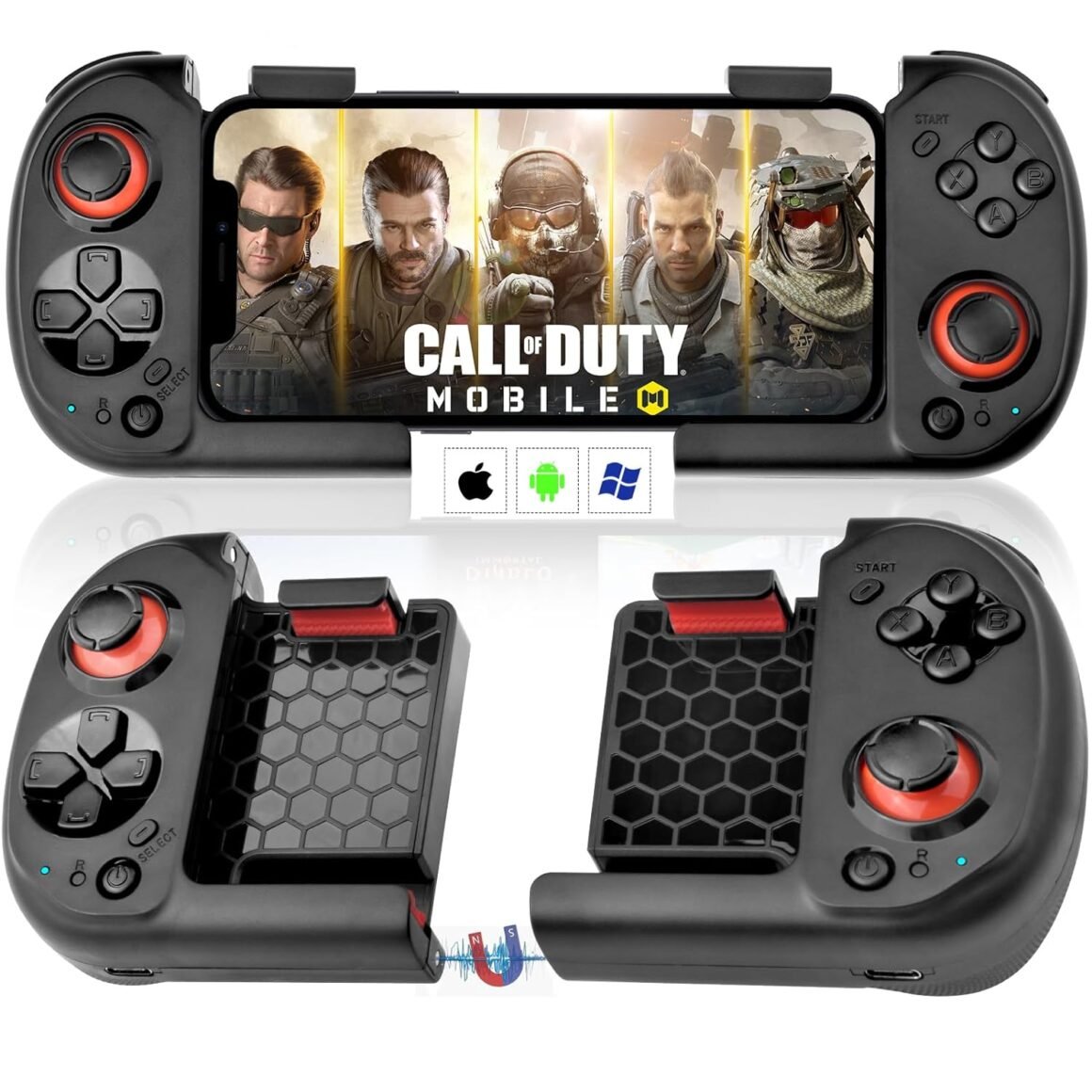
Product Description Long Service Life The wireless controller is designed with separate left and right handle design to helps to add coolers to mobile phones and allow you to play games for longer. Support Most Hot Controller Games Support most controller supported game from App Store/Google Play/Steam. Compatible with most cloud games on iOS and Android devices, such as Call of Duty Mobile, Genshin Immpact, Minecraft, Diablo Immortal, Modern Combat 5, Asphalt 9 etc. NOT FOR PUBG Mobile, FIFA.Android not for Genshin Impact. Which mobile phones does the gamepad support? Length – No Restrictions; Width – 2.36-3.54in; Thicknes – 0.28-0.47mm For iOS players, you can connect directly to play without downloading the APP.For Android players, if you receive a notification on the COD game interface to choose the handle model among “PS4, PS5 and XBOX”, please select “XBOX” Packing List: 1 x Mobile Game Controller1 x USB to Type-C Charging Cable1 x Instruction Manual Boot Method for iOS Play directly on your iPhone/iPad Left controller press D-Pad key “Down” + “HOME”, connect Bluetooth ‘Xbox Wireless Controller’. Once the connection has done, right controller press “HOME”, the right controller will automatically connect to the left controller. Boot Mode Notes: If the right controller does not automatically pair with the left controller by pressing “HOME”, press “A” + “HOME” for 2 seconds and the right-hand controller will pair with the left controller again. Boot Method for Android [2 Boot Modes] Play directly on your Android phone/Android Tablet [Boot Modes I ] Left controller press “Down” + “HOME”, connect Bluetooth ‘Xbox Wireless Controller’. Once the connection is complete, press the “HOME” button on the right controller. (COD Mobile, Minecraft play directly in this mode, if you find that a supported game does not run in this mode, switch the startup mode) [Boot Modes II ] Left controller press “Left” + “HOME”, connect Bluetooth ‘MOCUTE-HIDF13-061-L’. Once the connection is complete, press the “HOME” button on the right controller. Boot Method for PC Play directly on your PC Left controller press D-Pad key “Down” + “HOME”, connect Bluetooth ‘Xbox Wireless Controller’. Once the connection has done, right controller press “HOME”, the right controller will automatically connect to the left controller. PC wireless connection mode is compatible with most Steam controller games such as PUBG. (not for PUBG Mobile)If you’re not used to these split left and right hand controllers, you can use your mobile phone to connect the left & right grips into one to play the games. 🎁🎮【Directly Play On iOS】Koiiko iOS game controller supports direct play on iOS device. Perfect works with iOS 13.4+ version, not limited to: iPhone 15/15 Plus/15 Pro/15 Pro Max, iPhone 14/14 Plus/14Pro/14 Pro Max, iPhone 13 mini/13/13 Pro/13 Pro Max, iPhone 12/12 Pro/12 Pro Max, X, XR, XS, XS Max, 11 Pro, iPad, Macbook.🎁🎮【Directly Play On Android】This android game controller perfect works with Android 6.0+ version, not limited to: Samsung Galaxy S23/S23 Ultra/S23+, Galaxy S22/S22 Ultra/S22+, S21/S21 Ultra/S21+, S20, Galaxy Z Flip3, Google Pixel 6 5 Pro, Surface Duo, Asus ROG Phone 5, TCL, Huawei Mate 30, 30plus, P40, OPPO, VIVO, LG, X-iaomi, O-nePlus, M-otorola.🎁🎮【Support Various Games】for iPhone controller android gamepad, this controller support most controller supported games in the App Store and Google play – Call of Duty/ COD, Minecraft, Roblox, Sky: Children of the Light, Black Desert Mobile, Diablo Immortal, Hello Neighbor,Modern Combat 5, Asphalt 8/9 etc., for more games not listed above, you can consult us.🎁🎮【Magnetic Storage – Easy To Carry】The mobile game controller is designed with separate Left and Right grips, and you can store the Left & Right controller together by magnetic attraction. You can put the portable controller in your pocket, bag on travelling with you, the mini compact controller won’t take up extra space, allowing you to play controller games anytime and anywhere.🎁🎮【Great Features】Take your mobile gaming to new heights with our ergonomic, sleek design built with lightweight, durable and non-slip materials as well as a built-in 400mAh capacity rechargeable battery making for a long lasting, comfortable and pleasurable gaming experience. Also features 360 precision joystick, fast responsive buttons with no lag, giving you the gamer’s edge, allowing you to dominate and win more games.

The Koiiko mobile game controller is designed for long service life and supports most hot controller games from various platforms. It is compatible with a wide range of mobile phones and comes with a USB to Type-C charging cable and instruction manual. The boot method for iOS involves connecting the controllers via Bluetooth, while Android has two boot modes for connecting different controllers. For PC, the controllers can be connected via Bluetooth to play games, including Steam games. The controller supports various games on iOS and Android devices and has a magnetic storage feature for easy portability. It also features a built-in 400mAh rechargeable battery, ergonomic design, and fast responsive buttons for a comfortable and enjoyable gaming experience.

Price: $29.99
(as of Jul 18, 2024 23:39:49 UTC – Details)


Related Posts
Read More

“Teal Blue Seat Skin for Yamaha 1995-1996 VENTURE 700 & 1996 VENTURE 1100”: Available now at [price_with_discount]

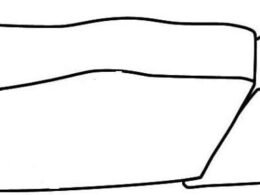
A brand-new seat cover (skin) in its original packaging (where packaging is applicable). This seat skin is sold Non-molded and NON-sewn by the manufacture. This item is professionally cut seat cover (skins) to the year, make and model listed; installation of this product requires stretching and stapling like the original product. This item is professionally cut seat cover (skins) to the year, make and model; installation deals with stretching and stapling like the original product. An emailed PDF step by step instruction manual is available with every purchase providing the directions needed for installation. Seat covers (skins) do not include the foam and/or the logos on them or for the personal watercraft manufacture. The image skeleton (above) which is used to show the color on the seat is an example only using graphic lines to show curves in the seat- these are not to be assumed as seams or sewn on our seat skins.
A brand-new seat cover (skin) in its original packaging (where packaging is applicable).
This seat skin is sold Non-molded and NON-sewn by the manufacture. This item is professionally cut seat cover (skins) to the year, make and model listed; installation of this product requires stretching and stapling like the original product.
An emailed PDF step by step instruction manual is available with every purchase providing the directions needed for installation.
DIY Seat Skins seat covers (skins) do not include the foam and/or the logos on the seat skins if applicable; additionally no logos or similar for the personal watercraft manufacture.
The image skeleton (above) which is used to show the color on the seat is an example only using graphic lines to show curves in the seat- these are not to be assumed as seams or sewn on our seat skins.
Read More

“60% Mini RGB Gaming Keyboard and Mouse Combo with Honeycomb Optical Mouse and Pad for Gamers and Typists”: Available now at [price_with_discount]

Product Description 0101

Description of Some Noteworthy Questions

What continuous improvement of product quality has been done?

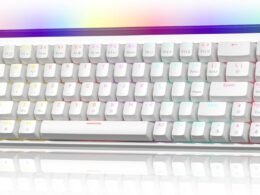
The milky white middle frame is replaced with a transparent middle frame, and the true RGB is brighter. The ESC key and the space bar use a luminous LOGO pattern, which makes the keyboard more personalized and beautiful.

How to use the arrow keys of this mini keyboard?

Fn+W switch W、S、A、D and up,down,left and right direction keys.Switch back and forth as needed.WASD is the scientific position of the arrow keys that is the consensus of the gaming industry.

Why is there no foot when designing the XINMENG 60% keyboard scheme?

Guided by loyalty to customer needs, after research, most European and American gaming keyboard users like the honest style.

Can it work on game consoles such as PS4/Xbox etc?

You can play PS4 through XINMENG 60 percent gaming keyboard.But you need choose gaming keyboard adapter that can support the corresponding game console. The converter from the same company XINMENGTech, another brandZIYOU LANG adapter is tested and supports Switch/Xbox one/Xbox 360/PS 4/PS 3/Xbox Series S/Xbox Series X.

0101

0202

0303

RGB BACKLIGHT

This gaming keyboard has 7 fixed RGB LED backlight modes. You can adjust the light mode by pressing FN+P. You can also adjust the light color by pressing FN+{/} in the fixed monochromatic light mode (up to 7 ).

Durable Contruction

The keycap adopts a mature double injection molding process, so that the characters can be clearly recognized in the day or in the dark night, and it is not affected by wear. It will be your best helper for office and games.

"WIN" Key Can be Disabled

Special design for gamers: Lockable "WIN" Key. Press "FN+WIN" to lock the "WIN" key before starting a game. It frees your concern regarding touching the "WIN" key accidentally so as to ensure an immersive gaming experience.

0303

0101

0202

0303

RGB Light Up

This gaming mouse has RGB lighting modes. The lighting mode is quickly switched design, and the lighting mode is selected by the button at the bottom of the mouse, which is fully customizable.

Comfort Ergonomic Shape

The appearance of the M7 gaming mouse is ergonomically designed to fit the right hand and the frosted painting surface makes it more comfortable to grip.

Powerful Actuation

User friendly and easy to install. M7 mouse software provides powerful customize setting for mouse click buttons, RGB colors, 100-10000 DPI adjustable range, and 1000 Hz Pulling rate.


【Compact and Practical】This mini 61 key gaming keyboard can realize multiple function like quick access to Home Page, Music, Email Box, etc. by pressing FN+related key , the side engraved visual symbol of the keys can help you understand the FN key combination function, floating high-low ergonomic key design allow using for a long time without fatigue, adjustable foot support can offer a alternative using angle if needed.
【Ergonomic Design Mechanical Keyboard】 The 61 keys mechanical keyboard with the scientific stair-up keycap design brings maximum comfort, keeping your hand in a most natural state to minimize hand fatigue after longtime use and help you minimize typos. So it's designed for gamer, office worker, copywriter, programmer, typing teacher and editors.
【Lightweight Honeycomb Gaming Mouse】Wired professional gaming mouse uses hard-core custom chip, high-precision optical sensor, up to 12000 dpi (level 6 / editable), able to withstand 20g acceleration, has 50,000,000 Button life. The high-performance mouse configuration can meet your needs for fast web browsing and gaming.
【65G Ultralight Ergonomic Gaming Mice】This lightweight PC gaming mice is designed with O-shaped perforated shape, reduces weight, saves more energy, improves heat dissipation, extend the service life,ergonomic housing can fit your palm perfectly whichever way you hold it, make using more comfortable especially when gaming.
【Wide Compatibility】This mechanical keyboard featured with waterproof, dust-proof, conflict-free, FN short key function, rainbow RGB backlit, non-slip mat, plug and play, 61key design, removable keycap, easy to clean, compatible with devices like pc, mac, laptop, computer which support windows series system or Android, Linux, IOS, etc, system,
Read More

Womier 60% Mechanical Gaming Keyboard – Hot-Swap RGB, Programmable 64 Keys with MCA Keycaps, OEM Profile, Ideal for PC and Mac Users

Product description The video showcases the product in use.The video guides you through product setup.The video compares multiple products.The video shows the product being unpacked. 60% Percent Keyboard Merchant Video

Win button doesn't work

Please try pressing FN+WIN to unlock it. This should resolve the issue youare experiencing with the WN key not working.

Is this a customizable mechanical keyboard?

Yes. It supports hot-swappable sockets for easy switch. You can use a screwdriver to disassemble the keyboard, and then fill it with the filler you need, which doubles the playability.

The keyboard RGB lighting?

Yes, there is LED mixed light inside the keyboard, and the lighting mode can be adjusted. The keyboard light box has RGB and monochrome lighting modes. Can be adjusted independently. Of course, you can also put it out completely.

What is the pre-installed switch on the keyboard?

The keyboard is provided with a linear mechanical switch,

Actuation Force: 60±10gf

Pre-travel:4.0+0.5mm

Durability:20,000,000 times

Does the keyboard have hot-swappable function?

Yes, you can pull out the keyboard switch without welding. Then change your favorite switch to use. (Tip: When pulling out the switch, you need to clamp the buckles at the north and south ends of the switch and take it out with some strength. )

60% Gaming Keyboard with Light Box, Wired RGB Backlit Mechanical Keyboard with MCA Keycaps 60% Gaming Keyboard with Light Box, Wired RGB Backlit Mechanical Keyboard with MCA Keycaps 60% Gaming Keyboard with Light Box, Wired RGB Backlit Mechanical Keyboard with MCA Keycaps 1 Neon Box Design Very Cool 2 Rich Custom Keycaps 3 Keyboard Programable 60% Gaming Keyboard with Light Box, Wired RGB Backlit Mechanical Keyboard with MCA Keycaps60% Gaming Keyboard with Light Box, Wired RGB Backlit Mechanical Keyboard with MCA Keycaps 60% Gaming Keyboard with Light Box, Wired RGB Backlit Mechanical Keyboard with MCA Keycaps 60% Gaming Keyboard with Light Box, Wired RGB Backlit Mechanical Keyboard with MCA Keycaps 60% Gaming Keyboard with Light Box, Wired RGB Backlit Mechanical Keyboard with MCA Keycaps 1 Hot-swappable 2 Hotkey at A Glance 3 60% Compact Layout WK68 PRO RGB Light Box 60% Keyboard 60% Keyboard60% Keyboard

Comfortable Ergonomic Angle

60% Keyboard60% Keyboard

60% Layout Saving Desktop Space

60% Keyboard60% Keyboard

Pre-lubricated Linear Mechanical Switch

60% Keyboard60% Keyboard

PACKAGE LIST: WK68PRO Keyboard*1

Keyboard Manual*1

Extra Keycaps and Switches

Switch and Keycap Puller*1

USB Cable for TYPE-C*1

Other goods you will like
WK68 PRO 60% Keyboard RGB Light Box : Womier brings you the latest popular keyboard. The keyboard is filled with RGB mixed-color lights, and the translucent light box can adjust RGB and monochromatic lights, which doubles the playability of the keyboard. Compact layout, not occupying desktop space. Give you the infinite possibility of DIY.
Hot-swappable Custom Gaming Mechanical Keyboard: The switches and keycaps can be freely replaced(keycap/switch puller are included in the package).This customizable keyboard with hot-swap PCB allows users to replace 3 pins/5 pins switches easily without soldering issue. When you pull out the pre-installed switch, you need to clamp the north and south ends of the switch and take it out with some strength.
Extra Key Caps for Mac and Windows Operating Systems: the clear laser engraving key function on the key cap can easily operate the original combination key. Considering the wide compatibility of the keyboard, it is equipped with the operation buttons of the MAC system, so that you have no worries.
North-facing LED Backlight & Programable:The PC gaming keyboard has more than 20 built-in backlight modes and north-facing LEDs. Programmable software allow you to experience the unlimited fun of customization. The programmable function of this 60 percent keyboard allows redefining the key, and macro settings, and customizing in Windows system. Keyboard is compatible with Windows and MacOS and can work smoothly on all kinds of devices.