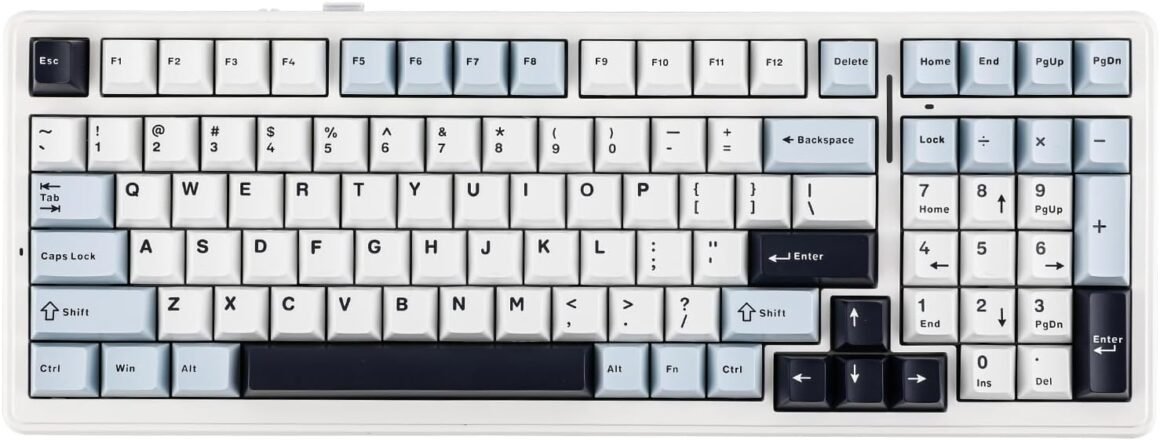
Experience Ultimate Gaming with the Wireless Hot-Swappable Gasket Mechanical Keyboard: Five-Layer Padding, Bluetooth/2.4GHz/USB-C Connectivity, 8000mAh Battery (White Blue, Reaper Switch)

Product description The video showcases the product in use.The video guides you through product setup.The video compares multiple products.The video shows the product being unpacked. 3/5 pins Mechanical Switch Supports 3/5-pin mechanical switches. Easily replaced without soldering. 1 Features 2 3 Modes 3 Flex-cut Plate 4 Hot Swappable 5 Keyboard Details Compatible with multiple systems 1 PBT Keycaps 2 Check Battery 3 Keyboard Mode Switching 4 Gasket Structure 16.8M RGB Illumination Engage in the dynamic glow of the F99’s RGB backlight, presenting a rich spectrum of 16.8 million colors for a personalized typing environment. Users can not only switch the backlight effect with a hotkey. The keyboard backlight can also be customised via the driver. Powerful Programming Software F99 Keyboard provides programming software for those who like DIY setups. You can create your favorite effects. Such as custom keys. Macro recording. Adjusting sleep mode. Adjusting key sensitivity. Customizing the backlight effect, etc. Note: The software only supports Windows, not Mac! High-capacity 8000mAh Battery The F99 is powered by a high-capacity 8000mAh battery for long-lasting performance. Five-layer Design Incorporating IXPE under-shaft pads, PORON cotton, and silicone bottom padding. It ensures ultra-comfortable typing with reduced sound and shock. One-piece Silicone Gasket The extended one-piece silicone pad better optimises flexibility for a softer, more resilient typing experience. Ergonomic Design With two-stage adjustable stand. The height of the keyboard can be adjusted to suit the needs of the user. What is the battery life of the F99 keyboard? How long does it go? (with no lights or either way) This is the battery life of the F99 mechanical keyboard we tested for your reference: about 53 hours with backlighting on, about 400 hours with no backlighting on. What switches are on these keyboards? What switch types are available for the F99? There are 4 switches, the Reaper Switch, the Whale Sea Switch, the Greywood V3 Switch, and the Nimbus Switch. All linear switches. Does the F99 have software for customization? Yes, but the software is only compatible with Windows, the Linux/Mac/iOS/Android OS does not support custom driver and FN+keys functions. Is the F99 keyboard compatible with macOS? Yes, F99’s supports Bluetooth/2.4GHz/USB wired connection. It is suitable for multi-devices and compatible with multiple systems including windows, Mac,iOS, Android, Linux,etc. Please note that, it may just support USB wired connection for Linux OS Does the F99 have RGB lighting? Yes, the F99 has RGB lighting. The keyboard features RGB backlighting with customizable lighting effects and colors. It also supports customizing the backlight effect through the software. TKL LAYOUT MECHANICAL GAMING KEYBOARD Keyboard Layout Standard ANSI (US) Layout, 87 Keys Keyboard Layout Standard ANSI (US) Layout, 87 Keys Keyboard Layout Standard ANSI (US) Layout, 80 Keys + 1 Knob Connection Methods 3 Modes, Bluetooth/2.4ghz Wireless/Tpye-C Connection Methods 3 Modes, Bluetooth/2.4ghz Wireless/Tpye-C Connection Methods Tpye-C Wired Keycap Profile Cherry Profile Keycap Profile Cherry Profile(Smoke Blue/Black Blue/White Orange), MDA Profile(White Green) Keycap Profile Cherry Profile Software F87 PRO Driver. Windows only, MacOS is not supported Software F87 PRO Driver. Windows only, MacOS is not supported Software F87 Driver. Windows only, MacOS is not supported Battery 8000mAh Battery 4000mAh Battery NO 【96% Layout&Gasket Mounted Structure】A 96% layout keyboard with 99 keys can help you save more space on your desk, while keeping the arrow keys and number pad you need for games and work. The F99 gaming keyboard gasket-mounted design, complemented by an extended one-piece silicone pad, delivers unmatched typing resilience and stability. This soft elastic structure ensures each keystroke is both softer and more responsive.【Innovative Single-Key Slotted PCB&Five-Layer Sound-Shock Absorption】Equipped with a unique single-key slotted PCB made of high-quality FR4 material, the F99 offers smooth typing feedback. Each key is independently slotted, enhancing the crispness and accuracy of keystrokes. The F99 features a five-layer design, incorporating IXPE under-shaft pads, PORON sound-absorbing cotton, and silicone bottom padding. This configuration ensures ultra-comfortable typing with reduced sound and shock.【Three-Way Connectivity for Any Scenario&8000 mAh Ultra-High Capacity Battery】The F99 supports Bluetooth, 2.4GHz wireless, and wired USB Type-C connections, making it compatible with a wide range of devices, including Windows, macOS, iOS, and Android. The F99 is powered by a high-capacity 8000mAh battery for long-lasting performance.【Hot-Swappable PCB&Pre-lubed Linear Switches】Enjoy the flexibility of personalizing your typing experience with the F99’s full-key hot-swappable sockets. It supports 3/5 pin mechanical switches. Easily interchange mechanical switches to suit your preference with a simple pull-and-plug method. Additionally, all switches are factory pre-lubricated and have been meticulously designed for longevity and durability, ensuring a reliable typing experience for years to come.【Next-Generation Wireless Connectivity】Equipped with cutting-edge wireless technology, the F99 offers a low-latency, ultra-fast connection, ensuring faster data transmission and immediate key response. Ideal for both daily use and intense gaming sessions. Combined with low-power consumption technology, it ensures extended usage times between charges.


Discover the Epomaker F99 Mechanical Keyboard: The Future of Typing and Gaming

In the crowded space of mechanical keyboards, the Epomaker F99 stands out as a multifaceted powerhouse designed for gamers and typists alike. With a remarkable blend of aesthetic appeal and cutting-edge technology, it promises to transform your typing experience.

Design & Build Quality

The F99 features a gasket-mounted design that not only amplifies comfort during long typing sessions but also enhances the keyboard’s stability. This innovation is complemented by an extended one-piece silicone pad, which ensures that each keystroke feels responsive yet soft. Typists will appreciate the clarifying sound produced by the five-layer sound-shock absorption system—built with IXPE under-shaft pads, PORON cotton, and silicone padding which reduces noise and enhances the overall typing experience.

Versatile Connectivity

What makes the F99 truly versatile is its three-way connectivity. It seamlessly supports Bluetooth, 2.4GHz wireless, and USB Type-C connections, making it compatible with a vast range of operating systems, including Windows, macOS, iOS, and Android. Whether gaming on a PC or getting work done on a tablet, this keyboard has you covered. The impressive 8000mAh battery ensures extended performance, offering up to 53 hours with backlighting on and around 400 hours without it.

Customization at Your Fingertips

For the DIY enthusiasts, the F99 doesn’t disappoint. Its hot-swappable PCB allows for easy upgrades of mechanical switches without the need for soldering. Supporting 3/5-pin mechanical switches, you can choose between a variety of pre-lubed linear options — enhancing both performance and lifeline. The keyboard is designed for personalization through its robust programming software, which is currently available on Windows.

A Blast of Color

Every keystroke comes alive with 16.8 million RGB backlighting options, delivering vibrant effects that you can easily customize. From intense gaming sessions to late-night work marathons, the RGB functionality adds both flair and utility.

Performance

Users consistently rate the Epomaker F99 at 4.5 stars, praising its exceptional build quality, responsiveness, and customizable features. It competes impressively in its category, ensuring that whether you’re in the middle of a gaming tournament or typing up reports, performance remains top-notch.


Brand Introduction

Epomaker is known for creating high-quality mechanical keyboards and accessories that cater to a wide range of users, from casual typists to serious gamers. Their commitment to innovation and design excellence positions them solidly in the tech market, making them a respected choice in the realm of mechanical keyboards.

In summary, the Epomaker F99 offers a perfect amalgamation of style, function, and personalization. Whether you’re looking for seamless connectivity, innovative design, or customizable options, the F99 is an exciting addition to any tech setup.


Price: $82.99 - $66.38
(as of Sep 04, 2025 10:22:55 UTC – Details)

Related Posts
Read More

“Funlab Firefly Switch Pro Controller: Wireless Gamepad with 7 LED Colors for Nintendo Switch/Lite – Ghost Pink”: Available now at [price_with_discount]

Product Description switch-pro-controller_01switch-pro-controller_01 Tap,Glow, and Trick!
Dark Mystery, Luminous Play!
switch-pro-controller switch-pro-controller switch-pro-controller switch-pro-controller 1 Game-playing Time 2 Back Buttons 3 Ergonomic Design 4 Compatibility More Compatibility, More Choices Compatibility

For SwitchFor PhonesFor PCFor Steamdeck For phones

For Phones

Android - 6.0 and aboveiOS - 13.3 and above For PC

For PC

Windows XP and above For Steamdeck

For Steamdeck

SteamOS Holo 3.4 and above How-To Video Connection Method Instruction

From the HOME Menu, select Controllers, then Change Grip and Order.Press and hold Y + HOME for 3 seconds and 4 LED lights flash quickly. The LED(s) becoming stable, pairing finishes.If you are not connecting for the first time, you can click HOME Button to connect successsfully. Turbo Function Instruction

Press and hold “T” Button + one of the Function Button (A/B/X/Y/L/R/ZL/ZR/D-pad Button).1st: Manual TURBO Function (Press and hold to launch continuously).2st: Automatic TURBO Function (Automatically continuous launch).3st: Clear TURBO Function. Light Control Instruction

Turn on the light: Press HOME Button.

Turn off the light: Press and hold Light Button for 3 seconds.Change the Light Color: Press Light Button. Colors will change each time you press Light Button. Change the Lighting Mode: Press Light Button + “⊕”: 1st: Breathing light mode; 2st: Quick flash mode; 3st: Vibration light mode.If the controller is not connected to the console, press Home Button and the LED pattern will be illuminated. Mapping Function Instruction

Press and hold “MR” Button, then input the single button (A/B/X/Y/L/R/ZL/ZR/+/-/D-pad Button and L/R joysticks) you want to map;The controller will have the vibration cue after loosing “MR” Button, and then press “XR” Button to trigger Programmable Buttons.The mapping function can also be achieved by using the ML Button as described above.)

How do I make this pure color switch pro controller show the exquisite pattern?

The first time you receive the controller without being connected to your console, you can press the Home button to active it. Then you can see its unique pattern.

Why does the pattern still not appear after pressing the Home button of this controller?

Check whether it is in either of the following conditions:

A.Out of power. Solution: Charge the controller and then press the Home button again.

B.In light off mode. Solution: Press Light Button and "+" Button to switch the lighting mode.

How to change the LED colors and the lighting modes?

A.Press Light Button:Always-on Mode.

B.Press Light and "+" Button:

1st:breathing light mode; 2nd:quick flash mode; 3rd:vibration lighting mode

C.Light Off Mode:Press and hold Light Button for 3s.

D.Colors will change each time you press Light Button.

How to calibrate the joystick of this switch gamepad?

A.HOME Menu - System Settings - Scroll down the menu on the left-hand side - Select Controllers and Sensors.

B.Select Calibrate Control Sticks - Tilt the joystick that you want to calibrate.

C.Follow the on-screen prompts to verify the joystick.

Frequently Bought Together on FUNLAB
Hidden-til-lit Display: It is one of our solutions to achieve this enhanced gaming experience. The surface decoration of switch controller design is seamlessly harmonized with lighting effects. When the LED is not active, it lies quietly as a pure pink controller. And when it turns on, the hidden pattern will light up your amazing gaming night.
Polychrome Breathing LED: Each time you press the Light button, 7 LED colors will change in sequence. 4 lighting modes of this switch pro controller for Halloween: breathing light mode, quick flash mode, vibration lighting mode, and always-on mode.
Back Paddle Buttons: Our switch pro controller wireless for Halloween can edit and define some buttons you want and enhance the gaming experience and meet the needs of hardcore competitive players.
Sensing Motion & Turbo Function: FUNLAB wireless switch controller is equipped with precise motion control and turbo function which supports continuous launch, suitable for various kinds of games such as shooting-game, flying-game, etc.
Battery Life: Our cute switch wireless controller for Halloween is built-in 3.7V/950mAH Lithium battery, and it can last up to 12.5 hours after being fully charged(turn lights off). Long endurance brings players uninterrupted gaming experience.
Read More

Upgrade Your Gaming: SZDILONG Wireless Controller for PS4, Pro, Slim, and Windows PC – Features Touchpad, Headphone Jack, Six-Axis Motion Control, and Charging Cable

Product description The video showcases the product in use.The video guides you through product setup.The video compares multiple products.The video shows the product being unpacked. Wireless Controller for Ps4 Gamepad Compatible with Ps4/Pro/Slim/Windows PC ps4 controller, playstation 4 controller, ps4 controller dualshock 4,  dualshock 4, control ps4ps4 controller, playstation 4 controller, ps4 controller dualshock 4,  dualshock 4, control ps4 ps4 controller, playstation 4 controller, ps4 controller dualshock 4,  dualshock 4, control ps4ps4 controller, playstation 4 controller, ps4 controller dualshock 4,  dualshock 4, control ps4 ps4 controller, playstation 4 controller, ps4 controller dualshock 4,  dualshock 4, control ps4ps4 controller, playstation 4 controller, ps4 controller dualshock 4,  dualshock 4, control ps4 ps4 controller, playstation 4 controller, ps4 controller dualshock 4,  dualshock 4, control ps4ps4 controller, playstation 4 controller, ps4 controller dualshock 4,  dualshock 4, control ps4 ps4 controller, playstation 4 controller, ps4 controller dualshock 4,  dualshock 4, control ps4ps4 controller, playstation 4 controller, ps4 controller dualshock 4,  dualshock 4, control ps4

Compatible with gaming platforms

Compatible with gaming platforms PC:Devil May Cry 5 , Apex,WoLong,Fortnite,Resident Evil,Uncharted 4:A third's end,Marvel's Spider-Man: Miles Morales,Sons of the Forest,Like a Dragon: Ishin!, Hogwarts Legacy,ONE PIECE ODYSSEY IOS/Android: Asphalt 9: Legend, Minecraft, Terraria, Cellule Morte, Impato Genshin (iOS only), Call of Mission Mobile, Sky: Son of Light (iOS only needs games that support MFI protocol)

Connection method

Console Ps-4: First connection. Connect the handle to the Ps-4 console with a data cable. Wait for the host to recognize the Controller. Disconnect the data cable. Hold down the P key and share at the same time. Wait for the white light on the top of the handle to flash twice. Release the key. Wait for the Bluetooth Controller to match. The blue light on the top of the controller is always on after pairing is successful.

Computer: Wired connection. Connect the handle to the USB interface of your computer with a data cable. Wait for the computer to recognize the handle. You can view the device called wireless controller in your computer's device manager, which means that the connection was successful.

Bluetooth connection: Hold down the P button and share on the handle, wait for the white light on the top of the handle to flash twice, then release the button. The computer's Bluetooth interface opens Bluetooth - add device - find the device "wireless controller" and click to connect. After the connection is successful, the blue light on the top of the handle is always on, which means the connection is successful

If the game is played on the Steam platform, you must check the P-s handle configuration support in Settings - Controller - General Controller - in the upper left corner of Steam, exit the setup interface after the application and then start the game


(Super compatibility) - This wireless controller adopts bluetooth connection technology, which shows stable connection, fast transmission speed, no delay, and is widely compatible with Ps4/Pro/Slim/PC (Win7/8/8.1/10). This is a third-party product, an unofficial controller.
(Immersive Gameplay Experience) - With a built-in speaker of the controller for Ps4,it can increase player immersion by playing various sounds through the controller speaker rather than through the TV speakers.It also equipped with a 3.5mm stereo audio jack for headphones if you want a personal audio solution.
(High performance) - 360° joystick and the latest six-axis sensor enable the controller to receive signals keenly, accurately locate and freely control game characters, creating an impressive gaming experience.
(Special gift) - This controller adopts a personalized graffiti style, and the abstract pattern has a unique charm. It can be used as an ideal gift for birthdays, Valentine's Day, Christmas and Children's Day to make your family, friends or children happy every day!
(Best customer service) - We have a reliable professional after-sales service team. If you encounter any problems after receiving the product, or if you have any questions about the product, please feel free to contact our customer service team via Amazon email, and you will get an answer.
Read More

“Review: Redragon S107 Gaming Combo – Keyboard, Mouse, & Pad Set”: Available now at [price_with_discount]

Product Description Add to Cart Add to Cart Add to Cart Customer Reviews 4.6 out of 5 stars 45,922 4.6 out of 5 stars 642 4.5 out of 5 stars 5,328 4.6 out of 5 stars 5,888 4.5 out of 5 stars 8,580 Price $39.99$39.99 — — $62.95$62.95 $43.59$43.59 Combo Type 2 in 1 2 in 1 2 in 1 3 in 1 4 in 1 Keyboard ✓ ✓ ✓ ✓ ✓ Mouse ✓ ✓ ✓ ✓ ✓ Mousepad X X X ✓ ✓ Headset X X X X ✓ Colour Option Black / White Black / White Black Black Black / White Wired/Wireless Wired Wired Wired Wired Wired Customer Reviews — — — — — Price — — — — — Keyboard Key Number 114 keys 114 keys 104 keys 104 keys 114 keys Backlight (Backlight Mode) RGB (5) RGB (6) RGB (5) RGB (5) RGB (5) Marco Setting X ✓ X X X Multi-media Key 12 +10 (Independent) 12 +10 (Independent) 12 12 12 +10 (Independent) Mouse DPI 3200dpi 7200dpi 3200dpi 3200dpi 3200dpi Number of Mouse Buttons (Programmable) 6 (5) 8 (7) 6 (5) 6 (5) 6 (5) Mouse Backlight Red RGB Red, Blue, Green and Purple Red, Blue, Green and Purple Red Weight Tuning for Mouse 8 x 2.4g weights X X X 8 x 2.4g weights Mouse Scanning Speed / Frequency 65ips /3600fps 30ips /4000fps 48ips /4000fps 48ips /4000fps 65ips /3600fps Software for Mouse ✓ ✓ X X ✓
【RGB Gaming Keyboard】6 RGB Lighting modes can be chosen, and the speed and lightness can also be adjusted according to your preference. Whether it is a single light, changing light effects, or no light, the Redragon gaming keyboard can satisfy it
【DPI Adjustable Gaming Mouse】Due to the adjustable DPI(1000/1600/2400/3200), this mouse can fit your different needs in gaming or working. The DPI is easily changed by clicking the dpi button and you can distinguish the dpi level according to the color
【Efficient & Convenient】This gaming keyboard and mouse combo is equipped with 12 Multimedia Function Keys, simple and convenient to operate. It not only improves efficiency but also makes your gaming process more convenient and faster
【Comfortable Gaming】The keyboard's foldable stand, skin-friendly coating, and floating Keycaps increase typing comfort. This keyboard and mouse are dedicated to providing an efficient gaming experience while ensuring maximum comfort
【25 Keys Anti-ghosting】Anti-ghosting ensures every button can be triggered. This allows you to accurately trigger key combinations in the game, and each skill can be accurately released to increase your winning rate. Redragon S107BA combo will be your perfect partner
【Plug & Play】No driver or software needed, plug and play, easy to use. Widely compatible with PC,laptop, computer, windows, etc.Redragon provides you with a 36-month warranty and a professional 24-hour after-sales and technical team