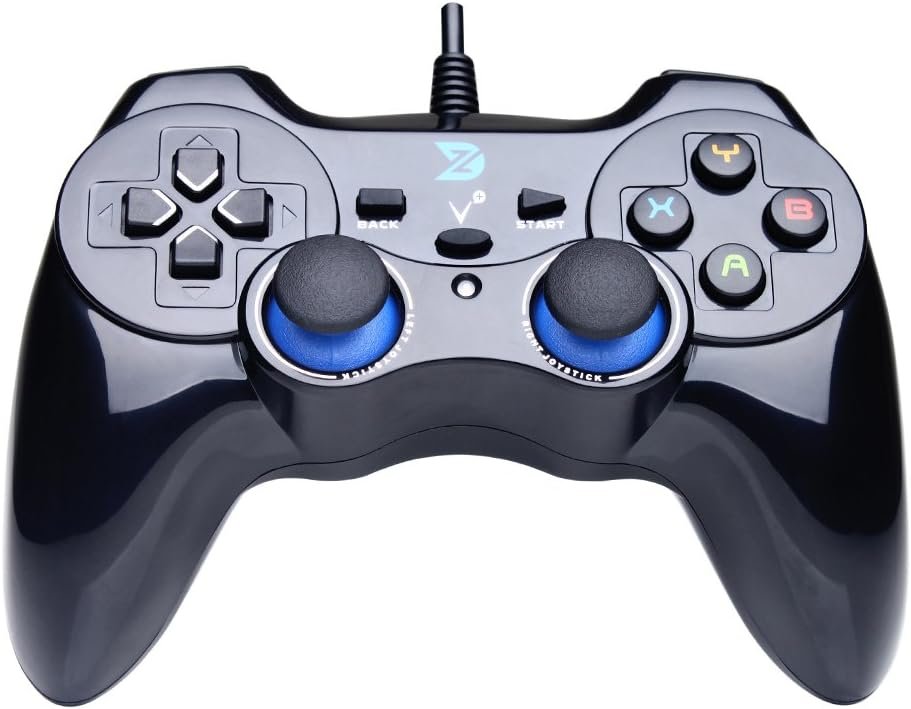
ZD-V+ USB Wired Gaming Controller for PC/Laptop & PS3 & Android & Steam – Black: Available now at [price_with_discount]

Product Description ZD-V+ USB Wired Gaming Controller Gamepad For PC/Laptop Computer(Windows XP/7/8/10/11) & PS3 & Android & Steam – [Black] ZD-V+ Wired Game Controller / Gamepad ZD-V+ controller is compatible with PC Windows (Xp/7/8/10) or later versions, Android 4.0 and PS3 via wired connection, working great with Laptop/PC, Android smart phones, TV boxes, tablets and PS3. This game controller can identify all the deices automatically, no need driver installation. Matters Needing Attention The device doesn’t support Xbox 360 / Xbox One / Mac OS / PS4. DirectX 9.0c or above may be installed if the device is to be used in Windows 10 or above. If the device is unable to be used in Windows systems, please try to install the latest version of Microsoft Xbox 360 Controller gamepad driver. The vibration-feedback function can only be used in PC games supporting Xinput mode and the function may need to be enabled in games. If you want to use the controller in devices with Micro-USB interfaces, you need to purchase OTG adapter or cable separately. Package List 1x English Instruction Manual 1x ZD-V+ Wired Gamepad(equipped with 1.5M USB cable) Feature (1) It supports plug and play, only for PC games supporting Xinput mode / Play Sation 3. Some games may need to set the buttons or use third-party software before use. (2) Vibration Feedback Function. (3) Multi-mode: Xinput / DirectInput(D-input). (4) JD-SWTICH Function, which can exchange the functions of D-pad and Left-Stick in Xinput mode. (5) Product Size: 150x105x65mm (6) Product Weight: 216g (7) Supporting Interface: USB 2.0 / 3.0 Excellent Design Ergonomic, and excellent design with high-quality material. ZD-V+ controller features brief and smooth streamline, it feels firmly, and comfortable to your palm with the texturing in the surface. The layout of the buttons is so humanized as to operate fluently and efficiently. JD-SWITCH Function This feature is very powerful, you can use the D-pad or Left-stick follow your heart in the game. In PC Windows and Xinput mode, you can switch the function between D-pad and Left Stick by pressing the BACK + LSB(press the Left Stick vertically) key combinations. High Precision D-pad Separated design, give you the best gaming experience, let the game control follow your heart. Non-slip Joystick Rough surface, non-slip texture, high precision components, This makes the joystick experience better in the game. Vibration Feedback The different vibration intensity allows you to have a real feedback in different scenes of games. The vibration-feedback function can only be used in PC games supporting Xinput mode and the function may need to be enabled in games. Support PC Windows XP / 7 / 8 / 10 / 11 & PS3 & SteamSupport Android (version 4.0 or above, and the device must fully support OTG function).【Not inlciud a OTG adapter in the package】Support Plug and Play, only for PC games supporting Xinput mode / PS3Feature: Multi-mode: Xinput & DirectInput / Vibration Feedback Function / JD-SWTICH Function (exchange the functions of D-pad and Left-Stick in Xinput mode)USB Wired Gamepad (PS architecture) – Does not support the Xbox 360 / Xbox One / Mac OS

The ZD-V+ USB Wired Gaming Controller Gamepad is a versatile and compatible controller that works with PC Windows, Android, PS3, and Steam. It features plug and play functionality for PC games supporting Xinput mode and PlayStation 3. The controller has a vibration feedback function for a more immersive gaming experience and a JD-SWITCH function that allows users to switch the functions of the D-pad and left stick in Xinput mode. The design of the controller is ergonomic and comfortable, with high-quality materials and a non-slip joystick for better control. The controller also has a high precision D-pad for a more accurate gaming experience. It supports PC Windows XP/7/8/10/11, PS3, and Steam, as well as Android devices with OTG support. However, it does not support Xbox 360, Xbox One, Mac OS, or PS4. Overall, the ZD-V+ USB Wired Gaming Controller Gamepad is a reliable and feature-rich controller for gaming on various platforms.

Price: $25.99 - $19.99
(as of Jul 12, 2024 01:53:06 UTC – Details)


Related Posts
Read More

Ultimate Guide to the Doriteney RG P01 Wireless Gaming Controller: Compatible with Switch, PC, Steam, iOS, and Android – Featuring Hall Effect Technology and RGB Lights

Product description rg p01rg p01 rg p01rg p01 rg p01rg p01 rg p01rg p01

Parameter Adjustment

Gyroscope calibration: When in sleep mode, press the Select + Home, and LED1-LED4 will flash up and down. Place the gamepad on a horizontal surface and press the Start key, and LED1-LED4 will all lighet up, and the calibration is complete.Joystick light mode: R3 + CAP key can modify the joystick light mode, etc. rotate between the magic color automatic gradient mode, the light color constant light mode, the light breathing automatic color change mode, the light same color constant light mode, the light same color breathing mode, and the light off.Rapid fire setting: First press and hold the button to set the rthen press and hold the TURBO key to enter semi-automatic rapid apid fire, fire, press again to enter fully automatic rapid fire, and press again to cancel the rapid fire.Rapid fire level: TURBO + right joystick up and down can adjust the rapid fire speed.Vibration level: TURBO + left joystick up and down can adjust the vibration intensity.Layout switching: TURBO +Select can swap the key values of A an and the key values of X and Y keys. d B keys.
🎮【Compatibility and Connectivity】 RG P01 game controller is fully compatible with PC, Switch, Android (version 11.0 and above), and iOS devices. It offers versatile connection options, including wireless pairing via Bluetooth and a 2.4G receiver for PC. Simply press specified buttons to switch between different modes and connect to your device seamlessly
🎮【Parameter Adjustment and Customization】Experience precise control with the gyroscope calibration feature, which can be easily activated by pressing Select + Home in sleep mode. Customize the joystick light mode to your preference with the R3 + CAP key combination, cycling through various lighting effects. Adjust rapid fire settings and speeds, as well as vibration intensity, using the TURBO key and joysticks
🎮【Layout Switching and Button Mapping】 RG P01 allows for flexible layout switching, enabling you to swap the key values of A and B, as well as X and Y, with the TURBO + Select combination. Macro programming mode lets you create custom button sequences for streamlined gameplay. Press M1 or M2 while holding down the buttons you wish to program, then finalize by pressing M1 or M2 again
🎮【Power Management and Sleep Mode】The controller features a built-in battery with convenient power management options. LED indicators display the current power status and charging progress. Automatically enter sleep mode after 5 minutes of inactivity to conserve battery life. Wake up the controller by pressing the HOME button
🎮【LED Status & Pairing Indicators】LED1-LED4 provide visual feedback for pairing status and mode selection. Once paired, pressing the HOME button will reconnect the controller to the host device automatically. During pairing, follow the specific LED pattern for your device (e.g., Android, iOS, Switch) and press the corresponding buttons to establish a connection
Read More

Upgrade Your Gaming: SZDILONG Wireless Controller for PS4, Pro, Slim, and Windows PC – Features Touchpad, Headphone Jack, Six-Axis Motion Control, and Charging Cable

Product description The video showcases the product in use.The video guides you through product setup.The video compares multiple products.The video shows the product being unpacked. Wireless Controller for Ps4 Gamepad Compatible with Ps4/Pro/Slim/Windows PC ps4 controller, playstation 4 controller, ps4 controller dualshock 4,  dualshock 4, control ps4ps4 controller, playstation 4 controller, ps4 controller dualshock 4,  dualshock 4, control ps4 ps4 controller, playstation 4 controller, ps4 controller dualshock 4,  dualshock 4, control ps4ps4 controller, playstation 4 controller, ps4 controller dualshock 4,  dualshock 4, control ps4 ps4 controller, playstation 4 controller, ps4 controller dualshock 4,  dualshock 4, control ps4ps4 controller, playstation 4 controller, ps4 controller dualshock 4,  dualshock 4, control ps4 ps4 controller, playstation 4 controller, ps4 controller dualshock 4,  dualshock 4, control ps4ps4 controller, playstation 4 controller, ps4 controller dualshock 4,  dualshock 4, control ps4 ps4 controller, playstation 4 controller, ps4 controller dualshock 4,  dualshock 4, control ps4ps4 controller, playstation 4 controller, ps4 controller dualshock 4,  dualshock 4, control ps4

Compatible with gaming platforms

Compatible with gaming platforms PC:Devil May Cry 5 , Apex,WoLong,Fortnite,Resident Evil,Uncharted 4:A third's end,Marvel's Spider-Man: Miles Morales,Sons of the Forest,Like a Dragon: Ishin!, Hogwarts Legacy,ONE PIECE ODYSSEY IOS/Android: Asphalt 9: Legend, Minecraft, Terraria, Cellule Morte, Impato Genshin (iOS only), Call of Mission Mobile, Sky: Son of Light (iOS only needs games that support MFI protocol)

Connection method

Console Ps-4: First connection. Connect the handle to the Ps-4 console with a data cable. Wait for the host to recognize the Controller. Disconnect the data cable. Hold down the P key and share at the same time. Wait for the white light on the top of the handle to flash twice. Release the key. Wait for the Bluetooth Controller to match. The blue light on the top of the controller is always on after pairing is successful.

Computer: Wired connection. Connect the handle to the USB interface of your computer with a data cable. Wait for the computer to recognize the handle. You can view the device called wireless controller in your computer's device manager, which means that the connection was successful.

Bluetooth connection: Hold down the P button and share on the handle, wait for the white light on the top of the handle to flash twice, then release the button. The computer's Bluetooth interface opens Bluetooth - add device - find the device "wireless controller" and click to connect. After the connection is successful, the blue light on the top of the handle is always on, which means the connection is successful

If the game is played on the Steam platform, you must check the P-s handle configuration support in Settings - Controller - General Controller - in the upper left corner of Steam, exit the setup interface after the application and then start the game


(Super compatibility) - This wireless controller adopts bluetooth connection technology, which shows stable connection, fast transmission speed, no delay, and is widely compatible with Ps4/Pro/Slim/PC (Win7/8/8.1/10). This is a third-party product, an unofficial controller.
(Immersive Gameplay Experience) - With a built-in speaker of the controller for Ps4,it can increase player immersion by playing various sounds through the controller speaker rather than through the TV speakers.It also equipped with a 3.5mm stereo audio jack for headphones if you want a personal audio solution.
(High performance) - 360° joystick and the latest six-axis sensor enable the controller to receive signals keenly, accurately locate and freely control game characters, creating an impressive gaming experience.
(Special gift) - This controller adopts a personalized graffiti style, and the abstract pattern has a unique charm. It can be used as an ideal gift for birthdays, Valentine's Day, Christmas and Children's Day to make your family, friends or children happy every day!
(Best customer service) - We have a reliable professional after-sales service team. If you encounter any problems after receiving the product, or if you have any questions about the product, please feel free to contact our customer service team via Amazon email, and you will get an answer.
Read More

Official NHL New Jersey Devils Decal Skin for BENGOO G9000 Gaming Headset: Available now at [price_with_discount]

Personalize the look on your Gaming Headset with the New Jersey Devils Distressed skin compatible with the BENGOO G9000 by Skinit. All New Jersey Devils decals compatible with the BENGOO G9000 Gaming Headset are cut and crafted with premium 3M vinyl and built to perfectly fit on your gaming headset without interfering with your game.
Comes with 1 skin compatible with BENGOO G9000 Gaming Headset
Precision cut for a flawless fit
3M vinyl decals printed with 3D Print Technology
Made in the USA
3M adhesive backing - easy on, easy off & residue-free
Read More

“8Bitdo Pro 2: Hall Effect Joystick Update for Ultimate Wireless Gaming on Switch & More (Gray Edition)”: Available now at [price_with_discount]

Product Description nintendo switch controller pc controller bluetooth controller for switch gamepad bluetooth gamepadnintendo switch controller pc controller bluetooth controller for switch gamepad bluetooth gamepad nintendo switch controller pc controller bluetooth controller for switch gamepad bluetooth gamepad  Bluetooth Controller for Switch, Hall Effect Joystick, Wireless Gaming Controller for Switch  Bluetooth Controller for Switch, Hall Effect Joystick Officially supported by Apple 1 Hall Effect Joystick 2 Ultimate Software 3 Officially Supported 4 for Steam Deck bluetooth controller for nintendo switchbluetooth controller for nintendo switch nintendo switch controller pc controller bluetooth controller for switch gamepad bluetooth gamepadnintendo switch controller pc controller bluetooth controller for switch gamepad bluetooth gamepad nintendo switch controller bluetooth controller pc gamepad bluetooth wireless controller androidnintendo switch controller bluetooth controller pc gamepad bluetooth wireless controller android nintendo switch controller bluetooth controller pc gamepad bluetooth wireless controller androidnintendo switch controller bluetooth controller pc gamepad bluetooth wireless controller android
Hall Effect Joystick Update.
Compatible with Switch, Windows, Apple, Android, Steam Deck, and Raspberry Pi.
2 pro-level back buttons.
Ultimate software now on PC, Android, and iOS.
Custom profile switching, enhanced grip, and 4-Way mode switching button.
Wireless Bluetooth, rumble vibration, motion controls, USB-C, and 20 hour rechargeable battery.