YUNZII IF99 Wireless Mechanical Gaming Keyboard: Smart LCD Display, QMK/VIA Programmable, Hot Swap RGB, 96% Layout for Mac/Windows – Cocoa Cream V2 Switch

Product description The video showcases the product in use.The video guides you through product setup.The video compares multiple products.The video shows the product being unpacked. 1 Merchant Video 1 CUSTOMIZABLE LCD SCREEN 2 TRI-MODE CONNECTION 3 MULTIPLE COMPATIBILITY 4 GASKET STRUCTURE 5 HOT SWAP 1 QMK/VIA PROGRAMMABLE 2 QMK/VIA CONNECTION 3 LONG LASTING BATTERY 4 DOUBLE SHOT KEYCAPS 5 DETAILS OF KEYBORAD 1 COCOA CREAM V2 SWITCH 2 RGB 3 RGB SHORTCUT 4 BLUETOOTH CONNECTION 5 2.4gHz CONNECTION Typing Sound of IF99 Keyboard Cocoa Cream V2 Switch Type: Linear switch Pre-Lubed: Yes Pins : 5pin Maximum Force: 55gf Max / Operation Force: 50±10gf Total Travel: 3.30mm / Pre-Travel:2.00±0.5mm The video showcases the product in use.The video guides you through product setup.The video compares multiple products.The video shows the product being unpacked. 1 Merchant Video Typing Sound of IF99 Keyboard Gateron Zero Switch Type: Linear switch Pre-Lubed: Yes Pins : 5pin Maximum Force:50gf Operation Force: 45gf Total Travel: 3.6mmMax Pre-Travel:2.0±0.6mm The video showcases the product in use.The video guides you through product setup.The video compares multiple products.The video shows the product being unpacked. 1 Merchant Video Enjoy Multiple RGB RGB Effects FN+Backspace:Backlight on/off FN+|:Change Backlight Effect FN+Enter:Switching Backlight Colour The video showcases the product in use.The video guides you through product setup.The video compares multiple products.The video shows the product being unpacked. 1 Merchant Video HOW TO UPLOAD GIF ON LCD SCREEN? Fn+0=GIF PAGE The video showcases the product in use.The video guides you through product setup.The video compares multiple products.The video shows the product being unpacked. 1 Merchant Video HOW TO UPLOAD PICTURE ON LCD SCREEN? Fn+9=PICTURE PAGE The video showcases the product in use.The video guides you through product setup.The video compares multiple products.The video shows the product being unpacked. 1 Merchant Video MAGNETIC PLATE The video showcases the product in use.The video guides you through product setup.The video compares multiple products.The video shows the product being unpacked. 1 Merchant Video Custom LCD Keyboard for Personalized Display:YUNZII IF99 wireless mechanical keyboards features a customizable LCD screen that can display time, GIFs, photos, battery status, connection mode, and more. Personalize it with your favorite images, like pets or loved ones, to keep you motivated during work or gaming. Enjoy an added touch of personalization that sets your computer keyboard with screen apartQMK/VIA Custom Keyboard for Full Control:Compatible with QMK and VIA software, the IF99 custom mechanical keyboard allows easy customization via Windows and macOS. Modify key mappings, create custom shortcuts, adjust RGB lighting effects, and more with this open-source platform. Achieve a truly personalized typing experience tailored to your typing, programmiong or gaming needsTri-Mode Connectivity & Long-lasting Battery:YUNZII IF99 wireless mechanical keyboard provides three connection methods, easily switch between BT5.0, 2.4GHz wireless, and USB-C wired modes. The Win / mac keyboard connect up to 5 devices, like tablet, PC, phone, laptop, and even gaming consoles like PS and Xbox. With the high-capacity 8000mAh battery, 1000hz polling rate of the mechanical keyboard wireless, you can work and game longer without frequent recharges, designed to keep you focused on gaming, work, or programming without frequent rechargingGasket Mount Hot Swappable Gaming Keyboard:This creamy keyboard with number pad features a gasket-mounted design with multiple layers of sound-absorbing material, reducing noise and enhancing typing comfort. The full-key hot-swappable thocky keyboard allows you to easily swap out 3-pin or 5-pin switches to customize the tactile keyboard feel and creamy keyboard sound of every keystrokeVibrant RGB Lighting & Customizable Magnetic Badge:The creamy keyboard’s south-facing LEDs offer dynamic 16.8 million RGB colors, 8 single backlit and south facing LEDs. As a gaming accessories, this creamy mechanical keyboard is perfect for gaming in dark environments.A magnetic, colorful metal badge enhances the RGB keyboard’s aesthetic while hiding the 2.4GHz receiver for a sleek look, elevating your gaming setup aesthetic with a premium and textured lookDurable Double-Shot PBT Keycaps:Crafted for durability and comfort, the double-shot PBT keycaps resist wear and fading. Enjoy superior fingertip feel and exceptional longevity, perfect for both work and gaming. The keyboard supports fully programmable macros, key mapping, and RGB lighting effects, ensuring a custom experience for every user

Discover the YUNZII IF99 Wireless Mechanical Keyboard: A Game Changer for Typists and Gamers Alike

In the world of mechanical keyboards, the YUNZII IF99 stands out with its innovative features and customizable design, catering to both productivity enthusiasts and gamers. This wireless mechanical keyboard redefines the typing experience, offering functionality, aesthetic appeal, and user personalization.

Customizable LCD Display

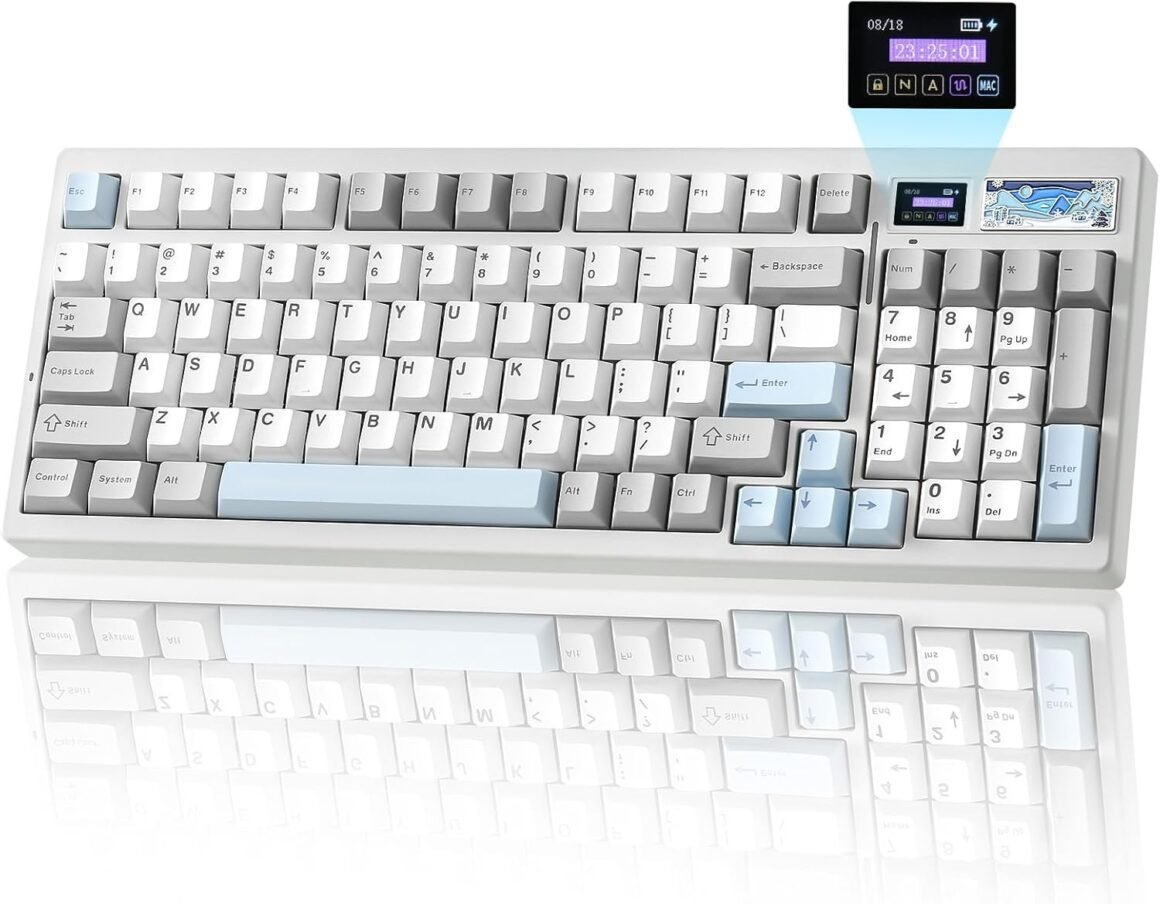
At the heart of the YUNZII IF99 is a stunning customizable LCD screen that adds a unique touch to your setup. Instead of a plain keyboard, personalize your display with GIFs, photos, or vital information like battery status and connection mode. This feature is particularly appealing for users who want to keep their workspace motivating and visually engaging. The LCD isn’t just a vanity feature; it serves practical purposes by providing crucial feedback, keeping you informed while you work or play.

QMK/VIA Customization

Flexibility in control is a hallmark of the YUNZII IF99. Built for open-source customization, it supports QMK and VIA software, allowing you to re-map keys, create macros, and personalize RGB lighting effects seamlessly. Whether you’re typing, programming, or gaming, the ability to modify the keyboard to suit your workflow sets it apart from standard keyboards.

Tri-Mode Connectivity

The YUNZII IF99 excels in connectivity options, offering a tri-mode connection that includes Bluetooth 5.0, 2.4GHz wireless, and USB-C wired modes. Easily switch between up to five devices, including tablets, PCs, and gaming consoles. With a robust 8000mAh battery, expect uninterrupted productivity and gaming without the hassle of frequent recharging.

Gasket Mount Hot-Swappable Design

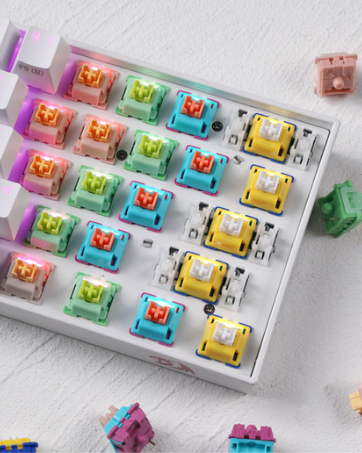
The keyboard features a gasket-mounted design, which is instrumental in delivering reduced noise and enhanced typing comfort. This design is complemented by its hot-swappable capability, allowing users to interchange either 3-pin or 5-pin switches effortlessly. This level of customization ensures your typing feel and sound can be tailored directly to your preferences, whether you prefer a tactile bump or a smooth keypress.

Vibrant RGB Lighting

Light up your workspace with 16.8 million RGB colors—the vibrant lighting options can be adjusted for your optimal gaming setup or aesthetic preference. South-facing LEDs project colorful effects, contributing both to functionality in darker environments and to the overall appeal of the keyboard. Additionally, a customizable magnetic badge not only enhances the keyboard’s look but also conceals the 2.4GHz receiver for a cleaner setup.

Conclusion

The YUNZII IF99 Wireless Mechanical Keyboard represents a perfect blend of technology and personalization, tailored for both casual users and hardcore gamers. With its innovative features like a customizable LCD screen, extensive connectivity options, and the ability to customize your typing experience, this keyboard distinguishes itself in a crowded market.

YUNZII is a trusted brand known for producing high-quality and innovative mechanical keyboards. With a commitment to enhancing user experience through careful design and cutting-edge functionality, YUNZII continues to lead the way in creating products that cater to the needs of modern typists and gamers.


In summary, the YUNZII IF99 offers:

  1. Customizable LCD screen for personalization.
  2. QMK/VIA compatibility for detailed customization.
  3. Tri-mode connectivity for versatility across devices.
  4. Gasket mount and hot-swap capability for comfort and customization.
  5. Vibrant RGB lighting to enhance aesthetics and functionality.

Elevate your typing experience with the YUNZII IF99, where innovation meets personalization.

Price: $99.99 - $79.99
(as of Sep 04, 2025 13:37:30 UTC – Details)

Related Posts
Read More

“Retroid Pocket 3 Carrying Case: Protect Your Handheld Console On-the-Go”: Available now at [price_with_discount]

Specifications: Material: EVA
Color: Black+Yellow
Size: Approx. 215x110x40mm/8.46x4.33x1.57inch
Applicable Model: compatible for Pocket 3 Console

Package Includes: 1 Piece Storage Bag

Note:
Other demo accessories are not included.
Please allow 1-2cm errors due to manual measurement, make sure that you do not mind before you mind.
Due to the differences between different monitors, the picture may not reflect the actual color of the item.

Features: Portable travel carrying bag designed specially compatible for Pocket 3 game console.
Protect your game console from dirt, damages, bumps and accidental scratches.
Compact size but offer adequate space to carry your console and memory cards.
Inner pocket design, which can store small items, such as charging cable, data line and more.
Harden outer casing, scratch-resistant, shockproof and fall-proof, soft liner material, provide full protections.
Read More

EPOMAKER TH99 Tri-Mode Wireless Mechanical Keyboard: 8000mAh Battery, Hot-Swappable Custom RGB Lighting & Numpad – Ideal for Gaming and Office Use (Black)

Product description

EPOMAKER TH99 Hot-Swappable Wireless Mechanical Keyboard for PC/Mac/Gamers

The video showcases the product in use.The video guides you through product setup.The video compares multiple products.The video shows the product being unpacked. Hot-Swappable Wireless Mechanical Keyboard Merchant Video a computer monitor and keyboard on a desk PC/MAC/Android/Linux

Works in premium condition across computers, tablets, phones, and gaming controllers.

Computer desk setup with wireless keyboard, mouse, speakers, and laptop. Features USB-C connectivity, 2.4GHz wireless, and Bluetooth 5.0 capabilities. Multiple screens display nature scenes. USB-C/2.4G/Bluetooth

Wire-free convenience of Bluetooth 5.0 and 2.4Gh with intuitive toggle.

TH99 Wireless Gaming Keyboard Rechargeable 8000mAh

Lasts 70 hours with RGB on and 800 hours if the Backlight is turned off.

Tri-Mode Wireless Keyboard with Cross-System Functionality

1 Gaming & Work 2 Tri-Mode Wireless 3 800h Long-Lasting a keyboard with a white and black keys Reliable & Stable

1000hz polling rate and 2ms low latency in cable mode. (2.4Ghz=1000hz, 5ms. Bluetooth=125hz, 11ms)

a keyboard with a keyboard in the middle N-Key Rollover

Support multiple inputs simultaneously. Level up your productivity and accuracy in leisure.

Close-up of a mechanical keyboard with hot-swappable PCB, compatible with 3/5 pin switches. One switch is removed, revealing the socket on the illuminated PCB beneath. Hot-Swappable PCB

Swap switches with a simple pull and push. (Compatible with 3/5-pin mechanical switches)

a keyboard with a broken keyboard on a desk. RGB & Singular Color

Bask in the immersive dynamic backlight, from 102 south-facing per-key LEDs.

a computer monitor sitting on a desk with headphones on it. Programming Software

For gaming efficiency, set macro as common action triggers or mode switchers.

Premium Gaming Keyboard that Support Hot-Swap and Programming

1 Low-Latency 2 Anti-Ghosting 3 Hot-Swappable 4 South-Facing RGB 5 Macro Editing a keyboard with a cherry profile on it. Ergonomic Angle

Adjustable 2-Stage Kick-Stand & Cherry-Profile Keycaps. (Front/Back Height=2.7/4.2cm)

Black mechanical keyboard with white keycaps on arrow keys and Enter key. Adjacent is a schematic outline of a numeric keypad on a dark surface. 1800 Compact Layout

Space-saving but functional, with a Numpad and 8 separate function keys.

Overhead view of a mechanical keyboard with white, gray, and light blue keycaps. The keyboard has a full layout including a number pad and function keys. Cushioned Gasket

Enjoy the creamy and satisfying thud of its keystroke granted by TH99’s superior interior structure.

the new keyboard keychain for the new year Smooth & Tactile

Factory-lubed and tuned switches and plate-mount stabilizers for smooth and responsive typing.

Comfortable Office Keyboard in Gasket with Numpad and Lubed Switches

1 Comfy & Cozy 2 Numpad & Func Keys 3 Sound-Dampening 4 Creamy Jade Switch 360° Showcasing on Thocky Sound, Stable Wireless Connection, Package & Size The video showcases the product in use.The video guides you through product setup.The video compares multiple products.The video shows the product being unpacked. video Merchant Video Gasket-Mount & Sound-Dampening Pre-Lubed EPOMAKER Creamy Jade Switch

Built in a Gasket Structure for a quiet creamy sound and soft flexible feel, TH99 is equipped with 5 layers of soft materials for a gentle and thocky sound. The plate-mount stabilizers and linear switch are lubed and tuned to be smooth and tactile, while the addition of the PET sound-enhancement pad highlights the creamy switch sound for enjoyable ASMR.

EPOMAKER Creamy Jade Switch: 5-pin Mechanical Linear Switch.Trigger Force: 45±5gf (50±5gf)Trigger & Total Travel: 2.0±0.4mm (3.6±0.4mm) The video showcases the product in use.The video guides you through product setup.The video compares multiple products.The video shows the product being unpacked. video Merchant Video Convenient Storage Hub for 2.4Ghz Receiver Intuitive Switch for Connection & OS Modes

Enjoy the wire-free convenience of Bluetooth 5.0 and 2.4Ghz connection, and experience the intuitive toggle control that switches between Mac and WIN mode with a simple push.

1st time connection: 1). Toggle to BT/2.4G. 2). Press FN+QWE/R until the flash quickens from slow to rapid. 3). Start BT Setting or Plug the dongle to PC.Connect to paired devices: 1). Toggle to BT/2.4G. 2). Short Press (Click) FN+QWE/R once. The video showcases the product in use.The video guides you through product setup.The video compares multiple products.The video shows the product being unpacked. video Merchant Video Length*Width=41.8*15cm. Weight=1.14kg Package Content

What's in the package:

1* EPOMAKER TH99 Mechanical Gaming Keyboard1* 2-in-1 Switch & Keycap Puller. 1*Multilingual Manual (EN/DE/ES/FR/IT/JP/CN)1*Detachable USB A to C Cable. 1*Wireless 2.4Ghz Receiver (stored on the keyboard) Dynamic RGB, Battery Check & Programming Software/Driver Customizable via Shortcut & Software Dynamic RGB Backlight in 16.8M Colors

Bask in the dynamic RGB backlight from 102 south-facing per-key LEDs, and indulge in the powerful software for programming and configuring key mapping, macro setting and backlight customization.

FN+Backspace=Turn On/Off BacklightFN+INS=Change Light Effect. FN+DEL=Change Light ColorFN+↑↓←→=Adjust Brightness/Speed The video showcases the product in use.The video guides you through product setup.The video compares multiple products.The video shows the product being unpacked. video Merchant Video Tips: Only charge via PC with original cable. Rechargeable 8000mAh Battery

Powered by a first-rate 8000mAh battery, the TH99 keyboard lasts 800 hours with the Backlight off. In wireless 2.4G or Bluetooth mode, use FN+ENTER to quickly check the battery status (the number row lights up, showing the power percentage).

FN+ENTER=Battery CheckFN+ESC=Reset TH99 Keyboard Black computer keyboard with white keys on a split black and white background. Colorful battery icon above. Partial views of other devices visible. Software only Support Windows System EPOMAKER TH99 Software

Comes with powerful software for remapping and customization, the TH99 keyboard has many to offer as you can modify it to suit your needs. Set macro as triggers for common action or reform function keys as mode switchers for gaming efficiency, as the customizable TH99 keyboard becomes your formidable companion in gaming and life.

Tips: Connect TH99 to your computer in USB mode (cable wired) to use the software. The video showcases the product in use.The video guides you through product setup.The video compares multiple products.The video shows the product being unpacked. video Merchant Video Capslock/WinLock/NumLock Accessible Indicator Lights

Numlock and Capslock stay white when the keyboard's capslock or Numpad is activated. When the keyboard is in WIN mode, press FN+WIN to lock and unlock the WIN key. When the WIN key is locked (deactivated), the WIN key stays in white and does not go along with the rest of the Backlight.

The video showcases the product in use.The video guides you through product setup.The video compares multiple products.The video shows the product being unpacked. video Merchant Video

96% 1800 Layout Mechanical Keyboard from EPOMAKER

Add to Cart Add to Cart Customer Reviews 4.8 out of 5 stars 292 4.6 out of 5 stars 1,277 4.6 out of 5 stars 397 4.4 out of 5 stars 65 4.4 out of 5 stars 424 3.9 out of 5 stars 2,295 4.4 out of 5 stars 114 Price $66.39$66.39 $66.38$66.38 $76.49$76.49 $67.49$67.49 $93.49$93.49 $84.79$84.79 — Layout & Keys 96% ANSI US, 102 keys 96% ANSI US, 99 keys 96% ANSI US, 99 keys 96% ANSI US, 96 keys 96% ANSI US, 101 keys 96% ANSI US, 97 keys 96% ANSI US, 97 keys Keycap Material & Profile PBT Plastic. Cherry Profile PBT Plastic. Cherry Profile PBT Plastic. Cherry Profile PBT Plastic. Cherry Profile PBT. Cherry/MDA Profile PBT Plastic. MDA Profile PBT Plastic. Cherry Profile Knob Function X X Volume & Brightness X Volume & Programmable Programmable Knob X Screen X X X LCD calculator screen X 1.3'' Detacbale Screen X Connectivity Bluetooth/2.4Ghz/USB-C Wired Bluetooth/2.4Ghz/USB-C Wired Bluetooth/2.4Ghz/USB-C Wired Bluetooth/2.4Ghz/USB-C Wired Bluetooth/2.4Ghz/USB-C Wired Bluetooth/2.4Ghz/USB-C Wired Bluetooth/2.4Ghz/USB-C Wired Battery Capacity 8000mAh 8000mAh 8000mAh 8000mAh 8000mAh 5000mAh 3000mAh Custom Software TH99 Software (WIN only) F99 Software (WIN only) F99 PRO Software (WIN only) Epomaker Software VIA Software EPOMAKER Software (WIN/Mac) EPOMAKER Software (WIN/Mac) Hot Swappable 3/5-pin Mechanical Switches 3/5-pin Mechanical Switches 3/5-pin Mechanical Switches 3/5-pin Mechanical Switches 3/5-pin Mechanical Switches 3/5-pin Mechanical Switches 3/5-pin Mechanical Switches Backlight RGB (Keycap not Shine-Through) RGB (Keycap not Shine-Through) RGB (Shine-Through & Not) RGB (Keycap not Shine-Through) RGB (Keycap not Shine-Through) RGB (Keycap not Shine-Through) RGB (Keycap not Shine-Through) Per-Key LEDs South-Facing North-Facing South-Facing South-Facing South-Facing South-Facing South-Facing Size & Weight 41.8*15*4.2cm. 1.14kg 39x14.7x3cm. 1.16kg 40.5x13.6x3x1.9cm. 1.2kg 39.4*14.5*4.3cm. 1kg 40.5*13.78*3.23cm. 2kg 39.7*15*3cm. 1.35kg — Special Features 1800 Layout (9 function keys) Low Latency (2ms-USB) Low Latency (2ms-USB) LCD calculator screen CNC Aluminum Shell Detachable miniTV Screen Retro Keycaps & Flex-cut
Accessible Custom Keyboard in Sleek Modern Design: Introducing the EPOMAKER TH99 Mechanical Keyboard, that draws from our previous 96% keyboard but with upgrade in function, interior structure and exterior appearance. Enjoy the stable typing of TH99 with over 1 kilo in weight and 4 silicone pads, and take delight in the creamy and satisfying thud of its keystroke granted by TH99’s flexible Gasket-Mount structure and 5 sound-dampening layers. Bask in the dynamic RGB backlight from 102 south-facing per-key LEDs, and indulge in the powerful software for programming and configuring on key mapping, macro setting and backlight customization
Productive Office Tool with Numpad and Function Keys: Housing 102 swappable keys in grease-resistant PBT keycaps that remain vivid and clear against wear down, the EPOMAKER TH99 Gaming Keyboard adopts the innovative compact 1800 layout that’s space-saving but functional. With a full Numpad and 8 separate function keys, the TH99 is an unparalleled tool for efficient workflow and productivity at work. Not just a reliable tool, the Cherry profile keycaps and 2-stage adjustable kickstand make TH99 ergonomic and comfortable to type on, making wrist strain and finger fatigue a worry in the past
Tri-Mode Wireless with Cross-System Functionality: Powered by a first-rate 8000mah battery that lasts 800 hours with Backlight off, the TH99 Wireless keyboard works in premium condition across computer, tablet, phone and gaming controller with a mere 2-5ms latency in cable and 2.4G mode. Enjoy the wire-free convenience of Bluetooth 5.0 and 2.4Ghz connection and experience the intuitive toggle control that switch between Mac and WIN mode with a simply push. Revel in the superior performance of the diverse EPOMAKER TH99 keyboard as the one-in-all solution for gaming, work and daily data input
Elite Gaming Controller with Low Latency: Gaming like a pro with the exceptional TH99 Custom Keyboard with speed, precision and style. With detachable cable and lubed switches, it’s ready in premium quality out of box. The 1000hz polling rate and 2ms low latency in cable mode is the crucial addition for you to step up in combat gaming, while the NKRO and anti-ghosting function level up your productivity and accuracy in leisure. Set macro as common action trigger or reform function keys as mode switcher for gaming efficiency, as the customizable TH99 keyboard becomes your formidable companion in gaming and life
Cushioned Gasket Structure for Satisfying Typing Sound: Experience the perfect mix of softness and rigidness on the EPOMAKER TH99 Keyboard for satisfying smooth feel and enjoyable sound. Build in Gasket-mount structure, which is famous for its quiet creamy sound and soft flexible feel, TH99 is equipped with 5 layers of soft materials including Poron Sandwich Pad, IXPE Switch Pad, Bottom Poron and Silicone to reduce hollow noise and mellow switch sound to be gentle and thocky. The plate-mount stabilizers and linear switch is lubed and tuned to be smooth and tactile, while the addition of PET sound-enhancement pad highlight the creamy switch sound for enjoyable asmr
Read More

Upgraded Wireless Controller for Nintendo Switch, Lite, and OLED – Pro Gamepad with Wake-Up Feature, Gyroscope, Turbo Mode, Dual Vibration, and Screenshot Functionality

Product description 11

How to pair the controller?

Switch mode Bluetooth connection

Step 1:Turn on the Switch host, click the "System settings"menu button at the main page interface, click the “Airplane Mode” option after entering the next level menu option , then click Controller Connection (Bluetooth)option make its Bluetooth function in open state.Step 2: Enter the Switch host handle Bluetooth pairing mode, click the “Controllers” menu button at the main page interface of host, click the “Change Grip/Order” option after entering the next level menu option, the host will automatically searching and pairing the handle.Step 3:Press the HOME button for 3-5 seconds enter the Bluetooth searching and pairing mode, LED1-LED4 keep flickering quickly, the handle will vibrate for a moment and the corresponding channel indicator light will always on after connect successfully with host and being assigned automatically.

Switch mode wired connection:

Put SWITCH in the SWITCH base after open the PRO handle’s wired connection option on Switch host, then connect the handle with the data cable, handle will connect the SWITCH automatically, after pull the data cable out, handle will backconnect to the SWITCH host by Bluetooth automatically

Connect the controller to PC WITH THE INCLUDED USB CABLE.

PLEASE NOTE:

ONLY SUPPORT INCLUDED USB CABLE CONNECTION WITH PC, DOES NOT SUPPORT WIRELESS BLUETOOTH CONNECTION TO PC.

Handle on shutdown, connect the PC through USB cable, PC-side will install driver automatically, the light of LED2 on handle always on means that the connection is successful, NOTE: the name displayed: Xbox 360 controller for windows (wired connection)

11 11 11

Note of Wireless Controller for Switch

First time connection steps: When the product is off, press and hold the "H" button for about 5 seconds, the 1234 indicator light on the handle flashes at the same time, and the connection with the host will be successful in about 5 seconds. Automatic connection steps: The host and the controller can reconnect again after sleeping, just press and hold “H” for two seconds, and the 1234 indicator light flashes slowly for 5 seconds to automatically reconnect to the host. PC Connection steps: When the handle is turned off, directly insert the TYPE-C data cable, the indicator lights on the handle 2 and 4 will always be on, and the controller on the pc side will display XBOX 360 controller. At this time, press and hold "H" for about 3 seconds. The indicator light 2 is always on and automatically enters the PC normal mode. Vibration adjustment steps: The default vibration intensity is 100%, after connecting the host, press and hold the screenshot button and then press the minus sign. The vibration intensity is 70%. There are four vibration levels, 0, 40, 70, and 100. Pressing the plus sign increases vibration. 11

WARM AND USEFUL TIPS:

(1) What should I do if the controller cannot be charged?If the controller cannot be charged, please reset the controller.How to reset the controller: Use a paper clip to press the reset hole on the back of the controller twice.

(2)What should I do if the controller cannot connect to the switch host via Bluetooth?step1: please clear the switch console's bluetooth memorystep2: Restart the switch hoststep3: reset the controller: Use a paper clip to press the reset hole on the back of the controller twice.step4:plug out the power adapter of the controller ( please Do not charge while pairing.)

If you have any questions during the use of the product, please feel free to contact the seller through the Amazon order page and we will give you a satisfactory reply within 12 hours.

Add to Cart Add to Cart Add to Cart Add to Cart Customer Reviews 4.4 out of 5 stars 35,423 4.4 out of 5 stars 35,423 4.4 out of 5 stars 35,423 4.4 out of 5 stars 35,423 Price $27.99$27.99 $26.98$26.98 $27.99$27.99 $27.99$27.99 Features Support Dual Vibration, 6-Axis gyro sensor, Screenshot, Screen Recording, Fast Charging, Wake-up Support Dual Vibration, 6-Axis gyro sensor, Screenshot, Screen Recording, Fast Charging, Wake-up Support Dual Vibration, 6-Axis gyro sensor, Screenshot, Screen Recording, Fast Charging, Wake-up, Programmable Support Dual Vibration, 6-Axis gyro sensor, Screenshot, Screen Recording, Fast Charging, Wake-up Connector Type Type-C Type-C Type-C Type-C Connectivity Technology Wireless/Wired Wireless/Wired Wireless/Wired Wireless/Wired Charging Time Within 3 Hours Within 3 Hours Within 3 Hours Within 3 Hours Playing Time UP To 20 Hours UP To 20 Hours UP To 20 Hours UP To 20 Hours
UNIVERSAL COMPATIBILITY : Pro Controller is fully compatible with Switch 2/Switch/Switch Lite/Switch OLED , also compatible with Windows PC and Android Phone, and perfectly compatible with games. No need to install any driver. NOTE: ONLY SUPPORT INCLUDED USB CABLE CONNECTION WITH PC, DOES NOT SUPPORT WIRELESS BLUETOOTH CONNECTION TO PC. This controller only supports connect to switch consoles, PC and Phone , NOT Compatible with other other devices such as: Apple TV, Fire Stick TV, Tesla, Xbox and Playstation consoles.DOES NOT SUPPORT WAKE-UP SWITCH 2 AND AUDIO FUNCTIONS
UPGRADE HALL JOYSTICK, NON-DRIFF: Diswoe Switch controllers is designed with HALL EFFECT joystick, solving the common problem of joystick drift. Unlike ALPS joysticks, high-sensitivity Hall sensors use Electromagnetic Induction to etect the movement of the joystick, the internal parts have no contact with each other, the sensor part will not wear out, faster response speed, especially for FPS shooting games.
POWERFUL FUNCTION : Have dual vibration motors that provide you excellent vibration feedback to enhance the game immersion. With the 6-axis gyro sensor, this controller can detect the inclination of the controller and make a quick response, give you more fun while playing motion-sensing games. No NFC function.
LOW ENERGY CONSUMPTION, LONG BATTERY LIFE : This perfected controller has a high-performance rechargeable battery with automatic sleep, Charging prompt and low voltage warning. The high-performance built-in 550mAh battery can service for 8 hours after fully charged, make sure you can enjoy games longer without interruption.
EXCELLENT HAND FEELING : The wireless controller is built with ergonomic and lightweight construction, make it comfortable even for long hours of continuous play. The gamepad comes with non-slip design, which will never slip off even if your hand sweats during intense gameplay.
STABLE WIRELESS BLUETOOTH CONNECTION : It provides stable and reliable signal without delay or drop-off within EIGHT meters. Featured with strong anti-interference technology and won't be affected by other wireless devices. Please read the user manual first before pairing.
Read More

“Redragon M813 PRO: RGB Gaming Mouse with Max 26,000DPI and 7 Macro Buttons”: Available now at [price_with_discount]

From the brand RedragonRedragon

WEEKLY BIG SAVE

NEW ARRIVED GEAR

Hot-Swap Series

Gaming Mice

Audio Gear

Gaming Setup

H848H848

Redragon H848 Headset

Weighs only 178g (6.2 oz)

Comfortable to wear all day long!

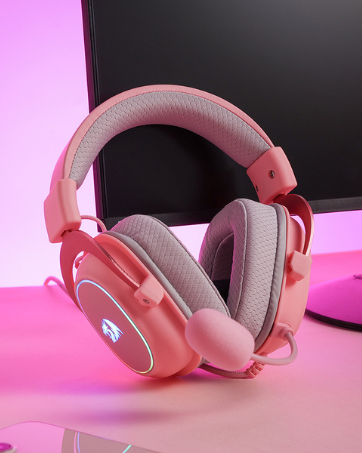
H510 RGBH510 RGB

Redragon H510 RGB Series

Pink! Yes, that is PINK available now, cute & hot.

A113A113

Redragon Custom Switches

6 Types Available for Any Keyboard Moding

Tactile, Linear, Silent, We Got What You Want


3 Modes Connect Tech: Cables truly will affect your detailed battle reaction, M813 PRO geared with BT and Nano 2.4Ghz receiver offers you the purest and preciser mouse moving experience and hype your KDA rise again.
Pentakill, 6 DPI Levels: Features 6 adjustable DPI levels (1000/2000/4000/8000/13000/26000) for pinpoint accuracy. DPI levels are free to DIY with software, take complete control of your gaming experience and dominate the competition.
Easy-control 4D Dual Mode Scroll Wheel: Effortlessly navigate to in both horizontal and vertical directions through your games and documents with Hyper-fast Scrolling or tactile cycling mode. Get immersed in an intuitive and seamless user experience.
Take The Advanced Shot: All 7 programmable buttons are all editable with customizable tactical keybinds in whatever game or work you are engaging. hit your hotkeys/keybinds faster than ever.
7 Decent Backlit Modes: Turn the backlit on and make some kills in your gaming battlefield. The hyped dynamic RGB backlit vibe will never let you down when decorating your gaming space.
Uncompromised Driver Support: All buttons with hotkeys, media, DPI settings are all customizable with Redragon dedicated software. Unleash your full potential with a single click, gain a competitive edge and conquer every challenge that comes your way.