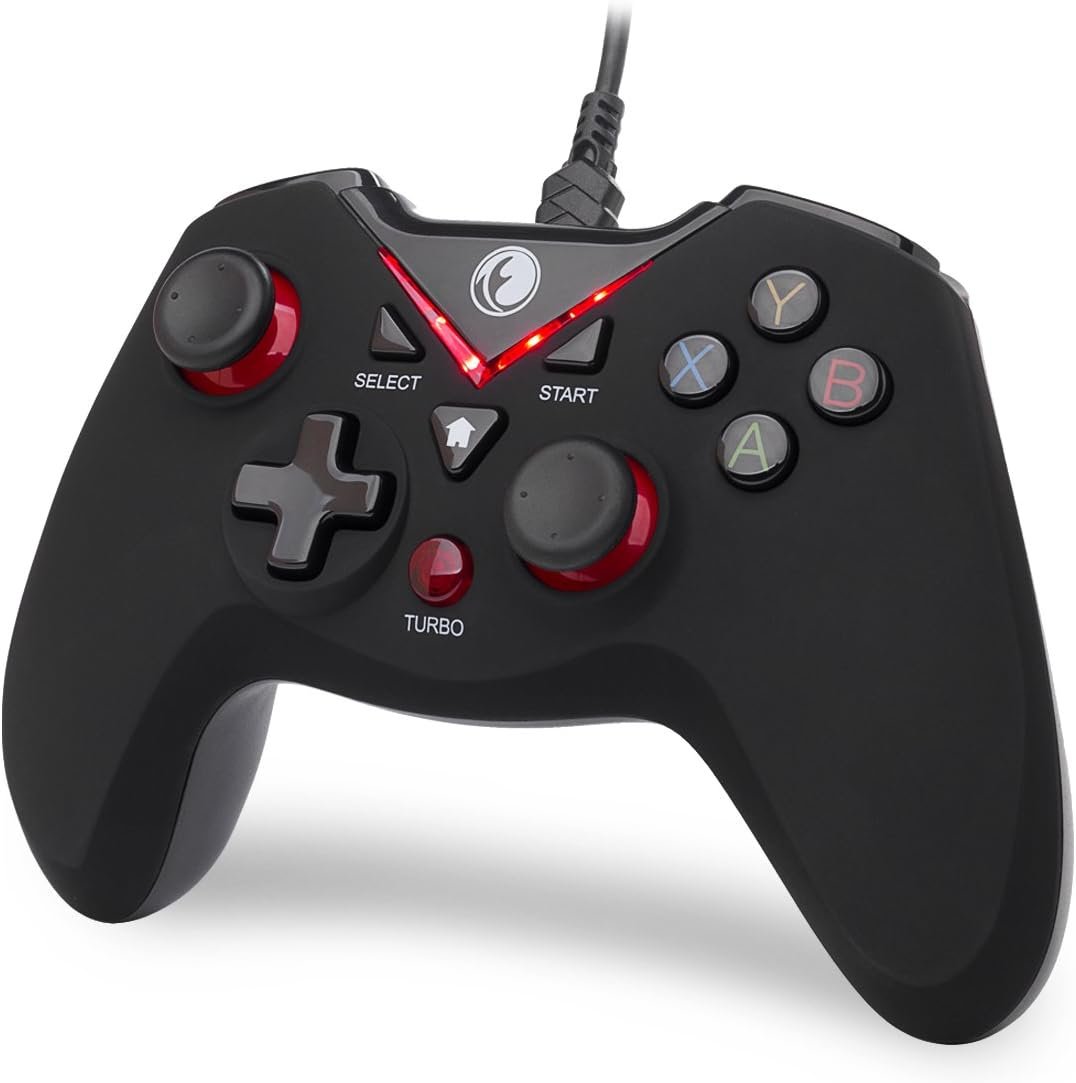
V-One Wired USB Gaming Controller Gamepad for PC, Steam, Android, and PS3 – Compatible with Windows XP/7/8/10/11 – Red Design

Product description IFYOO V-one Wired PC Game Controller / Gamepad Compatibility: Windows Xp / 7 / 8 / 10, Sony PlayStation 3(PS3), Android smartphone / tablet / smart TV / TV box Matters Needing Attention: (1) The device doesn’t support Xbox 360 / Xbox One / Mac OS / PS4.(2) DirectX 9.0c or above may be installed if the device is to be used in Windows 10 or above.(3) If the device is unable to be used in Windows systems, please try to install the latest version of Microsoft Xbox 360 Controller gamepad driver.(4) The vibration-feedback function can only be used in PC games supporting Xinput mode and the function may need to be enabled in games.(5) If you want to use the gamepad in devices with Micro-USB interfaces, you need to purchase OTG adapter or cable separately. Feature (1) It supports plug and play, only for PC games supporting Xinput mode / Play Sation 3. Some games may need to set the buttons or use third-party software before use.(2) Vibration Feedback Function.(3) Multi-mode: Xinput / Directinput(D-input) / Android / PS3(4) JD-SWTICH Function, which can exchange the functions of D-pad and Left-Stick in Xinput mode.(5) TURBO Function, which can set the button to realize automatic rapid repeating-hitting function.(6) Product Size: 160x110x52mm(7) Product Weight: 222g(8) Supporting Interface: USB 2.0 / 3.0 Ergonomic, and excellent design with high-quality material. The V element means victory, this element which is designed as an indicator light is highlights. it is very comfortable in hand because of the ergonomic shape and the skin type material on the surface. Also the different vibration intensity allows you to have a real feedback in different scenes of games. The vibration-feedback function can only be used in PC games supporting Xinput mode and the function may need to be enabled in games. JD-SWITCH Function In the Xinput mode, you can switch the function between D-pad and Left Stick by pressing the START + LSB(press the Left Stick vertically) key combinations. TURBO Function Press the TURBO + “the key you want to set” key combinations, and then it will activate the TURBO Function which can realize the function of rapid and repeated hitting automatically. Package List English Instruction Manual x1IFYOO V-one Wired Gamepad x1 (equipped with 1.8M USB cable) COMPATIBILITY: Support PC Computer, Laptop, Notebook. Windows XP/7/8/10/11, Steam, PS 3COMPATIBILITY FOR ANDROID: Support Android Mobile Phone/Tablet/TV/Box(system version 4.0 or above, and the device must fully support OTG function). Need to purchase a OTG adapter or cable for the Android device with Type-C or Micro-USB port.PLUG AND PLAY: Only for PC games supporting Xinput mode / Android mobile games supporting Android mode / PS 3. No need to install drivers except for Windows XP.PRODUCT FEATURE: Multi-mode: Xinput & Dinput & Android & PS 3 / Vibration Feedback Function / JD-SWTICH Function / TURBO FunctionNOTICE: This USB Wired PC Controller Gamepad does not support the Xbox 360 / Xbox One / Mac OS / PS4

IFYOO V-one Wired Gaming Controller: Game On!

In an age where gaming is more than just a hobby, finding the right controller can greatly enhance your experience. The IFYOO V-one Wired Gaming Controller stands out as a solid choice for gaming enthusiasts, bringing compatibility, functionality, and comfort together at an attractive price point.

Excellent Compatibility

One of the first things that makes the IFYOO V-one appealing is its extensive compatibility. It supports a wide range of platforms, including Windows XP, 7, 8, and 10, Sony PlayStation 3 (PS3), and Android devices. While it doesn’t support Xbox 360/Xbox One or Mac OS, it remains a versatile option for most PC gamers and mobile users. The controller offers plug and play functionality, eliminating the need for complex setup processes—just plug it in, and you’re ready to dive into your favorite games.

Multi-Mode Functionality

The IFYOO V-one allows you to switch between Xinput and DirectInput modes, supporting various gaming needs. Additionally, its JD-SWITCH function provides the flexibility to toggle between the D-pad and Left Stick in Xinput mode, making it adaptable to different gameplay styles. The TURBO function is another highlight, allowing users to set one button for rapid automatic repetitive hits, a feature that’s especially useful for fast-paced games requiring quick reflexes.

Feedback and Experience

One standout feature is the vibration feedback, which provides tactile sensations during gameplay. This function enhances immersion and allows players to feel the environment, but it’s worth noting that it’s only supported in PC games utilizing Xinput mode. The ergonomic design, coupled with the skin-type material on the surface, ensures that the controller feels comfortable in hand during long gaming sessions, reducing fatigue.

Design and Build Quality

Measuring 160x110x52mm and weighing 222g, the IFYOO V-one is designed to be lightweight yet sturdy. Its ergonomic shape promotes comfort, while the aesthetic appeal is marked by its design reflecting a “V” for victory, serving as an indicator light to boot. This design philosophy not only looks good but feels good, optimizing your gaming sessions.

Summary of Features

  • Compatibility: Windows XP, 7, 8, 10, PS3, Android (requires OTG adapter)
  • Modes Supported: Xinput, DirectInput, Android, PS3
  • Vibration Feedback: Available for supported PC games
  • JD-SWITCH and TURBO Functions: Enhanced functionality
  • Plug and Play: Simplified setup process
  • Ergonomic Design: Comfort-focused structure

Conclusion

For gamers seeking a reliable and feature-rich wired controller, the IFYOO V-one Wrestling Gaming Controller is an outstanding option that boasts a rating of 4.5 stars. It combines compatibility with functionality to deliver a robust gaming experience at an approachable price point. With its ergonomic design, vibration feedback, and seamless plug-and-play feature, this controller is certainly worth considering for anyone looking to upgrade their gaming setup.

Brand Introduction:
IFYOO specializes in creating high-quality gaming accessories designed to enhance the user experience. Committed to innovation and functionality, IFYOO continuously strives to empower gamers with products that elevate their performance and enjoyment.

Price: $20.99
(as of Sep 06, 2025 02:21:58 UTC – Details)

Related Posts
Read More

“ASUS 2024 Vivobook 17.3″ Laptop: FHD Display, Intel Core i5, 16GB RAM, 1TB SSD, Windows 11 – Cool Silver”: Available now at [price_with_discount]


WINDOWS 11 HOME
SLEEK, LARGE DISPLAY — A brilliant 17.3" display lets you scroll, create and work with stunning colors—plus a full-sized keyboard with NumKey for easier number punching.
INTEL CORE 5 PROCESSOR with INTEL IRIS Xᵉ GRAPHICS — Powerhouse performance for everyday productivity, with lag-free video calls, seamless multi-tasking and smooth editing.
FAST MEMORY, EVEN SUPERIOR STORAGE — 16GB of memory that won’t slow you down during multi-tasking. 1TB of storage that feels endless for extra-large files and apps.
SO LIGHT, SO RIGHT — Just over 4.5 lb, the Vivobook 17 balances portability without compromising screen size.
UP TO 12 HOURS OF BATTERY
SECURE BIOMETRICS — Login and keep your passwords safe with Windows Hello using the fingerprint sensor on the touchpad and 720p HD front camera
CRISP SOUND — Indulge your senses in clear, powerful sound.
PORTS — Stay connected with 1x USB-C, 3x USB-A, 1x HDMI, 1x Combo Audio Jack and 1x DC In
45W AC ADAPTER INCLUDED
Read More

“Skinit Decal Skin for BENGOO G9000 Gaming Headset: White and Black Stripes Design”: Available now at [price_with_discount]

Personalize the look on your Gaming Headset with the White and Black Stripes skin compatible with the BENGOO G9000 by Skinit. All Stripes decals compatible with the BENGOO G9000 Gaming Headset are cut and crafted with premium 3M vinyl and built to perfectly fit on your gaming headset without interfering with your game.
Comes with 1 skin compatible with BENGOO G9000 Gaming Headset
Precision cut for a flawless fit
3M vinyl decals printed with 3D Print Technology
Made in the USA
3M adhesive backing - easy on, easy off & residue-free
Read More

“Snprdiri 2.4G Wireless Gaming Keyboard and Mouse Combo: Mini 60% Mechanical Keyboard with Ergonomic Small Wireless Mouse (Red/Black)”: Available now at [price_with_discount]

Product Description SnpurdiriSnpurdiri wireless gaming keyboard and mousewireless gaming keyboard and mouse wireless gaming keyboard and mousewireless gaming keyboard and mouse small wireless gaming keyboardsmall wireless gaming keyboard 60 perccent wireless gaming keyboard and mouse combo60 perccent wireless gaming keyboard and mouse combo
【Small Gaming keyboard and Mouse Combo】The scientific choice is a wireless compact 60% keyboard and a cute pocket-sized mouse, which strives to create a perfect red-black combination of gaming and office. Slim and lightweight design makes it not occupy much space and provide convenience for travel.Note: The USB receiver is in the bottom of the small keyboard.
【2.4G wireless keyboard and mouse】Snpurdiri 2 in 1 keyboard and mouse set shares only a USB tiny receiver placed under the bottom of the keyboard. It adopts advanced stable 2.4G wireless transmission technology, and the mini keyboard and mouse have no signal interference, no delay. The effective transmission distance is 10 meters.
【Rechargeable & Long Battery Life】This rechargeable 60 percent keyboard is equipped with 2000 mAh battery. It only takes 2 hours to charge the keyboard by 5V/1A , and it can be used continuously for more than 44 hours. Support energy-saving sleep mode.
【Ergonomic Design and Mechanical Feel】Snpurdiri small gaming keyboard key height and vertical-feeling mouse is designed according to ergonomics,and the classic gaming set is not easy to fatigue after long-term use. It has a mechanical feel suitable for games, but it also has the special features of a silent keyboard and mouse combo suitable for office.Snpurdiri 60 keyboard also remain RGB backlight to enhance work or game atmosphere.
【Instructions for use】Before using this product, please turn the switch on the upper right corner of the keyboard to the on position, and turn the switch on the bottom of the mouse to the on (no light) or LED (light) position.There will be a little delay if the battery power of the keyboard and mouse is too low.
【Charging Instructions】Please use a DC:5V adapter to charge it. The charging indicator will turn off when fully charged. (If you use the USB interface to charge, due to the small current and large battery capacity, the charging time will be very long)