Ultimate Guide to the RedThunder K84 Wireless Keyboard and Mouse Combo: Rechargeable Rainbow Backlit TKL Design & Lightweight 3200 DPI Optical Mouse

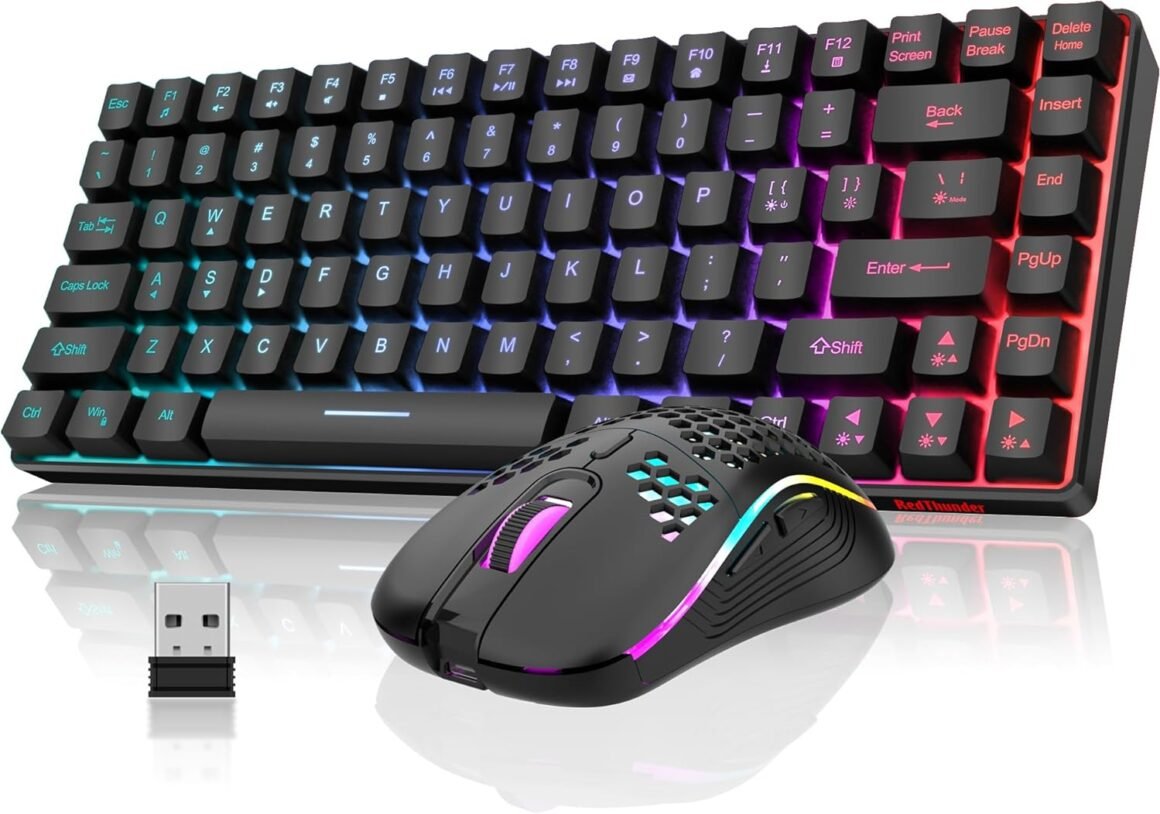
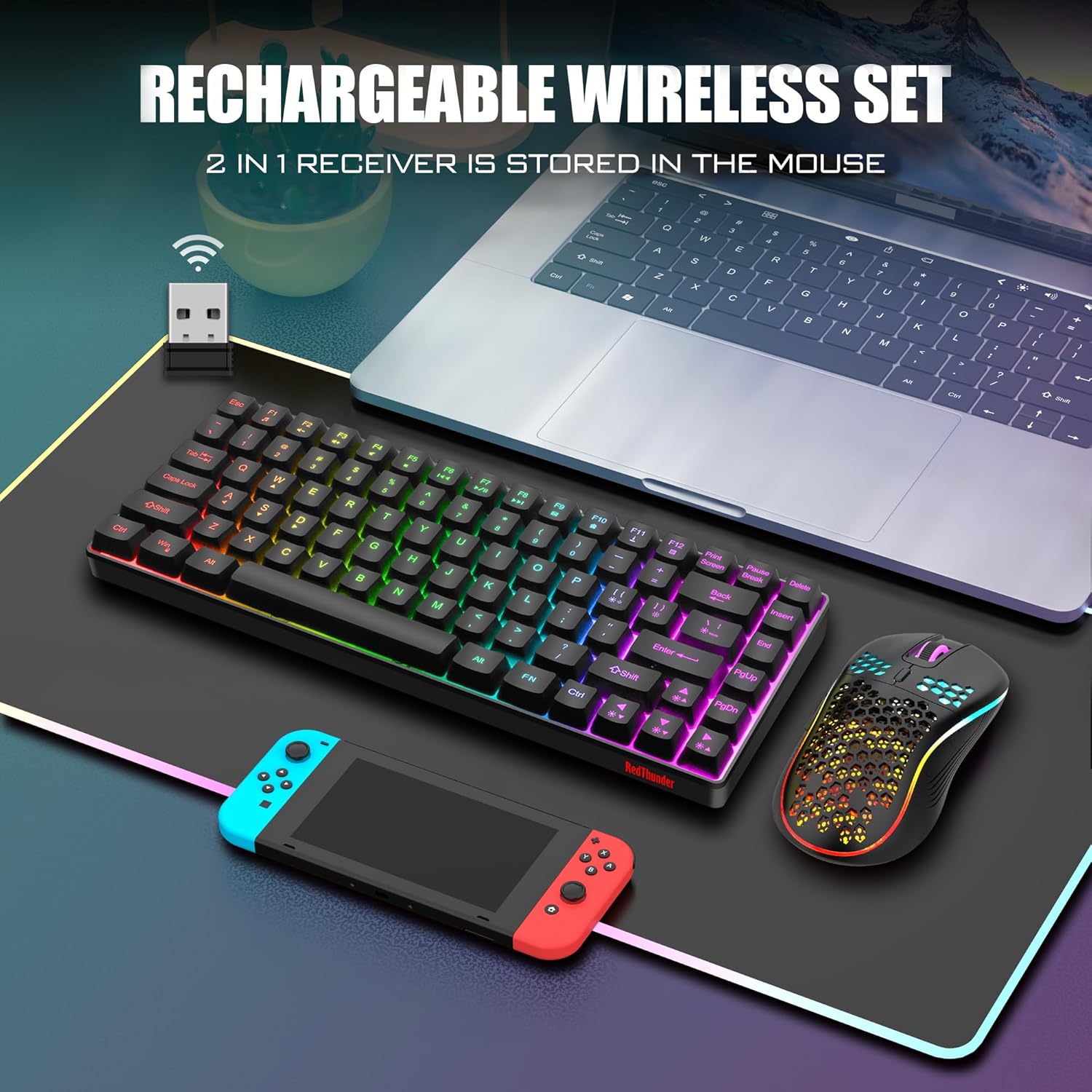
Product description Upgrade Type-C Charging Port The upgraded detachable Type-C interface is made of high-quality metal to enhance the texture. It has the characteristics of faster transmission speed, more durable use, pluggable at any time, and more convenient to carry. 2.4GHz USB Receiver 2 in 1 USB receiver is located in the mouse or the keyboard, keep it safe. The high-speed 2.4GHz USB receiver can satisfy your smooth use. Only with the USB receiver plugged in do the keyboard, mouse and lights work. Ergonomic Design The ergonomically designed minimalistic tripod on the bottom supports more stable and makes you more comfortable to use. It will give you a relaxing and pleasant experience. Type-C Rechargeable Wireless Mouse The wireless RGB mouse and the keypad are charged with the same Type-C data cable, and the mouse wheel will be illuminated by the indicator light when charging. The charging port is not easy to damage, more durable to use, simple to plug and unplug, and easy to carry. High-performance The side of the mouse adopts a non-slip curve design, with two buttons, the fingers fit the mouse more, and the use is more flexible. Professional gaming mouse adopts optical sensor, 3600DPI, 12000 FPS scanning speed, 40G acceleration, and tracking speed up to 400 IPS. Excellent Honeycomb Shell Design Taking creative design for lightweight honeycomb shell, owning the durable strength and excellecnt ventilation, meanwhile it keeps your palms cool and fresh, moving it more quickly and freely during your games, assures your long-session gaming without fatigue. How to change keyboard backlight? (1) FN+[{: Turn on/off the backlight (2) FN+]} or |:Switch the backlight (3) FN + ↑↓: Increase/decrease backlight color (4) FN + ←→: Speed up/slow down breathing rate Note: 1. Before using the product, please turn the switch at the bottom of the keyboard to the ON position, and turn the switch on the bottom of the mouse to the ON (no light) or LED (with light) position. 2. The keyboard and mouse share only one USB receiver, which is located at the bottom of the mouse or the keyboard. (Only when the receiver is plugged in, the lights of the keyboard and mouse will light up) 3. Please fully charge it before the first use, otherwise it will not last as long as expected when it is not fully charged. (Because we didn’t fully charge the keyboard/mouse before shipment to ensure transportation safety) 4. There will be a little delay when the battery of the keyboard and mouse is too low, please use a DC:5V adapter to charge them, and the charging indicator will go out after fully charged. (If you use the USB port to charge them, the charging time will be very long because of the low current and large battery capacity) 5. If you can’t press “WASD” or “↑↓←→”, don’t worry, please check if the FN function key is enabled. FN+any one of “W/A/S/D” key can be used to switch between letter “WASD” keys and arrow “↑↓←→” keys at will. If you don’t press any key, please check if the WIN key lock: press FN +WIN to lock or unlock the WIN keys. FN+(F1~F12): 12 multimedia combination keys. 6. For keyboard lighting adjustment, some shortcut keys and other information about the product, please refer to the user manual. 7. Turning off the keyboard light can extend the battery life of the keyboard moderately. 8. About Mac and tablet: Limited MacOS support and need USB port adapter. 9. If the connection with the USB receiver is lost does not work, please repair the USB Receiver with the keyboard and mouse. Pairing steps. Ensure enough power before pairing. Keep device & receiver close, avoid obstructions for stable signal, stay away from 2.4GHz interference sources like routers & Bluetooth devices. The USB receiver is not inserted into the USB port and operate it in sequence. Keyboard pairing steps: Step 1: Turn on the keyboard switch; Step 2: Press and hold the ESC key and the K key at the same time, the indicator light starts to flash; Step 3: Insert the USB receiver into the computer, and pairing is complete. Mouse pairing steps: Step 1: Turn the switch at the bottom of the mouse to the switch position with the sun logo; Step 2: Press and hold the mouse wheel and right button, the mouse RGB lights start to flash; Step 3: Insert the USB receiver into the computer and the pairing is complete. 10. If you have any problem, please tell us at the first time, we will try our best to solve it. Add to Cart Add to Cart Add to Cart Customer Reviews 4.0 out of 5 stars 997 4.1 out of 5 stars 92 4.3 out of 5 stars 2,077 4.2 out of 5 stars 135 4.0 out of 5 stars 2,553 3.9 out of 5 stars 714 Price $39.99$39.99 $35.85$35.85 $39.99$39.99 $89.99$89.99 $47.49$47.49 $49.99$49.99 Color Option Black/White/Black-White/White-Black Black Black/White Black Gold/Snowy White Black Pudding/White-Gray/Black/White/Pink Black/White Connection Wireless Wireless Wireless 2.4G/Wired/BT Wireless Wireless Keyboard Keys 84 93 61 95 104 114 Backlight Mode ✓ ✓ ✓ ✓ ✓ ✓ Battery Charge Protection Type-A to C ≤ DC: 5V (no fast charging) Type-A to C ≤ DC: 5V (no fast charging) Type-A to C ≤ DC: 5V (no fast charging) Type-A to C ≤ DC: 5V (no fast charging) Type-A to C ≤ DC: 5V (no fast charging) Type-A to C ≤ DC: 5V (no fast charging) 【High-performance 2.4G Wireless Keyboard and Mouse】Are you looking for a small wireless keyboard and mouse combo that can perfectly balance work and games? RedThunder K84 rechargeable wireless gaming keyboard and mouse combo will be your best choice. 2.4G high-speed and stable transmission, ensure that it can easily deal with even the most intense battles. Note: The keyboard and mouse share only one USB receiver at the bottom of the keyboard/mouse.【Rechargeable Wireless Keyboard and Mouse】The keyboard is equipped with a 1850 mAh battery, and the mouse is equipped with an 500 mAh battery. The long battery life allows you to use them continuously for 8 hours with light. The keyboard and mouse are equipped with smart energy-saving functions. If there is no operation within 2 minutes, they will automatically go to sleep, press any key to wake them up. Note: Not fully charged for safe transport. Please use original cable to charge via computer USB for 8 hours before use.【75% Compact Mini Keyboard and Ultra-light Honeycomb Shell Mouse】Removed the 10-key numeric pad. The ultimate tenkeyless keyboard (84-key) that retains dedicated media keys and arrow keys makes it more practical than the 60% keyboard. The well-designed perforated honeycomb shell mouse is ergonomically designed and weighs only 65 (+-5) grams, making it more flexible and comfortable without fatigue.【LED Backlit Light Up Keyboard and Mouse】The K84 gaming keyboard has built-in 3 groups of rainbow backlight effects, supports 3 static and 1 dynamic breathing mode, 3 brightness levels, and 4 breathing rates for choice. (Note: It’s not an RGB backlight and cannot be set the monochrome light). The mouse has a built-in 7-color cyclic gradual lighting effect.【Durable Ergonomic Keyboard and Mouse】The keys have a 10 000 000 keystrokes lifetime, so you can hold on to it for the next decade! ABS keycaps adopt two-color injection molding process, the letter of characters never fade. The mouse fits the palm perfectly, and the anti-sweat and non-slip design gives you complete control.【Plug and Play 】The keyboard and mouse share only one USB receiver, and the code has been completed by default. You only need to insert the receiver and turn on the keyboard and mouse to use it. (Note: If the receiver and the keyboard/mouse lose connection and cannot be used for any reason, you only need to reset the code pairing or contact us in time, we will try our best to solve it ASAP)

Elevate Your Gaming Experience with RedThunder’s K84 Wireless Keyboard and Mouse Combo

In the competitive world of gaming, having the right tools can make all the difference. Enter the RedThunder K84, a wireless keyboard and mouse combo designed for both gamers and professionals seeking optimal performance. The K84 brings together high-speed connectivity, ergonomic design, and striking aesthetics, making it a worthy addition to any setup.

Design and Build Quality

The K84 combines functionality with style in a compact 75% tenkeyless layout. By removing the numeric keypad, this design prioritizes a sleek look while retaining the essential arrow and media keys. Constructed with durable materials, it boasts a remarkable 10 million keystrokes lifetime, ensuring this peripheral can withstand prolonged gaming sessions.

Moreover, the lightweight honeycomb shell mouse not only enhances ventilation, keeping your palms cool, but also weighs in at just 65 grams, allowing for swift movements and agility during intense gameplay. Whether you are navigating through crowded digital landscapes or managing spreadsheets, this combo elevates your performance.

Cutting-Edge Features

Rechargeable Convenience

Equipped with 1850 mAh and 500 mAh batteries for the keyboard and mouse respectively, the K84 promises an impressive battery life of up to 8 hours of continuous use with RGB lighting. The intelligent energy-saving mode automatically puts the devices to sleep after two minutes of inactivity, ensuring longer use between charges.

Stunning LED Backlighting

Light up your workspace with the vivid rainbow backlighting that offers three static and one dynamic breathing mode, along with adjustable brightness levels. The mouse features a 7-color cyclic lighting effect, making it as visually appealing as it is functional. Perfect for late-night gaming or simply adding flair to your desk.

Effortless Setup

The inclusion of a 2.4GHz USB receiver means you can easily connect both the keyboard and mouse with just one plug, allowing for a neat workspace without clutter. Setup is straightforward with a plug-and-play experience; simply insert the USB receiver, switch on the devices, and you’re ready to go.

Enhanced Comfort

Crafted with ergonomics in mind, the K84 aims to minimize fatigue during extended use. The design features a secure tripod-like stance, lending stability and comfort, while the anti-sweat coating on the mouse ensures a solid grip during intense gaming marathons.

Trust and Reliability

  1. Durable Construction: Built to last with a keystroke rating of 10 million.
  2. Rechargeable Batteries: Long-lasting power with smart energy-saving features.
  3. User-Centric Design: Ergonomic and lightweight for prolonged comfort.
  4. Positive User Feedback: Customers consistently praise the K84 for its reliability and performance.

In conclusion, the RedThunder K84 Wireless Keyboard and Mouse Combo is an exceptional choice for those looking to enhance their gaming performance or simply streamline their work setup. With its cutting-edge features, stylish aesthetics, and robust build quality, the K84 is designed to impress.

About RedThunder

RedThunder is committed to providing gamers and tech enthusiasts with high-quality peripherals that enhance usability and performance. With a focus on innovation and customer satisfaction, RedThunder delivers products built for those who demand the best from their tech. Experience the difference with the K84 and take your gaming to the next level!

Price: $42.99 - $39.99
(as of Sep 05, 2025 05:58:02 UTC – Details)

Related Posts
Read More

ASUS VivoBook S15: Thin and Light 15.6” Laptop with Intel Core i5 Processor: Available now at [price_with_discount]

ASUS VivoBook, a perennial favorite, is getting a new, bolder look that’s sure to get pulses racing. The slim and lightweight VivoBook S15 now features an 11th Generation Intel Core Processor, diamond-cut edges and a textured finish, and is available in four distinct colors that have been chosen to reflect your personality. The positive vibes continue when you open the lid, where you’re greeted by an Enter key with color-blocking edges. VivoBook S15 brings out the true you, both inside and out. *The actual transfer speed of USB 3.0, 3.1, 3.2 (Gen 1 and 2), and/or Type-C will vary depending on many factors including the processing speed of the host device, file attributes and other factors related to system configuration and your operating environment.
15.6 inch Full HD NanoEdge bezel display with stunning 86% screen-to-body ratio
Latest 11th generation Intel Core i5-1135G7 Quad Core Processor (8M Cache, up to 4.70 GHz, with IPU)
8GB DDR4 RAM and 512GB PCIe SSD and Windows 10 Home
Metal chassis and 16mm z-height
Ergonomic backlit keyboard along with a fingerprint sensor activated via Windows Hello
Read More

TECWARE Phantom 87-Key Mechanical Keyboard: RGB LED Lighting & Outemu RED Switches for Enhanced Gaming Experience

Product description TECWARE Phantom 87/104 Key Mechanical KeyboardTECWARE Phantom 87/104 Key Mechanical Keyboard TECWARE Phantom 87/104 Key Mechanical KeyboardTECWARE Phantom 87/104 Key Mechanical Keyboard TECWARE Phantom 87/104 Key Mechanical KeyboardTECWARE Phantom 87/104 Key Mechanical Keyboard TECWARE Phantom 87/104 Key Mechanical KeyboardTECWARE Phantom 87/104 Key Mechanical Keyboard Add to Cart Add to Cart Add to Cart Add to Cart Customer Reviews 4.6 out of 5 stars 6,843 4.6 out of 5 stars 6,843 4.4 out of 5 stars 1,312 4.6 out of 5 stars 6,843 4.6 out of 5 stars 6,843 Price $49.99$49.99 $64.99$64.99 — no data $84.99$84.99 $84.99$84.99 Connectivity Wired (USB-A) Wired (USB-C) Wired (USB-C) 3-mode Connectivity (Wireless 2.4GHz / Bluetooth 5.0 / Wired USB-C) 3-mode Connectivity (Wireless 2.4GHz / Bluetooth 5.0 / Wired USB-C) Cable Braided USB Cable (1.8m) Detachable USB-C Braided Cable (1.8m) Detachable USB-C Braided Cable (1.8m) Detachable USB-C Coiled Cable (1.8m) Detachable USB-C Coiled Cable (1.8m) Switch Compatibility Outemu Blue/Brown/Red only Tecware Wraith Switches only Tecware Wraith Switches only 5-pin Universal Hot-swap 5-pin Universal Hot-swap Spare Switches no data ✓ ✓ ✓ ✓ Keycaps Double-shot ABS Keycaps Double-shot Double-walled ABS Keycaps Double-shot Double-walled ABS Keycaps Double-shot Double-walled Two-tone PBT Keycaps Double-shot Double-walled Two-tone PBT Keycaps Stabilizer V1 Stabilizers V3 Stabilizers (Tuned) V3 Stabilizers (Tuned) V3 Stabilizers (Tuned) V3 Stabilizers (Tuned) Sound Dampening - no data Silicone Spacebar Filler 4 Layers of Sound Dampening Foam Silicone Spacebar Filler 4 Layers of Sound Dampening Foam Silicone Spacebar Filler 4 Layers of Sound Dampening Foam Silicone Spacebar Filler 4 Layers of Sound Dampening Foam Circuit Board FR-4 Fibreglass PCB Dual-Layer Fibreglass PCB Dual-Layer Fibreglass PCB Dual-Layer Fibreglass PCB Dual-Layer Fibreglass PCB Software ✓ ✓ ✓ ✓ ✓
PREMIUM TYPING EXPERIENCE: Experience unparalleled performance with the Phantom 87 Key Mechanical Keyboard. Every inch of this keyboard is meticulously crafted, fine-tuned, and specially engineered to deliver a truly remarkable typing experience.
16.8 MILLION COLOR RGB LIGHTING: With 16.8 million colors and dynamic lighting effects, this LED mechanical keyboard will become a captivating centerpiece, enhancing your gaming setup or workspace.
18 PRE-SET LIGHT MODES: Express your unique style and personality with 18 pre-set RGB lighting modes. From pulsating waves to dynamic color shifts, you have the freedom to tailor the lighting effects to match your mood, preferences, or gaming environment.
OUTEMU MECHANICAL SWITCHES: This RGB mechanical gaming keyboard comes with pre-installed Outemu switches reliable for 50 million keystrokes. Available in Outemu Blue, Outemu Red, and Outemu Brown.
FIBERGLASS PCB: With its dual-layer fiberglass PCB, the Phantom wired mechanical keyboard ensures improved signal stability and a longer lifespan. Each Phantom keyboard comes with 4 spare mechanical switches, 1 switch puller, 1 keycap puller, and a manual.
Read More

“Unlock Your Gaming Potential: Discover the Ultimate Wireless Mechanical Keyboard with Customizable Features!”: Available now at [price_with_discount]

Product Description wireless mechanical keyboard creamy sound mechanical keyboard with numpad gaming keyboardwireless mechanical keyboard creamy sound mechanical keyboard with numpad gaming keyboard wireless mechanical keyboard creamy sound mechanical keyboard with numpad gaming keyboardwireless mechanical keyboard creamy sound mechanical keyboard with numpad gaming keyboard wireless mechanical keyboard creamy sound mechanical keyboard with knob gaming keyboardwireless mechanical keyboard creamy sound mechanical keyboard with knob gaming keyboard wireless mechanical keyboard creamy sound mechanical keyboard with numpad gaming keyboardwireless mechanical keyboard creamy sound mechanical keyboard with numpad gaming keyboard wireless mechanical keyboard creamy sound mechanical keyboard with numpad gaming keyboardwireless mechanical keyboard creamy sound mechanical keyboard with numpad gaming keyboard More Product Details Tri-mode mechanical gaming keyboard BT 2.4GHZ wireless mechanical keyboard for gamingTri-mode mechanical gaming keyboard BT 2.4GHZ wireless mechanical keyboard for gaming Tri-mode Connection

Support BT 3.0/5.0, 2.4GHZ wireless and USB-C wired connection. Users can quickly switch between connection modes using the mode switch on the side.

Rechargeable Wireless Mechanical Gaming KeyboardRechargeable Wireless Mechanical Gaming Keyboard 8000mAh Battery

The large battery capacity increases the battery life in wireless mode. Please note that don't use a fast charging cable to charge the keyboard.

Wireless Mechanical Gaming Keyboard PBT Keycaps mechanical keyboardWireless Mechanical Gaming Keyboard PBT Keycaps mechanical keyboard PBT Keycaps

Double shot PBT keycaps, made from two colors material molded into each others, make the keycaps characters maintain the vibrance and saturation.

Wireless Mechanical Gaming KeyboardWireless Mechanical Gaming Keyboard Adjustable Keyboard Stand

The keyboard stand has 2 adjustable height levels.

Users can adjust the keyboard tilt according to their own requirements.

Partial FN+ Shortcut Key Functions Introduction

FN + Scroll = PRTSCFN + DEL = INSFN + Home = ENDFN + ESC : Press and hold for 4-5 seconds until the keyboard backlight flashes to restore factory settingsFN + WIN : Lock/unlock windows key (WIN key cannot be used when locked)FN + 1 = BT device 1# | FN + 2 = BT device 2# | FN + 3 = BT device 3#

Supports simultaneous connection of 3 devices in BT mode, and can switch devices via shortcut keys

FN + W = Windows system | FN + E = Mac system | FN + Q = Android system | FN + R = IOS system

In order to use some shortcut key functions normally, users can use shortcut keys to switch the keyboard to the same system mode as your device. The keyboard shortcut functions are different in different systems. For details, please refer to the instructions included in our package.


Multi-Device Connection: AULA F99 Pro wireless mechanical keyboard provides three connection methods, including BT5.0, 2.4GHz wireless mode, and USB wired mode. It can be connected to up to five devices at the same time, and switch between them easily by FN and key combination keys and side button. No limits about your keyboard connection to meet the needs of work, gaming, and study
Multi-function Control Knob: This AULA 96% wireless gaming keyboard is equipped with functional knob to switch backlit mode or multimedia mode. In backlit mode, you can rotate the knob to adjust the brightness of the lights, and click the knob to switch the lighting effects easily; in multimedia mode, rotate the knob to adjust the volume, and click the knob to play or pause. Long press the knob for about 5 seconds to switch modes
Hot-swappable Custom Keyboard: The switches and keycaps can be freely replaced(keycap/switch puller are included in the package).This customizable keyboard with hot-swap PCB allows users to replace 3 pins/5 pins switches easily without soldering issue. F99 Pro mechanical keyboards equipped with pre-lubed linear switches, bring smooth typing feeling and pleasant typing sound, provide fast response for exciting game
Advanced Structure and PCB Single Key Slotting: This computer keyboard features a advanced structure, extended integrated silicone pad, and PCB single key slotting, better optimizes resilience and stability, making the hand feel softer and more elastic. Five layers of filling silencer fills the gap between the PCB, the positioning plate and the shaft,effectively counteracting the cavity noise sound of the shaft hitting the positioning plate, and providing a solid feel
Mechanical Gaming Keyboard: F99 Pro is a premium mechanical keyboard for both work and game. With 16 RGB lighting effect to adds a great atmosphere to the game room. Keys support macro customization, which allows macro recording and editing, customize key function and 16.8 million light colors, and supports cool music rhythm lighting effects with driver. N-key rollover, keyboard can respond to multiple key presses at the same time, which is helpful in very exciting real-time games
PBT Keycaps and 8000mAh Battery: 99 keys 96% layout compact keyboard can save more desktop space while keep necessary arrow keys and number area for games and work. The rechargeable keyboard built-in 8000mAh large capcacity battery to provide more power and longer battery life. Double shot PBT keycaps, made from two colors material molded into each others, make the keycaps characters maintain the vibrance and saturation, clear and not fade
Read More

“15 Light Modes RGB Gaming Mouse Pad: Anime Dragon Design – High-Performance Gamer Mat 31.5 X 12in”: Available now at [price_with_discount]

【FEATURES】

*Our large LED gaming mouse mat designed for gamers, great to use for gaming/office work.

* Made of Rubber

* RGB gaming mouse pad with 15 RGB lighting modes, including Red, green, blue, purple, indigo, yellow, white, magenta, orange, alternating wave, synchronizing wave, alternating flash, alternating red changing, , synchronize breathing, alternate breathing, Power-off memory mode, lights off, provides the visually stunning of colors and effects.

* Dimensions:

L(800mm)xW(300mm)xH(2mm) 31.5"x12"x0.12"inch

* Supports full-sized keyboard with more than enough room for mouse.

* Low Friction: Smooth surface for SPEED and CONTROL.

* Anti-slip rubber base.

* Portable with cloth surface.

* Optimized for various mouse sensors and sensitivities.

NOTE:
If you want to put away the mat, please do not to fold it into two. Otherwise the luminescent fiber will be damaged. We suggest to roll it up and put it in the storage bag.
NOTE: Due to rolling up for a long time in the package, if it's not flat, we suggest to put it be flat under heavy things for about 24H will be ok.

Package Include:
1 x Mousepad (SIZE: 31.5*11.8inches)
1 x USB charging cable
【15 RGB LIGHT MODES & LARGE SIZE】The RGB Gaming Mouse Pad features 15 Lighting Modes: includes 9 kinds of Monochromatic Light, 1 kind of RGB Alternating, 2 kinds of RGB Breathing , 3 kinds of RGB Running. the light is bright but not deter from viewing the monitor. The size of 31.5 x 12 inches fit your mouse and keyboard perfectly and still have a large amount of movement space.
【Smooth Surface and Base】The mouse pad is made of super fiber and soft soft cloth surface with rubber base, grips the desktop firmly, gaming mouse can slide on the mouse pads accurately and easily.
【Easy to Use】This mouse mat is powered by USB,plug and play.Press the button to change and select the lighting color mode,convenience to use.
【HIGH QUALITY Mouse Pad】Adopting high elasticity rubber materia. The stitched edges design ensures long last service time, protect the pad, deformation and degum.
【30-DAY MONEY BACK & LIFETIME QUALITY ASSURANCE】We Stand Behind Our Quality! If for any reason you are not entirely happy, CONTACT US directly, we will replace or return your order with no question asked. BUY WITH 100% CONFIDENCE!