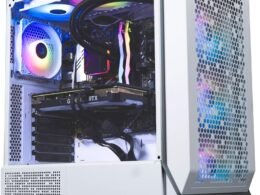
“Skytech Chronos Mini Gaming PC: AMD Ryzen 3, NVIDIA GTX 1660 Super, 16GB DDR4, 500GB SSD, Windows 10”: Available now at [price_with_discount]

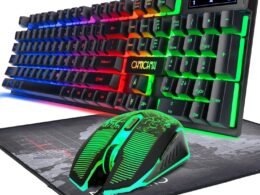
Why settle for mediocrity? Leap forward into the Chronos Mini series with the newest architecture. Featuring the latest GTX graphics technology and powered by AMD Ryzen 3 3100 4-Core 3.6 GHz Processor, the Chronos delivers the best price-to-performance value gaming rig in the market.The Skytech Chronos Mini offers the best gaming computer built up to date to quickly run popular games such as Call of Duty Warzone, Fortnite, Escape from Tarkov, Grand Theft Auto V, World of Warcraft, League of Legends, Apex Legends, Roblox, PLAYERUNKNOWN’s Battlegrounds, Overwatch 2, Counter-Strike 2, Battlefield V, Minecraft, Baldur’s Gate 3, Dota 2, HELLDIVERS 2, Monster Hunter, Palworld, Terraria, Rainbow Six Siege, Dragon’s Dogma 2, and more at Ultra settings, detailed 1080p HD resolution, and smooth 60+ FPS gameplay.SPECIFICATIONSProcessor: AMD Ryzen3 3100 4-core 3.6 GHz (3.9 GHz Turbo) CPU ProcessorMemory: 16GB DDR4 3200 Gaming MemoryVideo Card: NVIDIA GeForce GTX 1660 Super(Brand may vary)SSD: 500GB SSD – Up to 30x Faster Than Traditional HDDOperating System: Microsoft Windows 10 Home 64-bitCase: Skytech Chronos Mini, Black Edition w/ Front Mesh Gaming CasePower Supply: 80 PLUS 600W Gold Certified Power SupplyWiFi: 802.11ACFans: Built-in 3 x RGB FansProduct images used on this page are for illustrative purposes only and do not indicate the exact components used at the time of manufacture. The component makes and models may vary from depictions of the product in product images but will adhere to the specification outlined in the main description of the product. Particulars such as I/O ports may vary. Please contact us for more details.AMD Ryzen 3 3100 4-Core 3.6 GHz (3.9 GHz Turbo) CPU Processor | 500GB SSD – Up to 30x faster than traditional HDDGeForce GTX 1660 Super 6GB graphics card | 16GB DDR4 3200MHz gaming memory | Windows 11 home 64-bit✔ 802.11AC | No Bloatware | Graphic output options include 1 x HDMI, and 1 x Display Port Guaranteed, Additional Ports may vary | USB Ports Including 2.0, 3.0, and 3.2 Gen1 Ports | HD Audio and Mic | Free Gaming Keyboard and Mouse3 x RGB Dual RING Fans for Maximum Air Flow | Powered by 80 Plus Gold Certified 600 Watt Power Supply | Skytech Chronos Mini, Black Edition w/ Front Mesh Gaming Case | 1 Year Warranty on Parts and Labor | Lifetime Free Technical Support | Assembled in the USAThis powerful gaming PC is capable of running all your favorite games such as Call of Duty Warzone, Fortnite, Escape from Tarkov, Grand Theft Auto V, World of Warcraft, League of Legends, Apex Legends, Roblox, PLAYERUNKNOWN’s Battlegrounds, Overwatch 2, Counter-Strike 2, Battlefield V, Minecraft, The Division 2 and more at High to Ultra settings, crisp 1080p FHD resolution and smooth 60+ FPS game play.

The Chronos Mini series offers a gaming computer with the latest technology, featuring the AMD Ryzen 3 3100 4-Core 3.6 GHz Processor and NVIDIA GeForce GTX 1660 Super graphics card. With 16GB DDR4 3200 Gaming Memory and a 500GB SSD, this PC provides fast and efficient performance for popular games like Call of Duty Warzone, Fortnite, and more at Ultra settings and smooth 60+ FPS gameplay.

The Chronos Mini is built with 3 RGB fans for maximum airflow and comes with a 600W Gold Certified Power Supply. It includes Windows 10 Home 64-bit, 802.11AC WiFi, and no bloatware. The PC also comes with a gaming keyboard and mouse, as well as a 1-year warranty on parts and labor and lifetime free technical support.

This powerful gaming PC is capable of running a variety of games at High to Ultra settings, including Call of Duty Warzone, Fortnite, Grand Theft Auto V, and more. The Chronos Mini offers a superior gaming experience with crisp 1080p FHD resolution and smooth gameplay. With its high-performance components and sleek design, the Chronos Mini series is a top choice for gamers looking to upgrade their gaming rig.

Price: $699.99
(as of Aug 11, 2024 16:27:27 UTC – Details)


Related Posts
Read More

“2PCS 7.4V 600mah Lithium Battery for Syma & Skytech Remote Control Boats”: Available now at [price_with_discount]


For Syma Q2 Q3 Skytech H100 H102 H106 H120 remote control boat accessories
Battery connector is exactly same shape with the original battery ,no loose problems
Good product with superior material, which is more durable & practical, and not easy to damage. Built-in protection mechanism ensures safe charging and use.
Cool down the battery before your next flight or recharge;Light weight and easy to carry, put in your pocket when flying drone outdoors.
Package Content:2PCS 7.4V 600mah lithium battery
Read More

Kujian Wireless PC Controller: Bluetooth Gaming with Dual Vibration and LED Backlight: Available now at [price_with_discount]

Product Description pc gaming controller pc gaming controller wireless pc controller gaming controller controller for pc 01 03 1 Adjustable Vibration 2 Turbo Function 3 Six-Axis Gyro Sensor 4 Wireless & Wired 2 in 1 5 Ergonmics Design 05 05 07 08 09 10 1 Enjoy Every Moment 2 Family Time 3 Competition Time 4 Party Time

How can I adjust the wireless controller vibration?

Press T/FN, and click Up or Down of D-PAD button to adjust the Vibration intensity of the pc controller.

How can I adjust the button backlight brightness?

Press T/FN button, and click left or right of D-pad to adjust button backlight brightness level.

How to change the paired device?

Long press HOME Button for 5 sec when power off, and then select related device and long press HOME Button for 3 sec and restart to pair.

How to delete the Macro definition?

When controller is working, press T/Fn+M1, enter programming mode, the light of the right analog stick changes from blue to red, wait for seconds, short press M1, the light of the right stick changes red to blue, then all Macro definition is deleted.

Compare with similar items Add to Cart Add to Cart Add to Cart Add to Cart Add to Cart Add to Cart Customer Reviews 4.3 out of 5 stars 33 4.0 out of 5 stars 1,957 4.0 out of 5 stars 3,734 3.8 out of 5 stars 9 4.0 out of 5 stars 3,734 4.2 out of 5 stars 1,812 4.2 out of 5 stars 1,812 Price — $35.89$35.89 $32.99$32.99 $15.99$15.99 $55.99$55.99 $25.98$25.98 $25.98$25.98 Hardware Platform for Playstation 4/3 /PC/TV/iOS PC /Switch/TV/Steam/Cellphone for Playstation 4/3 /PC/TV/iOS for Playstation 3 for Playstation 4/3 /PC/TV/iOS for Playstation 3 for Playstation 3 Operating System P-4/Pro/Slim/Windows/Android Windows/TV/Android/iOS P-4/Pro/Slim/Windows/Android P-3 P-4/Pro/Slim/Windows/Android P-3 P-3 Connectivity Tech Bluetooth/Wired Bluetooth/Wired Bluetooth/Wired Bluetooth/Wired Bluetooth/Wired Bluetooth/Wired Bluetooth/Wired Power Source Battery Powered + Usb Cable Battery Powered + Usb Cable Battery Powered + Usb Cable Battery Powered + Usb Cable Battery Powered + Usb Cable Battery Powered + Usb Cable Battery Powered + Usb Cable Battery Powered 1000mAh 600mAh 800mAh 450mAh 800mAh 450mAh 450mAh USB Cable micro-usb type-c micro-usb micro-usb micro-usb micro-usb micro-usb
WIDE COMPATIBILITY: Kujian pc gaming controller compatible with Windows 11/10/8/7/Switch/Steam/Android/MacOS/iOS/Smart TV. (NOTE: Not support for Xbox 360/One/P3/P4/P5).
ADJUSTABLE DUAL VIBRATION & LED BACKLIGHT: The pc controller built-in dual motors with 4 levels of vibration intensity can be adjusted for a great gaming experience! Press T/FN and D-pad to adjust to None/Weak/Moderate/Strong according to your needs during the game to meet different gamers' demands. This Bluetooth gaming controller with ABXY button and joystick in fashionable LED light, you can adjust 4 levels light of ABXY to 0-35%-75%-100%.
TURBO & PROGRAMMABLE BUTTONS: The wireless pc controller with the 3 levels Turbo speed function and the 4 additional programmable buttons enables you to quickly fire weapons or perform other actions with ease. PC gaming controller with Macro keys helps to minimize button abuse, prolonging the service life of the controller.
WIRELESS & WIRED MODE: This is the most fantastic feature of this pc gaming controller. Once you are out of battery but are still willing to play, plug in the USB cable(about 2.2 meters) to connect the Bluetooth controller and game device and switch to wired mode. Keep gaming!
COMFORTABLE DESIGN & LONG PLAYING TIME: The controller for pc switches between 4 different connection modes to meet all players' device needs. Kujian pc game controller has also a comfortable grip and ergonomic design, without any pain after playing for a few hours. The gaming controller built-in 600mAh battery with only 2-3 hours of charging time and you can enjoy about 8 hours of use time.
Read More

ZTHY GK5CN Battery Replacement for Schenker XMG Neo and More: Available now at [price_with_discount]

Product Description 11 ii

Why should I choose this battery?

1: High capacity circulatory function

2: Overheating protection

3: Overcurrent protection

4: Overcurrent protection

5: Low power consumption IC design

11

Specifications:

Battery Type: Li-ion.

Battery Condition: Brand New.

Battery Voltage: 11.4V

Battery Capacity: 46.74Wh

Replacement for Part Number:

GK5CN-00-13-3S1P-0, GK5CN-00-13-4S1P-0, GK5CN-11-16-3S1P-0, GK5CN-03-13-3S1P-0, GK5CN-00-B-3S1P-0, GK5CON67VK/GT, GK5CN00133S1P0, GK5CN00B3S1P0, 40068133, 3ICP6/63/69

Compatible Models (use "Ctrl+F to find your model quickly")

For Getac GK5CN5Z GK7CN6S Series

For TONGFANG Series:

GK5CN, CUK Model Z, GK5CN4Z, GK5CN4X, GK5CN5Z, GK5CN6Z, GK5CQ7Z, GK6Z5CN, GK7CN6S, Model Z GK5CQ7Z, OP-LP2, GK7CP6R, GK7CP7S, GK5CP6V, GCK5CP6Z, GK5CP6X

For SCHENKER Series:

XMG Neo 15, XMG Neo 15 Turing, XMG Neo 15 XNE15M19, XMG Core 15, XMG Core 17, XMG Neo 17, Z2-G,

For MECHREVO Series:

X8Ti, X8Ti Pro, X8Ti Plus, X9Ti, X9Ti Pro, X9Ti-R, Z2, Z2 Air

For MAINGEAR Vector 15 Series

For Medion X6805 X6807 Series:

Erazer X6805, Erazer X6805(MD 61085 MSN 30024782), Erazer X6805(MD 61107 MSN 30024950), Erazer X6805(MD 61132 MSN 30024995), Erazer X6805(MSN 30025389), Erazer X6805-MD61085, Erazer X6805MD61085, Erazer X6805(MD 61085 MSN 30026695), Erazer X6805(MD 61108 MSN 30024951), Erazer X6805(MD 61146 MSN 30025058)

For MACHENIKE Series:

For MACHENIKE T90 Plus, T90 Plus-TB, T90 Plus-TB1, T90 Plus-TB3, T90-T3p, T90 Plus-TC, T90 Plus-TCi3p, T90 Plus-TCi5;

For MACHENIKE F117-B, F117-B Pro, F117-B1, F117-B2CK, F117-B6, F117-B6Cp, F117-B6D, F117-B3, F117-B2, F117-Break, F117-FP, F117-FP6, F117-FP6R, F117-FP6t, F117-FP6R2, F117-FP7

For Hasee Series:

Z7M-KP7Z, Z7M-KP7GZ, Z7M-KP5GZ, Z7M-CT7GS, Z7-KP7GZ, Z7-CT5VH, Z7-CT7GK, G7-CT7VK, GK5S03

For Evoo EG-LP4-BK Gaming, EG-LP5-BK Series

Add to Cart Customer Reviews 4.0 out of 5 stars 1 — Price $40.99$40.99 — Model GK5CN-00-13-3S1P-0 GK5CN-00-13-4S1P-0 Battery Voltage 11.4V 15.2V Battery Capacity 46.74Wh 62.32Wh Cells 3-Cell 4-Cell Over-charge Protection ✓ ✓ Over-current Protection ✓ ✓ Short-Circuit Protection ✓ ✓ Size 7.67*3.54*0.23 11.02*3.54*0.23 B0BM46VVVJB0BM46VVVJ

ZTHY laptop battery instruction:

1.Discharge the new battery use to 5%(not to 0%) and then charge to 95%, and cycle 3-4 times.

2.Do not disassemble, crush or puncture. Do not dispose of in fire or water.

3.If you remove battery for a long time, charge more than 80% at least one time within one months.

4.Don't connect adapter for a long time while using the battery. It may damage the battery.

5.When using the battery, care should be taken to prevent exposure and moisture.

Easy to deal a variety of use environment

oo

uu

ff

Install A New Battery:

1, You need to turn off your laptop and disconnect the power.

2, Disconnect the connection between the old battery and the motherboard to avoid unnecessary damage caused by disassembling the battery. Then unscrew the old battery screws one by one and carefully save each screw.

3, Remove the old battery, carefully install the new battery on the battery case, screw in the screw, and connect the wiring of the new battery.

4, If you don't understand the above steps, you can search for the video about laptop battery installation on YouTube. Maybe it will help you.

Installing New Battery Frequently Asked Question Solution:

Q: Why my computer didn't recognize this battery or I install this battery and it doesn't seem to work?

A: The reason is residual power stored in the laptop components that was preventing the battery from working properly. Please disconnecting the old battery, and holding down the power button for 20 seconds, then connect the new battery. This drains the residual or flea power and once the laptop is reassembled the battery will function properly.

The following are troubleshooting methods:

1.Turn off the laptop.

2.Unplug AC power.

3.Remove the battery.

4.Replace AC power.

5.Turn on laptop,allow OS to boot.

6.Once logged in to the machine,perform a normal shut donw.

7.Unplug AC power.

8.Replace battery.


Specification: Battery type: Li-ion. Color: Black. Voltage:11.4V .Capacity: 46.74Wh
Replace Part Number: GK5CN-00-13-3S1P-0, GK5CN-00-13-4S1P-0, GK5CN-11-16-3S1P-0, GK5CN-03-13-3S1P-0, GK5CN-00-B-3S1P-0, GK5CON67VK/GT, GK5CN00133S1P0, GK5CN00B3S1P0, 40068133, 3ICP6/63/69
Compatible Models: Replacement for Getac GK5CN5Z GK7CN6S Series ;for TONGFANG GK5CN CUK Model Z GK5CN4Z GK5CN4X GK5CN5Z GK5CN6Z GK5CQ7Z GK6Z5CN GK7CN6S Model Z GK5CQ7Z OP-LP2 GK7CP6R GK7CP7S GK5CP6V GCK5CP6Z GK5CP6X ; For SCHENKER XMG Neo 15 XMG Neo 15 Turing XMG Neo 15 XNE15M19 XMG Core 15 XMG Core 17 XMG Neo 17 Z2-G ; For MECHREVO Series: X8Ti X8Ti Pro X8Ti Plus X9Ti X9Ti Pro X9Ti-R Z2 Z2 Air ; For MAINGEAR Vector 15 Series ; For Hasee Z7M-KP7Z Z7M-KP7GZ Z7M-KP5GZ Z7M-CT7GS Z7-KP7GZ Z7-CT5VH Z7-CT7GK G7-CT7VK GK5S03 ; For Evoo EG-LP4-BK Gaming EG-LP5-BK Series.
Compatible Models: Replacement for Medion X6805 X6807 Series: Erazer X6805 Erazer X6805(MD 61085 MSN 30024782) Erazer X6805(MD 61107 MSN 30024950) Erazer X6805(MD 61132 MSN 30024995) Erazer X6805(MSN 30025389) Erazer X6805-MD61085 Erazer X6805MD61085 Erazer X6805(MD 61085 MSN 30026695) Erazer X6805(MD 61108 MSN 30024951) Erazer X6805(MD 61146 MSN 30025058) ; For MACHENIKE T90 Plus T90 Plus-TB T90 Plus-TB1 T90 Plus-TB3 T90-T3p T90 Plus-TC T90 Plus-TCi3p T90 Plus-TCi5 F117-B F117-B Pro F117-B1 F117-B2CK F117-B6 F117-B6Cp F117-B6D F117-B3 F117-B2 F117-Break F117-FP F117-FP6 F117-FP6R F117-FP6t F117-FP6R2 F117-FP7
Note: If the new battery is not recognized during the initial installation, please reinstall and check if the interface is fully connected. Discharge the new battery to 10-20% (not 0%), then charge and cycle 3-4 times to wake up the new battery