Skytech Chronos Gaming PC with Intel Core i5 12400F, NVIDIA RTX 4060, 1TB SSD, 16GB RAM, Windows 11: Available now at [price_with_discount]

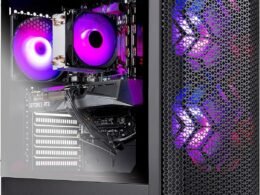
Why settle for mediocrity? Leap forward into the Skytech Chronos series with the newest architectures. Featuring the latest NVIDIA RTX series graphics cards and is powered by INTEL Core i5 Processor. The Skytech Chronos delivers the best price-to-performance value gaming rig in the market. The Skytech Chronos offers the best gaming computer built up to date to quickly run popular games such as Call of Duty Warzone, Fortnite, Escape from Tarkov, Grand Theft Auto V, Valorant, World of Warcraft, League of Legends, Apex Legends, Roblox, PLAYERUNKNOWN’s Battlegrounds, Overwatch 2, Counter-Strike 2, Battlefield V, New World, Minecraft, Elden Ring, Rocket League, Baldur’s Gate 3, Dota 2, HELLDIVERS 2, Monster Hunter, Palworld, Terraria, Rainbow Six Siege, Dragon’s Dogma 2, and more at Ultra settings, detailed 1080p Full HD resolution, and smooth 60+ FPS gameplay. SPECIFICATIONS Manufacturer Part#: ST-CHRONOS-0825-B-AMProcessor: INTEL Core i5 12400F 2.5 GHz (4.4GHz Max Boost) CPUMemory: 16GB DDR4 RAM 3200 Gaming Memory with Heat SpreaderVideo Card: NVIDIA Geforce RTX 4060 8GB GDDR6X Graphics Card (Brand may vary)SSD: 1TB NVME SSDOperating System: Microsoft windows 11 Home 64-bitCase: Skytech Chronos Case Black Edition with Front MeshWiFi: 802.11ACFans: 4 RGB Fans for Maximum Air Flow Product images used on this page are for illustrative purposes only and do not indicate the exact components used at the time of manufacture. The component makes and models may vary from product depictions in product images but will adhere to the specification outlined in the product’s main description. Particulars such as I/O ports may vary. Please get in touch with us for more details.INTEL Core i5 12400F 2.5GHz (4.4GHz Max Boost) CPU Processor | 1TB NVME SSD – Up to 30x Faster Than Traditional HDDNVIDIA Geforce RTX 4060 8GB GDDR6X Graphics Card (Brand may vary) | 16GB DDR4 RAM 3200 Gaming Memory with Heat Spreader | Windows 11 Home 64-bit802.11 AC | No Bloatware | Graphic output options include 1 x HDMI, and 1 x Display Port Guaranteed, Additional Ports may vary | USB Ports Including 2.0, 3.0, and 3.2 Gen1 Ports | HD Audio and Mic | Free Gaming Keyboard and Mouse4 RGB Fans for Maximum Air Flow | Skytech Chronos Case Black Edition with Front Mesh | 1 Year Warranty on Parts and Labor | Lifetime Free Technical Support | Assembled in the USAThis powerful gaming PC is capable of running all your favorite games such as Call of Duty Warzone, Fortnite, Escape from Tarkov, Grand Theft Auto V, Valorant, World of Warcraft, League of Legends, Apex Legends, Roblox, PLAYERUNKNOWN’s Battlegrounds, Overwatch 2, Counter-Strike 2, Battlefield V, New World, Minecraft, Elden Ring, Rocket League, Baldur’s Gate 3, Dota 2, HELLDIVERS 2, Monster Hunter, Palworld, Terraria, Rainbow Six Siege, Dragon’s Dogma 2, and more at Ultra settings, detailed 1080p Full HD resolution, and smooth 60+ FPS gameplay.

The Skytech Chronos series offers high-performance gaming rigs with the newest architectures, featuring the latest NVIDIA RTX series graphics cards and powered by an INTEL Core i5 Processor. This gaming computer is built to quickly run popular games such as Call of Duty Warzone, Fortnite, and more at Ultra settings and smooth 60+ FPS gameplay. The specifications include an INTEL Core i5 12400F 2.5GHz CPU Processor, 16GB DDR4 RAM, NVIDIA Geforce RTX 4060 8GB GDDR6X Graphics Card, and 1TB NVME SSD. The system also comes with 4 RGB fans for maximum air flow, a Skytech Chronos Case Black Edition with Front Mesh, and a 1-year warranty on parts and labor. This powerful gaming PC is capable of running a wide range of games at high settings and resolutions, making it a great choice for gamers looking for a top-performing rig.

Price: $1,049.99 - $949.99
(as of Aug 11, 2024 19:33:14 UTC – Details)


Related Posts
Read More

“WERJIA Hard Case for Retroid Pocket 3/3 Plus Retro Game Handheld Console”: Available now at [price_with_discount]

Product Description Add to Cart Add to Cart Add to Cart Add to Cart Add to Cart Customer Reviews 4.7 out of 5 stars 183 4.4 out of 5 stars 129 4.2 out of 5 stars 64 4.7 out of 5 stars 89 4.6 out of 5 stars 280 Price $15.99$15.99 $14.99$14.99 $17.99$17.99 $14.99$14.99 $14.99$14.99 ✓ ✓ ✓ ✓ ✓ Add to Cart Add to Cart Add to Cart Add to Cart Add to Cart Customer Reviews 4.7 out of 5 stars 38 4.9 out of 5 stars 28 4.3 out of 5 stars 16 4.6 out of 5 stars 39 4.5 out of 5 stars 10 Price $12.99$12.99 $16.99$16.99 $15.99$15.99 $14.99$14.99 $14.99$14.99 ✓ ✓ ✓ ✓ ✓ Retroid Pocket 3 Retro Retroid Pocket 3 Retro Retroid Pocket 3 Retro Retroid Pocket 3 Retro

Retroid Pocket 3 Retro Retroid Pocket 3 Retro

Retroid Pocket 3 Retro Retroid Pocket 3 Retro

Retroid Pocket 3 Retro Retroid Pocket 3 Retro

Durable high-grade hard EVA material, excellent touch, soft protection of content Storage protection, can prevent dirt, impact and wear hard shell has impact resistance, dustproof, semi-waterproof performance, and can protect the contents.
WERJIA Hard Carrying Case Compatible with Retroid Pocket 4/4pro/Retroid Pocket 3/Retroid Pocket 3 Plus Retro Game Handheld Console
Material: hard EVA material, excellent touch, soft protection of content.
Uses: Storage protection,protect your favorite device from bumps dents and scratches.
Design: Compact and lightweight design, easy to carry and keep, recommended for travel and home storage.
Internal size: 7.5*3.4*1.8inch, For sale is case only (device and accessories are not included)
Read More

Ultimate Guide to the RedThunder K84 Wireless Keyboard and Mouse Combo: Rechargeable Rainbow Backlit TKL Design & Lightweight 3200 DPI Optical Mouse

Product description RedThunder LOGORedThunder LOGO computer keyboards mouse combocomputer keyboards mouse combo 75% keyboard Lightweight 3600 DPI Honeycomb Optical Mouse75% keyboard Lightweight 3600 DPI Honeycomb Optical Mouse

Type-C Charging PortType-C Charging Port

Upgrade Type-C Charging Port

The upgraded detachable Type-C interface is made of high-quality metal to enhance the texture. It has the characteristics of faster transmission speed, more durable use, pluggable at any time, and more convenient to carry.

Bottom of keyboard 2.4Ghz USB receiver with magnetic attraction, not easy to dropBottom of keyboard 2.4Ghz USB receiver with magnetic attraction, not easy to drop

2.4GHz USB Receiver

2 in 1 USB receiver is located in the mouse or the keyboard, keep it safe. The high-speed 2.4GHz USB receiver can satisfy your smooth use. Only with the USB receiver plugged in do the keyboard, mouse and lights work.

Ergonomically designed simple tripod is more stableErgonomically designed simple tripod is more stable

Ergonomic Design

The ergonomically designed minimalistic tripod on the bottom supports more stable and makes you more comfortable to use. It will give you a relaxing and pleasant experience.

Type-C pluggable mouseType-C pluggable mouse

Type-C Rechargeable Wireless Mouse

The wireless RGB mouse and the keypad are charged with the same Type-C data cable, and the mouse wheel will be illuminated by the indicator light when charging. The charging port is not easy to damage, more durable to use, simple to plug and unplug, and easy to carry.

Streamlined designStreamlined design

High-performance

The side of the mouse adopts a non-slip curve design, with two buttons, the fingers fit the mouse more, and the use is more flexible. Professional gaming mouse adopts optical sensor, 3600DPI, 12000 FPS scanning speed, 40G acceleration, and tracking speed up to 400 IPS.

Lightweight 3600 DPI Honeycomb Optical MouseLightweight 3600 DPI Honeycomb Optical Mouse

Excellent Honeycomb Shell Design

Taking creative design for lightweight honeycomb shell, owning the durable strength and excellecnt ventilation, meanwhile it keeps your palms cool and fresh, moving it more quickly and freely during your games, assures your long-session gaming without fatigue.

gaming keyboard and mousegaming keyboard and mouse

How to change keyboard backlight?

(1) FN+[{: Turn on/off the backlight (2) FN+]} or |:Switch the backlight (3) FN + ↑↓: Increase/decrease backlight color (4) FN + ←→: Speed up/slow down breathing rate

Note:

1. Before using the product, please turn the switch at the bottom of the keyboard to the ON position, and turn the switch on the bottom of the mouse to the ON (no light) or LED (with light) position.

2. The keyboard and mouse share only one USB receiver, which is located at the bottom of the mouse or the keyboard. (Only when the receiver is plugged in, the lights of the keyboard and mouse will light up)

3. Please fully charge it before the first use, otherwise it will not last as long as expected when it is not fully charged. (Because we didn't fully charge the keyboard/mouse before shipment to ensure transportation safety)

4. There will be a little delay when the battery of the keyboard and mouse is too low, please use a DC:5V adapter to charge them, and the charging indicator will go out after fully charged. (If you use the USB port to charge them, the charging time will be very long because of the low current and large battery capacity)

5. If you can't press "WASD" or "↑↓←→", don't worry, please check if the FN function key is enabled. FN+any one of "W/A/S/D" key can be used to switch between letter "WASD" keys and arrow "↑↓←→" keys at will. If you don't press any key, please check if the WIN key lock: press FN +WIN to lock or unlock the WIN keys. FN+(F1~F12): 12 multimedia combination keys.

6. For keyboard lighting adjustment, some shortcut keys and other information about the product, please refer to the user manual.

7. Turning off the keyboard light can extend the battery life of the keyboard moderately.

8. About Mac and tablet: Limited MacOS support and need USB port adapter.

9. If the connection with the USB receiver is lost does not work, please repair the USB Receiver with the keyboard and mouse.

Pairing steps. Ensure enough power before pairing. Keep device & receiver close, avoid obstructions for stable signal, stay away from 2.4GHz interference sources like routers & Bluetooth devices. The USB receiver is not inserted into the USB port and operate it in sequence.

Keyboard pairing steps: Step 1: Turn on the keyboard switch; Step 2: Press and hold the ESC key and the K key at the same time, the indicator light starts to flash; Step 3: Insert the USB receiver into the computer, and pairing is complete.

Mouse pairing steps: Step 1: Turn the switch at the bottom of the mouse to the switch position with the sun logo; Step 2: Press and hold the mouse wheel and right button, the mouse RGB lights start to flash; Step 3: Insert the USB receiver into the computer and the pairing is complete.

10. If you have any problem, please tell us at the first time, we will try our best to solve it.

Add to Cart Add to Cart Add to Cart Customer Reviews 4.0 out of 5 stars 997 4.1 out of 5 stars 92 4.3 out of 5 stars 2,077 4.2 out of 5 stars 135 4.0 out of 5 stars 2,553 3.9 out of 5 stars 714 Price $39.99$39.99 $35.85$35.85 $39.99$39.99 $89.99$89.99 $47.49$47.49 $49.99$49.99 Color Option Black/White/Black-White/White-Black Black Black/White Black Gold/Snowy White Black Pudding/White-Gray/Black/White/Pink Black/White Connection Wireless Wireless Wireless 2.4G/Wired/BT Wireless Wireless Keyboard Keys 84 93 61 95 104 114 Backlight Mode ✓ ✓ ✓ ✓ ✓ ✓ Battery Charge Protection Type-A to C ≤ DC: 5V (no fast charging) Type-A to C ≤ DC: 5V (no fast charging) Type-A to C ≤ DC: 5V (no fast charging) Type-A to C ≤ DC: 5V (no fast charging) Type-A to C ≤ DC: 5V (no fast charging) Type-A to C ≤ DC: 5V (no fast charging)
【High-performance 2.4G Wireless Keyboard and Mouse】Are you looking for a small wireless keyboard and mouse combo that can perfectly balance work and games? RedThunder K84 rechargeable wireless gaming keyboard and mouse combo will be your best choice. 2.4G high-speed and stable transmission, ensure that it can easily deal with even the most intense battles. Note: The keyboard and mouse share only one USB receiver at the bottom of the keyboard/mouse.
【Rechargeable Wireless Keyboard and Mouse】The keyboard is equipped with a 1850 mAh battery, and the mouse is equipped with an 500 mAh battery. The long battery life allows you to use them continuously for 8 hours with light. The keyboard and mouse are equipped with smart energy-saving functions. If there is no operation within 2 minutes, they will automatically go to sleep, press any key to wake them up. Note: Not fully charged for safe transport. Please use original cable to charge via computer USB for 8 hours before use.
【75% Compact Mini Keyboard and Ultra-light Honeycomb Shell Mouse】Removed the 10-key numeric pad. The ultimate tenkeyless keyboard (84-key) that retains dedicated media keys and arrow keys makes it more practical than the 60% keyboard. The well-designed perforated honeycomb shell mouse is ergonomically designed and weighs only 65 (+-5) grams, making it more flexible and comfortable without fatigue.
【LED Backlit Light Up Keyboard and Mouse】The K84 gaming keyboard has built-in 3 groups of rainbow backlight effects, supports 3 static and 1 dynamic breathing mode, 3 brightness levels, and 4 breathing rates for choice. (Note: It's not an RGB backlight and cannot be set the monochrome light). The mouse has a built-in 7-color cyclic gradual lighting effect.
【Durable Ergonomic Keyboard and Mouse】The keys have a 10 000 000 keystrokes lifetime, so you can hold on to it for the next decade! ABS keycaps adopt two-color injection molding process, the letter of characters never fade. The mouse fits the palm perfectly, and the anti-sweat and non-slip design gives you complete control.
【Plug and Play 】The keyboard and mouse share only one USB receiver, and the code has been completed by default. You only need to insert the receiver and turn on the keyboard and mouse to use it. (Note: If the receiver and the keyboard/mouse lose connection and cannot be used for any reason, you only need to reset the code pairing or contact us in time, we will try our best to solve it ASAP)
Read More

“Comfy Baby Bouncer with Vibrations and Taggies – Perfect for 0-6 Months”: Available now at [price_with_discount]

Every wild one needs a place to unwind. After all the monkey business is said and done, place baby in the Bright Starts Whimsical Wild Bouncer. The deep, plush seat will comfort your baby, and an assortment of soothing Taggies™ and toys bring extra entertainment. The satin Taggies are like tiny security blankets, giving baby a soft tactile experience made just for little hands to tug and grasp. Gentle vibrations and seven sweet melodies make this the best monkey canopy in the whole treehouse. When baby needs to switch to mom and dad’s arms, you can easily remove the toy bar with just one hand.
Rest like the king of the jungle
Squirm-proof bouncer with non-slip feet
Includes 2 plush hanging toys & Taggies
7 melodies with volume control and auto-shut off
Removable headrest fits baby just right
Read More

“Funlab Firefly Switch Pro Controller: Wireless Gamepad with 7 LED Colors for Nintendo Switch/Lite – Ghost Pink”: Available now at [price_with_discount]

Product Description switch-pro-controller_01switch-pro-controller_01 Tap,Glow, and Trick!
Dark Mystery, Luminous Play!
switch-pro-controller switch-pro-controller switch-pro-controller switch-pro-controller 1 Game-playing Time 2 Back Buttons 3 Ergonomic Design 4 Compatibility More Compatibility, More Choices Compatibility

For SwitchFor PhonesFor PCFor Steamdeck For phones

For Phones

Android - 6.0 and aboveiOS - 13.3 and above For PC

For PC

Windows XP and above For Steamdeck

For Steamdeck

SteamOS Holo 3.4 and above How-To Video Connection Method Instruction

From the HOME Menu, select Controllers, then Change Grip and Order.Press and hold Y + HOME for 3 seconds and 4 LED lights flash quickly. The LED(s) becoming stable, pairing finishes.If you are not connecting for the first time, you can click HOME Button to connect successsfully. Turbo Function Instruction

Press and hold “T” Button + one of the Function Button (A/B/X/Y/L/R/ZL/ZR/D-pad Button).1st: Manual TURBO Function (Press and hold to launch continuously).2st: Automatic TURBO Function (Automatically continuous launch).3st: Clear TURBO Function. Light Control Instruction

Turn on the light: Press HOME Button.

Turn off the light: Press and hold Light Button for 3 seconds.Change the Light Color: Press Light Button. Colors will change each time you press Light Button. Change the Lighting Mode: Press Light Button + “⊕”: 1st: Breathing light mode; 2st: Quick flash mode; 3st: Vibration light mode.If the controller is not connected to the console, press Home Button and the LED pattern will be illuminated. Mapping Function Instruction

Press and hold “MR” Button, then input the single button (A/B/X/Y/L/R/ZL/ZR/+/-/D-pad Button and L/R joysticks) you want to map;The controller will have the vibration cue after loosing “MR” Button, and then press “XR” Button to trigger Programmable Buttons.The mapping function can also be achieved by using the ML Button as described above.)

How do I make this pure color switch pro controller show the exquisite pattern?

The first time you receive the controller without being connected to your console, you can press the Home button to active it. Then you can see its unique pattern.

Why does the pattern still not appear after pressing the Home button of this controller?

Check whether it is in either of the following conditions:

A.Out of power. Solution: Charge the controller and then press the Home button again.

B.In light off mode. Solution: Press Light Button and "+" Button to switch the lighting mode.

How to change the LED colors and the lighting modes?

A.Press Light Button:Always-on Mode.

B.Press Light and "+" Button:

1st:breathing light mode; 2nd:quick flash mode; 3rd:vibration lighting mode

C.Light Off Mode:Press and hold Light Button for 3s.

D.Colors will change each time you press Light Button.

How to calibrate the joystick of this switch gamepad?

A.HOME Menu - System Settings - Scroll down the menu on the left-hand side - Select Controllers and Sensors.

B.Select Calibrate Control Sticks - Tilt the joystick that you want to calibrate.

C.Follow the on-screen prompts to verify the joystick.

Frequently Bought Together on FUNLAB
Hidden-til-lit Display: It is one of our solutions to achieve this enhanced gaming experience. The surface decoration of switch controller design is seamlessly harmonized with lighting effects. When the LED is not active, it lies quietly as a pure pink controller. And when it turns on, the hidden pattern will light up your amazing gaming night.
Polychrome Breathing LED: Each time you press the Light button, 7 LED colors will change in sequence. 4 lighting modes of this switch pro controller for Halloween: breathing light mode, quick flash mode, vibration lighting mode, and always-on mode.
Back Paddle Buttons: Our switch pro controller wireless for Halloween can edit and define some buttons you want and enhance the gaming experience and meet the needs of hardcore competitive players.
Sensing Motion & Turbo Function: FUNLAB wireless switch controller is equipped with precise motion control and turbo function which supports continuous launch, suitable for various kinds of games such as shooting-game, flying-game, etc.
Battery Life: Our cute switch wireless controller for Halloween is built-in 3.7V/950mAH Lithium battery, and it can last up to 12.5 hours after being fully charged(turn lights off). Long endurance brings players uninterrupted gaming experience.