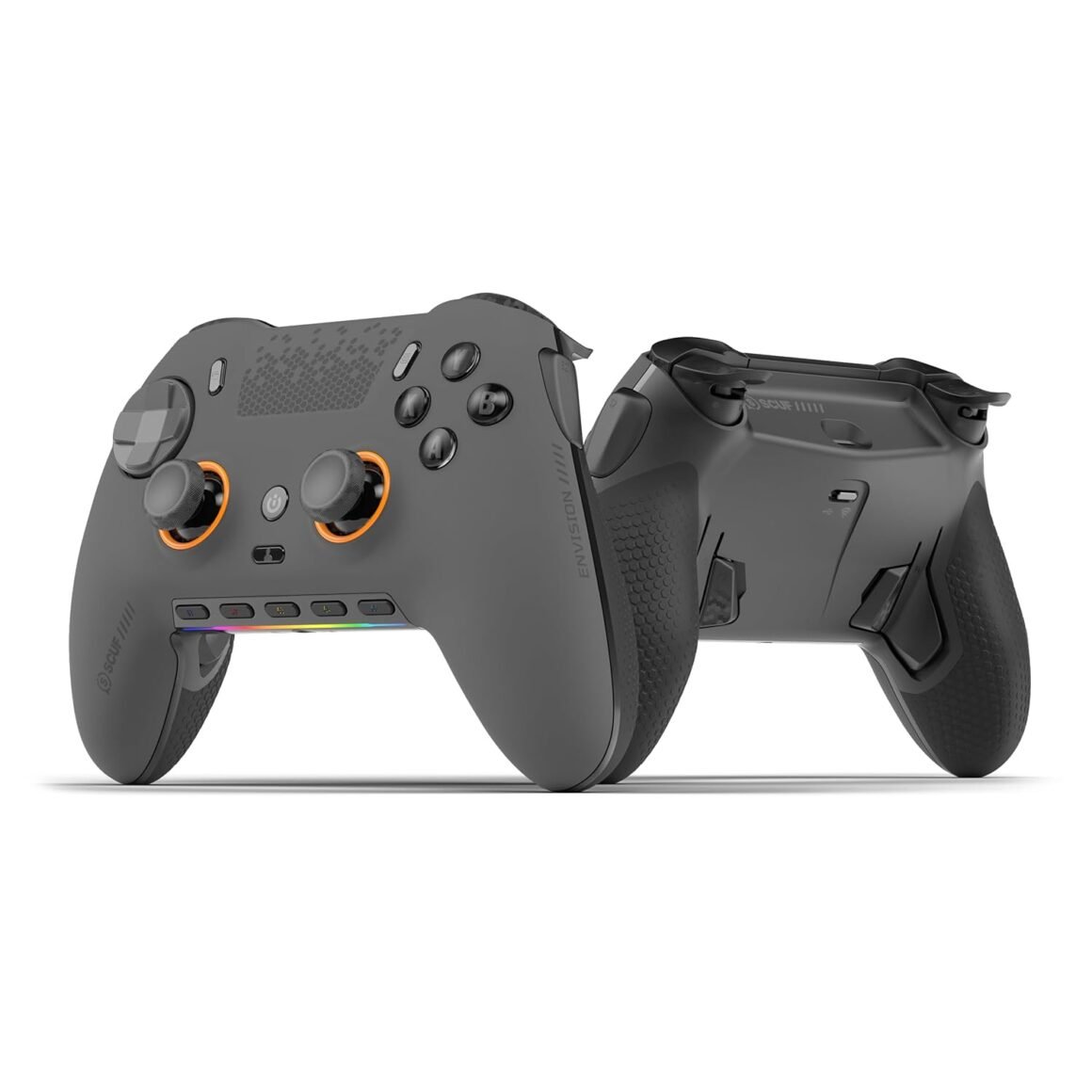
SCUF ENVISION PRO Wireless V2 (2025) Gaming Controller for PC: Anti-Drift Thumbsticks, Five Remappable G-Keys, Back Paddles, Instant Triggers – Steel Gray Edition

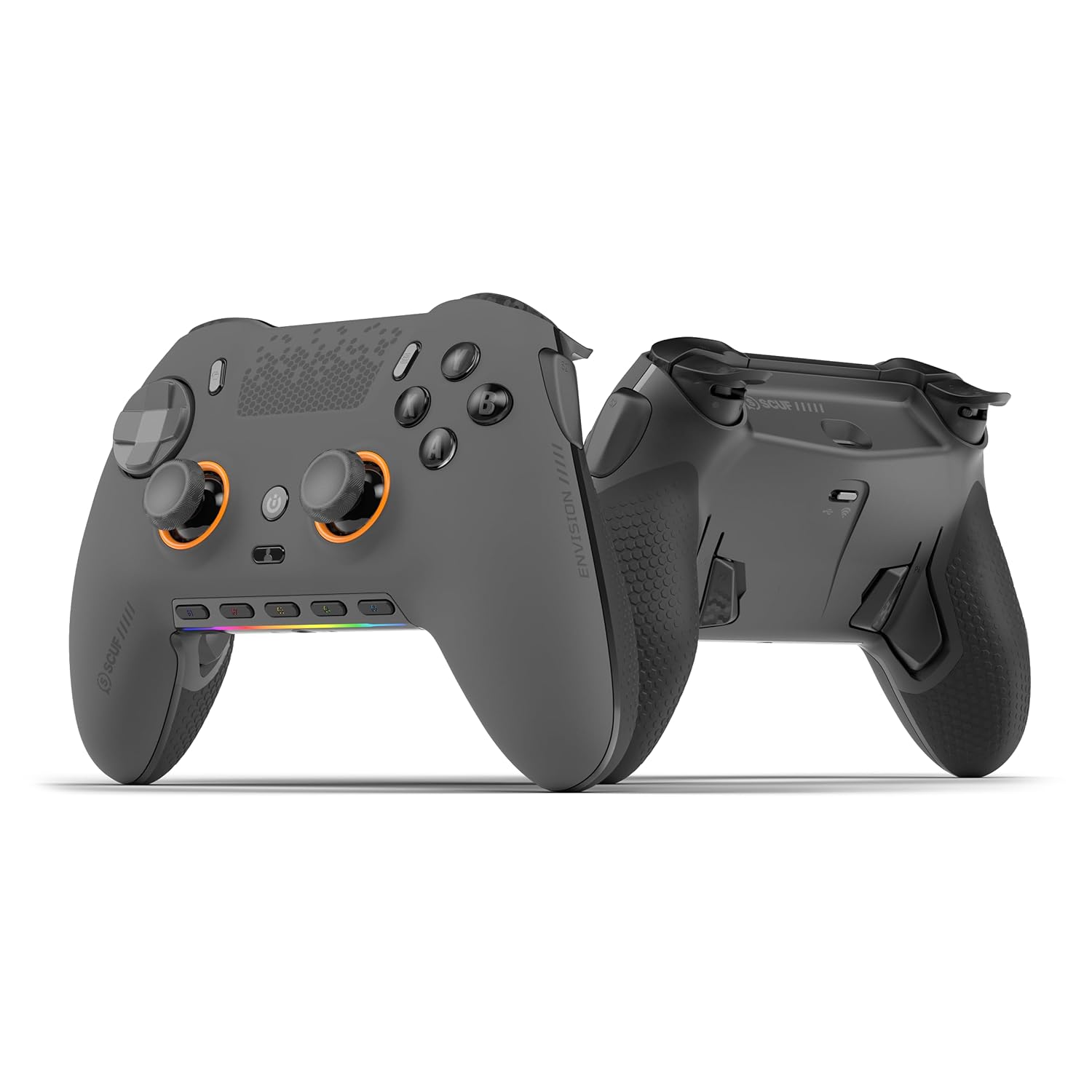
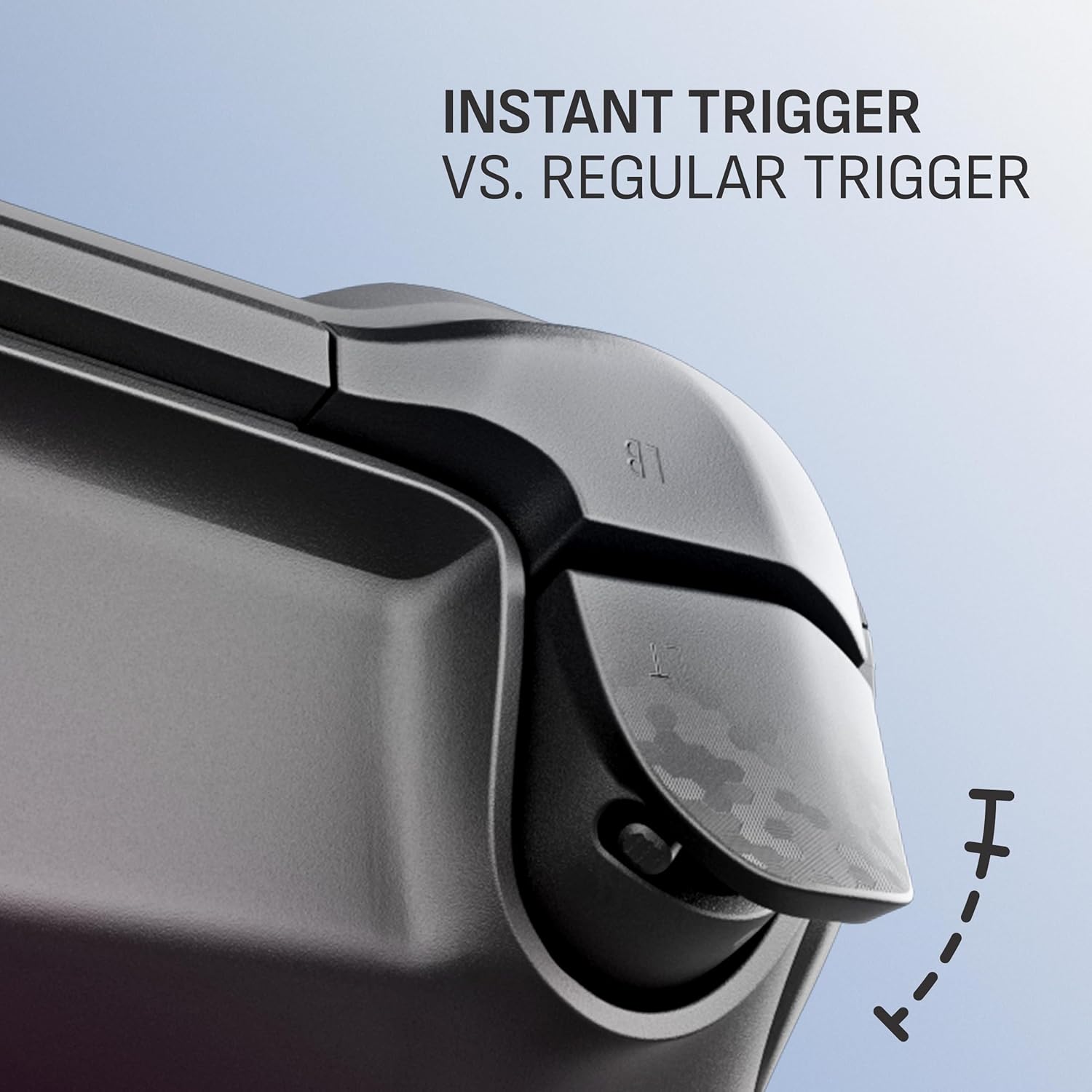
SCUF Envision was designed to deliver the best controller experience for PC gamers. Equipped with 11 additional remappable inputs, ultra-fast wired/wireless connectivity, and advanced software for macros and endless customization options. Our new OMRON™ mechanical ABXY and D-Pad buttons offer crisp and responsive clicks. Adjustable Instant Triggers allow you to switch between mouse-like clicks and full trigger range. Unlock the full power of Envision by mapping the fully configurable inputs to any PC shortcut, customizing your RGB Lighting Strip, and tailoring your anti-drift Hall Effect thumbstick and trigger response curves. More control, more finesse, and more performance to once again, change your game. Anti-drift Hall effect thumbsticks prolong the life of your controller.Four rear, remappable paddles keep your thumbs on the sticks for faster reactions.Five fully remappable G-Keys for advanced macros and Corsair iCUE integration.Two unique side-mounted SAX buttons are designed to provide additional configurability and fit the natural placement of your fingers.Corsair SlipStream ultra-fast wireless-connectivity.

Elevate Your Game with SCUF Envision: The Ultimate PC Gaming Controller

In the competitive landscape of PC gaming, the right controller can make all the difference. Enter the SCUF Envision, meticulously engineered to deliver a premium gaming experience for enthusiasts seeking detailed customization and unparalleled performance.

Unmatched Features for Tailored Experiences

The SCUF Envision prides itself on offering 11 additional remappable inputs, allowing gamers to configure their controls to best suit their personal playstyle. This flexibility enables you to optimize your setup for various game genres, from first-person shooters to complex strategy games. The ultra-fast wired and wireless connectivity guarantees rapid response times—essential for those crucial moments when every millisecond counts.

At the heart of the Envision are the innovative OMRON™ mechanical ABXY and D-Pad buttons, designed to provide crisp and responsive clicks that bring a tactile satisfaction with every interaction. This mechanical feedback enhances your gameplay experience, ensuring that every command feels deliberate and precise.

Advanced Customization

The SCUF Envision goes beyond standard gaming controllers with its Adjustable Instant Triggers, which allow gamers to switch between mouse-like clicks for rapid firing and a full trigger range for more nuanced actions. This capability is crucial for different gaming scenarios, allowing for quicker reflexes in intense firefights or more controlled inputs in exploration-heavy games.

The controller’s true strength lies in its extensive customization options. With fully configurable inputs that can be mapped to any PC shortcut, the Envision creates a personal relationship between you and your controller. Gamers can also customize the RGB Lighting Strip, making the controller not just a tool, but an extension of their gaming identity. The anti-drift Hall Effect thumbsticks and adjustable trigger response curves provide an additional layer of personalization, enhancing not just performance but longevity as well.

Enhanced Control and Comfort

Adding to its wealth of features, the SCUF Envision includes four rear remappable paddles. This ingenious layout allows you to keep your thumbs on the thumbsticks, facilitating faster reactions in high-stakes scenarios. Additionally, five fully remappable G-Keys empower gamers with advanced macros, integrating seamlessly with Corsair’s iCUE software for further customization.

For those who prioritize ergonomics, the two unique side-mounted SAX buttons offer additional configurability. Strategically positioned for natural finger placement, these buttons enhance your control without compromising comfort or ease of use.

Summary

In summary, the SCUF Envision is more than just a controller; it’s a powerful gaming ally designed to elevate your performance. With its impressive array of remappable inputs, ultra-fast connectivity, and a robust suite of customization options, gamers can forge their ultimate gaming experience. Its advanced technology, such as the anti-drift Hall Effect thumbsticks, ensures durability without sacrificing performance.

Brand Introduction

SCUF Gaming, a pioneer in customizable gaming controllers, is dedicated to enhancing player performance through innovative designs and cutting-edge technology. By focusing on personalization, SCUF allows gamers to achieve their utmost potential, making them a trusted brand in the competitive gaming community. Experience the SCUF Envision and unlock your path to victory today.

Price: $179.99
(as of Sep 06, 2025 22:47:16 UTC – Details)

Related Posts
Read More

“Funlab Firefly Switch Pro Controller: Wireless Gamepad with 7 LED Colors for Nintendo Switch/Lite – Ghost Pink”: Available now at [price_with_discount]

Product Description switch-pro-controller_01switch-pro-controller_01 Tap,Glow, and Trick!
Dark Mystery, Luminous Play!
switch-pro-controller switch-pro-controller switch-pro-controller switch-pro-controller 1 Game-playing Time 2 Back Buttons 3 Ergonomic Design 4 Compatibility More Compatibility, More Choices Compatibility

For SwitchFor PhonesFor PCFor Steamdeck For phones

For Phones

Android - 6.0 and aboveiOS - 13.3 and above For PC

For PC

Windows XP and above For Steamdeck

For Steamdeck

SteamOS Holo 3.4 and above How-To Video Connection Method Instruction

From the HOME Menu, select Controllers, then Change Grip and Order.Press and hold Y + HOME for 3 seconds and 4 LED lights flash quickly. The LED(s) becoming stable, pairing finishes.If you are not connecting for the first time, you can click HOME Button to connect successsfully. Turbo Function Instruction

Press and hold “T” Button + one of the Function Button (A/B/X/Y/L/R/ZL/ZR/D-pad Button).1st: Manual TURBO Function (Press and hold to launch continuously).2st: Automatic TURBO Function (Automatically continuous launch).3st: Clear TURBO Function. Light Control Instruction

Turn on the light: Press HOME Button.

Turn off the light: Press and hold Light Button for 3 seconds.Change the Light Color: Press Light Button. Colors will change each time you press Light Button. Change the Lighting Mode: Press Light Button + “⊕”: 1st: Breathing light mode; 2st: Quick flash mode; 3st: Vibration light mode.If the controller is not connected to the console, press Home Button and the LED pattern will be illuminated. Mapping Function Instruction

Press and hold “MR” Button, then input the single button (A/B/X/Y/L/R/ZL/ZR/+/-/D-pad Button and L/R joysticks) you want to map;The controller will have the vibration cue after loosing “MR” Button, and then press “XR” Button to trigger Programmable Buttons.The mapping function can also be achieved by using the ML Button as described above.)

How do I make this pure color switch pro controller show the exquisite pattern?

The first time you receive the controller without being connected to your console, you can press the Home button to active it. Then you can see its unique pattern.

Why does the pattern still not appear after pressing the Home button of this controller?

Check whether it is in either of the following conditions:

A.Out of power. Solution: Charge the controller and then press the Home button again.

B.In light off mode. Solution: Press Light Button and "+" Button to switch the lighting mode.

How to change the LED colors and the lighting modes?

A.Press Light Button:Always-on Mode.

B.Press Light and "+" Button:

1st:breathing light mode; 2nd:quick flash mode; 3rd:vibration lighting mode

C.Light Off Mode:Press and hold Light Button for 3s.

D.Colors will change each time you press Light Button.

How to calibrate the joystick of this switch gamepad?

A.HOME Menu - System Settings - Scroll down the menu on the left-hand side - Select Controllers and Sensors.

B.Select Calibrate Control Sticks - Tilt the joystick that you want to calibrate.

C.Follow the on-screen prompts to verify the joystick.

Frequently Bought Together on FUNLAB
Hidden-til-lit Display: It is one of our solutions to achieve this enhanced gaming experience. The surface decoration of switch controller design is seamlessly harmonized with lighting effects. When the LED is not active, it lies quietly as a pure pink controller. And when it turns on, the hidden pattern will light up your amazing gaming night.
Polychrome Breathing LED: Each time you press the Light button, 7 LED colors will change in sequence. 4 lighting modes of this switch pro controller for Halloween: breathing light mode, quick flash mode, vibration lighting mode, and always-on mode.
Back Paddle Buttons: Our switch pro controller wireless for Halloween can edit and define some buttons you want and enhance the gaming experience and meet the needs of hardcore competitive players.
Sensing Motion & Turbo Function: FUNLAB wireless switch controller is equipped with precise motion control and turbo function which supports continuous launch, suitable for various kinds of games such as shooting-game, flying-game, etc.
Battery Life: Our cute switch wireless controller for Halloween is built-in 3.7V/950mAH Lithium battery, and it can last up to 12.5 hours after being fully charged(turn lights off). Long endurance brings players uninterrupted gaming experience.
Read More

A36 Gaming Headset: Stereo Wired Noise Cancelling Over-Ear Headphones with Mic for PC, Xbox, PlayStation, Switch (Blue): Available now at [price_with_discount]

From the brand kids headphoneskids headphones Kids HeadphonesKids Headphones

IMYB is a company specializing in the production and sales of children's earphones and game earphones. We have been engaged in the earphone industry for more than 10 years

Our mission is to provide safe, beautiful and high-quality earphones for children and adults

Your satisfaction is the purpose of our service. We will do our best to provide you with the best.

Kids HeadphonesKids Headphones

Kids Headphones

Kids HeadphonesKids Headphones Kids HeadphonesKids Headphones Kids HeadphonesKids Headphones
【Multi-platform Compatible】 Gaming headset with microphone for PC, PS4, PS5, Xbox One Series X/S (older version requires adapter), Nintendo 3DS, Switch, Laptop, PSP, Tablet, iPad, Computer, Mobile Phone, 3.5mm jack device.
【Surrounding Stereo Subwoofer】 Gaming headset with high power 50mm neodymium magnet drivers, greatly enhance the expressiveness and sense of depth of voice playback details, powerful sound quality provide you immersive gaming experience.
【Noise Isolating Microphone】Headset integrated onmi-directional microphone can transmit high quality communication with its premium noise isolating function, which enables you to clearly deliver or receive messages while you are in a gamer.
【Humanised Design】 Soft and skin-friendly ear cushions, flexible headband with thickening pads, headset weight is only 0.77lb, lightweight and comfortable design provides you with a long-lasting excellent gaming experience.
【Professional Gaming Headset】Gaming headphones with 6.5ft high tensile strength, anti-tangle braided cable, rotary volume control and button microphone mute.
Read More

Thermaltake LCGS Quartz i460 R4 Gaming Desktop: Intel Core i5, 16GB RGB Memory, NVIDIA GeForce RTX 4060, 1TB NVMe M.2: Available now at [price_with_discount]


Intel Core i5-13400F CPU, Intel B660 Chipset mATX motherboard, 16GB 3600MHz DDR4 RGB Memory, 1TB NVMe M.2, WiFi
NVIDIA GeForce RTX 4060, 3x Display Port/1x HDMI
Chassis I/O - 2x USB 3.0, 1x Headphone, 1x Mic Ports
3mm Thick Tempered Glass Side Panel
Full Length PSU Power cover cleans up cables for a professional look.
Read More

“Stay Safe on the Road with Safe Traffic System Travel Vest Gen 5 in Large Gray”: Available now at [price_with_discount]

RideSafer is a safe, convenient, easy, ultra-portable and comfortable alternative to booster seats and car seats. It is more convenient for travel, carpool, and/or multi-child families, and perfect for frequent taxi/Uber rides.
RideSafer's innovative design elements reduce head and knee excursion, reposition lap belt below abdomen to protect organs, and relocate shoulder belt away from the child’s neck
RideSafer Travel Vest has two different ways to use; the first way is to use with a vehicle lap belt and top tether by securing RideSafer with a top tether anchor in the vehicle. The other way is to use without a tether belt. RideSafer can also be used with a lap and shoulder belt only
RideSafer is certified for use in motor vehicles, meets all applicable FMVSS 213 requirements, and tested with lap-only belt plus tether and lap/shoulder belt to meet certification and performance standards according to FMVSS 213
RideSafer's age range is 3 years and above and the weight range is between 30 lbs. and 110 lbs
RideSafer can be used with Delighter Booster made by the same manufacturer, Safe Traffic System, Inc