“RK Royal Kludge S108 Retro Mechanical Gaming Keyboard: RGB Backlit, Detachable Wrist Rest, Blue Switches”: Available now at [price_with_discount]

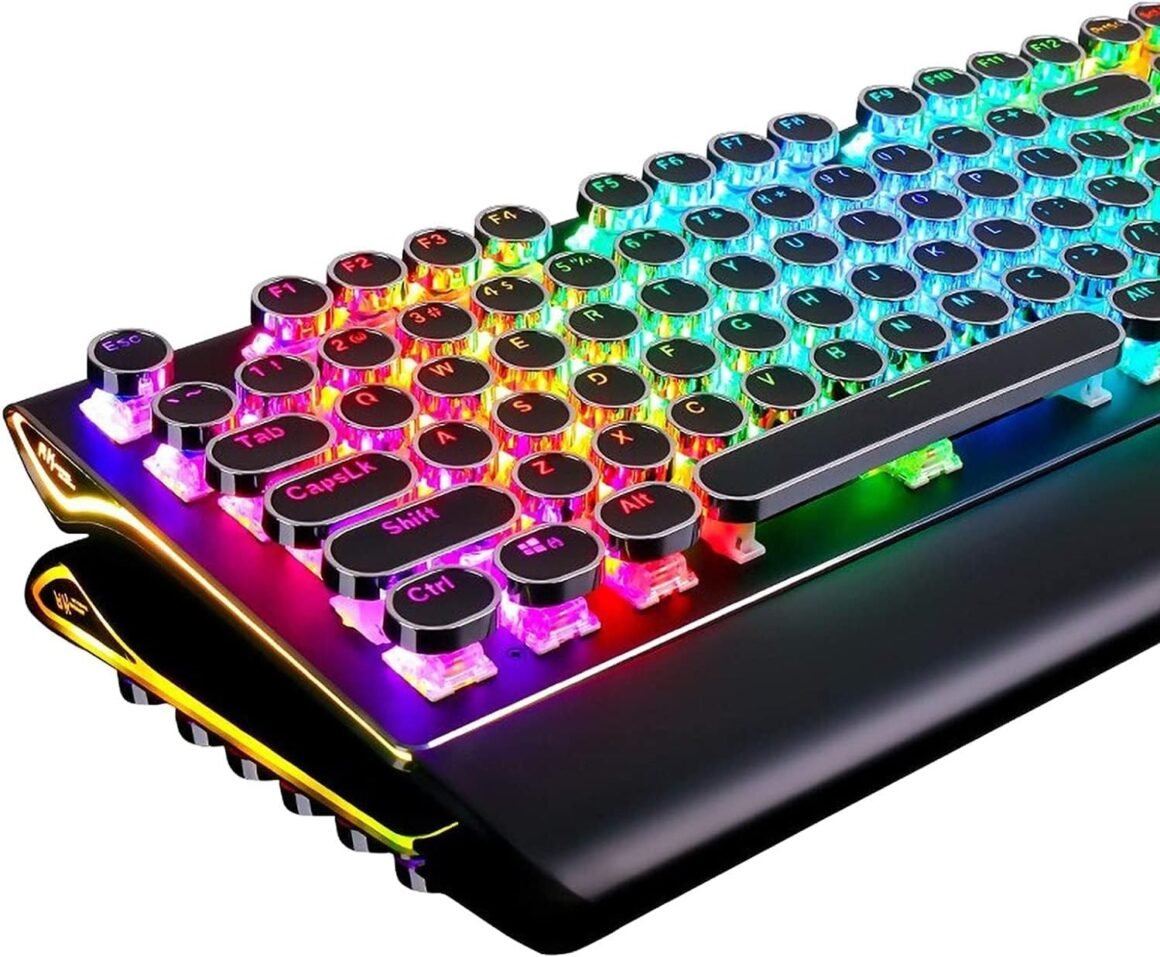
Product Description Note: S108 may need to be ‘woken up’ after computer boots by hitting some keys several times. Fix the problem through this firmware: bit.ly/RKS108Fix Retro Typewriter Style Round Keycaps With vintage steampunk round keycaps looks like a old school fashion typewriter, brings you comfortable typing feeling & stable clicking touch. True RGB Backlit Up to 168 RGB backlit modes and 7-color sidelight. Press “Fn+Pause” to change the global backlight color, supports solid color and RGB color. How to reset the keyboard: Fn+Esc: Press and hold for 3 seconds All 108 Keys Anti-Ghosting N-key rollover. It allows you to press multiple keys at a time to execute intricate moves with precision. No delay, no error. Clicky Mechanical Blue Switches Mechanical blue switch for ultimate gaming performance. The mechanical keys offer medium resistance, audible click sound & tactile feedback. PS: The switches are not swappable. Also, we provide medium brown switches and quiet red switch for your choice. Collapsible Wrist Rest The ergonomic ABS wrist pad provides firm support that alleviates pressure on your wrist from gaming or typing at an elevated angle. 2 Colors Available, Black/White This awesome typewriter keyboard has 2 color choices. 3 Wire Trunking Design In order to cope with different usage scenarios, the three-cable slot design allows you to place USB cables in different directions, keeping the desktop tidy. It is up to you to decide how to place the keyboard, and get rid of the desktop clutter caused by wires. Convenient Shortcuts: Fn+F1: My ComputerFn+F2: BrowserFn+F3: Calculator, Fn+F4: MusicFn+F5: Previous, Fn+F6: Play/PauseFn+F7: Next, Fn+F8: StopFn+F9: Search, Fn+F10: FavoriteFn+F11: None, Fn+F12: EmailFn+Win: Win Key Lock/Unlock Typewriter Style Mechanical Gaming Keyboard with True RGB Backlit Shortcuts You Should Know Before Getting in the colorful world: 1.Pick up a keyboard backlight effect: Fn+Del: Dynamic effects; Fn+Ins: Interactive effects; Fn+Home: Breathing effect; Fn+PgUp: Switch the stars/7-color gradient backlight 2.Select the color: Fn+Pause: Switch Global backlight color; Fn+ScLk: Switch the interactive part color (Only work for interactive backlight effects) 3.Brightness and Lighting Speed: Fn+”→”/”←”: Lighting speed ; Fn+”↑”/”↓”: Lighting brightness 4.Sidelight: Fn+PgDn (Dynamic Effect and light OFF included) How to Customize the Backlight: 1. Press Fn+1 to start customize mode. 2. Press Fn+F11 to start recording the LED lights of backlight (The Caps, Win and Scrlk keys are flashing) 3. Press any key by any need to LED ON/OFF. Press same key multiple times to change color. 4. Press Fn+F11 again to save it. (The Caps, Win and Scrlk keys stop flashing) 5. Press Fn+1 switch to the customized backlight. Specification Dimension 440*182*42mm, 17.4*7.2*1.6in Net Weight 0.9kg, 1.98lb Backlit Lighting Effects 168 lighting effects Dynamic Sidelight Rim 7 lighting effects Number of Keys 108 keys Switch blue switch Switch Lifespan >50 million Actuation Force 60gf±5gf Keystroke Travel 2.0mm Keycaps double-shot injection molded Connection wired USB USB Cable Length 1.8m, 70.9in Voltage 5V Current 200mA Add to Cart Add to Cart Add to Cart Add to Cart Add to Cart Add to Cart Customer Reviews 4.6 out of 5 stars 6,304 4.3 out of 5 stars 81 4.5 out of 5 stars 191 4.6 out of 5 stars 572 4.6 out of 5 stars 572 4.6 out of 5 stars 572 Price $59.99$59.99 $39.99$39.99 $59.99$59.99 $69.99$69.99 $69.99$69.99 $69.99$69.99 Switches Blue Switches Pink Switches Red Switches Skycyan Switches Brown Switches Speed Silver Switches Connectivity Technology Wired Wired Wired Triple Mode Triple Mode Triple Mode Number of Keys 108 68 108 81 81 81 RGB Backlit ✓ ✓ ✓ ✓ ✓ ✓ 🌈 Retro Typewriter Style with Mechanical Keys – Mechanical blue switches offer medium resistance, audible click sound & tactile feedback, provides responsive and precise gaming environment and performance. Vintage steampunk keyboard round keycaps looks like a classical typewriter, brings you comfortable typing feeling & stable clicking touch.🌈 Unique RGB Backlit Light Up Keyboard – Featuring dynamic colorful Per-Key Illumination, up to 168 LED backlit modes, Dynamically adjusting color changing. This RGB mechanical keyboard has customizable transparent sidelight for an immersive gaming atmosphere. You can also adjust the rainbow keyboard backlit brightness and speed. Moreover, you can create customized backlight as needed.🌈 Detachable Wrist Rest & Metal Panel – The ergonomic ABS palm rest provides firm support that alleviates pressure on your wrist from gaming at an elevated angle.The gaming mechanical keyboard panel was made of top-grade aluminium alloy material, with matte-finish texture, sturdy and robust enough to protect it from scratch.🌈 108-Key Anti-Ghosting – 108 keys full size keyboard, and all keys non-conflict. Every keystroke is registered during intense gameplay and fast typing, no matter how many other keys are pressed at the same time. Clicky keyboard let you enjoy high-grade game with fast response.🌈 PC Gaming Keyboard Compatibilty – Support PC Mac Laptop, Tablet, Desktop computer, compatible with Windows 7/8/10/XP/Vista, Linux and Mac OS systems. Plug and play. No drivers are required. Universal Keycaps Compatibility: Seamlessly swap between vintage typewriter keycaps and standard keycaps for a unique and versatile typing experience, catering to your individual style and preferences.

The Retro Typewriter Style Mechanical Gaming Keyboard offers a vintage steampunk design with round keycaps reminiscent of an old-school typewriter. The keyboard features true RGB backlit lighting with up to 168 different modes and 7-color sidelight options. It also has 108 keys anti-ghosting and clicky mechanical blue switches for ultimate gaming performance.

In addition to the blue switches, the keyboard also offers medium brown and quiet red switches. It comes with a collapsible wrist rest for ergonomic support and is available in black or white. The three-wire trunking design allows for easy cable management on your desktop.

The keyboard includes convenient shortcuts for quick access to various functions like My Computer, Browser, Calculator, Music, and more. It also has customizable backlight options with different effects, colors, brightness levels, and lighting speed settings.

The specification includes details on dimensions, weight, switch type, lifespan, keystroke travel, connection type, and more. Customer reviews rate the keyboard highly, and the price ranges from $39.99 to $69.99 depending on the switch type chosen.

Overall, the Retro Typewriter Style Mechanical Gaming Keyboard offers a unique and stylish design with customizable backlight options and high-performance features for gaming and typing. It is compatible with various devices and operating systems, making it a versatile choice for users looking for a customized and responsive keyboard experience.

Price: $100.00 - $59.99
(as of Jun 30, 2024 12:47:29 UTC – Details)


Related Posts
Read More

“MSI MPG MT201DR – Premium RGB Dual Monitor Stand with Heavy Duty Gas Spring Mount”: Available now at [price_with_discount]

Elevate Your Workspace with the MSI MPG MT201DR Premium RGB Dual Monitor Stand Arms. Experience the ultimate in ergonomic comfort and productivity with our fully adjustable heavy-duty gas spring mount. Perfect for monitors sized 17-35 inches, each arm boasts a capacity of 44 lbs per screen, ensuring stability and versatility. Compatible with VESA mounting standards (100x100 and 75x75), installation is a breeze with the quick-release plate. Enhance your setup with sleek gray aesthetics. Plus, enjoy peace of mind with our 3-year coverage.
Heavy Duty Design: Experience durability and reliability with the MSI MPG MT201DR Premium Dual Monitor Stand Arms, supporting screen sizes from 17 to 35 inches and a weight capacity of 2 to 20 kg (4.4 to 44 lbs) per screen
Vibrant RGB Lighting: Add a dynamic touch to your workspace with RGB lighting, enhancing both aesthetics and functionality.
Versatile Base Options: Choose between clamp and grommet base options for easy installation on desktops with thicknesses ranging from 10 to 85 mm (clamp) or 10 to 48 mm (grommet), ensuring compatibility with various setups.
Compatibility: Designed with VESA compatibility (75x75, 100x100 mm) to accommodate a wide range of monitors, ensuring a perfect fit for your setup.
Fully Adjustable: Customize your workspace with adjustable tilt (up to +50°/-20°), swivel (up to +90°/-90°), and screen rotation (up to +180°/-180°), providing ergonomic comfort and flexibility.
Read More

“AccuPoint Active Stylus: BoxWave Pen for Ayaneo 2 in Metallic Silver”: Available now at [price_with_discount]

BoxWave Stylus Pen Compatible With Ayaneo 2.

The
AccuPoint Active Stylus from BoxWave looks and feels just like a real pen!

The AccuPoint Active Stylus does NOT require any form of pairing for your Ayaneo 2! Simply press the button to turn it on, and the AccuPoint Active Stylus emits small
ELECTRONIC PULSES to interact with your screen, allowing you to write with a much more natural pressure and writing position. PLEASE NOTE: The AccuPoint Active Stylus does not support Palm Rejection or Pressure Sensitivity.

Simply touch the
ULTRA-ACCURATE 2mm pen tip for your Ayaneo 2 touchscreen with the same pressure you would use with pen and paper.

Draw, write, tap and swipe for
UP TO 12 HOURS! When it's time to recharge, simply charge your AccuPoint Active Stylus with the INCLUDED MicroUSB cable, which is compatible with any USB Power Source!

Make the switch from pen and paper to stylus for your Ayaneo 2 with the AccuPoint Active Stylus: A Stylus that looks and feels just
LIKE A REAL PEN!
👉 [NO HASSLE] BoxWave Stylus Pen Compatible With Ayaneo 2. The AccuPoint Active Stylus does NOT require any form of pairing for your Ayaneo 2! Simply press the button to turn it on, and the AccuPoint Active Stylus emits quick ELECTRONIC PULSES to interact with your screen, allowing you to write with a much more natural pressure and writing position. PLEASE NOTE: The AccuPoint Active Stylus does not support Palm Rejection or Pressure Sensitivity.
✍ [ULTRA FINE TIP] Ultra accurate 2mm tip lets you tap, swipe, and draw accurately for your Ayaneo 2, like you were using a real pen
🔋 [LONG LIFE] Built in battery provides 12 hours of use
💪 [STRENGTH AND STABILITY] Solid brushed aluminum barrel construction provides strength and stability
💼 [INCLUDED] MicroUSB cable for charging with any standard USB power source!
Read More

X1 Wireless Gaming Headset: Ultimate Compatibility and Long Battery Life: Available now at [price_with_discount]

Product Description Gaming headset XboxGaming headset Xbox xbox headset xbox headset wireless xbox one headset

1. Plug the Receiver to Xbox Controller directly. (Extra Microsoft Adapter needed (Not Included) when connect to old version controller)

2. Low battery of the controller can cause insufficient power supply to the receiver, the headset might not work. Please ensure sufficient power of the controller.

The video showcases the product in use.The video guides you through product setup.The video compares multiple products.The video shows the product being unpacked.

Troubleshootings for X1 Gaming Headset

Detailed demonstration for the X1 operations

1. Why can't I connect the headset with controller?

2. No sound from the microphone? Microphone sound too low?/Why can't my teammates hear me?

3. Echo from the microphone?

4. Why is there a lot of noise?/Headset volume too low?

The video showcases the product in use.The video guides you through product setup.The video compares multiple products.The video shows the product being unpacked.

Plug the dongle tightly and fully

How to plug the dongle to controller correctly?

× The dongle not plugged in tightly (there is a gap) It may cause noise, static, low volume, or no sound in the headphones.

√ The dongle plugged in tightly and fully (no gap) Please plug the dongle fully and tightly,so that could avoid noise, static, low volume, or no sound in the headphones.

The video showcases the product in use.The video guides you through product setup.The video compares multiple products.The video shows the product being unpacked.

Plug the X1 Dongle to the Xbox Controller directly

How to connect the Headset to Xbox Controller?

1. Plug the X1 Dongle to the Xbox Controller directly. (Not support the 3rd parties' controller)

2. While the Leds of the dongle flashing, please turn the headset power on.

3. Please keep the headset on 2.4GHz mode. (You could hold the Light Button to swith it to 2.4GHz or BT Mode)

4. Click the 'Xbox Accessories' option on your xbox device, makes the headset connect to it. Choose the 'Volume' option and enter into the 'Audio and Music' interface to turn the headset volume and mic on.

wireless headset headset gaming headset xbox one ps5 headset ps4 headset gaming headphones xbox headset with mic wirelessxbox headset with mic wireless

Please confirm the receiver is inserted to the controller or devices tightly and fully, to avoid the noise or echoes caused by the poor contact.

xbox pc headset computer headset

Why can't I connect the headset with controller?/Headset doesn’t work?

Confirm if you are in Bluetooth Mode or 2.4GHz Mode. The 2.4GHz dongle cannot be connected in Bluetooth mode. You need to switch to 2.4GHz mode.

No sound from the microphone? Microphone sound too low?Mic doesn’t work?

Confirm the settings on the Xbox console, whether the microphone sound is turned up to the maximum at the (Headset chat mixer)? Adjust the game sound and chat sound to the center to make them be balanced. Assure the microphone is properly plugged in

Why the volume is low while connect to the Xbox?

Make sure the (Headset Volume) on the Xbox console is set to maximum. When using the headset for the first time, the default volume on the console is 80%. And please insert the dongle tightly and fully.

Echo from the microphone?

Turn off monitoring mode in the Xbox console settings.

While connecting, headset sound got noise or echoes?

Make sure the transmitter is fully inserted into the controller. If the transmitter is not fully inserted, there will be significant electrical noise in the headset.


Wide Compatibility: Our wireless gaming headphones are equipped with both Bluetooth and 2.4G dual modes: ①. Allowing for wireless connection to Xbox controllers (Please note that the X1 Receiver only support the Official Controllers instead of the 3rd parties, and you need an extra Microsoft Adapter (Not Included) when connecting with an old version Xbox One controller) ②. as well as seamless compatibility with PC, PS5, laptops via a 2.4GHz receiver. ③. Mac and Switch supported by Bluetooth mode. Just plug and play for instant gaming immersion.
Superior Sound Quality: Immerse yourself in the game with our 50mm speakers and 3D surround sound technology. Hear every detail and experience realistic game sound effects. The noise-canceling microphone ensures clear communication with your teammates, enhancing teamwork during intense gaming sessions.
Extended Battery Life and Low Latency: Enjoy uninterrupted gaming with up to 40 hours of continuous playtime on a single charge, fully charge only need 2 hrs. Our wireless headphones feature low latency technology(<20ms ), providing instant audio feedback without any noticeable delays, allowing for faster reactions and better gameplay.
Comfortable and Durable Design: Designed for long gaming sessions, our headphones prioritize comfort and durability. The adjustable headband and memory foam ear cushions provide a customized fit, ensuring hours of comfortable gameplay. The durable construction ensures longevity, making these headphones a reliable companion for avid gamers.
Convenient Controls: Take control of your gaming experience with easy-to-reach buttons on our headphones. Adjust the volume, mute the microphone, or control other settings directly from the headset, allowing for a seamless and effortless gaming experience.
How to activate the mic function on Xbox: ①.Connecting to the controller, enter to the interface - Click the Choose the - Click the - See the and choose the
Read More

2022-2023 ASUS Chromebook CR1 Cover Case – Blue: Available now at [price_with_discount]


☞⚠❤️🛑⭕️‼️ NOTE: Before placing order, PLEASE make sure to verify your laptop model number as this case is MODEL specific and NOT interchangeable. ‼️⭕️🛑❤️⚠☜
❌‼️🛑⭕️ NOT fitting other 11.6-inch ASUS laptops. NOT compatible with ANY other laptops as well. ❌‼️🛑⭕️
Made of high-quality translucent polycarbonate material which is shatter-proof and will protect your 2022~2023 11.6" Asus Chromebook CR1 ( CR1100CK or CR1100FK ) series Notebook Computer all around
Designed to perfectly fit the 2022~2023 11.6" ASUS Chromebook CR1100 models with Dimensions (Width x Length x Height) of 11.60 x 8.07 x 0.81 inch ( 29.46 x 20.49 x 2.07 cm )
2-piece light-weight ( 8 oz or 227 g ) shell easily snaps on and off.