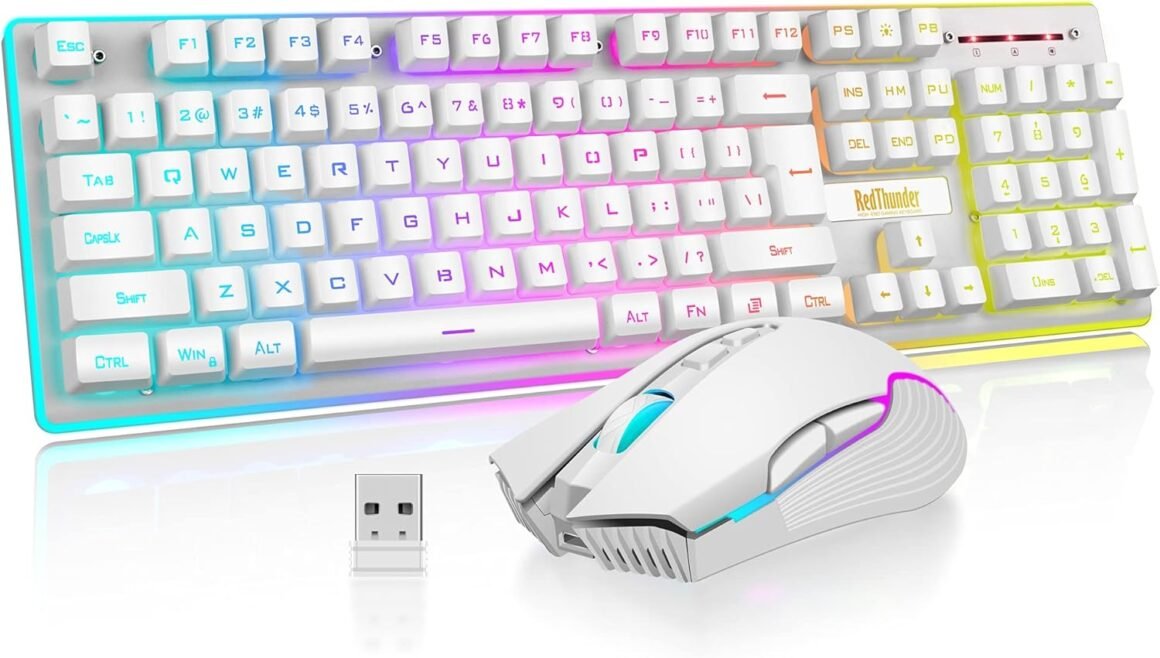
RedThunder K10 Wireless Gaming Keyboard and Mouse Combo: LED Backlit, Rechargeable 3800mAh Battery, Mechanical Feel Anti-Ghosting Keyboard & 7D 3200DPI Mouse for Ultimate PC Gaming Experience (White)

Product description How to customize keyboard lighting and FN key? 1. LED: Turn on/off the backlight o switch the backlight color. 2. FN + LED: Switch between 1-color and 3-color breathing mode. 3. FN + PU/PD: increase/decrease backlight brightness. 4. FN + +/-: Speed up/slow down breathing rate. 5. FN+W: Exchange WASD and arrow keys. 6. FN + WIN: WIN key lock. 7. FN + (F1-F12): 12 multimedia combination keys. When your keyboard doesn’t work, please note the following. 1.The keyboard and mouse share only one USB receiver, which is located in the bottom of the mouse. (Only when the receiver is plugged in, the lights of the keyboard and mouse will light up) 2. Please fully charge it with the computer’s USB port before the first use. 3.No software, just plug the USB receiver into the USB port, turn the switch at the bottom of the keyboard to the ON position, and turn the switch on the bottom of the mouse to the ON (no light) or LED (with light) position. 4. There will be a little delay or the lights will not turn on when the battery is too low, please charge the keyboard/mouse in time, the charging indicator will go off after full charge. 5. Please use a lower than DC:5V adapter to charge to protect battery life, preferably using the computer’s USB port to charge directly. Due to the different currents of different computer USB charging ports, some users may need longer charging time to fully charge. 6. Turning off the keyboard light can extend the battery life of the keyboard moderately. 7. If you can’t press “WASD” or “↑↓←→”. Please press FN+ “W” key to solve this problem. 8.USB Receiver Pairing steps. Make sure the keyboard/mouse fully charged. Keyboard pairing steps: Step 1: Turn on the keyboard switch; Step 2: Press and hold the ESC key and the K key at the same time, the indicator light starts to flash; Step 3: Insert the USB receiver into the computer, and pairing is complete. Mouse pairing steps: Step 1: Turn the switch at the bottom of the mouse to the switch position with the sun logo; Step 2: Press and hold the mouse wheel and right button, the mouse RGB lights start to flash; Step 3: Insert the USB receiver into the computer and the pairing is complete. 9. About Mac: Limited MacOS support and need USB port. Add to Cart Add to Cart Add to Cart Add to Cart Customer Reviews 4.0 out of 5 stars 2,553 — 4.2 out of 5 stars 135 3.9 out of 5 stars 162 4.3 out of 5 stars 2,078 4.0 out of 5 stars 997 Price $49.99$49.99 — no data $99.99$99.99 $39.99$39.99 $39.99$39.99 $42.99$42.99 Color Option White/Black/Pink/White-Gray White/Black White-Blue/Black-Gold White/Black White/Black White/Black/White-Black/Black-White Connection Wireless Wired 2.4G Wireless/Wired/BT Wireless Wireless Wireless Keyboard Keys 104 104 95 114 61 84 Backlight Mode ✓ ✓ ✓ ✓ ✓ ✓ Anti-Ghosting ✓ ✓ ✓ ✓ ✓ ✓ Mouse DPI 3200 7200 no data 4800 3200 3200 Keyboard Battery capacity 3000mAh – no data 8000mAh 2000mAh 2000mAh 1850mAh Mouse Battery capacity 800mAh – no data – no data 600mAh 500mAh 500mAh 【High-performance 2.4G Wireless Keyboard and Mouse】Are you looking for a wireless keyboard and mouse combo that can perfectly balance work and games? RedThunder K10 rechargeable wireless gaming keyboard and mouse combo will be your best choice. 2.4G high-speed and stable transmission, ensure that it can easily deal with even the most intense battles. Note: The keyboard and mouse share only one USB receiver. The USB receiver is in the bottom of the mouse.【Rechargeable & Long Battery Life】The keyboard is equipped with a 3000 mAh battery, and the mouse is equipped with an 800 mAh battery. The long battery life allows you to use them continuously for 8 hours with light. The keyboard and mouse are equipped with smart energy-saving functions. If there is no operation within 2 minutes, they will automatically go to sleep, press any key to wake them up. Please charge 8 hours before using.【Light Up Keyboard and Mouse】The keyboard has built-in three groups of rainbow backlight effects, supports 2 breathing modes, 3 static modes, and 4 brightness levels. The luminous design of Letters, logo, gaps and surroundings makes it the best light up wireless keyboard on the market (Note: There is no surrounding light in the right top corner due to the indicator light). The mouse has a built-in 7-color cyclic gradual lighting effect.【Durable Ergonomic Keyboard and Mouse】The keys have a 10 000 000 keystrokes lifetime, so you can hold on to it for the next decade! ABS keycaps adopt two-color injection molding process, the letter of characters never fade. Thick and firm frosted metal cover, long service life, and never deforms. The mouse fits the palm perfectly, and the anti-sweat and non-slip design gives you complete control.【Plug and Play 】The keyboard and mouse share a USB receiver, and the code has been completed by default. You only need to insert the receiver and turn on the keyboard and mouse to use it. (Note: If the connection is lost for any reason, you only need to reset the code pairing. Or if it cannot be used for any reason, please contact us in time, we will try our best to solve it.)【Wide Compatibility】Windows 11, Windows 10, Windows 8, Windows 7, Windows Vista, or Windows XP, Limited MacOS keyboard and mouse support. Works well with all major computer brands and Gaming PCs (Note: Need USB Port).

Introducing the RedThunder K10 Wireless Gaming Keyboard and Mouse Combo

In a world where performance and aesthetics converge, the RedThunder K10 Wireless Gaming Keyboard and Mouse Combo emerges as a compelling choice for both gamers and professionals alike. Designed with cutting-edge technology and user experience in mind, this dynamic duo not only enhances your productivity but also elevates your gaming experience to a new level.

Unmatched Performance and Connectivity

The RedThunder K10 brims with features that make it a standout option. Utilizing a 2.4G wireless transmission, it ensures smooth and stable connectivity, which is crucial during intense gaming sessions or busy work tasks. The keyboard and mouse share only one USB receiver, conveniently located at the bottom of the mouse. Simply plug it in, and you’re ready to go—no complex setups or software installations required.

Long-lasting Battery Life

Forget about frequent recharging; the K10 is equipped with a 3000 mAh battery for the keyboard and 800 mAh for the mouse, offering an impressive battery life. You can expect approximately 8 hours of usage with lights—ideal for long gaming marathons or extended work hours. The combo also features smart energy-saving functions, automatically entering sleep mode after two minutes of inactivity. A quick keystroke brings them back to life, ensuring you are never out of the action.

Dynamic Lighting Features

One of the most eye-catching elements of the RedThunder K10 is its RGB backlighting. With three beautiful rainbow backlight effects, along with two breathing modes and four brightness levels, you can customize your setup to match your mood or décor. The keyboard’s letters and logos are luminous, ensuring that you can keep working or playing even in low-light environments. Meanwhile, the mouse glows with a dazzling 7-color cyclic lighting effect, adding yet another layer of flair to your gaming station.

Ergonomic Design and Durability

Comfort meets durability with this ergonomic design. The anti-sweat, non-slip finish on the mouse provides a firm grip for long-term use, while the keyboard is built to withstand the test of time, boasting a lifespan of 10 million keystrokes. Constructed with ABS keycaps that are resistant to fading and a robust metal cover, you can enjoy the assurance of quality craftsmanship for years to come.

Wide Compatibility

The RedThunder K10 seamlessly integrates with a wide range of systems, supporting Windows 11, 10, 8, 7, Vista, and XP, while offering limited support for MacOS. It works effortlessly with major computer brands and gaming PCs, making it a versatile choice for any user.


Brand Overview

RedThunder is dedicated to delivering high-quality gaming peripherals that blend functionality with modern design aesthetics. Whether you’re a hardcore gamer or merely seeking to enhance your computing setup, RedThunder products are crafted to meet your needs with precision and style. With its commitment to quality and customer satisfaction, RedThunder continues to innovate in the face of evolving technology trends, providing gamers and professionals with reliable and stylish solutions.

In summary, the RedThunder K10 Wireless Gaming Keyboard and Mouse Combo offers a blend of performance, ergonomic design, and eye-catching aesthetics, making it a vital addition to any tech-savvy workspace or gaming setup. With high ratings from users, its combination of advanced features and user-friendly operation builds the trust you need in a reliable tech partner. Plus, its competitive pricing makes it accessible to a wide audience. Elevate your game and productivity with the RedThunder K10 today!

Price: $54.99 - $49.99
(as of Sep 04, 2025 20:10:05 UTC – Details)

Related Posts
Read More

Swiftpoint Creator 3D CAD Mouse: Customizable, High-DPI, Ergonomic: Available now at [price_with_discount]

Product Description

Introducing the Swiftpoint Creator Wired 3D CAD Mouse, our classic-grip mouse that bridges professional design and gaming perfection! Discover the precision, comfort, and innovation that sets Creator apart as the go-to tool for unleashing your creativity and gaming performance.

Precision Performance Precision Performance Unmatched Precision for Designers

Elevate your creativity to art with the Creator mouse’s pro-grade 12,000 DPI sensor. Experience pixel-perfect accuracy that brings your vision to life in graphic design, video editing, and CAD work. The 200-12,000 DPI range ensures your vision comes to life exactly as you imagined.

13 Programmable Buttons 13 Programmable Buttons Customize your Creative Process

Streamline your workflow with 13 uniquely placed buttons, including 2 pressure-sensitive Deep Click buttons and 2 side buttons. Customize your setup for unrivaled productivity and creative freedom, achieving 15 button actions when including Deep Clicks.

Comfortable to use Comfortable to use Experience Ultimate Comfort and Performance

Enjoy long hours of comfortable use with the Creator’s ergonomic shape and customizable button caps. High-quality switches rated for 20 million clicks deliver durability and superb response, keeping you at peak performance.

Creator - Video Editing Creator - Video Editing Effortless Software Integration

Seamlessly sync with your favorite design tools like Photoshop, Adobe Illustrator, Davinci Resolve, Blender, and Canva (desktop app). Compatible with both MacOS and Windows, the Creator Mouse integrates smoothly into your daily routine, helping you work faster and more efficiently.

X1 Control Panel - Custom Profiles - Onboard Memory X1 Control Panel - Custom Profiles - Onboard Memory Onboard Memory for Personalized Performance

Save your customized settings directly to the mouse with onboard memory, allowing you to switch between software seamlessly. With a 1000Hz max polling rate, a 6.8-foot braided cord, be always ready to create with no charging or pairing needed.

Add Deep Clicks and Haptic Feedback Add Deep Clicks and Haptic Feedback Feel the Power of Deep Clicks

Experience a new level of control with pressure-sensitive buttons offering customizable actions and haptic (vibration) feedback. Feel the difference in every click, enhancing precision and control in your tasks. The wired connection reduces latency, maximizing precision and performance.

Download the Swiftpoint X1 Control Panel - update the firmware & drivers X1 Control Panel X1 Control Panel

Before first using your Creator mouse make sure you download and install the X1 Control Panel Software from the Swiftpoint Website, and then update your firmware and drivers for optimal performance.

INSTRUCTIONAL VIDEOS

X1 Control Panel

What are the 13 buttons on the Creator?

X1 Control Panel

How to update firmware & drivers?

X1 Control Panel

How to create custom app profiles?

X1 Control Panel

How to adjust the DPI?
Swiftpoint Mice Range Add to Cart Add to Cart Add to Cart Add to Cart Add to Cart Add to Cart Add to Cart Customer Reviews 3.8 out of 5 stars 6 4.2 out of 5 stars 344 3.9 out of 5 stars 51 — — 4.2 out of 5 stars 13 4.4 out of 5 stars 8 Price $189.90$189.90 $159.90$159.90 $89.00$89.00 $164.90$164.90 $174.90$174.90 $79.00$79.00 $24.90$24.90 Wired ✔ ✘ ✘ ✘ ✘ ✘ ✘ Bluetooth ✘ ✔ ✔ ✔ ✔ ✔ ✘ Ergonomic Design ✔ ✔ ✔ ✔ ✔ ✔ ✘ Rechargeable ✘ ✔ ✔ ✔ ✔ ✔ ✘ Carry case ✘ ✔ ✔ ✔ ✔ ✔ ✘ Support Software ✔ ✔ ✔ ✔ ✔ ✔ ✘
Seamless integration - with your workflow/software, such as; 3D CAD, Photoshop, Adobe Illustrator, Blender, Canva and many more.
Ergonomics/buttons + Deep click - Powerful, customizable, yet intuitive & easy-to-use.
Pre-made profiles by professionals - Expert profiles auto-loaded – straight out of the box.
Easy-to-use action libraries - Customize your set-up to better suit your specific workflow.
Pixel perfect precision - Pro gaming 12,000 DPI Sensor for pixel perfect accuracy.
Read More

Redragon K580 VATA RGB Mechanical Gaming Keyboard and M990 Mouse Bundle: Available now at [price_with_discount]

K580 Keyboard and M990 Gaming Mouse
This bundle includes a K580 RGB LED Backlit Mechanical Gaming Keyboard and an M990 Gaming Mouse.
5 Macro Keys: There are 5 programmable macro keys(G1~G5) on the keyboard which can be recorded macros on the fly without any additional software required to be installed. Easy to edit and DIY your stylish keyboard.
Dedicated Multimedia Controls: The multimedia controls let you quickly play, pause, skip the music right from the keyboard without interrupting your game. Also, designed with a volume/backlight adjust wheel, it's easy to adjust volume or backlight brightness directly with the wheel in the upper right side of the keyboard. Very convenient and cool looking.
High-End Gaming Mouse - Geared with 5 redefinable DPI levels (default as: 1000/2000/4000/8000/16000), easy to switch between different game needs. Dedicated demand of DPI options between 100-32000 is also available to be processed by software.
Comfort & Precision At Your Hands - Redragon M990 gaming mouse is an essential computer accessory for die-hard gamers with its aggressive design for hands! Comes with 8-piece weight tuning set (2.4g x8), easy to change the weight to suit your games.
Read More

“MSI MAG325CQRF QD Gaming Monitor: 31.5″ QHD Rapid VA, 1ms, 170Hz, FreeSync Premium”: Available now at [price_with_discount]

MSI MAG325CQRF QD, 31.5" Gaming Monitor, 2560 x 1440 (QHD) Rapid VA with Quantum Dot, 1 ms, 170Hz, FreeSync Premium, HDR Ready, 1000R, HDMI, DisplayPort, Tilt and Height adjustable.
31.5" Rapid VA with Quantum Dot (2560 x 1440QHD)
170Hz refresh rate - Display without after image.
1ms response time helps eliminate screen tearing and choppy frame rates
Wide view angle - 178° visible.
Adaptive sync - keep screen tearing away from your monitor.
Read More

“Skytech AFVK-SP-MH/L Manual Gas Valve Kit with Remote Control”: Available now at [price_with_discount]

The Skytech AFVK-SP-MH/L electronic safety pilot system was developed to provide safe, reliable, user-friendly control for gas heating appliances. These intermittent pilot ignition (IPI) gas valve kits are set up for natural gas (NG) only and are designed to be used with 18 to 30-inch gas log sets. Optional propane (LP) gas conversions kits LPK-18 or LPK-24 are available. The AFVK-SP-MH/L features a manual Hi/Lo spark to pilot gas valve and a flame modulating remote control with On/Off/Hi/Lo infinite flame adjustment and On/Off continuous pilot. It includes a complete pilot assembly, remote control, damper clamp, and all connectors for the main burner and pilot.
Is Discontinued By Manufacturer ‏ : ‎ No
Product Dimensions ‏ : ‎ 5.5 x 3.75 x 5.5 inches; 4.76 Pounds
Item model number ‏ : ‎ 9800544
Date First Available ‏ : ‎ December 14, 2005
Manufacturer ‏ : ‎ Skytech
ASIN ‏ : ‎ B00V4PIKWU

Spark to pilot valve kit with remote flame adjustment for use with 18 to 30 inch gas logs
Continuous pilot switch on the valve and on the On/Off/Hi/Lo remote control
Includes quick mount pilot assembly, damper clamp, valve, remote, batteries, and flex line
For use with Natural Gas (LP conversion kits available)
Valve measures 3 3/4" W x 5 1/2" D 5 1/2" H