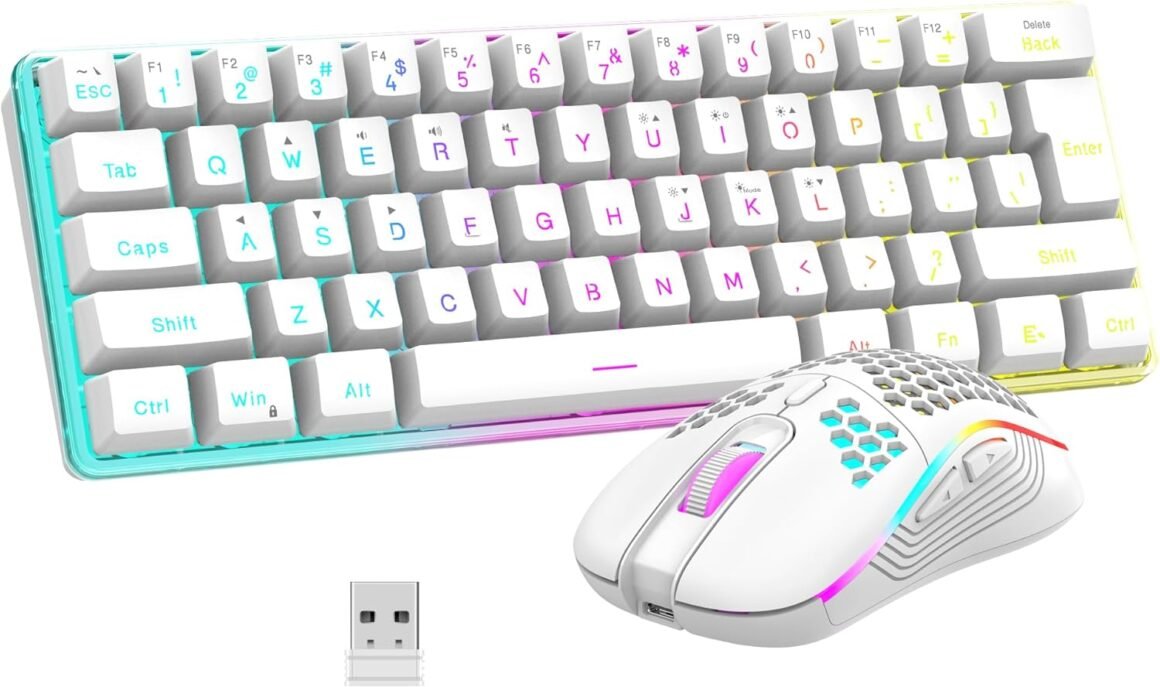
RedThunder 60% Wireless Gaming Keyboard and Mouse Combo: Ultra-Compact RGB Mechanical Feel with 2500mAh Rechargeable Battery, Lightweight Honeycomb Optical Mouse for Gaming and Business – Stylish White Finish

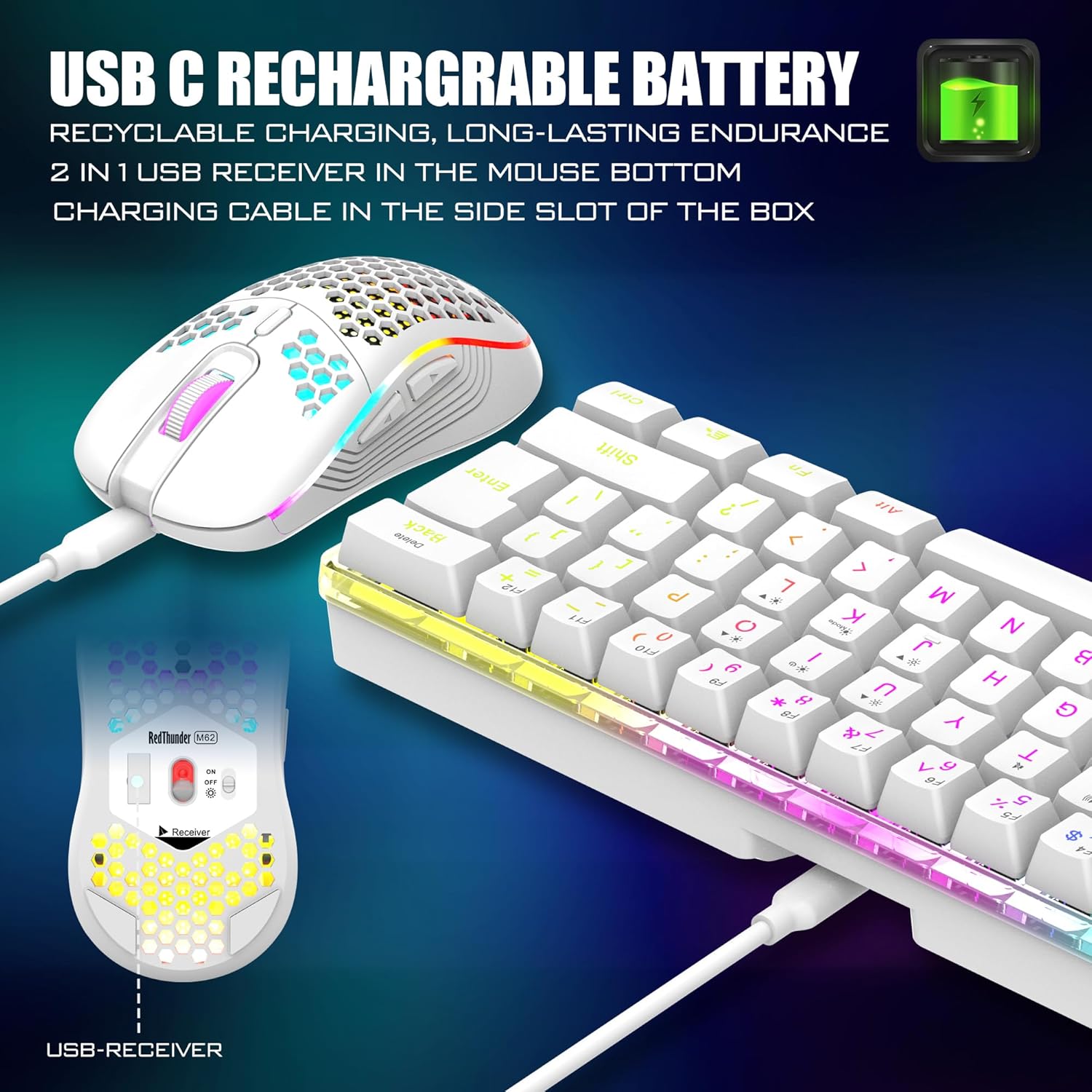
Product description Unique translucent built-in panel. The wireless keyboard has been designed with a unique built-in transparency board, which will enhance the overall gaming lighting atmosphere. Mechanical Feel Keyboard The closest mechanical feel to the crater structure and has a high quality conductive film that has been tested on 1,000,000 printing presses. Its 2ms response time is the fastest of any non-mechanical keyboard. Upgrade Type-C Charging Port The upgraded detachable Type-C interface is made of premium metal for enhanced texture. It has the characteristics of being more durable to use, plugging and unplugging at any time, and more convenient to carry. Type-C Rechargeable Wireless Mouse The wireless RGB mouse and the keypad are charged with the same Type-C data cable, and the mouse wheel will be illuminated by the indicator light when charging. The charging port is not easy to damage, more durable to use, simple to plug and unplug, and easy to carry. High-performance The side of the mouse adopts a non-slip curve design, with two buttons, the fingers fit the mouse more, and the use is more flexible. Professional gaming mouse adopts optical sensor, 3600DPI, 12000 FPS scanning speed, 40G acceleration, and tracking speed up to 400 IPS. Excellent Honeycomb Shell Design Taking creative design for lightweight honeycomb shell, owning the durable strength and excellecnt ventilation, meanwhile it keeps your palms cool and fresh, moving it more quickly and freely during your games, assures your long-session gaming without fatigue. How to use the Fn function and RGB lighting? 1. FN+ “BACK” = DELETE ; 2. FN+ “`~” = ESC; 3. FN+ “1” = F1; FN+ “2” = F2; FN+ “3” = F3; FN+ “4” = F4; FN+ “5” = F5; FN+ “6” = F6; FN+ “7” = F7; FN+ “8” = F8; FN+ “9” = F9; FN+ “0” = F10; FN+ “-_” = F11; FN+ “=+” = F12; 4. FN+ “I” = Backlight ON/OFF; 5. FN+ “K” = Switch Mode; 6. FN+”O”/”L” = Adjust Brightnes; 7. FN + “U”/”J” = Adjust Speed; 8. FN + “W” = Switch Between WASD and ↑←↓→; 9. FN + “R” = Volume- ; 10. FN+”T” = Volume+ ; 11. FN+”Y” = Mut; 12. FN+”WIN” = Lock WIN and MENU. Note 1. The keyboard and mouse share only one USB receiver to reduce the number of USB ports, which is located at the bottom of the mouse. (Only when the USB dongle is plugged in, the lights of the keyboard and mouse will light up). 2. Please fully charge it before the first use, otherwise it will not last as long as expected when it is not fully charged. (Because we didn’t fully charge the keyboard/mouse before shipment to ensure transportation safety). 3. No software installation is required before the first use, just plug the USB receiver into the USB port, turn the switch at the bottom of the keyboard to the ON position, and turn the switch on the bottom of the mouse to the ON (no light) or LED (with light) position. 4. There will be a little delay or the lights will not turn on when the keyboard/mouse battery is too low, please charge the keyboard/mouse in time, the charging indicator will go off after full charge. 5. To protect battery life, please use a lower than DC:5V adapter to charge, preferably using the computer’s USB port to charge directly. Due to the different currents of different computer USB charging ports, some users may need longer charging time to fully charge. 6. Turning off the keyboard light can extend the battery life of the keyboard moderately. 7. If you can’t press “WASD” or “↑↓←→”, don’t worry, please check if the FN function key is enabled. FN+ “W” key can be used to switch between letter “WASD” keys and arrow “↑↓←→” keys at will. 8.If the keyboard/mouse is not working, they may lose connection with the USB receiver. Please try pairing with the USB receiver again. Pairing steps as following: Make sure the keyboard/mouse fully charged and re-pair with the USB receiver. Mouse pairing steps: Step 1: Turn the switch at the bottom of the mouse to the switch position with the sun logo; Step 2: Press and hold the mouse wheel and right button, the mouse RGB lights start to flash; Step 3: Insert the USB receiver into the computer and the pairing is complete. Keyboard pairing steps: Step 1: Turn on the keyboard switch; Step 2: Press and hold the ESC key and the K key at the same time, the indicator light starts to flash; Step 3: Insert the USB receiver into the computer, and pairing is complete. 9. If you have any problem, please tell us at the first time, we will try our best to solve it. Add to Cart Add to Cart Add to Cart Add to Cart Add to Cart Customer Reviews 4.3 out of 5 stars 2,077 4.0 out of 5 stars 997 4.2 out of 5 stars 135 3.9 out of 5 stars 162 4.0 out of 5 stars 2,553 4.5 out of 5 stars 1,296 Price $39.99$39.99 $39.99$39.99 $99.99$99.99 $39.99$39.99 $49.99$49.99 $39.99$39.99 Color Option White/Black White/Black/Black-White/White-Black White/Black/Black-White/White-Black White/Black White Pudding/Black Pudding/Black/White/Pink/White-Gray Black/White Connection Wireless Wireless Trip-Mode Wireless Wireless Wired Keyboard Keys 61 84 95 114 104 104 Backlight Mode ✓ ✓ ✓ ✓ ✓ ✓ Anti-Ghosting ✓ ✓ ✓ ✓ ✓ ✓ Mouse DPI 3200 3200 no data 4800 3200 7200 Keyboard Battery capacity 2000mAh 1850mAh 8000mAh 2000mAh 3000mAh no data Mouse Battery capacity 500mAh 500mAh no data 600mAh 800mAh no data 【High-performance 2.4G Wireless Keyboard and Mouse】Are you looking for a small wireless keyboard and mouse combo that can perfectly balance work and games? RedThunder K62 rechargeable wireless gaming keyboard and mouse combo will be your best choice. 2.4G high-speed and stable transmission, ensure that it can easily deal with even the most intense battles. Note: The keyboard and mouse share a USB receiver in the bottom of the mouse.【Rechargeable & Long Battery Life】The keyboard is equipped with a 1850 mAh battery, and the mouse is equipped with an 500 mAh battery. The long battery life allows you to use them continuously for 8 hours with light. The keyboard and mouse are equipped with smart energy-saving functions. If there is no operation within 2 minutes, they will automatically go to sleep, press any key to wake them up. Please charge 8 hours before using.【60% Compact Small Keyboard and Ultra-light Honeycomb Shell Mouse】The most delicate and cute keyboard keeps your desktop neat, more space for mouse movement and other desktop devices. The well-designed perforated honeycomb shell mouse is ergonomically designed and weighs only 65 (+-5) grams, making it more flexible and comfortable without fatigue.The small keyboard and mouse combo will be the best choice for gamers.【Light Up Keyboard and Mouse】60 percent rgb gaming keyboard features 4 RGB backlight modes, 4 levels of brightness adjustment, 7 monochrome backlight modes and 1 full rainbow backlight. The luminous design of Letters and gaps makes it the best light up wireless mini keyboard on the market. The mouse has a built-in 7-color cyclic gradual lighting effect.【Durable Ergonomic Keyboard and Mouse】The keys have a 10 000 000 keystrokes lifetime, so you can hold on to it for the next decade! ABS keycaps adopt two-color injection molding process, the letter of characters never fade. The mouse fits the palm perfectly, and the anti-sweat and non-slip design gives you complete control.【Plug and Play 】The keyboard and mouse share only one USB receiver, and the code has been completed by default. You only need to insert the receiver and turn on the keyboard and mouse to use it. (Note: If the receiver and the keyboard/mouse lose connection and cannot be used for any reason, you only need to reset the code pairing or contact us in time, we will try our best to solve it)

Unleashing Your Gaming Potential: The RedThunder K62 Wireless Keyboard and Mouse Combo

In an era where precision and performance are pivotal for gamers and professionals alike, the RedThunder K62 Wireless Keyboard and Mouse Combo emerges as a game-changer. This innovative set combines functionality and aesthetics, making it an ideal choice for both work and gaming environments.

Key Features of the K62 Combo

  1. High-performance 2.4G Wireless Connection: The K62 utilizes a 2.4G wireless transmission technology that promises both speed and stability. Bid farewell to lag during crucial moments in your games. Plus, the convenience of having a single USB receiver, tucked neatly beneath the mouse, minimizes clutter and eases the hassle of connectivity.

  2. Rechargeable with Long Battery Life: Efficiency is at the core of this combo. The keyboard features a robust 1850 mAh battery, while the mouse is paired with a 500 mAh battery. Expect up to 8 hours of continuous use, even with RGB lights. Moreover, the smart energy-saving function allows the devices to sleep after 2 minutes of inactivity, ensuring you’re not frequently scrambling for a charger.

  3. Compact Design and Ultra-light Mouse: This 60% compact keyboard design maximizes your workspace while maintaining essential keys for effortless typing and gaming. Weighing only 65 grams, the honeycomb shell mouse is engineered for agility, giving your hand comfort during long sessions without causing fatigue.

  4. Dynamic RGB Lighting: The backlit keyboard offers 4 RGB modes, allowing for a customizable ambiance that can elevate your gaming experience. Ghosting issues are tackled effectively thanks to the anti-ghosting feature, ensuring your commands are executed flawlessly.

  5. Durability Meets Comfort: With a lifespan of 10 million keystrokes, the K62 is not just a temporary tool but a long-term investment in your gaming arsenal. The anti-sweat and non-slip designs on the mouse provide an ergonomic experience while maintaining perfect control—even during intense gameplay.

Final Thoughts

In conclusion, the RedThunder K62 Wireless Keyboard and Mouse Combo harmonizes cutting-edge technology with user-friendly features, making it a must-have for every gaming setup. With its solid battery life, sleek design, and vibrant RGB lighting, this combo accentuates not only the functionality but also the aesthetic appeal of your gaming station.

About RedThunder

RedThunder is a renowned brand dedicated to providing gamers with high-performance gear tailored for superior gameplay. Focused on innovation and quality, RedThunder continues to excite users with ergonomic designs and advanced technology. Join the community of satisfied gamers who trust RedThunder to enhance their gaming experiences. The K62 combo, rated an impressive 4.5 out of 5 stars, is a testament to the brand’s commitment to excellence. Don’t miss the chance to elevate your gaming with this remarkable keyboard and mouse combo.

Price: $45.99 - $39.99
(as of Sep 05, 2025 11:36:50 UTC – Details)

Related Posts
Read More

“Skinit Decal Skin for BENGOO G9000 Gaming Headset: White and Black Stripes Design”: Available now at [price_with_discount]

Personalize the look on your Gaming Headset with the White and Black Stripes skin compatible with the BENGOO G9000 by Skinit. All Stripes decals compatible with the BENGOO G9000 Gaming Headset are cut and crafted with premium 3M vinyl and built to perfectly fit on your gaming headset without interfering with your game.
Comes with 1 skin compatible with BENGOO G9000 Gaming Headset
Precision cut for a flawless fit
3M vinyl decals printed with 3D Print Technology
Made in the USA
3M adhesive backing - easy on, easy off & residue-free
Read More

“BoxWave Bullet Capacitive Stylus Pen for Ayaneo 2 – Bronze”: Available now at [price_with_discount]

BoxWave Stylus Pen Compatible With Ayaneo 2.

BoxWave's award-winning family of stylus products welcomes the
Bullet Capacitive Stylus, known for its shorter length and ultra portable design.

NEW UPGRADED MODEL - The best just got better! The Bullet Capacitive Stylus is now extendable so that you can use it more comfortably! Carry the stylus at the usual 2 inch position for portability, and extend it to 3 inches to write, tap, or draw with higher precision! It still comes with the popular KEYCHAIN option to fit easily onto your existing key ring! Carry your stylus EVERWHERE!

The Bullet Capacitive Stylus still maintains the praised usability that made BoxWave the industry leader for touchscreen styli. The rubber tip provides a
SMOOTH GLIDE on your Ayaneo 2 touchscreen for better sensitivity. It will have you rethinking using your finger as your touchscreen tool of choice.

Use the Bullet Capacitive Stylus to
DISTANCE your finger from the surface. Perfect for hospital settings, obtaining signatures, and general everyday use!

At a length of only 2 inches (5cm), the Bullet Capacitive Stylus is ultra
PORTABLE! Just hook the included keychain attachment to your key-ring and off you go!

The Bullet Capacitive Stylus is made with the highest
QUALITY silicone and aluminum materials. The long-lasting tip is dependable and durable, while the robust aluminum body is strong and looks great!

Ready. Set. Create with the Bullet Capacitive Stylus!

🔑 [NEW UPGRADED MODEL] BoxWave Stylus Pen Compatible With Ayaneo 2. The best just got better! The Bullet Capacitive Stylus is now extendable so that you can use it more comfortably! Carry the stylus at the usual 2 inch position for portability, and extend it to 3 inches to write, tap, or draw with higher precision! It still comes with the popular KEYCHAIN option to fit easily onto your existing key ring! Carry your Stylus EVERWHERE!
🏄 [SMOOTH GLIDE] The Bullet Capacitive Stylus still maintains the praised usability that made BoxWave the industry leader for touchscreen styli. The rubber tip provides a SMOOTH GLIDE on your Ayaneo 2 touchscreen for better sensitivity. It will have you rethinking using your finger as your touchscreen tool of choice.
👾 [SOCIAL DISTANCING] Use the Bullet Capacitive Stylus to DISTANCE your finger from the surface. Perfect for hospital settings, obtaining signatures, and general everyday use!
📏 [SIZE MATTERS] At a length of only 2 inches (5cm), the Bullet Capacitive Stylus is ultra PORTABLE! Just hook the included keychain attachment to your key-ring and off you go!
🏅 [HIGH QUALITY] The Bullet Capacitive Stylus is made with the highest QUALITY silicone and aluminum materials. The long-lasting tip is dependable and durable, while the robust aluminum body is strong and looks great!
Read More

“EasySMX Wireless PC Controller: Dual-Vibration Gamepad for Multi-Platform Gaming”: Available now at [price_with_discount]

From the brand easysmxeasysmx EasySMXEasySMX

What makes the X10 Controller Special?

Hall Effect Triggers and JoysticksMechanical Keys1000mAh large batteryA Replaceable Faceplate A Custom appFast connection to various devices, including iPhone, iPad, PC, Android, Switch, and Steam Deck.

All these features make the X10 Controller unique, comfortable, and outstanding

January Release

easysmx controllereasysmx controller easysmx controllereasysmx controller easysmx controllereasysmx controller easysmx controllereasysmx controller easysmx controllereasysmx controller easysmx controllereasysmx controller easysmx controllereasysmx controller easysmx controllereasysmx controller easysmx controllereasysmx controller easysmx controllereasysmx controller easysmx controllereasysmx controller easysmx controllereasysmx controller easysmx controllereasysmx controller
🎮【Universal Compatibility】EasySMX 9110 Wireless Game Controller supports PS3, PC, Android phones and tablets, and it is compatible with Windows XP/ 7/8/10 and Android 4.0 or above.
🎮【Wireless Connectivity】10m(32.8ft) connectivity range covers the living room and bedroom. No wires, no mess, no hassle. Just wirelessly connect to your device and get to the gaming.
🎮【Dual Vibration Feedback】Asymmetrical linear motor put you in the center of the action, giving you immersive gaming experience with multi magnitude of vibration feedback.
🎮【Ergonomics】The non-slip grips are designed for improved stability. The indentation and textured surface of the joystick fit your fingers snuggly and prevent slips in intense games, giving you full control.
🎮【Battery Operated】The wireless game controller has an embedded lithium battery and it has a smart sleep function, increasing battery efficiency.
Read More

“BENGOO G9000 Gaming Headset: Tweety Bird iPod Skin by Skinit”: Available now at [price_with_discount]

Personalize the look on your Gaming Headset with the Tweety Bird Ipod skin compatible with the BENGOO G9000 by Skinit. All Tweety Bird decals compatible with the BENGOO G9000 Gaming Headset are cut and crafted with premium 3M vinyl and built to perfectly fit on your gaming headset without interfering with your game.
Comes with 1 skin compatible with BENGOO G9000 Gaming Headset
Precision cut for a flawless fit
3M vinyl decals printed with 3D Print Technology
Made in the USA
3M adhesive backing - easy on, easy off & residue-free