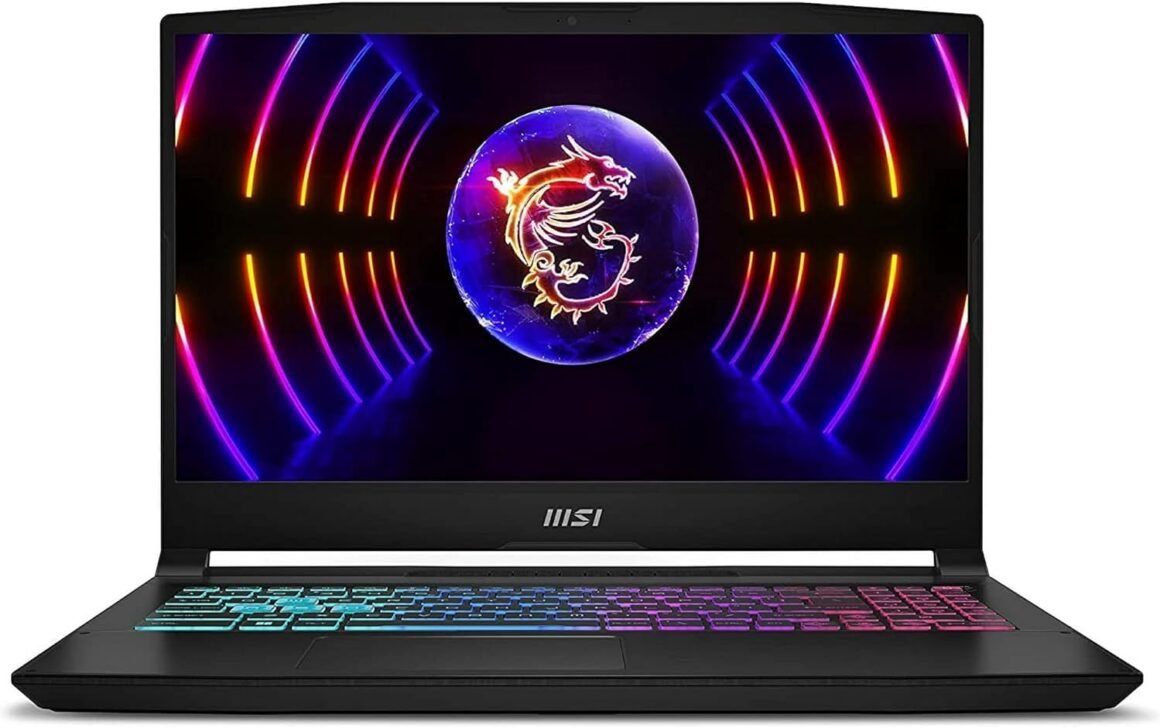
MSI Katana 15.6″ Gaming Laptop: 144Hz FHD, Intel 10-Core i7, GeForce RTX 4060, 32GB DDR5, 1TB SSD, RGB Keyboard, Windows 11: Available now at [price_with_discount]

We sells computers with upgraded configurations. If the computer has modifications (listed above), then the manufacturer box is opened for it to be tested and inspected and to install the upgrades to achieve the specifications as advertised. If no modifications are listed, the item is unopened and untested. Defects & blemishes are significantly reduced by our in depth inspection & testing. Operating System: Windows 11 Home Processor: Intel i7-13620H (2.4GHz, Up to 4.9GHz) 10-Core 24MB Memory: 32GB DDR5 Memory Slots (Total): 2 Solid state drive: 1TB NVMe Gen4x4 Screen: 15.6″ Full HD IPS 1920×1080 144Hz Widescreen Front Camera Resolution: 720p GPU Type: NVIDIA GeForce RTX 4060 Video Memory: 8GB GDDR6 VR Ready: Yes Speakers: 2 x 2W Speakers LAN: Gigabit LAN LAN Data Transfer Rate: 10/100/1000Mbps WLAN: 2×2 Intel Wireless-AX 201 Wireless Technology: WiFi 6 (802.11ax) Bluetooth: Bluetooth 5.2 PORTS & CONNECTORS: 1 x USB 2.0 (Type-A) 2 x USB 3.2 (Gen 1 Type-A) 1 x USB 3.2 (Gen 1 Type-C) 1 x HDMI 1 x LAN RJ-45 1 x Audio Keyboard Features: 4-Zone RGB Backlit Keyboard Mouse Type: Multi-Touch Touchpad Power Supply: 240 Watt AC Adapter Battery: 3-Cell Li-ion Polymer Energy Star Compliant: Yes Width: 14.13 in Depth: 10.20 in Height: 0.98 in Weight: 4.96 lbs 15.6 144Hz FHD Display. Never miss a shot with the striking visuals and smooth refresh rate of the 144Hz FHD IPS-level display.32GB DDR5 RAM. Enjoy even faster frequencies, greater capacities, and better performance with DDR5.light up with gaming style. The Katana Series is equipped with a 4-Zone RGB Keyboard with the highlighted WASD and specially-designed keycaps.Introducing the new Shared-Pipe heatsink design, the heat pipe attaches to both the CPU and GPU. Shared-Pipe can improve thermal capability, especially when pushing CPU perfomance! With MSI Cooler Boost 5, gamers can freely explore increasingly complex game worlds.NVIDIA GeForce RTX 40 Series GPUs are beyond fast for gamers and creators. They’re powered by the ultra-efficient NVIDIA Ada Lovelace architecture which delivers a quantum leap in both performance and AI-powered graphics. Experience lifelike virtual worlds with ray tracing and ultra-high FPS gaming with the lowest latency.

The company sells computers with upgraded configurations that are tested and inspected to ensure they meet advertised specifications. This particular computer features Windows 11 Home, an Intel i7-13620H processor, 32GB DDR5 RAM, a 1TB NVMe Gen4x4 solid state drive, a 15.6″ 144Hz FHD IPS display, and an NVIDIA GeForce RTX 4060 GPU with 8GB GDDR6 video memory. It also includes a 4-Zone RGB backlit keyboard, multi-touch touchpad, 240 Watt AC adapter, and a 3-cell Li-ion polymer battery. The computer boasts a 4-Zone RGB keyboard, Shared-Pipe heatsink design for improved thermal capability, and MSI Cooler Boost 5 for better cooling. The NVIDIA GeForce RTX 40 Series GPU provides fast performance and lifelike graphics with ray tracing and ultra-high FPS gaming capabilities. The computer is designed for gamers and creators seeking high performance and visual quality.

Price: $1,099.00
(as of Sep 11, 2024 18:17:42 UTC – Details)


Related Posts
Read More

X1 Wireless Gaming Headset: Ultimate Compatibility and Long Battery Life: Available now at [price_with_discount]

Product Description Gaming headset XboxGaming headset Xbox xbox headset xbox headset wireless xbox one headset

1. Plug the Receiver to Xbox Controller directly. (Extra Microsoft Adapter needed (Not Included) when connect to old version controller)

2. Low battery of the controller can cause insufficient power supply to the receiver, the headset might not work. Please ensure sufficient power of the controller.

The video showcases the product in use.The video guides you through product setup.The video compares multiple products.The video shows the product being unpacked.

Troubleshootings for X1 Gaming Headset

Detailed demonstration for the X1 operations

1. Why can't I connect the headset with controller?

2. No sound from the microphone? Microphone sound too low?/Why can't my teammates hear me?

3. Echo from the microphone?

4. Why is there a lot of noise?/Headset volume too low?

The video showcases the product in use.The video guides you through product setup.The video compares multiple products.The video shows the product being unpacked.

Plug the dongle tightly and fully

How to plug the dongle to controller correctly?

× The dongle not plugged in tightly (there is a gap) It may cause noise, static, low volume, or no sound in the headphones.

√ The dongle plugged in tightly and fully (no gap) Please plug the dongle fully and tightly,so that could avoid noise, static, low volume, or no sound in the headphones.

The video showcases the product in use.The video guides you through product setup.The video compares multiple products.The video shows the product being unpacked.

Plug the X1 Dongle to the Xbox Controller directly

How to connect the Headset to Xbox Controller?

1. Plug the X1 Dongle to the Xbox Controller directly. (Not support the 3rd parties' controller)

2. While the Leds of the dongle flashing, please turn the headset power on.

3. Please keep the headset on 2.4GHz mode. (You could hold the Light Button to swith it to 2.4GHz or BT Mode)

4. Click the 'Xbox Accessories' option on your xbox device, makes the headset connect to it. Choose the 'Volume' option and enter into the 'Audio and Music' interface to turn the headset volume and mic on.

wireless headset headset gaming headset xbox one ps5 headset ps4 headset gaming headphones xbox headset with mic wirelessxbox headset with mic wireless

Please confirm the receiver is inserted to the controller or devices tightly and fully, to avoid the noise or echoes caused by the poor contact.

xbox pc headset computer headset

Why can't I connect the headset with controller?/Headset doesn’t work?

Confirm if you are in Bluetooth Mode or 2.4GHz Mode. The 2.4GHz dongle cannot be connected in Bluetooth mode. You need to switch to 2.4GHz mode.

No sound from the microphone? Microphone sound too low?Mic doesn’t work?

Confirm the settings on the Xbox console, whether the microphone sound is turned up to the maximum at the (Headset chat mixer)? Adjust the game sound and chat sound to the center to make them be balanced. Assure the microphone is properly plugged in

Why the volume is low while connect to the Xbox?

Make sure the (Headset Volume) on the Xbox console is set to maximum. When using the headset for the first time, the default volume on the console is 80%. And please insert the dongle tightly and fully.

Echo from the microphone?

Turn off monitoring mode in the Xbox console settings.

While connecting, headset sound got noise or echoes?

Make sure the transmitter is fully inserted into the controller. If the transmitter is not fully inserted, there will be significant electrical noise in the headset.


Wide Compatibility: Our wireless gaming headphones are equipped with both Bluetooth and 2.4G dual modes: ①. Allowing for wireless connection to Xbox controllers (Please note that the X1 Receiver only support the Official Controllers instead of the 3rd parties, and you need an extra Microsoft Adapter (Not Included) when connecting with an old version Xbox One controller) ②. as well as seamless compatibility with PC, PS5, laptops via a 2.4GHz receiver. ③. Mac and Switch supported by Bluetooth mode. Just plug and play for instant gaming immersion.
Superior Sound Quality: Immerse yourself in the game with our 50mm speakers and 3D surround sound technology. Hear every detail and experience realistic game sound effects. The noise-canceling microphone ensures clear communication with your teammates, enhancing teamwork during intense gaming sessions.
Extended Battery Life and Low Latency: Enjoy uninterrupted gaming with up to 40 hours of continuous playtime on a single charge, fully charge only need 2 hrs. Our wireless headphones feature low latency technology(<20ms ), providing instant audio feedback without any noticeable delays, allowing for faster reactions and better gameplay.
Comfortable and Durable Design: Designed for long gaming sessions, our headphones prioritize comfort and durability. The adjustable headband and memory foam ear cushions provide a customized fit, ensuring hours of comfortable gameplay. The durable construction ensures longevity, making these headphones a reliable companion for avid gamers.
Convenient Controls: Take control of your gaming experience with easy-to-reach buttons on our headphones. Adjust the volume, mute the microphone, or control other settings directly from the headset, allowing for a seamless and effortless gaming experience.
How to activate the mic function on Xbox: ①.Connecting to the controller, enter to the interface - Click the Choose the - Click the - See the and choose the
Read More

RK Royal Kludge M75 Wireless Mechanical Keyboard: 2.4GHz & BT5.1 Connectivity, 75% Layout, Gasket Mount, OLED Display, RGB Backlight, Hot-Swappable Pale Green Switches – Ideal for Gamers

Product description mechanical keyboard rkm75mechanical keyboard rkm75

Royal Kludge M75

Gasket Structure

RK M75 wireless keyboard features a gasket structure, which uses gasket material between the plate and keyboard housing on both top and bottom sides. This gives the keyboard a soft keypress feel, which is really comforting and soft to type on.

South-facing RGB Backlight

This gaming keyboard also features south-facing RGB backlit with multiple lighting modes, allowing you to customize the lighting to your preferences and better illuminating the keyboard backlight from the typist’s angle and free from interference while changing the switches.

Double-shot PBT Keycaps

This gaming keyboard is coming with the PBT keycaps. Compared with ABS keycaps, PBT keycaps has better high hardness, oil resistance and high temperature resistance.

gaming keyboardgaming keyboard

Tri-modes Collection Gaming Keyboard

Tenkeyless keyboard

The RK M75 Mechanical Gaming Keyboard is 75% compact 81 keys, saving more space withour numpad, making it easy to carry and use anywhere.

Triple Mode + Multi-device Connection

The RK M75 mechanical keyboard has three connection methods: wired, Bluetooth, and 2.4GHz. It can easily switch between 3 different wireless devices, and no longer limits the possibility of connection.

All Keys Programmable

Driver Software Link: bit.ly/RKRGBSOFT (The programmer of this gaminng keyboard is only for Window system, kindly please run the software in wired mode).

RK M75 keyboardRK M75 keyboard

Multi-functional Display Screen

Display functions: battery level, WIN/MAC, wired/2.4G/BT mode, volume level, let this gaming keyboard status be clear at a glance, and remind you to charge.

PS: Rotate the knob to switch modes, short press to enter the mode, short press again to return to the mode selection page. Select RTN, short press the knob to return to the main interface.

wireless keyboardwireless keyboard

RK M75 built-in Rotary Knob

Display Functions: power on/off, volume adjustment, switching mode. Multi-functional display screen, display functions: battery level, WIN/MAC, wired/2.4G/BT mode, volume level, let the keyboard status be clear at a glance, and remind you to charge.

gaming wireless keyboardgaming wireless keyboard

Multimiedia Key and System Requirements

Multimieda Key for Windows

Windows system (Fn+A: switch to Windows system)

Fn+F1: Computer Fn+F2: Browser Fn+F3: Mailbox

Fn+F4: Calculator Fn+F5: Player Fn+F6: Stop Fn+F7: Last Song

Fn+F8: Play / Pause Fn+F9: Next Song Fn+ F10: Mute Fn+ F11: Volume- Fn+F12: Volume+

Multimieda Key for MAC

Mac system (Fn+S: switch to MAC system)

Fn+F7: Last Song Fn+F8: Play/Pause Fn+F9: Next Song

Fn+ F10: Mute Fn+ F11: Volume- Fn+F12: Volume+

bluetooth keyboardbluetooth keyboard

3 Indicator Lights

Allows you to easily judge capitalization, win/mac mode, and scroll lock status.

RK M75 mechanical keyboardRK M75 mechanical keyboard

Two-stage Adjustable Tilt Legs

Anti-slip and two-stage adjustable tilt outriggers, available in two different heights according to different needs.

triple mode keyboardtriple mode keyboard

Type-C Ports

This PC gaming keyboard is coming with 2 Type-C ports, which allows to back up more facilities.


75% RGB Mechanical Gasket Mount Keyboard: 75% layout with 81 keys, which makes the desktop more concise; the gasket structure of 75% keyboard provides a cushioned, consistent typing feel and pleasing acoustic feedback
OLED Smart Display & Knob: RK M75 comes with a built-in OLED screen and rotary knob; OLED screen design can display battery level, WIN/MAC, wired/2.4G/Bluetooth mode. And you can adjust volume, switch mode and device with the rotary knob
Triple Mode & Multi-device Connectivity: This hot swappable keyboard supports USB-C wired, 2.4G wireless, and Bluetooth 5.1 modes; Connect up to 3 devices via Bluetooth and switch seamlessly using the knob, compatible with Win and Mac
Hot-Swappable Pale Green Switch: M75 mechanical keyboard is equipped with pale green switch; The total travel is 3.70mm and operating force is 40gf, so the keypress offers a light and smooth feel, which will be a brand new input experience
Double-shot PBT Keycaps & South-facing RGB: The gaming keyboard features durable double-shot PBT keycaps for a comfortable, oil-resistant feel; South-facing RGB lighting ensures even backlighting and avoids interference when swapping switches
Read More

Official NHL Anaheim Ducks Distressed Design Skinit Decal for BENGOO G9000 Gaming Headset: Available now at [price_with_discount]

Personalize the look on your Gaming Headset with the Anaheim Ducks Distressed skin compatible with the BENGOO G9000 by Skinit. All Anaheim Ducks decals compatible with the BENGOO G9000 Gaming Headset are cut and crafted with premium 3M vinyl and built to perfectly fit on your gaming headset without interfering with your game.
Comes with 1 skin compatible with BENGOO G9000 Gaming Headset
Precision cut for a flawless fit
3M vinyl decals printed with 3D Print Technology
Made in the USA
3M adhesive backing - easy on, easy off & residue-free
Read More

“Ayaneo Geek Screen Protector: Anti-Reflective & Shock-Absorbing FX Film (3X)”: Available now at [price_with_discount]

FX-Antireflex Screen Protector by atFoliX, dazzle-free and shock-absorbing, compatible with Ayaneo Geek

- integrated shock absorbing layer
- anti-reflective effect
- dirt-repellent surface
- robust and safe
- especially easy mounting

Shock absorbing and safe
Screen Protection Film made of tough and energy absorbing PET. The material helps to protect the glass surface of your device against impacting objects.

Antireflection coating
The finely matt surface significantly reduces annoying reflections on the screen, while minimizing sharpness and contrast.

Dirt-repellent and robust
The matt surface hardly gives fingerprints and impurities a chance. At the same time, the coating of the Protector Film provides reliable protection against scratches.

Clean and easy installation
Can easily be mounted and repositioned due to dry mounting. Residue-free removal.

Scope of delivery
- 3 x FX-Antireflex Screen Protection Film compatible with Ayaneo Geek
- cleaning cloth
- installation tool (squeegee)
- Link to the multilingual, illustrated mounting instructions (including mounting video)

FX-Antireflex Protector Film: Glare-free, shock-absorbing, perfect fit and compatible with Ayaneo Geek
Anti-reflective effect due to the finely matt surface. Significantly improved readability of the display when working in sunlight and under strong light sources.
Anti-shock: Highly shock-absorbing effect thanks to integrated PET absorber layers. The Screen Protector reduces the risk of display breakage to a minimum.
Fingerprints on the display are reduced by the Screen Protector. Maximum protection against scratches due to high surface hardness (3H pencil hardness)
Accessory@FoliX - Made in Germany *** Stress- and bubble-free installation of the Screen Protection Film due to optimised adhesive layer - perfect hold - removable without leaving residues