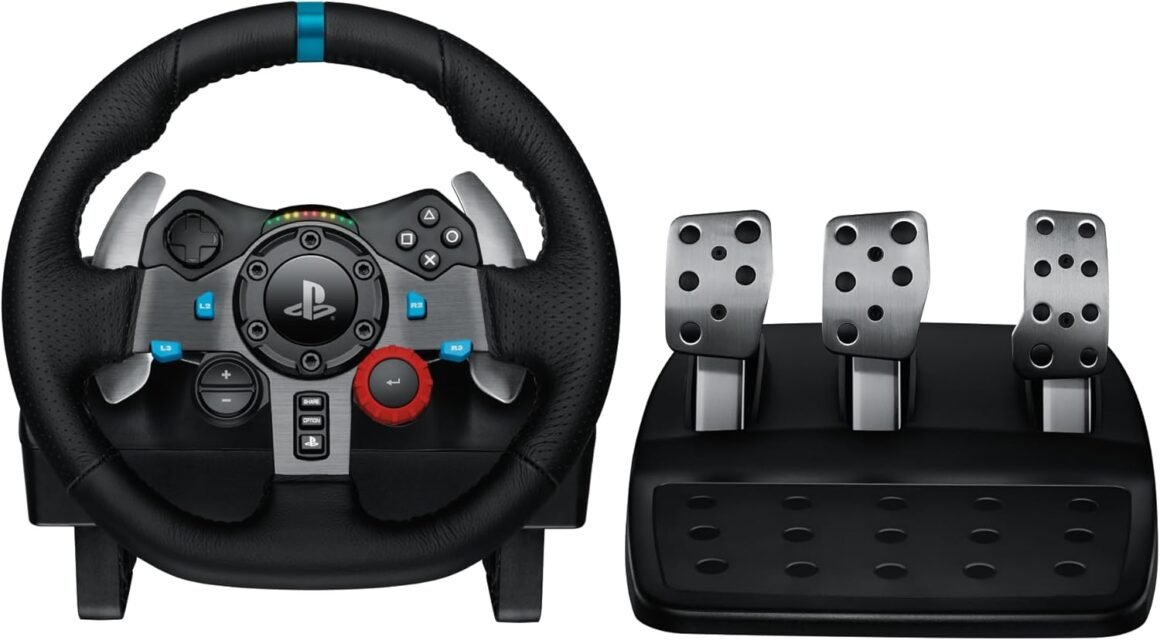
Logitech G29 Driving Force Racing Wheel & Floor Pedals – Real Force Feedback, Stainless Steel Paddle Shifters, Leather Cover – Compatible with PS5, PS4, PC & Mac – Black

Works with PlayStation®5 and PlayStation®4 Driving Force is designed for console, including the latest PlayStation®5 and PlayStation®4 racing game titles. G29 Driving Force Pro also works on PC with select racing game titles. Add Driving Force to your controller selection and you may never want to race with a regular controller again. Realistic Force Feedback G29 Driving Force is engineered with a dual-motor force feedback mechanism that is designed to realistically simulate the feel of your tires on turns and terrain. With anti-backlash helical gears modeled after the gearing used in car transmissions, you get exceptionally smooth, quiet and precise steering action. Easy-Access Game Controls The D-Pad and buttons of the G29 are located on the wheel for convenient access. RPM/Shift indicator LEDs let you know exactly when to shift gears without taking your eyes off the track. For even greater control, add on the optional 6-speed manual Driving Force Shifter attachment, sold separately.* *6-Speed Manual Shifter attachment not compatible with Playstation®3 Responsive Pedal Unit The separate pedal unit enables a more natural body position for driving, so you can comfortably brake, accelerate and change gears like you would in an actual car. The nonlinear brake pedal mimics the performance of pressure-sensitive brake systems for a more responsive, accurate braking feel. Quality Construction G29 Driving Force is built top-to-bottom to handle the stress of racing, from solid steel ball bearings and stainless steel paddle shifters, to built-in clamps and bolt points that keep the wheel securely mounted to your rig. High-quality, hand-stitched leather provides the grip and feel of a high-performance racecar wheel. 6-Speed Shifter Compatible with 6-Speed Manual Shifter Attachment* (Sold separately) *6-Speed Manual Shifter attachment not compatible with Playstation®3. Immersive Gaming Experience: Perfect for PlayStation 5, PS4 and PC gaming titles, the Driving Force simulates the feeling of driving a real car with precision steering and pressure-sensitive pedalsPremium Control: The Driving Force feedback racing wheel provides a detailed simulation of driving a real car, with helical gearing delivering smooth, quiet steering and a hand-stitched leather coverCustomizable Pedals: These pressure-sensitive nonlinear brake pedals provide a responsive, accurate braking feel on a sturdy base – with adjustable pedal faces for finer control900-Degree Rotation: Lock-to-lock rotation of the Driving Force means you can turn the wheel around two and a half times, hand over hand on wide turns – just like a real F1 race carUp Your Game: Take your racing simulation to the next level with Driving Force accessories like the Driving Force Shifter or desk and rig mountsThe plastic parts in G29 Driving Force include 52 percent certified post consumer recycled plastic..Certified carbon neutral.Total Wheel Control: Control wheel sensitivity, force feedback levels, and button customization via powerful G HUB Gaming Software for PC. Download at logitechG /downloadsWheel: Length: 10.24 in (260 mm) Height: 10.63 in (270 mm) Width: 10.94 in (278 mm) Weight without cables: 4.96 lb (2.25 Kg) Pedals: Length: 16.87 in (428.5 mm) Height: 6.57 in (167 mm) Width: 12.24 in (311 mm) Weight without cables: 6.83 (3.1 Kg). Compatible with Windows 11, Windows 10, Windows 8.1, Windows 8, Windows 7

Unleashing the Race: The Logitech G29 Driving Force Racing Wheel Review

In the evolving world of gaming, realism is key. For racing enthusiasts, the Logitech G29 Driving Force Racing Wheel offers a compelling upgrade from conventional controllers, bringing the thrill of high-performance racing right into your living room. With its compatibility across PlayStation®5, PlayStation®4, and select PC titles, this racing wheel is engineered for serious gamers who crave the adrenaline of realistic driving experiences.

Immersive Realism with Dual-Motor Force Feedback

The G29’s standout feature is its dual-motor force feedback, which elegantly simulates tire feel, road conditions, and vehicular dynamics. This level of realism is achieved through anti-backlash helical gears, a design inspired by the precision of contemporary car transmissions. The outcome? Exceptionally smooth and quiet steering that enhances the driving experience. Whether navigating hairpin turns or competing in high-speed straightaways, the steering feels authentic, elevating your gameplay to unprecedented heights.

Intuitive Game Controls

Designed with functionality in mind, the G29 features easy-access game controls right on the wheel. The ergonomic D-Pad and buttons are comfortably situated for quick access, allowing you to focus on the race rather than fumbling for controls. The addition of RPM/Shift indicator LEDs provides real-time feedback on the optimal shifting point, keeping your attention firmly on the track. For those aiming for even greater depth, the optional 6-speed manual Driving Force Shifter attachment (sold separately) offers an authentic gear-shifting experience, amplifying your racing simulation.

Responsive Pedal Unit for Authentic Control

Equipped with a separate pedal unit, the G29 enables a natural driving posture that replicates the feel of real-world driving. The nonlinear brake pedal mimics the behavior of pressure-sensitive systems, providing a more responsive and accurate braking experience. This attention to detail in pedal design allows for a level of control that any racing fan would appreciate.

Quality Construction that Lasts

The G29 is built to endure the rigors of competitive gaming, with solid steel ball bearings and durable stainless steel paddle shifters. Its sturdy construction is further enhanced by built-in clamps and bolt points that secure the wheel to your gaming rig. Adding a touch of luxury, the hand-stitched leather cover gives it the feel of a high-performance racecar, ensuring both comfort and grip during extended gaming sessions.

Advanced Control Options

Gaming shouldn’t just be enjoyable; it should also be customizable. The Logitech G HUB Gaming Software allows you to control wheel sensitivity, force feedback levels, and button configurations, putting you in the driver’s seat—quite literally. This capability not only enhances the user experience but also ensures that your gameplay can be tailored to your personal preferences.

Conclusion

In summary, the Logitech G29 Driving Force Racing Wheel is an exceptional tool for anyone serious about racing simulation. With its immersive dual-motor feedback, intuitive controls, and quality construction, this racing wheel transforms the way you play. The option to gameplay with a 6-speed manual shifter further enhances its appeal, offering a comprehensive racing experience that no traditional controller can match.

Discover the difference with Logitech. Known for its commitment to quality and innovation, Logitech has solidified its reputation in the gaming equipment industry. Now, with the G29 Driving Force, you can elevate your racing to a level that truly feels like you’re on the track—because when it comes to gaming, there’s no substitute for reality.

Price: $329.99 - $249.99
(as of Sep 07, 2025 20:03:17 UTC – Details)

Related Posts
Read More

“Redragon K621 Horus TKL Wireless RGB Mechanical Keyboard: Ultra-Thin Low Profile with Linear Red Switches”: Available now at [price_with_discount]

Product Description K621K621 K621K621 K621K621

K621K621

K621K621

K621K621

5 Devices Switchable

With 3 BT devices storable, a 2.4Ghz wireless mode, a wired mode, K621 can save and switch connections to five devices simultaneously. One keyboard is good enough for most of the devices in your home.

Superb RGB For Gamer

Up to 20 preset vibrant backlight modes can be adjusted easily by FN + Ins, the brightness is also adjustable by scroll section. Redragon logo filled with same RGB colors offers extra actively buff for gamer.

Solid Use Durability

Equipped with an advanced reliable battery, the keyboard provides a prolonged using time in wireless mode. Low battery indicator makes sure the keyboard will always online if you don't forget to recharge.

K621K621 K621K621

Q&A

Q1: How can I tell what mode the keyboard is in? How to switch modes?

In different modes, the M indicator will be displayed in different colors. Three modes BT1 (2, 3)/2.4G/USB will display Blue (Cyan, Purple)/Green/White in order.

With existing device connections, switching among by FN+1.2.3(BT)/4(2.4G), FN+5 (OFF).

Q2: When does the keyboard needs to be recharged and how do I know it is full?

When the M indicator light starts flashing in red, it is in low battery indication and you need to plug in the USB-C cable to charge in time.

During charging, M indicator will stay in solid red color (any mode) and restore to current connection mode color status when it’s fully charged.

Q3: Even in OFF mode, why does the keyboard still go into sleep mode?

This is because the keyboard is still in wireless mode (even in OFF mode), you need to press FN+5 to enter the wired USB mode again to make the keyboard backlight does not go out.

Q4: Why does the W/A/S/D keys become arrow keys? Why does the F1-F4 keys show different solid color?

Press FN + W to switch the WASD keys function to arrow keys, press them again to restore original. M1-M4 profile function will be activated when press FN + F1-F4 together, F1 will be lighted to white when profile M1 selected by pressing FN + F1 (FN + ESC to reset and exit profile mode).

Add to Cart Add to Cart Add to Cart Add to Cart Customer Reviews 4.1 out of 5 stars 944 4.1 out of 5 stars 944 4.3 out of 5 stars 196 4.7 out of 5 stars 1,899 4.5 out of 5 stars 5,960 4.3 out of 5 stars 141 Price $54.99$54.99 $49.99$49.99 — $39.99$39.99 $59.99$59.99 — Dimension/size 14.0×5.8 in 14.0×5.8 in 11.6×4.1 in 11.5×3.9 in 11.5×3.9 in 17.1×4.9 in Keyboard Weight 0.60 kg 0.58 kg 0.42 kg 0.54 kg 0.61 kg 0.72 kg Switch Type Red Switch (Low profile) Red Switch (Low profile) Red Switch (Low profile) Red Switch Brown Switch (Hot-Swap) Brown Switch Keys 87 87 61 61 61 104 Connection Wired/BT/2.4Ghz Wired Wired Wired Wired/BT/2.4Ghz Wired Extra G Keys 4 4 0 0 0 0 RGB Backlit ✓ ✓ ✓ ✓ ✓ Rainbow Backlit Software ✓ ✓ ✓ ✓ ✓ /
3-Mode Connection: Here comes Redragon innovative 1st-Gen 3-mode connection technology, USB-C wired, BT 3.0/5.0 & 2.4Ghz wireless modes which make the user experience upgraded to another level in all fields.
Worry-Free Wireless: Built-in upgraded 3.0/5.0 BT and 2.4Ghz wireless chips, K621 offers a real-wireless and no-latency connection for all devices in the market. Easy to toggle among different devices in 3 modes set no limits of possibility.
Master for both Win and Mac: Seamlessly switch between Windows and macOS operating systems, providing you with the flexibility you need for a smooth workflow.
80% TKL Low-Profile: Compact tenkeyless 87 keys in low-profile design, offers more space for mouse movement and shorter actuation distance. Provides precise performance at half the height while retaining white simplicity style.
More Extra Practical: Set with 4 x 4 on-the-fly macro keys and a dedicated function area for media control. Convenient to rec frequently used macros without software, play the next song, or just scroll for volume adjustment.
Endless Redefine Ways: With powerful software support, whatever backlit modes, key reassignments or combo keys macro records all enable for easy access. Level up your working efficiency and gaming performance in the best way.
Read More

RedThunder 60% Wireless Gaming Keyboard and Mouse Combo: Ultra-Compact RGB Mechanical Feel with 2500mAh Rechargeable Battery, Lightweight Honeycomb Optical Mouse for Gaming and Business – Stylish White Finish

Product description RedThunder LOGORedThunder LOGO 75% keyboard wireless mechanical tkl wired redthunder ps4 keyboard b097t276ql b07xvcp7f5 b07gqnl7xj75% keyboard wireless mechanical tkl wired redthunder ps4 keyboard b097t276ql b07xvcp7f5 b07gqnl7xj 60% xbox mini white tkl mechanical rgb redthunder compact b07zt61ltz b07vpvfjdd b07p6k5gmy60% xbox mini white tkl mechanical rgb redthunder compact b07zt61ltz b07vpvfjdd b07p6k5gmy

Membrane keys b07nbjvh4gMembrane keys b07nbjvh4g

Unique translucent built-in panel.

The wireless keyboard has been designed with a unique built-in transparency board, which will enhance the overall gaming lighting atmosphere.

Membrane KeysMembrane Keys

Mechanical Feel Keyboard

The closest mechanical feel to the crater structure and has a high quality conductive film that has been tested on 1,000,000 printing presses. Its 2ms response time is the fastest of any non-mechanical keyboard.

Tripod ErgonomicTripod Ergonomic

Upgrade Type-C Charging Port

The upgraded detachable Type-C interface is made of premium metal for enhanced texture. It has the characteristics of being more durable to use, plugging and unplugging at any time, and more convenient to carry.

Type-C charging CableType-C charging Cable

Type-C Rechargeable Wireless Mouse

The wireless RGB mouse and the keypad are charged with the same Type-C data cable, and the mouse wheel will be illuminated by the indicator light when charging. The charging port is not easy to damage, more durable to use, simple to plug and unplug, and easy to carry.

left mouse buttonleft mouse button

High-performance

The side of the mouse adopts a non-slip curve design, with two buttons, the fingers fit the mouse more, and the use is more flexible. Professional gaming mouse adopts optical sensor, 3600DPI, 12000 FPS scanning speed, 40G acceleration, and tracking speed up to 400 IPS.

Wireless RGB MouseWireless RGB Mouse

Excellent Honeycomb Shell Design

Taking creative design for lightweight honeycomb shell, owning the durable strength and excellecnt ventilation, meanwhile it keeps your palms cool and fresh, moving it more quickly and freely during your games, assures your long-session gaming without fatigue.

Wireless keyboard and wireless mouse comboWireless keyboard and wireless mouse combo

How to use the Fn function and RGB lighting?

1. FN+ "BACK" = DELETE ; 2. FN+ "`~" = ESC; 3. FN+ "1" = F1; FN+ "2" = F2; FN+ "3" = F3; FN+ "4" = F4; FN+ "5" = F5; FN+ "6" = F6; FN+ "7" = F7; FN+ "8" = F8; FN+ "9" = F9; FN+ "0" = F10; FN+ "-_" = F11; FN+ "=+" = F12; 4. FN+ "I" = Backlight ON/OFF; 5. FN+ "K" = Switch Mode;

6. FN+"O"/"L" = Adjust Brightnes; 7. FN + "U"/"J" = Adjust Speed; 8. FN + "W" = Switch Between WASD and ↑←↓→;

9. FN + "R" = Volume- ; 10. FN+"T" = Volume+ ; 11. FN+"Y" = Mut; 12. FN+"WIN" = Lock WIN and MENU.

Note

1. The keyboard and mouse share only one USB receiver to reduce the number of USB ports, which is located at the bottom of the mouse. (Only when the USB dongle is plugged in, the lights of the keyboard and mouse will light up).

2. Please fully charge it before the first use, otherwise it will not last as long as expected when it is not fully charged. (Because we didn't fully charge the keyboard/mouse before shipment to ensure transportation safety).

3. No software installation is required before the first use, just plug the USB receiver into the USB port, turn the switch at the bottom of the keyboard to the ON position, and turn the switch on the bottom of the mouse to the ON (no light) or LED (with light) position.

4. There will be a little delay or the lights will not turn on when the keyboard/mouse battery is too low, please charge the keyboard/mouse in time, the charging indicator will go off after full charge.

5. To protect battery life, please use a lower than DC:5V adapter to charge, preferably using the computer's USB port to charge directly. Due to the different currents of different computer USB charging ports, some users may need longer charging time to fully charge.

6. Turning off the keyboard light can extend the battery life of the keyboard moderately.

7. If you can't press "WASD" or "↑↓←→", don't worry, please check if the FN function key is enabled. FN+ "W" key can be used to switch between letter "WASD" keys and arrow "↑↓←→" keys at will.

8.If the keyboard/mouse is not working, they may lose connection with the USB receiver. Please try pairing with the USB receiver again. Pairing steps as following: Make sure the keyboard/mouse fully charged and re-pair with the USB receiver.

Mouse pairing steps: Step 1: Turn the switch at the bottom of the mouse to the switch position with the sun logo; Step 2: Press and hold the mouse wheel and right button, the mouse RGB lights start to flash; Step 3: Insert the USB receiver into the computer and the pairing is complete. Keyboard pairing steps: Step 1: Turn on the keyboard switch; Step 2: Press and hold the ESC key and the K key at the same time, the indicator light starts to flash; Step 3: Insert the USB receiver into the computer, and pairing is complete.

9. If you have any problem, please tell us at the first time, we will try our best to solve it.

Add to Cart Add to Cart Add to Cart Add to Cart Add to Cart Customer Reviews 4.3 out of 5 stars 2,077 4.0 out of 5 stars 997 4.2 out of 5 stars 135 3.9 out of 5 stars 162 4.0 out of 5 stars 2,553 4.5 out of 5 stars 1,296 Price $39.99$39.99 $39.99$39.99 $99.99$99.99 $39.99$39.99 $49.99$49.99 $39.99$39.99 Color Option White/Black White/Black/Black-White/White-Black White/Black/Black-White/White-Black White/Black White Pudding/Black Pudding/Black/White/Pink/White-Gray Black/White Connection Wireless Wireless Trip-Mode Wireless Wireless Wired Keyboard Keys 61 84 95 114 104 104 Backlight Mode ✓ ✓ ✓ ✓ ✓ ✓ Anti-Ghosting ✓ ✓ ✓ ✓ ✓ ✓ Mouse DPI 3200 3200 no data 4800 3200 7200 Keyboard Battery capacity 2000mAh 1850mAh 8000mAh 2000mAh 3000mAh no data Mouse Battery capacity 500mAh 500mAh no data 600mAh 800mAh no data
【High-performance 2.4G Wireless Keyboard and Mouse】Are you looking for a small wireless keyboard and mouse combo that can perfectly balance work and games? RedThunder K62 rechargeable wireless gaming keyboard and mouse combo will be your best choice. 2.4G high-speed and stable transmission, ensure that it can easily deal with even the most intense battles. Note: The keyboard and mouse share a USB receiver in the bottom of the mouse.
【Rechargeable & Long Battery Life】The keyboard is equipped with a 1850 mAh battery, and the mouse is equipped with an 500 mAh battery. The long battery life allows you to use them continuously for 8 hours with light. The keyboard and mouse are equipped with smart energy-saving functions. If there is no operation within 2 minutes, they will automatically go to sleep, press any key to wake them up. Please charge 8 hours before using.
【60% Compact Small Keyboard and Ultra-light Honeycomb Shell Mouse】The most delicate and cute keyboard keeps your desktop neat, more space for mouse movement and other desktop devices. The well-designed perforated honeycomb shell mouse is ergonomically designed and weighs only 65 (+-5) grams, making it more flexible and comfortable without fatigue.The small keyboard and mouse combo will be the best choice for gamers.
【Light Up Keyboard and Mouse】60 percent rgb gaming keyboard features 4 RGB backlight modes, 4 levels of brightness adjustment, 7 monochrome backlight modes and 1 full rainbow backlight. The luminous design of Letters and gaps makes it the best light up wireless mini keyboard on the market. The mouse has a built-in 7-color cyclic gradual lighting effect.
【Durable Ergonomic Keyboard and Mouse】The keys have a 10 000 000 keystrokes lifetime, so you can hold on to it for the next decade! ABS keycaps adopt two-color injection molding process, the letter of characters never fade. The mouse fits the palm perfectly, and the anti-sweat and non-slip design gives you complete control.
【Plug and Play 】The keyboard and mouse share only one USB receiver, and the code has been completed by default. You only need to insert the receiver and turn on the keyboard and mouse to use it. (Note: If the receiver and the keyboard/mouse lose connection and cannot be used for any reason, you only need to reset the code pairing or contact us in time, we will try our best to solve it)
Read More

“MAONO Gaming Microphone with Noise Cancellation, Mute, Gain, and Monitoring for Streaming and Podcasting on Various Platforms (Black)”: Available now at [price_with_discount]

MAONO Gaming Microphone, Noise Cancellation mic with Mute, Gain, Monitoring for Streaming, Podcast, Twitch, YouTube, Discord, PC, Computer, PS4, PS5, Mac(Black)
MORE FOCUS AND CLARITY - Whether it's multiplayer online games, cooperative games, or competitive games, the USB microphone can capture game players' voices clearly, thereby enhancing the collaboration and competitiveness of the game. Cardioid pickup focuses more on capturing sound from the mic front, providing better sound quality and accuracy for gaming streaming or voice.
CONTROLLABLE RGB LIGHTING - You can change the color of RGB lights to match your game streaming aesthetic. The computer microphone has 9 personalized RGB lighting modes, Soft and coordinated lighting effects make your gaming video or gaming live broadcast stand out from the crowd. Long-pressing the RGB button turns off the RGB lights, while a short press turns on the lights and adjusts the light color.
PLUG AND PLAY - The game streaming microphone is compatible with Windows PC computer laptop, Mac, and PS4/5. The gaming USB microphone is ready to capture it when inspiration strikes. Just plug the mic straight into your computer or laptop with the included USB and USB C cable, and you're all set to record or stream, right away, No drivers are required.
STURDY & FLEXIBLE ARM STAND - The easy-to-position metal arm stand adjusts to support a variety of setups, You can quickly pull the podcast microphone near your mouth when in use, or fold it away to save more space. The shock mount can further reduce game-induced machine noise and vibration, and the removable pop filter can reduce noise without blocking the gaming computer screen.
WHAT YOU GET - The USB gaming PC microphone set package includes, USB condenser microphone*1, Metal Boom arm stand*1, Shock mount*1, Pop filter*1, USB and USB C cable*1, Desktop Clamp*1, User's Manual*1. Dynamic Microphone, Shock Mount, 2.5m USB-C to USB-A/C Cable, 5/8'' to 3/8'' Adapter, User's Manual, 18 Months Free Warranty (NOTE: XLR CABLE NOT INCLUDED)
Read More

Ultra-Compact 68-Key Gaming Keyboard: Wired Backlit Mini Membrane Design with Anti-Ghosting for PC and Laptop Gamers

Product description wired gaming keyboardwired gaming keyboard wired gaming keyboardwired gaming keyboard wired gaming keyboardwired gaming keyboard wired gaming keyboardwired gaming keyboard wired gaming keyboardwired gaming keyboard

GEODMAER 65% Wired Gaming Keyboard Series

Add to Cart Add to Cart Add to Cart Add to Cart Add to Cart Price $15.97$15.97 $15.97$15.97 $17.97$17.97 $17.97$17.97 — — $17.97$17.97 Wired Connection ✔ ✔ ✔ ✔ ✔ ✔ ✔ LED Backlit ✔ ✔ ✔ ✔ ✔ ✔ ✔ 10,000,000+ Keystrokes ✔ ✔ ✔ ✔ ✔ ✔ ✔ 26 Keys No-Conflict ✔ ✔ ✔ ✔ ✔ ✔ ✔ Anti-Ghosting ✔ ✔ ✔ ✔ ✔ ✔ ✔
【65% Compact Design】GEODMAER Wired gaming keyboard compact mini design, save space on the desktop, novel black & silver gray keycap color matching, separate arrow keys, No numpad, both gaming and office, easy to carry size can be easily put into the backpack
【Wired Connection】Gaming Keybaord connects via a detachable Type-C cable to provide a stable, constant connection and ultra-low input latency, and the keyboard's 26 keys no-conflict, with FN+Win lockable win keys to prevent accidental touches
【Strong Working Life】Wired gaming keyboard has more than 10,000,000+ keystrokes lifespan, each key over UV to prevent fading, has 11 media buttons, 65% small size but fully functional, free up desktop space and increase efficiency
【LED Backlit Keyboard】GEODMAER Wired Gaming Keyboard using the new two-color injection molding key caps, characters transparent luminous, in the dark can also clearly see each key, through the light key can be OF/OFF Backlit, FN + light key can switch backlit mode, always bright / breathing mode, FN + ↑ / ↓ adjust the brightness increase / decrease, FN + ← / → adjust the breathing frequency slow / fast
【Ergonomics & Mechanical Feel Keyboard】The ergonomically designed keycap height maintains the comfort for long time use, protects the wrist, and the mechanical feeling brought by the imitation mechanical technology when using it, an excellent mechanical feeling that can be enjoyed without the high price, and also a quiet membrane gaming keyboard