“KOORUI RGB Mechanical Keyboard: Hot Swappable, 104 Keys, Blue Switches”: Available now at [price_with_discount]

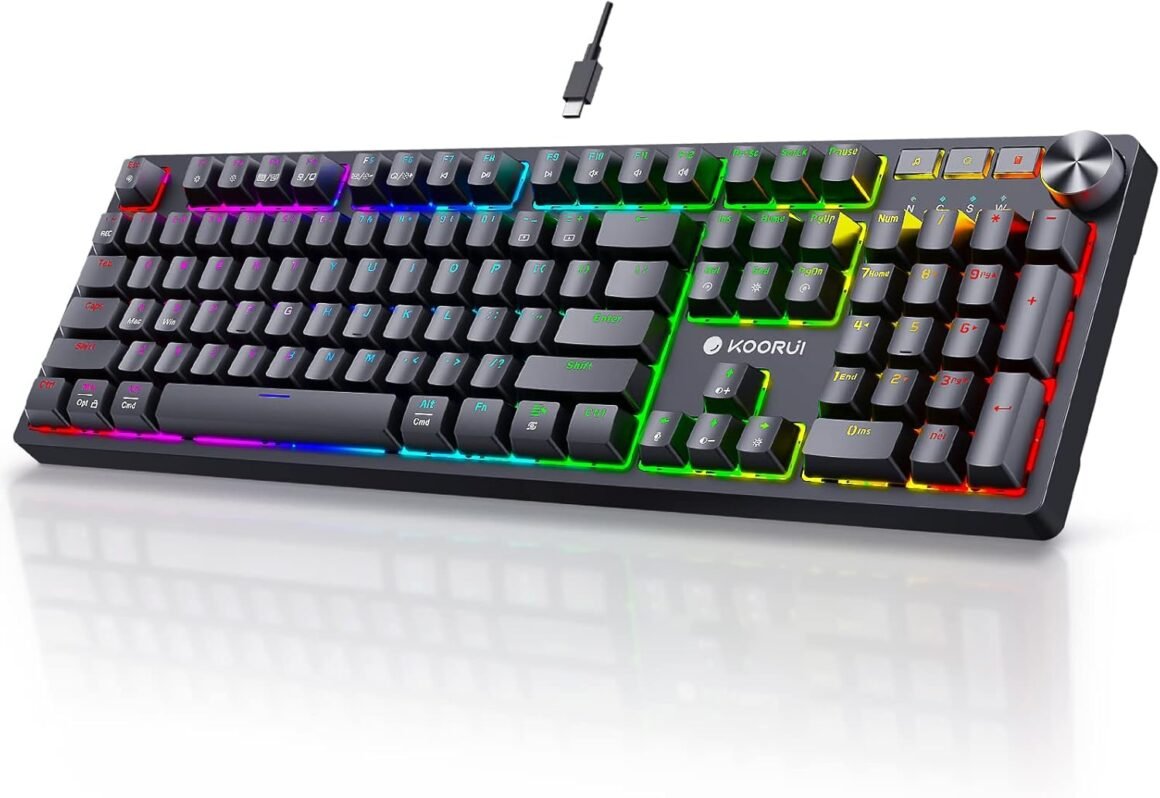
Product Description FULL SIZE 104 KEYS GAMING KEYBOARD Built-in lighting effect memory function, which saves you the hassle of reconfiguring the settings when you restart it Dual System Fast Control Technology Support Win Vista/XP/7/8/10/11、MacOS、Linux FN+A Mac System FN+S Win SystemFN+WIN Windows Lock BLUE SWITCHES Tactile feedback: provide a noticeable tactile bump, giving a satisfying feel and feedback when pressed Audible click: produce a distinct clicking sound, providing an audible confirmation for each keystroke Enhanced typing experience: The combination of tactile feedback and audible click can improve typing accuracy and gaming experience. REAL Hot-Swappable Switches Try different switch types and enrich your typing experience(DIY) FN+F1 Screen brightness – FN+F2 Screen brightness + FN+F3 Mission Control FN+F4 LaunchPad FN+F5 Keyboard brightness – FN+F6 Keyboard brightness + FN+F7 Play Prev FN+F8 Play/Pause FN+F9 Play Next FN+F10 Mute EXTRA 6 switches (two each of red, brown, and blue) EXTRA 2 in 1 keycap puller and switch puller The USB cable comes with Velcro, making it convenient for storage and organization All Keys No-Conflict Full-key anti-ghosting technology ensures that every keystroke is registered, and even when multiple keys are pressed at the same time, the keyboard’s super-responsive speed keeps up with your best moves, allowing you to enjoy a seamless, uninterrupted gaming experience and help you win games Common interface Type-C cable The Type-C cable allows for direct charging, enabling you to power on by plugging it in and power off by unplugging it. Double-shot Keycaps The double-shot injection keycaps are fade-resistant and long-lasting. Streamlined Design The support stand at the bottom of the keyboard can be opened to provide a comfortable typing angle, reducing pressure on the wrists. 💥26 Gorgeous Backlighting Effects: The 104 keys gaming keyboard offers 26 backlighting modes with RGB effects, providing over 16 million color combinations to personalize your keyboard’s appearance. The lighting also has a memory function, you can quickly resume your preferred lighting mode when restart computer.💥Hot-Swappable Switches: The full keys mechanical keyboard comes with six extra switches (two each of red, brown, and blue) for you to try different switch types and enrich your typing experience. Additionally, the double-shot injection keycaps are fade-resistant and long-lasting.💥Anti-Ghosting Technology: With full-key anti-ghosting to ensure every keystroke is registered, even when multiple keys are pressed simultaneously, enabling users to enjoy a seamless and uninterrupted gaming experience.💥Multi-Functionality and Compatibility: The keyboard has the leading dual system fast control technology, quick MW technology can realize the common multi-function combination control under Apple and Microsoft system, including multimedia control and other high frequency use scenarios, easy for you to achieve fast use.💥KOORUI SERVICES: KOORUI provide high-quality gamer keyboard and premium services, included 12 months warranty. If you find any damage, malfunction or missing accessories, please feel free to contact us.

The product being described is a full-size gaming keyboard with 104 keys. It features Blue switches that provide tactile feedback and an audible click, enhancing the typing experience and improving accuracy. The keyboard also has real hot-swappable switches, allowing users to try different switch types to customize their typing experience.

The keyboard comes with extra switches (red, brown, and blue), as well as a 2-in-1 keycap puller and switch puller for DIY customization. It has full-key anti-ghosting technology, ensuring every keystroke is registered even when multiple keys are pressed simultaneously. The keyboard uses a common interface Type-C cable for direct charging and has double-shot injection keycaps that are fade-resistant and long-lasting.

The keyboard offers 26 backlighting modes with RGB effects, providing over 16 million color combinations for personalization. The lighting has a memory function, allowing users to quickly resume their preferred lighting mode when restarting the computer. The support stand at the bottom of the keyboard provides a comfortable typing angle to reduce wrist pressure.

Overall, the keyboard is designed for gamers and offers multi-functionality and compatibility with both Mac and Windows systems. It is backed by a 12-month warranty and high-quality customer service from KOORUI. If there are any issues with the product, customers can contact KOORUI for assistance.

Price: $29.99 - $21.99
(as of Jul 04, 2024 01:25:40 UTC – Details)


Related Posts
Read More

IINE Retro Pocket Wireless Game Controller: Compact Gamepad with Hall Effect Joysticks, Customizable Buttons, and 1000Hz Polling Rate – Compatible with PC, Switch, Mobile, Steam Deck, and Tablets (Black)

Optimize your gaming experience with the IINE Retro Pocket Wireless Game Controller, featuring advanced Hall Effect joysticks for precision control, customizable button configurations, and a rapid 1000Hz polling rate. Perfectly designed for seamless compatibility with PC, Switch, mobile devices, Steam Deck, and tablets. Elevate your gameplay today!

Product description The video showcases the product in use.The video guides you through product setup.The video compares multiple products.The video shows the product being unpacked. IINE Retro Pocket Wireless Game Controller Merchant Video 22 3 3-2 3-3 3-4 1 ABXY Button Layout 2 Turbo Fucntion 3 4/8 Way D-pad 4 Wake-up Function 44 55

How to connect different devices?

Android: Hold [Pairing] + [A] 3s, select ‘IINE Gamepad’

IOS: Hold [Pairing] 3s, select ‘Xbox Wireless Controller’

Switch: Hold [Pairing] + [Y] 2s

PC: Hold [Pairing] 3s

DualShock4 Mode: Hold [Pairing] + [B] 3s, select ‘DualShock4 Wireless Controller’

How to Calibrate the Joysticks on the IINE Retro Pocket Controller?

1. With the controller off, hold [Home + Screenshot] – LED1 flashes slowly (Calibration Mode).

2. Press [A] to start – LED2 flashes slowly.

3. Rotate both joysticks in full circles 3 times each.

4. Press [A] to finish.

How to switch between XINPUT and DINPUT modes?

Hold [Start] + [Select] + [X] button for 3 seconds.


[Compact & Portable Design] Slip it in your pocket and take it anywhere! This ultra-compact wireless controller is ideal for gaming on the go, offering a lightweight yet ergonomic grip for extended play
[Advanced Hall Effect Joysticks] Enjoy smooth, drift-free control with high-precision Hall Effect joysticks and a recessed design that enhances grip and control. Combined with a 1000Hz polling rate for ultra-responsive input
[Recessed Joystick Design + Bonus Thumb Caps] Features a recessed joystick layout for improved thumb stability and precision during fast-paced gameplay. Comes with two bonus joystick extenders to enhance control accuracy and personalize your grip preference
[Customizable Button Mapping] Customize your gameplay with easily reconfigurable buttons and layout. Includes one-click adaptation for different button styles—perfect for users who switch between platforms
[Multi-Platform Compatibility] Seamlessly connects via Bluetooth to a wide range of devices—PCs, tablets, smartphones, handheld gaming consoles, car screens, and more. Plug-and-play simplicity without extra drivers
[Retro Style, Modern Features] Classic D-pad and ABXY layout inspired by retro aesthetics, upgraded with turbo functions and responsive triggers—blending nostalgia with cutting-edge tech
Read More

Redragon K673 PRO: Compact Wireless RGB Gaming Keyboard: Available now at [price_with_discount]

Product Description K673K673 K673 K673 That THOCK!

Equipped with 3.5mm sound-absorbing pads located between the PCB which absorbs the sound resonance between the metals and reduces the cavities noise.

K673 Mixed-Color Keycaps

Trending color match design, creative PBT keycaps mix deep blue and white elements. Based on a smooth surface board, neat and simple beauty.

K673 K673 Hot-Swappable

The unique exclusive structure design of the socket makes the switch mounting easier and less wobbling. All types of 3/5 pins switches are compatible.

K673 Dongle Socket

Armed with 3-mode connection technology, K673 enables wireless connection via a 2.4Ghz receiver, user-friendly design of the hub keeps the dongle hard to lose.

K673K673 Pro Software Supported

Expand your options using the available software to design your own new modes and effects found on redragonshop.

K673K673 Find Your Angle

With a two-level stand design, K673 offers 3 angles for your choice. Find the best choice you prefer, for max efficiency and wrist fatigue care.

K673K673 Redragon EPIC KB Add to Cart Add to Cart Add to Cart Add to Cart Add to Cart Add to Cart Add to Cart Customer Reviews 4.7 out of 5 stars 337 4.6 out of 5 stars 8,409 4.1 out of 5 stars 46 4.6 out of 5 stars 4,351 4.3 out of 5 stars 46 4.7 out of 5 stars 41 4.1 out of 5 stars 1,634 Price $64.99$64.99 $69.99$69.99 $64.99$64.99 $69.99$69.99 $46.99$46.99 $74.99$74.99 $64.99$64.99 Dimension 13.1 x 5.4 in 13.9×4.9 in 11.5×3.9 in 17.3 x 6.0 in 13.7 x 4.9 in 15.3 x 5.5 in 17.2×5.8 in Weight 0.95 kg 0.90 kg 0.56 kg 1.17 kg 0.73 kg 0.92 kg 0.73 kg Switch Red Switch Red Switch Magnetic Switch (HE Effect) Red Switch Red Switch Custom Switch (Litsea) Red Switch (Low profile) Keys 81 87 61 104 78 98 104 Extra G Keys 0 0 0 5 4 0 5 Connection Wired/BT/2.4Ghz Wired/BT/2.4Ghz Wired Wired/BT/2.4Ghz Wired Wired/BT/2.4Ghz Wired/BT/2.4Ghz RGB ✔ ✔ ✔ ✔ ✔ ✔ ✔ Software ✔ ✔ ✔ ✔ ✔ ✔ ✔
REDRAGON GASKET OUT - The body structure differs from traditional screw fixing by using precision-locked covers with gaskets to assist with noise reduction and flexibility. It provides even feedback while the vertical cushioning reduces rigid noise, delivering a crisp, clean and softer typing feel.
3-Mode Connection - Geared with Redragon advanced tri-mode connection technology, USB-C wired, BT 3.0/5.0 & 2.4Ghz wireless modes which make the user experience upgraded to another level in all fields.
ONE-Knob Control - Armed with a convenient easy access control knob, the keyboard backlight brightness and media (volume, play/pause, switch) are all in control with no hassle. Plus functionary with no extra keys or space to waste.
Noise Dampening X 2 - Equipped with two 3.5mm sound-absorbing foams located between the PCB, along with the silicone gasket. Significantly reduce the sound resonance between the metals and reduce the cavities noise. Creating a clear and pure switch traveling sound ONLY, no extra string mushy noise.
81 Keys Layout - The innovative design keeps the original 65% layout’s length, which cuts out the numpad for larger mouse moving space. While adding the TOP function keys zone that is critical to many users, no FN combo keys anymore, featuring compact with more convenience and practicality.
UPGRADED HOT-SWAP - The brand new upgrade with nearly all switches(3/5 pins) compatible, the free-mod hot-swappable socket is available now. The exclusive next-level socket makes the switch mounting easier and more stable than ever.
Pro Software Supported - Expand your options using the available software to design your own new modes and effects found on redragonshop. Macros with different keybindings or shortcuts for more efficient work and gaming.
Read More

VX2 AimBox: Keyboard and Mouse Adapter for Console Gaming, Compatible with Switch, Xbox, and Playstation: Available now at [price_with_discount]

Product Description 1 1

To meet the needs of the game players, we added the 3.5mm audio in the second version of LeadJoy VX2 AimBox. In the meantime makes up for the incompatibility of PS5 games in the first version of VX AimBox. Now you can use headphones to hear sounds, but also communicate with your teammates, perfect cooperation to get more victories. And you can also enjoy more PS5 games through the PS5 console.

3 3

Compatible with Xbox One, Xbox Series X/S, PlayStation 4, PlayStation 5 and Nintendo Switch.

LeadJoy VX2 Aimbox is compatible with PS5 games, which is not available in the first generation. Gamers guide PS5 consoles to play PS5 games through officially authorized third-party controllers, (The original PS5 controller does not support guidance, and some new games also don't support guidance. Like Rainbow Six).

Specification 3.5mm Audio Port: Yes (not supported on PS5) Battery: No Micro-USB Cable Length: 50 cm / 1.64 ft Type-C Cable Length: 50 cm / 1.64 ft Product Size: 80*58*18.5 mm / 3.15*2.28*0.73 in Net Weight: 84 g / 0.19 lbs

4 4

4 4

2 2

3.5mm Audio Port Supported

gamers can interact with teammates through the built-in 3.5mm headphone jack, and feel the stereo effect of the game through headphones

Extraordinary Gaming Experience

Use agility translation technology, ensures 1:1 game accuracy, precise aim in shooting games, and quickly drag and rotate with the mouse to give the enemy a fatal blow

Customizable via VLeed APP

You can easily customize keymaps and mouse sensitivity for any game through the GameSir APP when playing the video game. It's simple, flexible, and fast.

6 6

6 6

7 7

4 Silicone Anti-skid Foot Pads

Equipped with a counterweight inside and silicone rubber foot pads, it is not easy to slide and keeps stable. VX2 AimBox can be fixed on the table even in fierce battles, allowing you to devote yourself to the game and enjoy the happiness of the game.

Support Wireless&Wired Keyboard

VX2 AimBox supports both wireless and wired mouse and keyboard. Players according to their preferences to choose wireless or wired. Note: Mice and keyboards that require a driver to be installed before they can be used are NOT SUPPORTED.

Reversible 3 USB Port

The LeadJoy VX2 AimBox is equipped with a set of innovative features, including three Reversible USB 2.0 ports. It will help you to plug your USB mouse and keyboard in any direction, no need to recognize the upside and downside.

10 10

11 11

12 12

Connect to PlayStation 4/5

1. Go to PlayStation 4 “Accessories>Controllers>Communication Method>Use USB cable”

2. Connect the official PlayStation 4 game controller to the controller connection interface

3. Connect the keyboard/mouse to the keyboard/mouse interface

4. Connect the VX2 AimBox to the USB port of PlayStation4/ PlayStation 5 through the USB plug.

Connect to Nintendo Switch

1. Go to switch “System Settings> controller and sensors> Pro controller wired connection”, and adjust it to the “on” state

2. Connect the keyboard/mouse to the keyboard/mouse interface

3. Connect VX2 AimBox to the USB interface of the Nintendo Switch dock through a USB plug.

Connect to Xbox Series/Xbox One

1. Connect the official Xbox gamepad to the controller connection interface

2. Connect the keyboard/mouse to the keyboard/mouse interface

3. Connect the VX2 AimBox to the USB port of the Xbox Series through the USB plug.


【Upgraded Game Console Adapter】LeadJoy VX2 AimBox is the upgraded version of the most advanced keyboard and mouse adapter tech - the Agility Translator. It's compatible with Switch, Xbox One, Xbox Series X/S, PlayStation 4, PlayStation 5, and supports PS5 games too.
【Immersive Gaming Experience】Plug in your favorite headphones to the built-in 3.5mm audio jack of the VX2 AimBox and immerse yourself in your gaming world, free from surrounding noise. Communicate with your teammates in real-time, discuss tactics, and share the moment of victory.
【Precision and Speed】Experience fast turning and easy pinpointing in Returnal and other PS5 games with the keyboard and mouse controls. The VX2 AimBox offers 1:1 game accuracy, providing you with a comfortable and precise gaming experience.
【Customizable for Each Game】Different games require different in-game settings, and the VLead App enables you to fine-tune mouse, camera, joystick, keybinds, and lighting settings. Enjoy total control on the battlefield with your preferred and familiar configuration.
【365-day Warranty】We provide a 365-day support, repair or replacement warranty. If you have any questions about the VX2 AimBox, please don't hesitate to contact us.Important Notes: 1. Maximize in-game sensitivity before use. 2. Mice that require drivers to be installed before use are not supported.
Read More

Renewed Logitech G Pro TKL Mechanical Gaming Keyboard – GX Blue Clicky Switch, LIGHTSYNC RGB, 12 F-Key Macros: Available now at [price_with_discount]

PRO Keyboard The pros asked, we listened. With a compact design and pro-grade clicky switches, PRO is pro-tested, tournament-assured and built to win. Built for pros from the bottom up. A compact tenkeyless design frees up table space for low-sens mousing. Pro-grade Clicky switches give you an audible feedback bump. Programmable LIGHTSYNC RGB and onboard memory lets you customize and store a lighting pattern for tournaments. A detachable cable makes for easy transportation. Play to Win. The Logitech Pro Mechanical Keyboard features a compact tenkeyless design, complete with a detachable cable for users who like to take their gaming gear on-the-go. Built with Logitech GX Blue switches, this keyboard offers a tactile and audible typing experience. By downloading the Logitech G Hub software, users can customize its LIGHTSYNC RGB lighting that offers users plenty of color and lighting effect options to choose from to best suit their style. Users can also sync compatible products for a unified theme as well as set up custom macro commands for its twelve function keys.
GX Blue Switches - Mechanical keyboards utilize a different type of key switch technology for a more durable and unique typing experience. The Logitech GX Blue switch has an actuation force of 50g and offers both an audible "click" and a tactile bump when pressed, letting you know that the key has registered. The "click" comes from a mechanism within the switch that triggers when the key reaches its actuation point.
LightSYNC RGB - LIGHTSYNC RGB Lighting offers users plenty of color and lighting effect options to choose from to best suit their style. Users can also sync compatible products for a unified theme.
3 Angles + Rubber Feet - The rubber non-slip rubber feet prevent the keyboard from moving and have three levels of adjustments to fit your preference.
12 Programmable F-Keys - Execute a set of complex or timed actions or commands with the press of a button. F-key (F1-F12) programming and use requires Logitech G HUB software.*
Ultra portable compact design - Ultra-portable compact tenkeyless design frees up table space for mouse movement. It’s easy to pack up and transport to tournaments.