InnoGear Desktop Mic Stand for Blue Yeti & More: Available now at [price_with_discount]

Product Description InnoGear is a pioneer company in the art of aromatherapy, solar light and music accessories that will transform our routine life naturally. We continuously innovate to integrate nature and technology to provide comfortable, superior and straightforward products as we aim to help you spread care for your family. InnoGear Adjustable Desktop Microphone Stand Good quality & Stable Are you looking for the right desktop microphone stand to use? InnoGear desktop microphone stand is a solid pick for you which could be a great fit for professionals and beginners. It’s height-adjustable between 10.6 to 15.4 inches, giving you a lot of control about the height. The heavy metal base is to keep your mic secure and not easy to fall off. On the bottom of the base, it comes with four non-slip pieces of cotton in order to prevent your table from being scratched when moving. The 5/8″ male to 3/8″ female screw is suitable for Blue Yeti, Blue Yeti Pro, Snowball and other microphone. Perfect for broadcasters and podcasters to create a masterpiece. Max. Microphone Clip Diameter is 1.26″/32mm Height Adjustable & Portable The height of stand is adjustable from 10.6 inches to 15.4 inches. You can adjust the height you want according to your actual needs. It is easy to carry, providing great convenience for various types of activities like meetings, broadcasting. Upgraded Advantages The knob of InnoGear desktop mic stand is designed to screw type, tight and safe. The all-metal base has 4 non-slip pads at the bottom to protect your table from scratches. The bigger diameter of base enhances stability greatly. Easy to Install The desk mic stand is easy to install and use. Unscrew the knob to adjust the height you need. Use the included metal 5/8“ male to 3/8” female screw to connect your microphone such as Blue Snowball, Blue Yeti and more. Add to Cart Add to Cart Add to Cart Add to Cart Add to Cart Customer Reviews 4.5 out of 5 stars 235 4.5 out of 5 stars 453 4.2 out of 5 stars 91 4.5 out of 5 stars 203 4.6 out of 5 stars 415 Price $32.99$32.99 $26.99$26.99 $14.99$14.99 $18.99$18.99 $27.99$27.99 Adjustable ✓ ✓ ✓ ✓ ✓ Compatibility Microphone Microphone Cellphone, harmonic, capo, tuner, tablet Microphone Projector, laptop, musicbook Larger Base Diameter and Heavier Weight: Enhanced with a sturdy metal base measuring 5.12″ in diameter and weighing 1.85 pounds, the mic stand ensures stability and surface protection with four non-slip pads.Adjustable Height: Effortlessly adjust the desktop mic stand’s height from 10.6″ to 15.4″ with a secure screw-in knob, providing superior stability compared to snap-on knobs prone to loosening over time. This ensures the boom mic stand maintains its height without any sliding down.Upgraded Load bearing Capacity: High quality metal material ensures an excellent load bearing capacity of up to 3.3 lbs, compared to others of 2.2lb max load capacity; InnoGear microphone stand allows seamless, quiet positioning, crucial for live recordings.Strong Compatibility: With a 3/8″ to 5/8″ adapter, the desk mic stand is compatible with Blue Yeti, Blue Yeti Pro, Blue Snowball, HyperX QuadCast, SoloCast, Fifine, AT2020, Razer Seiren X, and other microphones. The package also comes with a mic clip with a max diameter of 1.26″, compatible with dynamic microphones such as Shure SM58, Shure SM48, Samson Q2U, Shure PGA48, etc.Portable & Convenient: Easily transportable and simple to set up, fitting into a laptop bag without occupying much space. Ideal for conferences, churches, and public venues.

The InnoGear Adjustable Desktop Microphone Stand is a high-quality, stable microphone stand suitable for professionals and beginners. It is height-adjustable between 10.6 to 15.4 inches and features a heavy metal base with non-slip pads to keep your mic secure and prevent scratching of your table. The stand is easy to install and compatible with various microphones, making it perfect for broadcasters and podcasters.

The stand also has upgraded features such as a screw-type knob for safety, a larger base diameter for increased stability, and a higher load-bearing capacity of up to 3.3 lbs. It comes with a 3/8″ to 5/8″ adapter for compatibility with popular microphones like Blue Yeti, Blue Snowball, and more. Additionally, the stand is portable and convenient, making it ideal for meetings, broadcasting, conferences, and public venues.

Overall, the InnoGear Adjustable Desktop Microphone Stand has received positive reviews from customers, with an average rating of 4.5 out of 5 stars. It is available for purchase at a reasonable price and offers a reliable solution for your microphone needs.

Price: $17.99 - $15.99
(as of Aug 31, 2024 17:17:08 UTC – Details)


Related Posts
Read More

“4-Pack Vaxson Anti Blue Light Screen Protectors for AYANEO FLIP KB 7″ – TPU Film Stickers”: Available now at [price_with_discount]

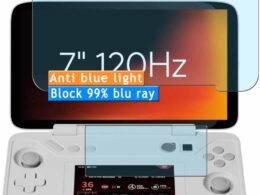
Why choose Anti Blue Light screen protector: It can block most harmful blue light, and the blocking range is between 380nm 495nm, providing a wide range of HEV protection. It has the functions of anti-radiation, anti-ultraviolet and anti-static, which can greatly reduce the damage of blue light and ultraviolet light to our eyes, effectively relieve eye fatigue and headache, help you sleep better and enjoy digital time at ease. Precise Cutting:Advanced precision laser cutting technology ensures the film to cover your device to the greatest extent. High Sensitivity: High sensitivity and HD definition bring you fast application startup, smooth game and video playback, let you enjoy the comfort of fluency. Self-healing Technology:Self-healing technology enables the film to recover from minor scratches in 48 hours, keep your screen brand new.
Please note that this protective film is made of flexible plastic.
Blue Light Filter: UV400 protection, anti-static, relieve the fatigue of eyes and help you sleep better.
4H hardness protects your screen from daily scratches, scrapes, and normal signs of wear.
Self-healing technology enables the film to recover from minor scratches in 48 hours.
Bubble-free, fingerprint-free, dust-resistant. No sticky residue when removed.
Read More

Koiiko Wireless Gaming Controller: Hall Effect Triggers, Rocker Design, Multi-Platform Compatibility, Bluetooth Connectivity (Graffit Black): Available now at [price_with_discount]

Product Description Wireless gaming controllerWireless gaming controller Function BlockFunction Block Function IntroductionFunction Introduction Connection method Wireless PC Game Controller

Make sure controller is off, hold down ‘R’ key, then press 'Home’ key for 2 sec to boot controllerSearh and select Connect Bluetooth 'Xbox Wireless Controller' Connection method Play Directly on your iPhone

Make sure controller is off, hold down ‘R’ key, then press 'Home’ key for 2 sec to boot controller'Searh and select Connect Bluetooth 'Xbox Wireless Controller'Android users boot mode 2: 'Y+HOME' Connection method Play Directly on your Android phone

Make sure controller is off, hold down ‘R’ key, then press 'Home’ key for 2 sec to boot controller'Searh and select Connect Bluetooth 'Xbox Wireless Controller'Android users boot mode 2: 'Y+HOME' Connection method Wireless Nintendo Switch Game Controller

Make sure controller is off, hold down ‘ZR’ key, then press 'Home' key for 2 sec to boot controller'The controller will automatically connect to the console Connection method Wireless PS4/PS3 Game Controller
Make sure controller is off, connect the controller to the PS3/PS4 console with Type-C cable Press ‘Home’ key , the controller will automatically connect to the console Ergonomic design compliantErgonomic design compliant

Why controller doesn’t work after connection

Please remove and delete Bluetooth connection then recon nect it again, or reset the controller.

Can’t power on the controller after charging overnight

While charging, the charging led light stays on, but still cant power on the controller. Then, you need to press the RESET key to reboot the controller.

Why does the button flip /fail to connect after connection?

The graffiti version requires pressing "home+A+Y" to press the button in the Bluetooth mode of the" Xbox wireless controller".

The regular version requires pressing "Home+b+x " to switch between buttons.

Why I can’t turn on the new Gamepad?

Please recharge the Gamepad before you use it at the first time or use it again after a long period.

How to reset default setting for the gamepad?

There is a ‘Reset’ hole on the back of the gamepad. When gamepad is turned on, press the reset button, LED light will turn off after reset.

Product Description

Name Wireless Controller for Tesla/Android/iOS/PC/Switch/PS4/PS3 Size Small Size (14cm*9cm*4cm/5.51*3.54*1.57in, 173g/0.38Ib.) Product List 1x Wireless Gamepad; 1x Type C Charging Cable; 1x User Manual Support iOS 13.0+ Phone game controller for iPhone 15/iPhone 15 Plus/iPhone 15 Pro/iPhone 15 Pro Max/iPhone 14/14 Plus/14 Pro /14 Pro Max/ iPhone 13/13 mini/13 Pro/13 Pro Max/iPhone 12/12 mini/12 Pro/12 Pro Max/iPhone 11/11 Pro/11 Pro Max/iPhone X/XR/XS/XS Max/iPhone 8 Plus/7 Plus/6 Plus; for iPad controller: iPad/iPad Mini/iPad Pro/iPad Air(Not for Apple TV&iPod, Fire TV/TV Box) Support Android 6.0+ Phone controller compatible with Samsung Galaxy S23, Galaxy S23 Ultra, Galaxy S23+, Galaxy S22, Galaxy S22 Ultra, Galaxy S22+, Galaxy S21, Galaxy S21 Ultra, Galaxy S21+, Galaxy S20, Galaxy S9, S9 + , S10, S10+, oppo, vivo, LG, X-iaomi, O-nePlus, M-otorola, TCL and more Android phones. Tablet controller compatible with Samsung Galaxy Tab S, Galaxy Tab A, Lenovo Legion Y700 etc. Support PC PC wireless controller for MacBook, PC, Notebook, Laptop (If your PC does not have its own Bluetooth function, then you need to buy another Bluetooth receiver(Bluetooth Receiver Hardware Required: Bluetooth 4.2 +) Support Switch Pro controller for Nintendo Switch, Switch OLED, Switch Lite Support PlayStation Wireless controller for PS3, PS4, PS4 Pro, PS4 slim (only supports playing PS4 games on PS5 consoles; No support for playing PS5 games) Support Cloud Gaming Support cloud gaming on iOS/Android mobile or tablet: Nvidia GeForce Now, xbox game pass, Amazon Luna, Google Stadia, Rainway, Moonlight, Arcade Tips for the Controller Please fully charge the controller before first use. (2)Ensure that the controller is turned off before Bluetooth pairing connection.
📱🖥【COMPATIBILITY】 Koiiko wireless gamepad compatible with most platform, for iphone, iPad, Android, TCL, LG, Tablet, tablet, play the iOS, Switch and PC games, support for Steam, PlayStation4/3 and most; for Nintendo Switch/Switch OLED/Switch Lite.(Not support Apple TV&iPod, Fire TV/TV Box.)
🎮🕹️【MULTI-FUNCTIONAL BLUETOOTH CONTROLLER】 Koiiko mobile controller is equipped with clickable thumbsticks, turbo, 6-axis gyro, responsive Hall Linear Trigger, Hall Rockerand 2 back buttons programmable function.(Vibration and 6-axis gyro supported on PC/PS3/PS4/Switch only)
🎮✨【Dazzling Cool Lighting design】The Koiiko mobile controller has a dedicated light adjustment button, Featuring a 7-color RGB breathing light. Compatible with 5 RGB light modes on the joystick, press the Button to Choose Your Favorite Color Light for Everyday Mood.
🎮✅ 【PRO GAMING GRADE KEYS GAME CONTROLLER】 Koiiko mobile controller is equipped with LB RB M1 M2 buttons. Highly customized,up to 30 actions keys could be saved per profle to allow gamers take ultimate skill by one click, gaming become more easily and fun.
🎮☁【ADVANCED CLOUD GAMING SERVICES】 Koiiko Mobile Controller offers seamless connectivity for a variety of devices and support most Cloud Game App including Play Space,Nvidia GeForce Now, Xbox game pass, Amazon Luna, Google Stadia, Rainway, Moonlight etc.. lets you play games without needing to download them.
🎮🎉【ADVANTAGE】Koiiko Mobile Controller no 2.4G adapter needed, no worry about missing the dongle.Has a 600mA Built-in Lithium Battery, allow you to use continuously for at least 10 hours!!Easy To Carry, Small and lightweight design for easy to carry and storage.
🥰 🥰【PACKING & TECHNICAL SUPPORT SERVICE】Package include: Game controller x 1, ,USB cable x 1, User manual x 1. Contact us for any questions,Our technology team will provide you technical support service.
Read More

AULA F2088 Typewriter Style Mechanical Gaming Keyboard – Blue Switches, RGB LED Backlit, Retro Keycaps, USB Wired: Available now at [price_with_discount]

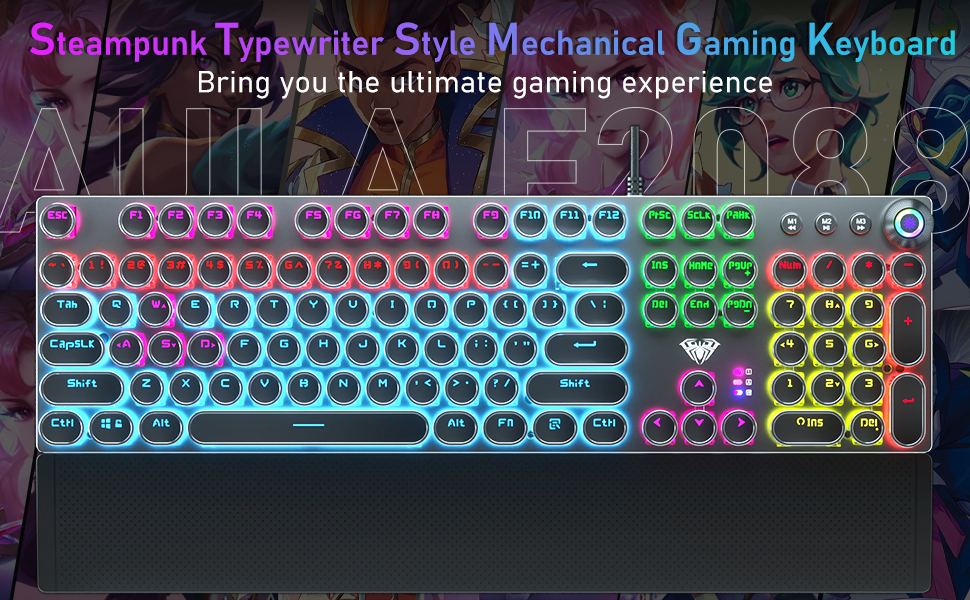
Product Description typewriter keyboard rgb wired keyboard typewriter style mechanical keyboard led cool gaming keyboardtypewriter keyboard rgb wired keyboard typewriter style mechanical keyboard led cool gaming keyboard

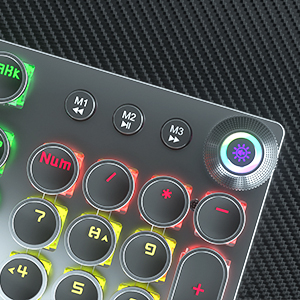
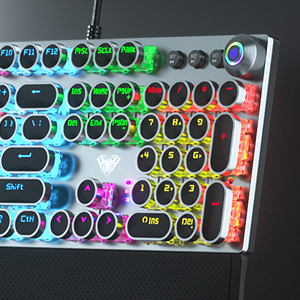
MULTIFUNCTIONAL KNOB: CONTROL MEDIA VOLUME AND LIGHTING EFFECTS

typewriter keyboard rgb mechanical gaming keyboard retro keyboard volume knob light up keyboard ledtypewriter keyboard rgb mechanical gaming keyboard retro keyboard volume knob light up keyboard led How to switch the mode of the knob?

Long press the knob until the knob LED light OFF: enter the multimedia mode.

Long press the knob until the knob LED light ON: enter the lighting control mode.

Lighting Effect Control

When the LED light of knob is on, the knob is in the light effect control mode:

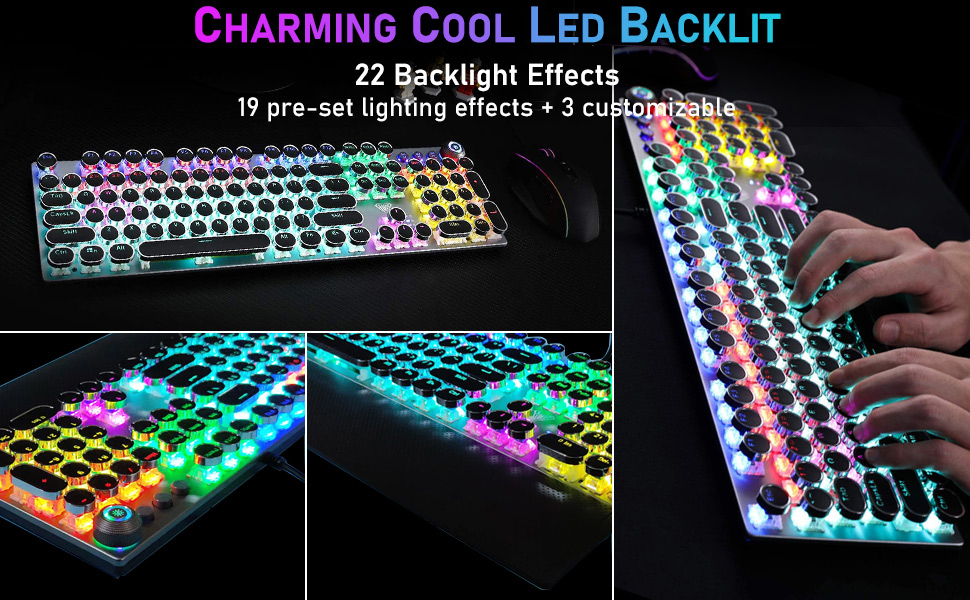
1.Click the button to switch the light effect mode and store up to 19 lighting effects.

2.Rotate the knob to adjust the brightness.

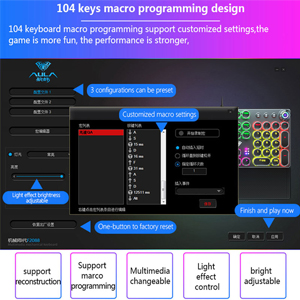
3.You can customize 3 lighting effects according to your preference through M1/M2/M3 keys. (Refer to the manual)

Media Volume Control

When the LED light of knob is off, the knob is in the multimedia mode:

1.Click the button to mute the function.

2.Rotate the knob to adjust the volume.

cool keyboard rgb rainbow backlit mechanical keyboard gaming type writer keyboard light up keyboardcool keyboard rgb rainbow backlit mechanical keyboard gaming type writer keyboard light up keyboard  typewriter mechanical keyboard wired rgb gaming keyboard retro keyboard led light up keyboard cool typewriter mechanical keyboard wired rgb gaming keyboard retro keyboard led light up keyboard cool

FULL-SIZE GAMING/OFFICE MECHANICAL KEYBOARD

Convenient Shortcut Keys

FN+F1 (My Computer); FN+F2 (Search)

FN+F3 (Calculator); FN+F4 (CD Player)

FN+F5 (Previous Song); FN+F6 (Next Song)

FN+F12 (Lock/Unlock Full Keyboard)

FN+WIN-L (Lock WIN+APP)

FN+-→(Speed+); FN+<←(Speed-)

FN+PRTSC (6-key Rollover)

FN+SCRLK (N-key Rollover)

typewriter keyboard mechanical ergonomic wrist rest keyboard rgb game keyboard retro cool keyboardtypewriter keyboard mechanical ergonomic wrist rest keyboard rgb game keyboard retro cool keyboard

retro typewriter keyboard rainbow backlit keyboard typewriter gaming keyboard mechanical round keyretro typewriter keyboard rainbow backlit keyboard typewriter gaming keyboard mechanical round key

typewriter gaming keyboard wired blue switch mechanical keyboard computer keyboard light up keys ledtypewriter gaming keyboard wired blue switch mechanical keyboard computer keyboard light up keys led

 programmable keyboard mechanical keyboard cool keyboard computer light up keyboard rainbow keyboard programmable keyboard mechanical keyboard cool keyboard computer light up keyboard rainbow keyboard

Retro Typewriter Style Mechanical Keyboard Blue Switch for Both Gaming and Office Support Macro Programming

Specification

Keyboard Size 435×123×38mm Wrist Rest Size 435×68×15mm Connection Method USB Wired Cable Length 1.8m Number of Keys Full Size Keyboard(104 normal keys + 4 multimedia keys) Key Stroke 4.0mm Keystroke Force 60±10g Key Life Times 100 Million Times Rated Voltage DC 5V Rated Current 250mA Types Of Lighting Effects 22 Kinds Knob Function Media Volume Control/Lighting Effect Switch Switch Type Blue Switch System Support Mac OS, Windows 7/8/10/Vista Applicable Equipment Ps4/ Ps5/ Xbox/ Pc/ Mac/ Laptop/ Tablet/ Notebook/ Desktop Computer Material Metal Panel/Alloy Knob/ABS Keycaps/LED Backlight/Nylon Braided Wire/Silicone Base/Plastic Keyboard Stand
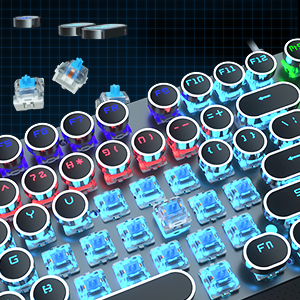
💻⌨️🖥️【Retro Typewriter Style Round Keycaps】Mechanical blue switch offers a quicker and springier response, crisp click sound, precise tactile feedback for ultimate gaming performance. Double-shot injection molded Vintage steampunk round keycaps for clear backlight and extreme durability, The stepped floating keycap fit your fingertips perfectly for precise positioning, prevent fatigue and wrong typing. Comes with keycap puller for easy keycaps cleaning.
🖥️⌨️💻【Multimedia & Backlight Control Knob】This wired mechanical keyboard effortlessly controls media thanks to its dedicated media control keys. Quick-access buttons for media volume, backlight effect, music play/pause/switch. You can switch 19 different lighting effects or adjust the backlit brightness and speed. And you can create 3 customized backlight as you like. Long press knob for three seconds to switch between media and lighting modes.
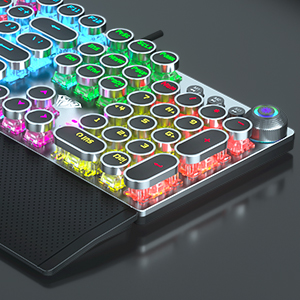
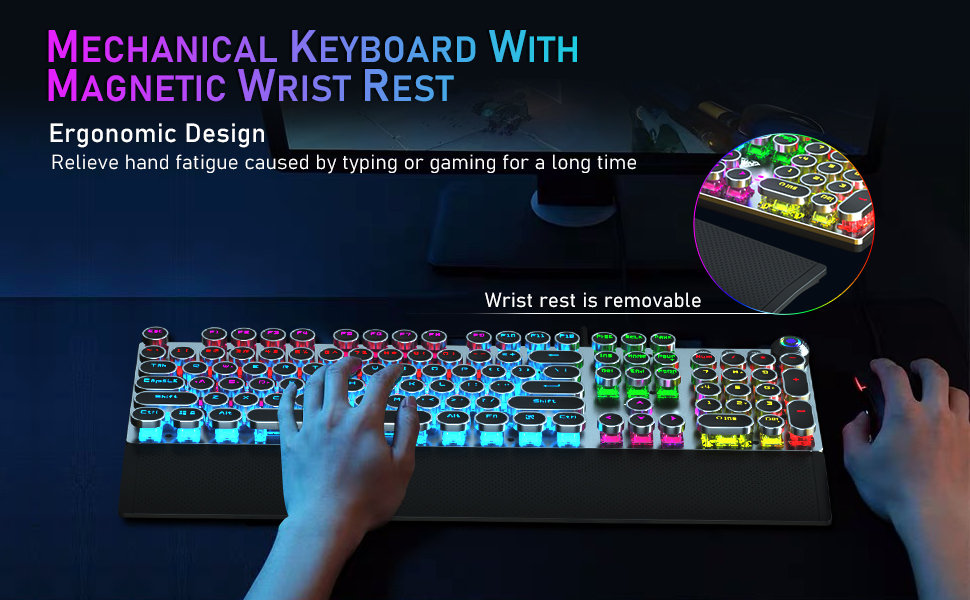
💻⌨️🖥️【Metal Panel & Magnetic Wrist Rest】The computer keyboard panel is made of top-grade aluminium alloy material, with matte-finish texture, sturdy and robust enough to protect it from scratch. The ergonomic ABS palm rest provides firm support that alleviates pressure on your wrist from gaming at an elevated angle. The surface has a smooth and comfortable touch that enhances the feeling of the keyboard. USB connector for a reliable connection and ultimate gaming performance.
🖥️⌨️💻【104 Keys Anti-Ghosting Programmable】This mechanical gaming keyboard features Anti Ghosting Technology which ensures your simultaneous keystrokes register the way you intended, allow multi-keys to work simultaneously with high speed. Each key is controlled by independent switch, let you enjoy high-grade games with fast response, boosting your performance! The PC Gaming Keyboard has been ergonomically designed to be a superb typing tool for office work as well.
💻⌨️🖥️【Stylish Durable & Wide Compatibility】Modern and sleek design with superior performance. High low key layout with suspended round key fits fingers effectively, help reduce hand fatigue, aluminum alloy metal panel, matte texture, sturdy and robust, protect it from scratch. Support PC Mac Laptop, Tablet, Desktop computer, suitable for Windows 7/8/10/XP/Vista, Linux and Mac OS systems. USB wired conection, plug and play! No drivers or softwares are required.
Read More

“ASUS ROG STRIX GA15 Gaming Desktop – AMD Ryzen 7, NVIDIA RTX 3080, 64GB RAM, Windows 11 Pro”: Available now at [price_with_discount]

Statement:
Original Seal is opened for upgrade ONLY. If the computer has modifications, then the manufacturer box is opened for it to be tested and inspected and to install the upgrades to achieve the specifications as advertised
Brand: ASUS
Operating System: Windows 11 Pro
Processor Model: AMD Ryzen 7-5800X
Processor Cores: 8-core
Processor Thread: 16 threads
Processor Speed: 4.70GHz
Processor Brand: AMD
Graphics: NVIDIA GeForce RTX 3080
Graphics Type: Dedicated
Graphics Brand: NVIDIA
System Memory (RAM): Up to 64GB DDR4 RAM
Type of Memory (RAM): DDR4
Storage Type: SSD
Total Storage Capacity: Up to 4TB SSD +2TB HDD
Solid State Drive Interface: PCIe
Hard Drive Interface: SATA
Wi-Fi: Wi-Fi 6 (802.11ax), Bluetooth
Color: Black
Ports:
Front:
1 x USB 3.2 (Gen 1 Type-C)
1 x USB 3.2 (Gen 1 Type-A)
1 x headphone
1 x microphone
Back:
4 x USB 3.2 (Gen 1 Type-A)
2 x USB 3.2 (Gen 2 Type-A)
1 x VGA 15-pin
1 x DVI
1 x HDMI
4 x eSATA 6Gb/s
1 x LAN RJ-45
3 x Audio
Dimensions Width x Depth x Height (inches): 7.28" x 16.57" x 19.61"
Product Weight: 24.25 pounds
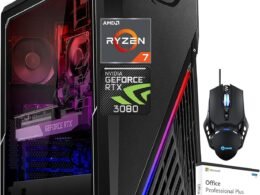
Processor: Equipped with AMD Ryzen 7-5800X,up to Turbo Boost 4.70GHz, 8 cores, 16 threads). It delivers exceptional computing power for gaming, content creation, and multitasking, ensuring a seamless experience even during the most demanding tasks
Incredible Graphics: NVIDIA GeForce RTX 3080 (10 GB GDDR6 dedicated). This gaming desktop is designed to render lifelike visuals and deliver a captivating gaming experience. With advanced ray tracing and AI capabilities, you can expect realistic graphics and smooth gameplay, making it perfect for both gaming and creative work
Connectivity: This desktop ensures flexibility and convenience in connecting with the Wi-Fi 6 and Bluetooth, and it includes, Front: 1 x USB 3.2 (Gen 1 Type-C), 1 x USB 3.2 (Gen 1 Type-A), 1 x headphone, 1 x microphone; Back: 4 x USB 3.2 (Gen 1 Type-A), 2 x USB 3.2 (Gen 2 Type-A), 1 x VGA 15-pin, 1 x DVI, 1 x HDMI, 4 x eSATA 6Gb/s, 1 x LAN RJ-45, 3 x Audio
Operating System: The combination of Windows 11 Pro and Microsoft Office makes this ASUS ROG Stri GA15 Gaming Desktop a powerful and versatile solution for a wide range of tasks
Enhanced Cooling: Keep your system cool and running at optimal performance levels with Flow Tech Ventilation, designed to maximize airflow and reduce internal temperatures