“Exlene® 10ft USB Gamepad Joystick 2-Pack for PC, Raspberry Pi, Sega Genesis”: Available now at [price_with_discount]

Product Description To cater most of our customers’ needs,Exlene lanched this new version usb snes controller with 3M long cable and sensitive buttons. It Bring Back Your Youth Memories With USB SNES / NES Controller.With this USB controller, your raspberry pi 3 could act as a retro gaming machine. Package: 2 x EXLENE SNES Retro USB Super Nintendo Controllers Supported Operating system: Windows 98, ME, Vista, 2000, 2003, XP, 7, 8, 8.1, 10; Linux UBUNTU, Linux Mint, Android Linux (via an USB OTG cable); Mac OS X and beyond; Retrogaming operating systems: RetroPie, Recalbox, Happi Game Center, Lakka, ChameleonPi, Piplay. Supported Device (With USB storage device): PC, Notebook Computer, Laptop Computer; MacBook; Raspberry Pi (RPI, Raspberry pie): Raspberry Pi 1 Model B, Model A, Raspberry Pi 1 Model B+, Raspberry Pi Zero, Raspberry Pi 2, Raspberry Pi 3 Model B, Raspberry Pi 3, Retro Pie. Supported Platform: Steam (Not Support all games. Perfect for Several simple steam games) Supported Game Emulators: NES, SNES, Snes9x, ZSNES, Higan, Handheld GBA emulator, Sega Genesis emulator, Sega OpenEmu (Only support OS X) About Exlene Exlene is a good online provider with gamepads and accessories like charging cables, extension cables, wall charger,SNES controller, GBA usb cables…etc.We try to service our each customer with best quality at best offer! 3M long cable 3M cable puts you far away from the display,you don’t have to research USB extender cables for these controllers any more.You can play games on bed. Good responsiveness Unlike previous versions whose D-pad button need to be pressed multiple times or very hard to register,this new updated version controller solved the problem by using high quality conducting resin inside.The buttons are are easy to get response and have much better performance now. Playing super Nintendo Games Support to play the old games, like super Mario, Teenage Mutant Ninga Turtles, Contra(Operation C), Ninja Gaiden, The Legend of Zelda, DOUBLE DRAGON, Downtown – Nekketsu Monogatari, Tetris… Compatible with Compatible with for Raspberry Pi /Raspberry PI 2 model B /Retro Pi OS/Retropi System Compatible Platform: for SNES/NES emulator,PC,MAC,Raspberry Pi (RetroPie),used it as a SNES, NES, and Genesis controller Works instantly on GNU/Linux (Ubuntu specifically).It does not work with tv box android to play emulators. Works great on android phone by an OTG cable This snes usb game controller works with an emulator on Android. Any emulator with usb input support should support it. The controllers are great for playing classic games It is amazing to feel what an old-school controller used to be like. They bring you back many memories of long nights and crazy experiences with your family playing Mario Kart and similar games from your youth. √Standard USB port: Plug and play, nothing else necessary. It works with any emulator you wish to download and use. (Just Google SNES emulator). Good button response for precision control: no mushiness or sticky buttons.√3M usb cable: you can play comfortably while sitting on couch instead of the floor 3ft away from the screen,you don’t get that kink in your neck looking up at the TV.The kids won’t throw the remote at the TV if they are too close.√Great for playing classic games: especially those looking to extend their controllers to multiplayer sessions. These work great for Genesis, SNES, NES, and Gameboy games, and any handheld gaming machine up to the DS on emulation.√Feel close to the original controllers: it is third-party product.Good for you to come weekends playing old school games with friends, they are to size and feel like the real thing if you like to play retro games on the go.√100% satisfaction guarantee: 100% money back guarantee if not satisfied for any reason. Any quality problem,feel free to return or exchange. Kindly please feel free to message us, we will try everything to help you!

Exlene has launched a new version of the USB SNES controller with a 3M long cable and sensitive buttons, designed to bring back memories of playing classic games. The package includes 2 controllers and is compatible with various operating systems and devices, including Raspberry Pi. The controller works well with emulators on Android phones and is great for playing retro games like Super Mario and Zelda. The controller has a standard USB port for easy plug and play functionality and offers good button response for precision control. The 3M cable allows for comfortable gaming from a distance, and the controllers are great for multiplayer gaming sessions. They closely resemble the original controllers and come with a 100% satisfaction guarantee. Overall, the Exlene USB SNES controller is a great option for those looking to relive their favorite childhood games with friends and family.

Price: $6.99
(as of Jul 17, 2024 00:18:32 UTC – Details)


Related Posts
Read More

“Ultimate Replacement Battery for ASUS ZenBook UX303 – C31N1339 [11.31V50WH]”: Available now at [price_with_discount]

Product Description ANGWELANGWEL BPU37BPU37 Fit for P/N C31N1339 0B200-9300000 3ICP7/55/90 Compatible Laptop Model

Asus ZenBook UX303 SeriesAsus ZenBook TP300L SeriesAsus ZenBook Q302L SeriesAsus ZenBook UX303L SeriesAsus ZenBook UX303LA SeriesAsus ZenBook UX303LN Series BPU37-1BPU37-1

IC 222IC 222

222222

444444

Some time because the residual power stored in the laptop components will battery can not recognize by the laptop or the battery seem to does not working. Please disconnecting the old battery, and holding down the power button for 20 seconds, then connect the new battery. This drains the residual or flea power and once the laptop is reassembled the battery will function properly.

For initial using of the battery, please first of all discharge it to 3% and then fully charge it to 100%. For normal daily usage, please recharge immediately when the battery reduced to 3%, it is prohibited to discharge the battery to 0% as that will shorten the battery life and causing damages to the battery. Battery down to 3%, must charge it within two days, otherwise it cannot recharged again.

If you do not use the battery for a long time(3 months or more), you should charged the battery to a minimum level of 50%.The battery needs to be constantly recycled. It is recommended to fully discharge to 3% and recharge to 100% once every two months in order to maintain the best state. Add to Cart Add to Cart Add to Cart Customer Reviews 4.4 out of 5 stars 231 4.3 out of 5 stars 120 3.8 out of 5 stars 7 5.0 out of 5 stars 2 Price $10.99$10.99 $12.99$12.99 $8.99$8.99 — Input 100-240V 100-240V 100-240V 100-240V Output 20V 2.25A / 5V 3A / 12V 3A / 15V 3A 20V/3.25A, 5V/3A, 9V/3A, 15V/3A 20V 2.25A / 5V 3A / 12V 3A / 15V 3A / 3A(9V, 15V), 2.25A(20V) / PPS : 4.05A(3.3-11.0V) or 2.8A(3.3-16.0V) or 2.1A(3.3-21.0V) Power 45W Max 65W Max 45W Max 45W Max Compatible Model HP X360 Chromebook Spectre 12 13 15; Dell XPS 13 15 Latitude 13 14 ; Lenovo Thinkpad T470; Google Pixel 2 XL; Tablets and Smartphones with USB TYPE-C Port series HP Spectre X2 Spectre x360 Chromebook 11 13 14 ProBook 455 EliteBook x360; Dell Latitude 11 12 13 14 15 17 XPS 12 13 15 Chromebook 3100 Chromebook 5190 2 in 1;IdeaPad Yoga 720 730 [Fit below 45 watts] HP X360 Chromebook Spectre 12 13 15; Dell XPS 13 15 Latitude 13 14 ; Lenovo Thinkpad T470; Google Pixel 2 XL; Tablets and Smartphones with USB TYPE-C Port series Galaxy S22/ S22 Ultra/ S22+/ S20 Ultra / Note 10 Plus /IPhone 13, 13 Pro, Pro Max, Mini, iPhone 12, 12 Pro, 12 Pro Max, SE/iPad Pro 2018, 2020, iPad Air 4, 3, 2
Battery Type: Li-ion ; Voltage: 11.31V; Capacity:50Wh
Fit for P/N : C31N1339 0B200-9300000 3ICP7/55/90
Compatible with Model: Asus ZenBook UX303 UX303L UX303LA UX303LN TP300L Q302L Serie
Amazon return windows will close after one month, don’t worry about it, you can click on seller store on right corner “ask a question” and contact seller directly for 12 month warranty
Read More

“Wireless PS4 Controller: Dual Shock, Motion Sensor, Touch Pad, Speaker & Headset Jack”: Available now at [price_with_discount]

Product Description ps4 controller dualshock 4ps4 controller dualshock 4 ps4 pro controllerps4 pro controller playstation 4 pro controllerplaystation 4 pro controller Ergonomic DesignErgonomic Design Ergonomic Design

The handle is designed to fit the palm more comfortably for a more comfortable grip to enhance your gaming experience.

charging cablecharging cable Attached Charging cable

Allows you to comfortably play while charging during an emergency game.

ps4 ps3 playstation 4 playstation 3 ps5 1 Relaxing time 2 Gaming Together 3 Joyful Gaming 4 Family Game Time 5 Love for Gaming

How to connect your console?

You can use the USB cable to connect your console for the first time and then press and hold the home button for 3 seconds on controller.

How to turn on/off ?

The wireless remote will turn on when you press the round button or connect with the computer by data cable. It will turn off when it has been disconnected for 5 minutes.

What is inside the package?

1 x USB cable

1 x User Manual

1 x Wireless Controller

Tips:

1.Our wireless controllers for Playstation 4 have an automatic sleep function, so please pay attention to it.

2.Do not use the cellphone's charger to charge it, since the cellphone's voltage is higher, which may damage the controller.


【Compatible with Sony PlayStation 4 Series】This wireless controller is compatible with PlayStation 4/Pro/Slim. For the first match connection, please activate the device with a USB cable.
【The Ultimate Aesthetic Design】Revolutionary features like a touchpad, built-in speaker, 3.5mm audio port, and light bar enhance the wireless gaming controller for PS4 and create an exciting gaming experience. The share button also makes it easy to share your greatest gaming moments.
【Immersive Gaming Experience】Experience a more realistic gaming experience with built-in dual motors and a 6-axis gyroscope that simulate hits, explosions, collisions, steering, and other high-intensity moments of the game. Racing, sports, shooting, and other games produce different strong and weak vibration effects based on the game state and scenes.
【Humanized Design】Enhanced analog sticks and trigger buttons provide players with absolute control over all games. The improved grip feels more comfortable in your hands, and extended gaming sessions won't leave you feeling tired.
【Best Gift】Featuring a personalized Blue Galaxy and Black Ghost design. the Boowen Wireless Controller for PS4 offers superior design and performance for any gamer. This controller makes a great gift idea for birthdays, Christmas, and Children's Day that will bring happiness to your family, friends, and children every day.
Read More

Keychron K10 Full Size 104-Key Bluetooth Wireless Mechanical Gaming Keyboard for Mac & Windows – K Pro Brown Switch, Multitasking Features, White LED Backlight, USB-C Wired Compatibility

Product description K10-A+1K10-A+1 K10-A+3

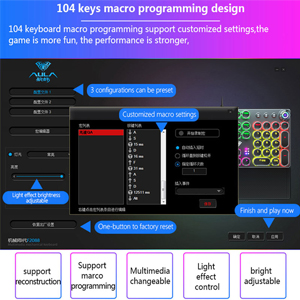
104-keys

Comes with a 104 key full size layout

A full size layout (104-key) white backlight Bluetooth mechanical keyboard.

K10-A+5

Switch Operating Systems

Support macOS / Windows

Just plug and use, Extra keycaps for both Windows and Mac operating systems are included.

K10-A+7

Keychron K Pro switch

With the Keychron K Pro mechanical switch

We’ve got you covered with three Keychron K Pro switch options (Silent Red, Red, Brown).

K10-A+9

Wireless and Wired

Multi-Device Connectivity

Connect up to 3 devices via the stable Broadcom Bluetooth 5.1 chipset and switch easily.

1 100% Layout 2 macOS / Windows 3 Keychron Switch 4 Multitasking Keychron K10 Wireless Mechanical Keyboard K10-A+19K10-A+19

Keychron K10 is a full size layout (104-key) white backlight Bluetooth mechanical keyboard for Mac and which setting up a good example of space-efficient usage.

K10-A+21K10-A+21 For Mac & Windows

With a unique Mac layout and Windows compatibility, the K10 is offering convenient accessibility to all the essential multimedia and function keys.

K10-A+22K10-A+22 4000mAh Big Battery

The K10 can last up to 240 hours (with backlit disabled) with a 4000 mAh big battery, which is one of the biggest in mechanical keyboards.

K10-A+23K10-A+23 Ergonomic Support

Two-level adjustable feet, an inclined bottom frame, and curved OEM profile keycaps, all working together to provide long-lasting ergonomic support.

K10-A+24K10-A+24 White LED Backlight

White backlight that is always in sync with your mood to keep you productive. Easily cycle to different backlight schemes using the light bulb key.

K10-A+11 White LED Backlight

Charming white backlight that is always in sync with your mood to keep you happy and productive. Easily cycle to different backlight schemes using the light bulb key.

K10-A+13 4000mAh Big Battery

The K10 can last up to 240 hours (with backlit disabled) with a 4000 mAh big battery, which is one of the biggest in mechanical keyboards. N-key rollover (NKRO) on wired mode or 6KRO on wireless mode.

K10-A+15 Ergonomic Support

Two-level adjustable feet, an inclined bottom frame, and curved OEM profile keycaps, all working together to provide long-lasting ergonomic support when you type on the K10.

K10-A+17

Can't Type After Waking Up Mac?

This issue is caused by Apple's FileVault, which prevents third‑party Bluetooth keyboards from unlocking the login screen.

Solutions:

1.Turn off FileVault to enable normal login.

2.Use a wired connection to enter your password.

Bluetooth Not Connecting? Try These Steps:

1.Reset keyboard: Hold Fn + Z + J for 4s.

2.Power cycle all devices.

3.Disable auto-sleep: Hold Fn + S + O for 4s.

4.Test with other devices to confirm keyboard functionality.

Bluetooth Not Connecting (For macOS)?

1.Check Mac’s Wi-Fi and Bluetooth interference: see troubleshooting guide for details.

2.Try these troubleshooting tips: see troubleshooting guide for details.

Bluetooth Not Connecting (For Windows)?

1.Uncheck "Allow the computer to turn off this device" in Device Manager > Power Management.

2.Update Bluetooth firmware if the keyboard still connects.

3.Reset the Bluetooth drivers on your PC.

One key does not work/register/input properly?

1.Remove the keycap and clean with compressed air.

2.If that fails, reset by holding Fn + Z + J for 4s.

3.Might be a switch issue—Gateron switches on your keyboard are soldered. Let us know if you'd like to replace soldered switches.


The Keychron K10 is a 104 keys white LED backlight Bluetooth mechanical keyboard made for Mac and Windows. Engineered to maximize your productivity with most popular full size layout with number pad.
With a unique Mac layout while compatible with Windows, the K10 has all essential multimedia and function keys you need (Num Lock works with Windows only), and comes with a dedicated Screenshot Key, Siri (Cortana) Key, and Screen Lock Key. Extra keycaps for both Mac and Windows operating systems are included.
Connects with up to 3 devices via the reliable Broadcom Bluetooth 5.1 chipset and switch among them easily for multitasking needs. The K10 is best to fit home, office and light gaming use while connecting with your smartphone, laptop and iPad. It also has wired mode with USB Type-C connection.
With the Keychron Pro mechanical switch providing unrivaled tactile responsiveness on the Brown switch with up to 50 million durable keystroke lifespan. N-key rollover (NKRO) on wired mode or 6KRO on wireless mode.
The K10 can last up to 240 hours (with backlight off) with a 4000 mAh big battery, which is one of the biggest in mechanical keyboards. Two level adjustable feet (6º and 9º) and inclined bottom frame provides a great ergonomic support for long lasting typing comfort.