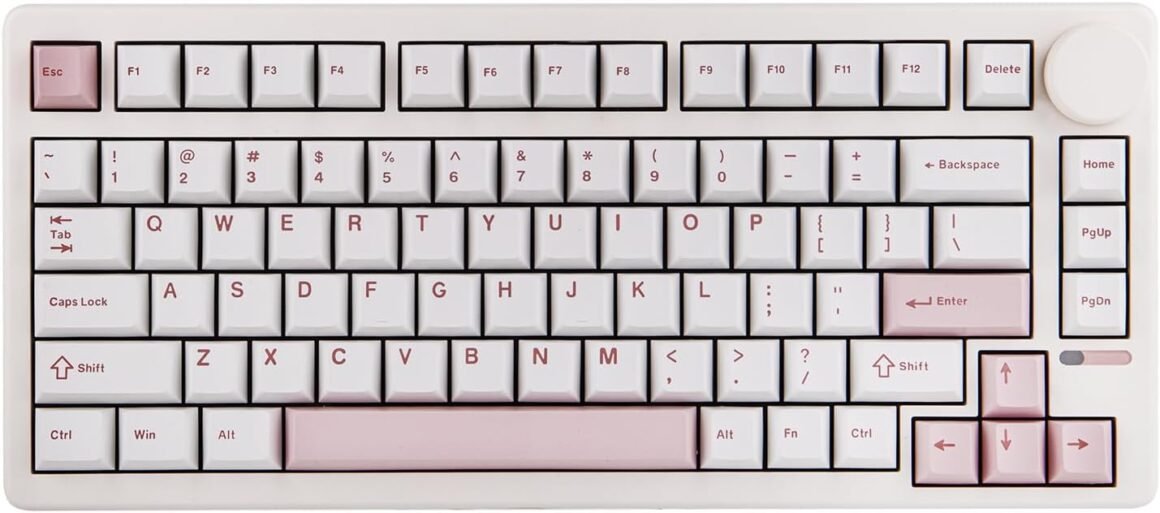
EPOMAKER QK81 75% Wireless Mechanical Gaming Keyboard: Hot-Swappable, QMK/VIA Customizable, 81 Keys with Metal Knob, 2.4GHz/BT/USB, Creamy Gasket-Mount, RGB Backlit (White & Wisteria Switch)

Product description EPOMAKER QK81 75% QMK/VIA Programmable Wireless Gaming Keyboard 1 Tri-Mode Wireless 2 QMK/VlA Customizable 3 Long-Lasting 4 Ultra Low-Latency 1 Lubed Linear Switch 2 Hot Swappable PCB 3 Gasket Mounted Structure 4 NKRO Adjustable Kickstand Type comfortably from multiple angles, with the embedded feetstand. Connectivity Switch Clear and visible instructions to help you change connectivity mode. Volume Control Knob The knob can be used to adjust the volume. Additionally, you can customize the knob to your desired functions via VIA software. 2.4GHz Dongle Storage Slot With a built-in 2.4GHz receiver storage slot, user can easily access it when needed and securely store it to prevent loss. VIA/QMK Programmable Wireless Keyboard with 16.8M RGB Backlight To Customise with VIA Software Guide on connecting to and using the VIA software Engineered for ultimate customization through VIA software, the QK81 QMK keyboard adapts precisely to your unique needs and playstyle. Tips on using VIA software: 1). Get the QK81 JSON File; 2). Import the QK81 JSON file to the online version of VIA Software. 3) Start programming. The video showcases the product in use.The video guides you through product setup.The video compares multiple products.The video shows the product being unpacked. EPOMAKER QK81 75% QMK/VIA Wireless Gaming Keyboard Merchant Video with Dynamic RGB Effect Lubed Switches & South-Facing LEDs Creamy Gasket Keyboard with Sound-Dampening, with linear switches well-lubed in factory.Feel the satisfying tactile feedback of each keystroke, as the 81 south-facing LEDs shines bright in customizable RGB lights: FN+|: Change Light EffectFN+PgDn: Change Light ColorsFN+↑↓←→: Adjust Brightness/Speed The video showcases the product in use.The video guides you through product setup.The video compares multiple products.The video shows the product being unpacked. EPOMAKER QK81 75% QMK/VIA Wireless Gaming Keyboard Merchant Video Package Content 1* QK81 Wireless Mechanical Gaming Keyboard1.8m Detachable USB A to C Keyboard Cable1* 2-in-1 Switch-and-Keycap Puller1* Multilingual Manual (EN,DE,ES,FR,IT,JP,CN) The video showcases the product in use.The video guides you through product setup.The video compares multiple products.The video shows the product being unpacked. EPOMAKER QK81 75% QMK/VIA Wireless Gaming Keyboard Merchant Video 75% Layout Mechanical Keyboard from EPOMAKER Add to Cart Add to Cart Add to Cart Add to Cart Add to Cart Customer Reviews 4.5 out of 5 stars 100 4.6 out of 5 stars 84 4.6 out of 5 stars 74 3.7 out of 5 stars 16 4.6 out of 5 stars 116 4.2 out of 5 stars 13 4.7 out of 5 stars 374 Price $71.99$71.99 $79.99$79.99 $93.49$93.49 $62.99$62.99 $79.99$79.99 $47.00$47.00 $70.54$70.54 Case Material Plastic Plastic Aluminum Plastic Plastic Aluminum Plastic Layout 75% Layout 75% Layout 75% Layout 75% Layout 75% Layout 75% Layout 75% Layout Keys 81+1 80+1 84 81 81+1 81 80+1 Screen ✘ ✘ ✘ ✔ ✘ ✘ ✔ Knob ✔ ✔ ✘ ✔ ✔ ✘ ✔ Connectivity Bluetooth/2.4Ghz/USB-C Wired Bluetooth/2.4Ghz/USB-C Wired Bluetooth/2.4Ghz/USB-C Wired Bluetooth/2.4Ghz/USB-C Wired Bluetooth/2.4Ghz/USB-C Wired Bluetooth/2.4Ghz/USB-C Wired Bluetooth/2.4Ghz/USB-C Wired Battery Capacity 4000mAh 4000mAh 3000mAh 4000mAh 4000mAh 8000mAh 4000mAh Keycap Material Double-shot PBT Double-shot PBT Double-shot ABS Double-shot PBT Double-shot PBT Double-shot PBT Double-shot PBT Keycap Profile Cherry Profile Cherry Profile DSA Profile Cherry Profile Cherry Profile Cherry Profile Cherry Profile Switch Option Linear Linear Low-profile Linear, Tactile Linear Linear Linear Linear Programmable QMK/VIA Software F75 Software QMK/VIA Software EPOMAKER Software EA75 Software M75 Software F75 MAX Software Keyboard Size (cm) 33*14.6*4.7cm 32.3*14.3*4.3cm 314*129*26 mm 33.5*14.5*4.4cm 33.3*14.7*4.5cm 31.9*13.4*4.2cm 32.8*14.3*4.4cm QMK/VIA Custom Keyboard: Engineered for ultimate customization through VIA software, the QK81 QMK keyboard adapts precisely to your unique needs and playstyle. Tailoring every keypress for lightning-fast reactions in your favourite FPS or MMO, remapping crucial in-game actions like quick inventory access for a tangible edge over the competition, or seamlessly executing complex macro commands with a single keystroke. For unparalleled speed and accuracy, beyond gaming, take the QK81 keyboard to streamline your workflow for coding, video editing or graphic design with personalized layers and shortcuts. Unlock your full potential and experience the future of personalized input75% Compact with Big Knob: Introducing the compact powerhouse – QK81 – an 81-key mechanical keyboard engineered for peak gaming and typing experiences. Dominate your favourite titles with a clutter-free desk, with valuable mouse space freed up for those crucial flick shots and swift manoeuvres, and enjoy seamless, on-the-fly audio control with our intuitively placed and sized volume knob. LAN parties, esports tournaments, or simply moving between your gaming rig and workstation, the 0.8kg weight and reduced size makes transportation a breeze. Elevate your gameplay and productivity with this space-saving marvel, designed for those who demand high performance without the bulkRGB Backlit Custom Keyboard: Elevate your setup, enhance your gameplay, and personalize your experience with the QK81 RGB keyboard. Not just a canvas to express your creativity, with colour and effect adjustable dynamic lights, experience immersive gaming that goes beyond the screen, for immediate visual cues that light up the path to success. Feel the satisfying tactile feedback of each keystroke, as the 81 south-facing LEDs shines bright in customizable RGB lights: be one step ahead with custom colour profiles – a subtle green for healing spells or a flashing yellow for incoming alerts, as unmissable beacon directing you to hard-fought victoryCreamy Gasket Keyboard with Sound-Dampening: Experience the pinnacle of typing bliss and gaming tranquillity, with the Gasket-Mounted QK81 cushioned with 5 layers of sound-dampening materials. Unlike traditional keyboards, the Gasket-Mount structure suspends the key switches between layers of sound-dampening material, eliminating harsh bottom-outs for a uniquely creamy, cushioned feel. Each press on the key feels like sinking into a cloud, with a refined, almost silent symphony of gentle thock. Feel the difference as your fingers glide effortlessly across the keys, for enjoyable typing without disturbing others260 Hours Long-Lasting Wireless Keyboard: Unleash yourself from cable clutter and power anxiety with the QK81 wireless keyboard. Conquering the virtual worlds for weeks on a single charge. Boasting an incredible 4000mAh battery, this powerhouse delivers an astounding 260 hours of uninterrupted use with the vibrant backlight off, for a clean, minimalist desk setup, unburdened by tangled wires, offering complete freedom of movement for your mouse and peripherals. Cable wired, 2.4Ghz or Bluetooth wireless, easily switch between 3 connection modes with the toggle besides USB port, for stable performance on PC, Mac laptop, Android tablet, phones or gaming controllers

EPOMAKER QK81: A Game-Changer in Wireless Gaming Keyboards

In the vast landscape of gaming peripherals, a keyboard is more than just a tool—it’s an extension of the gamer’s command center. Enter the EPOMAKER QK81, a compact yet powerful 75% QMK/VIA programmable wireless gaming keyboard that promises to elevate your gaming experience.

Key Features That Matter

  1. Tri-Mode Wireless Connectivity: Say goodbye to cumbersome cables. The QK81 offers seamless connectivity through Bluetooth, a 2.4GHz dongle, or USB-C wired options, providing flexibility for various devices. Whether you’re gaming on a PC or a tablet, setup is effortless.

  2. Customizable QMK/VIA Software: Tailor each keystroke to your playstyle. The QK81 allows for intricate customization: remap keys, program macros, or craft unique profiles tailored for different games or tasks. It’s engineered to enhance both gaming precision and productivity for everything from coding to graphic design.

  3. Unmatched Battery Life: The QK81 is a workhorse, equipped with a 4000mAh battery. With the backlight off, users can expect up to 260 hours of uninterrupted use. This long-lasting performance ensures you remain focused on victory, not the charging cable.

  4. Stunning RGB Backlighting: Immerse yourself in dynamic lighting effects and customize colors to elevate your gaming setup. The south-facing LEDs enable a vibrant display, providing visual cues that enhance gameplay while allowing for personalized expressions of creativity.

  5. Exceptionally Comfortable Typing Experience: Built with a gasket-mounted structure that employs sound-dampening materials, the QK81 mitigates harsh sounds and offers a cushioned, "thocky" feel with every keystroke. This design fosters a serene typing and gaming experience, perfect for long hours of use.

  6. Portable and Compact Design: Weighing in at just 0.8kg, the QK81’s compact layout not only saves desk space but also allows for easy transportation to LAN parties or tournaments, ensuring you’re always ready for action.

  7. Enhanced Control Features: The keyboard includes a convenient volume control knob, adjustable kickstand, and a dedicated toggle for connectivity modes, making it user-friendly and intuitive during intense gaming sessions.

User Satisfaction

The QK81 enjoys positive reviews, garnering an impressive 4.5 out of 5 stars from users who praise its performance, design, and versatility. Many have highlighted its superb build quality, long battery life, and the unique feel of its switches as standout features.

Brand Overview

EPOMAKER is dedicated to pushing the boundaries of gaming and typing experiences through innovative design and advanced technology. With a commitment to customization and quality, the brand has earned a reputation among gamers and typists alike, making them a trusted name in the realm of mechanical keyboards.

In conclusion, the EPOMAKER QK81 is not just another keyboard; it’s a customizable, high-performance peripheral designed for gamers and professionals who demand excellence. With tri-mode connectivity, extended battery life, and an array of customizable features, it stands as a formidable ally in any gaming arsenal. Elevate your play and typing with the QK81—where performance meets personalization.

Price: $79.99 - $71.99
(as of Sep 04, 2025 21:34:55 UTC – Details)

Related Posts
Read More

“Funlab Firefly Switch Pro Controller: Wireless Gamepad with 7 LED Colors for Nintendo Switch/Lite – Ghost Pink”: Available now at [price_with_discount]

Product Description switch-pro-controller_01switch-pro-controller_01 Tap,Glow, and Trick!
Dark Mystery, Luminous Play!
switch-pro-controller switch-pro-controller switch-pro-controller switch-pro-controller 1 Game-playing Time 2 Back Buttons 3 Ergonomic Design 4 Compatibility More Compatibility, More Choices Compatibility

For SwitchFor PhonesFor PCFor Steamdeck For phones

For Phones

Android - 6.0 and aboveiOS - 13.3 and above For PC

For PC

Windows XP and above For Steamdeck

For Steamdeck

SteamOS Holo 3.4 and above How-To Video Connection Method Instruction

From the HOME Menu, select Controllers, then Change Grip and Order.Press and hold Y + HOME for 3 seconds and 4 LED lights flash quickly. The LED(s) becoming stable, pairing finishes.If you are not connecting for the first time, you can click HOME Button to connect successsfully. Turbo Function Instruction

Press and hold “T” Button + one of the Function Button (A/B/X/Y/L/R/ZL/ZR/D-pad Button).1st: Manual TURBO Function (Press and hold to launch continuously).2st: Automatic TURBO Function (Automatically continuous launch).3st: Clear TURBO Function. Light Control Instruction

Turn on the light: Press HOME Button.

Turn off the light: Press and hold Light Button for 3 seconds.Change the Light Color: Press Light Button. Colors will change each time you press Light Button. Change the Lighting Mode: Press Light Button + “⊕”: 1st: Breathing light mode; 2st: Quick flash mode; 3st: Vibration light mode.If the controller is not connected to the console, press Home Button and the LED pattern will be illuminated. Mapping Function Instruction

Press and hold “MR” Button, then input the single button (A/B/X/Y/L/R/ZL/ZR/+/-/D-pad Button and L/R joysticks) you want to map;The controller will have the vibration cue after loosing “MR” Button, and then press “XR” Button to trigger Programmable Buttons.The mapping function can also be achieved by using the ML Button as described above.)

How do I make this pure color switch pro controller show the exquisite pattern?

The first time you receive the controller without being connected to your console, you can press the Home button to active it. Then you can see its unique pattern.

Why does the pattern still not appear after pressing the Home button of this controller?

Check whether it is in either of the following conditions:

A.Out of power. Solution: Charge the controller and then press the Home button again.

B.In light off mode. Solution: Press Light Button and "+" Button to switch the lighting mode.

How to change the LED colors and the lighting modes?

A.Press Light Button:Always-on Mode.

B.Press Light and "+" Button:

1st:breathing light mode; 2nd:quick flash mode; 3rd:vibration lighting mode

C.Light Off Mode:Press and hold Light Button for 3s.

D.Colors will change each time you press Light Button.

How to calibrate the joystick of this switch gamepad?

A.HOME Menu - System Settings - Scroll down the menu on the left-hand side - Select Controllers and Sensors.

B.Select Calibrate Control Sticks - Tilt the joystick that you want to calibrate.

C.Follow the on-screen prompts to verify the joystick.

Frequently Bought Together on FUNLAB
Hidden-til-lit Display: It is one of our solutions to achieve this enhanced gaming experience. The surface decoration of switch controller design is seamlessly harmonized with lighting effects. When the LED is not active, it lies quietly as a pure pink controller. And when it turns on, the hidden pattern will light up your amazing gaming night.
Polychrome Breathing LED: Each time you press the Light button, 7 LED colors will change in sequence. 4 lighting modes of this switch pro controller for Halloween: breathing light mode, quick flash mode, vibration lighting mode, and always-on mode.
Back Paddle Buttons: Our switch pro controller wireless for Halloween can edit and define some buttons you want and enhance the gaming experience and meet the needs of hardcore competitive players.
Sensing Motion & Turbo Function: FUNLAB wireless switch controller is equipped with precise motion control and turbo function which supports continuous launch, suitable for various kinds of games such as shooting-game, flying-game, etc.
Battery Life: Our cute switch wireless controller for Halloween is built-in 3.7V/950mAH Lithium battery, and it can last up to 12.5 hours after being fully charged(turn lights off). Long endurance brings players uninterrupted gaming experience.
Read More

Introducing the wangpeng® Cooling Fan Upgrade for Machenike F117 Series: Available now at [price_with_discount]

New Cooling Fan for Machenike F117-S6 F117-S11 F117-S6CP F117-S6CS CPU & GPU Cooling Fan GTX1060TI

Part Numbers:


Compatible model:
Machenike F117-S6 F117-S11 F117-S6CP F117-S6CS CPU & GPU Cooling Fan GTX1060TI Series Laptops

Package include:
1 x Fan

Date First Available ‏ : ‎ March 29, 2022
Manufacturer ‏ : ‎ wangpeng
ASIN ‏ : ‎ B09WQTQ4LQ

100% Brand New And High Quality
3 months Warranty
As the picture
Only Compatible Models: for Machenike F117-S6 F117-S11 F117-S6CP F117-S6CS GTX1060TI Series Laptop
Please check both the model and picture before purchase
Read More

“HUO JI Mechanical Gaming Keyboard: Purple LED Backlit, Red Switch, Compact Design with Number Pad”: Available now at [price_with_discount]

Product Description compact keyboard space saving mechanical compact keyboard space saving mechanical

Note: Some people may feel the sound of the keys a bit loud. There is a way to reduce the sound. Please add O ring on the keycaps. If you don't have, please search O-Ring Switch Dampener on Amazon.

purple led light backlit purple led light backlit double shot pbt keycaps key caps double shot pbt keycaps key caps gaming gamer gaming gamer for office girl gift for office girl gift
❤ Compact and Convenient ▶ It has a compact layout 94 keys, boasts both practicality, the full-function and compact characteristics of keyboard and it also geared with numkeys, arrow keys, frequently used control keys ,and FN multimedia keys.
❤ Purple and White Keycaps ▶ Constructed from unique and high-quality durable Double-shot keycaps, This mechanical keyboard has excellent touch experience and long serving time. Colorful keycaps can bring a more pleasant mood during games or work, decorate your space and enhance your life.
❤ Colorful LED Backlit ▶ Preset 10 lighting modes, 5 backlight brightness levels,breathing speed. Precision engineered double shot keycaps never fade. Light can be off.
❤ Red Switches ▶ Offer a medium resistance, quiet sound, and linear feedback. Every keystroke is registered during intense gameplay and fast typing, no matter how many other keys are pressed simultaneously.
❤ Ergonomic Comfort ▶ The design of this 94-key keyboard is based on ergonomics, Detachable USB-C (connect keyboard) to USB-A (connect PC) cable, the two keyboard kickstands provide comfortable angle for typing and effectively reduces the burden on the wrist.
❤ Wide Compatibility ▶ This 94 key mechanical keyboard is compatible with Windows 10, Windows 8, Windows 7, Windows XP, Windows VISTA and Mac systems.
❤ 𝗡𝗼𝘁𝗲 ▶ Some people may feel the sound of the keys a bit loud. Please add O ring on the keycaps. If you don't have, please search O-Ring Switch Dampener on Amazon.