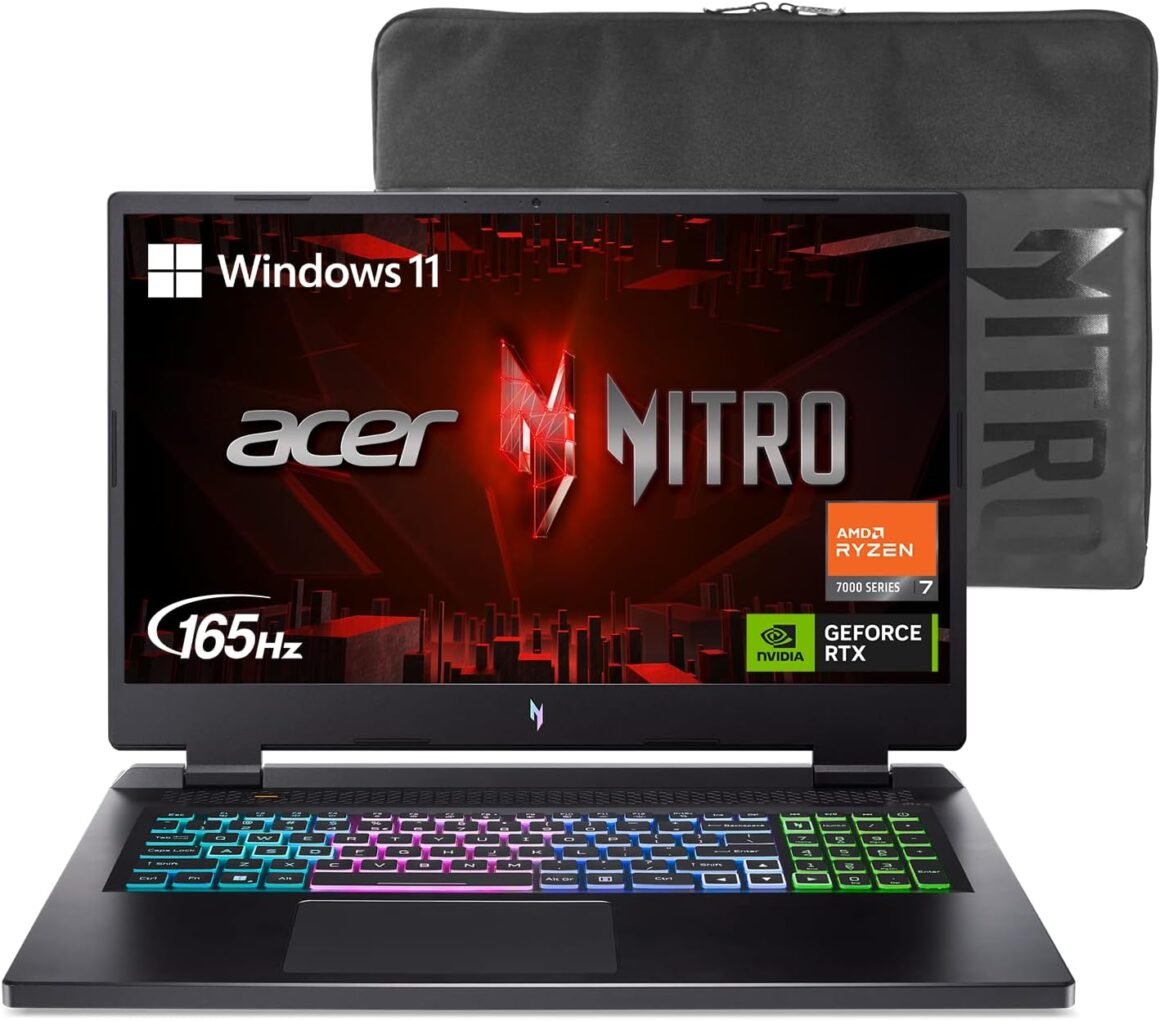
“Powerful Acer Nitro 17 Gaming Laptop: AMD Ryzen 7, GeForce RTX 4050, 1TB SSD”: Available now at [price_with_discount]

Go full throttle with the Acer Nitro 17 gaming laptop featuring the latest AMD Ryzen Processors and NVIDIA’s DLSS 3 technology – whether playing casually or ranking up online. The picture-perfect 17.3-inch FHD display with 165Hz refresh rates provides an immersive viewing experience while next-gen cooling, a 4-zone RGB keyboard and NitroSense software let you take command of the playing field. (NH.QKLAA.001). Go full throttle with the Acer Nitro 17 gaming laptop featuring the latest AMD Ryzen 7000 Series Processors and NVIDIA’s DLSS 3 technology – whether playing casually or ranking up online. The picture-perfect 17.3-inch FHD display with 165Hz refresh rates provides an immersive viewing experience while next-gen cooling, a 4-zone RGB keyboard and NitroSense software let you take command of the playing field.AMD Ryzen 7000 Series: Now featuring the AMD Ryzen 7 7840HS Octa-Core Processor delivering superior gaming performance where you need it most. With Precision Boost, get up to 5.1GHz for your high-demand games.AMD Ryzen AI: Present your best self with AI-enhanced video chat. Get a laptop that’s AI ready.Beyond Fast: The NVIDIA GeForce RTX 4050 Laptop GPU is beyond fast for gamers and creators. They’re powered by the ultra-efficient NVIDIA Ada Lovelace architecture which delivers a quantum leap in both performance and AI-powered graphics. With the included MUX switch, you can disable the integrated graphics for an increase in gaming performance.Bask in Visual Glory: With a lightning-quick 165Hz refresh rate, the 17.3″ Full HD (1920 x 1080) display makes your game sessions fluid, unbroken, and unmatched. Now you can land those reflexive shots with pinpoint accuracy and minimal ghosting.Internal Specifications: 16GB DDR5 Memory; 1TB PCIe Gen 4 SSD; Wireless Wi-Fi 6E supports dual-stream Wi-Fi in the 2.4GHz, 5GHz and 6GHz bands, including 2×2 MU-MIMO Technology; Killer Ethernet E2600 10/100/1000; Bluetooth 5.1Complete Next-Gen Cooling: The newly refined chassis has a few extra tricks up its sleeve when it comes to cooling with dual-fan, dual-intakes (top and bottom), and a quad-exhaust port design. This also includes the chilling effects of liquid metal thermal grease which acts as a more efficient heat transfer between the CPU and the heatsink.The Keys to Victory: Spice things up with the 4-zone RGB keyboard and take command of the inner workings of the laptop via the dedicated NitroSense Key. With the NitroSense utility app, you can control fan speeds, lighting, and more to push performance to its max.Max Your Speeds with Wi-Fi 6E: Get an edge online by taking control of your network and prioritizing your gameplay with Killer Ethernet E2600 and Wi-Fi 6E. Plug all your peripherals into the full range of ports, including HDMI 2.1, USB Type-C Port – supporting USB4 and the newest USB 3.2 standard with Gen 2 support. There’s even a MicroSD Card Reader should it be needed.Ports For All Your Accessories: 1 – USB Type-C Port – supporting USB4 (up to 40 Gbps), USB Charging & Power Delivery (Up to 65W), 1 – USB Type-C Port USB 3.2 Gen 2 (up to 10 Gbps) DisplayPort over USB Type-C, & USB Charging & Power Delivery (Up to 65W), 2 – USB 3.2 Gen 2 Ports (One Featuring Power-off Charging), 1 – USB 2.0 Port, 1 – HDMI 2.1 Port with HDCP Support, 1 – Ethernet (RJ-45) Port, 1 – Headphone/Microphone-in Jack

The Acer Nitro 17 gaming laptop is designed for high-performance gaming, featuring the latest AMD Ryzen 7000 Series Processors and NVIDIA’s DLSS 3 technology. The laptop boasts a stunning 17.3-inch FHD display with 165Hz refresh rates for an immersive viewing experience. The AMD Ryzen 7 7840HS Octa-Core Processor delivers superior gaming performance with Precision Boost up to 5.1GHz. The NVIDIA GeForce RTX 4050 Laptop GPU provides fast graphics performance and includes a MUX switch to disable integrated graphics for increased gaming performance.

Internal specifications include 16GB DDR5 Memory, 1TB PCIe Gen 4 SSD, and Wireless Wi-Fi 6E with dual-stream Wi-Fi support. The laptop features next-gen cooling with dual-fan, dual-intakes, and liquid metal thermal grease for efficient heat transfer. The 4-zone RGB keyboard and NitroSense software allow users to customize performance settings.

Wi-Fi 6E and Killer Ethernet E2600 provide fast network speeds for online gaming. The laptop features a variety of ports including USB Type-C with USB4 support, HDMI 2.1, USB 3.2 Gen 2 ports, USB 2.0 port, Ethernet port, and headphone/microphone-in jack for connecting accessories. Overall, the Acer Nitro 17 gaming laptop offers high-performance gaming capabilities in a sleek and stylish design.

Price: $1,280.00
(as of Sep 22, 2024 09:42:36 UTC – Details)


Related Posts
Read More

“Unleash Your Typing Experience: The Ultimate Customizable Aluminum Mechanical Keyboard with RGB Lighting!”: Available now at [price_with_discount]

Product Description dd

LEMOKEY P1 Pro QMK Wireless Mechanical Keyboard

The Lemokey P1 Pro is a 75% layout QMK custom gaming keyboard. Packed with many pro-grade features, a 1000 Hz polling rate, a smooth knob, thocky and satisfying typing sound thanks to the flexible gasket, solid aluminum body and more tech. The P1 Pro is ready to take you to dominate the game.

The built-in PCB-mounted screw-in stabilizer minimizes the rattle and wobble of larger keys such as the space bar, shift, enter, and backspace keys. It ensures large keys operate consistently no matter where you press for a smooth typing experience.

 s s

Programmable Knob

Designed to enhance your creative workflow, the premium rotary encoder allows you to easily customize your favorite keys and macros on the knob through the launcher app.

ss

Double-shot PBT Keycaps

The P1 Pro is equipped with premium non-shine through double-shot Cherry PBT Keycaps that are durable, anti-oil, and wear-resistant for optimal gaming performance throughout the keyboard's life.

bb

Wireless and Wired Connection

Comes with a detachable Type-A to Type-C USB cable, the P1 Pro provides a wired connectivity boasting a rapid 1000Hz polling rate with almost no lag for maximum stability. Connect the P1 Pro with up to 3 devices wirelessly via its stable Broadcom Bluetooth 5.1.

ff

Remap Any Key on Lemokey Launcher

Drag and drop your favorite keys or macros to remap any key on any system (macOS, Windows, or Linux) through the Lemokey Launcher web app. The Launcher does not load tons of CPU and memory usage as it doesn't require software download or installation, even for firmware upgrades.

KK

Powerful Chip (MCU) With 256K Flash

A brand new powerful ultra-low-power Arm chip (MCU) that is armed with 256K Flash to provide more flexibility for developers. The polling rate is 1000 Hz on 2.4GHz and wired modes right out of the box, which makes latency non-existent for the competitive gamer.

ss ss

Unique Mirror Polish Finish

The back of the keyboard is decorated with a mirror-polished strip which is a highly reflective, smooth finish with a scratch-free appearance.

hh
QMK 82 Keys Wireless Keyboard: The Lemokey P1 Pro is a 75% layout QMK custom gaming keyboard. Packed with many pro-grade features, a 1000 Hz polling rate, a smooth knob, thocky and satisfying typing sound thanks to the flexible gasket, solid aluminum body and more tech. The P1 Pro is ready to take you to dominate the game. Lemokey is a brand of KEYCHRON
2.4 GHz and Ultra-low Latency Connection: A pro-grade 2.4 GHz wireless connectivity and a 1000 Hz polling rate offering ultra-low latency performance and fast response, crucial for gaming and real-time applications. Connect the P1 Pro with 3 devices through Bluetooth on the fly, and switch among your games, and work flawlessly. (Wired mode is also available)
Remap Any of Your Desired Key: With the Lemokey web app, you can effortlessly remap each key and knob function, customize any macro command, shortcuts, or key combinations to unlock many more options, and make complex actions simple to enhance gaming or work efficiency (Please use the latest version of Chrome / Opera / Edge browser to open the Launcher and connect the keyboard to your device via wired mode)
Hot-swappable: The P1 Pro allows you to customize a stellar typing experience with the hot-swappable feature, you can change the preinstalled KEYCHRON Super switch with almost all the 3-pin or 5-pin MX-style mechanical switches on the market (including Cherry, Gateron, Kailh, Panda, etc.) without soldering required
Solid build: Engineered with the 6063 aluminum body, and durable double-shot Cherry PBT keycaps, the premium build keeps the P1 Pro durable and smooth even during an intense gaming session
Fully Customizable: A combination of premium acoustic foams such as IXPE, PET, and absorbing foam has been added for a more satisfying sound and thock feel. You can also modify the P1 Pro easily the way you want
Read More

“9H Hybrid-Glass FX Film for Retroid Pocket 3+: Ultimate Protection”: Available now at [price_with_discount]

FX-Hybrid-Glass Plastic Glass Protective Film by atFoliX, ultra thin and super hard, compatible with Retroid Pocket 3+

The FX-Hybrid-Glass Glass Protector completely redefines the subject of screen protection thanks to a unique material composition: the development of this extremely hard (9H pencil hardness) and resistant glass / plastic material makes it possible to produce particularly thin screen protectors. So your touch screen reacts to your input as a completely unprotected display. The hardness, which is unusually high for a screen protector film, hardly leaves any chance for scratches.

Super thin and superhard - the new standard in screen protection!

The particularly low material thickness of the Plastic Glass Protective Film ensures an optimal look-and-feel of your display. Together with the high light transmittance of almost 98%, this Plastic glass protective film is practically invisible.

Maximum protection of your screen: Made of the latest high-tech materials, the Glass Screen Protector of plastic provides optimum protection against scratching and soiling. Extremely robust and resistant due to the hardness of 9H.

Easy to install: Easy assembly of the Plastic glass protective film - Clean the display, align the foil, and finish. Through special silicone materials, the Plastic Glass Protective Film sucks automatically on the display. The strong silicone adhesive layer closes the majority of the scratches already present. Residue-free removable.

Scope of delivery
- 1 x FX-Hybrid-Glass Glass Protector compatible with Retroid Pocket 3+
- cleaning cloth
- installation tool (squeegee)
- Link to the multilingual, illustrated mounting instructions (including mounting video)

Better than glass: unlike real glass or tempered glass, this FX-Hybrid-Glass Glass Screen Protector of plastic is unbreakable and splinter-free - fit for and compatible with Retroid Pocket 3+
Maximum protection against scratching (hardness 9H at 500g writing pressure) - this Plastic glass protective film consists of an extremely thin (approx. 0.2 mm) and resistant material
The unique glass / plastic material composition of the Plastic Glass Protective Film provides the highest light permeability and an oleophobic anti-fingerprint coating
Extra strong silicone adhesive layer - existing scratches on the display simply disappear
Accessory@FoliX - Made in Germany *** Easy to install: the FX-Hybrid-Glass Glass Protector has a similar stiffness to that of real glass and can be installed easily and without bubbles
Read More

“DIERYA DK61se 60% Mechanical Gaming Keyboard with Red Switches: Compact & Stylish for PC Typists”: Available now at [price_with_discount]

Product Description DK61SEDK61SE

DK61SE Mechanical Keyboard – Compact Size, Maximum Power!

DK61SE- Red Switch DK61SE- Brown Switch DK61SE- Blue Switch DK61SE-Detachable Power Cable Detachable Power Cable

Plug and play, widely compatible with PC devices. Easily store away, simplifying your workspace.

DK61SE-Ergonomic design Foldable tilt Legs

Adjust the height and angle of your keyboard to find the most comfortable posture for yourself.

DK61SE-Double- shot Keycap Double- shot Keycap

Durable, even light transmission, and long-lasting without fading.

DK61SE-Full Anti-Ghosting Full Anti-Ghosting

No More Missed Keystrokes – Dominate Every Game with Precision and Speed.

1 Detachable Power Cable 2 Foldable tilt Legs 3 Double- shot Keycap 4 Full Anti-Ghosting DK61SE-Packing ListDK61SE-Packing List

Streamlined for Maximum Desk Space – Ideal for Work and Play!

DK61SE-Game OfficeDK61SE-Game Office
【Minimalism】The DK61se is a 61-key mechanical gaming keyboard with all functions implemented through the "FN" key combination. The ultra-compact structure allows you to maximize the use of desktop and mouse space.
【Mechanical Red Switch】Red switches is linear and lighter that ideal for gaming where the low articulation force and linear path allow for quick successive keypresses. It is the best preference for gamers.
【Cool LED Backlight】 DK61SE mechanical keyboard is fixed lighting color, but not bland. You can switch between 19 built-in backlight modes and adjust the backlight brightness & speed via shortcut keys.
【Full Anti-Ghosting 】Supporting simultaneous pressing of all keys without any conflicts, providing a fast and seamless feedback experience for efficient office work and competitive gaming.
【Ergonomic Keyboard】The design of this mechanical gaming keyboard is based on ergonomics. Scientific stair-up keycaps design brings maximum comfort, keeping your hand in a most natural state to minimize hand fatigue after longtime use. Perfect for gamer, office worker, copywriter, typing teacher and editors.
【Compatibility and after-sales service】 Compatibility and after-sales service Suitable for Windows11/10/8/7/XP. Mac OS, Vista and Linux are compatible with typing and office only. 🌹Our products support one year warranty, if you encounter any problems, please feel free to contact us, give you a satisfactory answer within 24 hours🌹
Read More

RedThunder 60% Wireless Gaming Keyboard and Mouse Combo: Ultra-Compact RGB Mechanical Feel with 2500mAh Rechargeable Battery, Lightweight Honeycomb Optical Mouse for Gaming and Business – Stylish White Finish

Product description RedThunder LOGORedThunder LOGO 75% keyboard wireless mechanical tkl wired redthunder ps4 keyboard b097t276ql b07xvcp7f5 b07gqnl7xj75% keyboard wireless mechanical tkl wired redthunder ps4 keyboard b097t276ql b07xvcp7f5 b07gqnl7xj 60% xbox mini white tkl mechanical rgb redthunder compact b07zt61ltz b07vpvfjdd b07p6k5gmy60% xbox mini white tkl mechanical rgb redthunder compact b07zt61ltz b07vpvfjdd b07p6k5gmy

Membrane keys b07nbjvh4gMembrane keys b07nbjvh4g

Unique translucent built-in panel.

The wireless keyboard has been designed with a unique built-in transparency board, which will enhance the overall gaming lighting atmosphere.

Membrane KeysMembrane Keys

Mechanical Feel Keyboard

The closest mechanical feel to the crater structure and has a high quality conductive film that has been tested on 1,000,000 printing presses. Its 2ms response time is the fastest of any non-mechanical keyboard.

Tripod ErgonomicTripod Ergonomic

Upgrade Type-C Charging Port

The upgraded detachable Type-C interface is made of premium metal for enhanced texture. It has the characteristics of being more durable to use, plugging and unplugging at any time, and more convenient to carry.

Type-C charging CableType-C charging Cable

Type-C Rechargeable Wireless Mouse

The wireless RGB mouse and the keypad are charged with the same Type-C data cable, and the mouse wheel will be illuminated by the indicator light when charging. The charging port is not easy to damage, more durable to use, simple to plug and unplug, and easy to carry.

left mouse buttonleft mouse button

High-performance

The side of the mouse adopts a non-slip curve design, with two buttons, the fingers fit the mouse more, and the use is more flexible. Professional gaming mouse adopts optical sensor, 3600DPI, 12000 FPS scanning speed, 40G acceleration, and tracking speed up to 400 IPS.

Wireless RGB MouseWireless RGB Mouse

Excellent Honeycomb Shell Design

Taking creative design for lightweight honeycomb shell, owning the durable strength and excellecnt ventilation, meanwhile it keeps your palms cool and fresh, moving it more quickly and freely during your games, assures your long-session gaming without fatigue.

Wireless keyboard and wireless mouse comboWireless keyboard and wireless mouse combo

How to use the Fn function and RGB lighting?

1. FN+ "BACK" = DELETE ; 2. FN+ "`~" = ESC; 3. FN+ "1" = F1; FN+ "2" = F2; FN+ "3" = F3; FN+ "4" = F4; FN+ "5" = F5; FN+ "6" = F6; FN+ "7" = F7; FN+ "8" = F8; FN+ "9" = F9; FN+ "0" = F10; FN+ "-_" = F11; FN+ "=+" = F12; 4. FN+ "I" = Backlight ON/OFF; 5. FN+ "K" = Switch Mode;

6. FN+"O"/"L" = Adjust Brightnes; 7. FN + "U"/"J" = Adjust Speed; 8. FN + "W" = Switch Between WASD and ↑←↓→;

9. FN + "R" = Volume- ; 10. FN+"T" = Volume+ ; 11. FN+"Y" = Mut; 12. FN+"WIN" = Lock WIN and MENU.

Note

1. The keyboard and mouse share only one USB receiver to reduce the number of USB ports, which is located at the bottom of the mouse. (Only when the USB dongle is plugged in, the lights of the keyboard and mouse will light up).

2. Please fully charge it before the first use, otherwise it will not last as long as expected when it is not fully charged. (Because we didn't fully charge the keyboard/mouse before shipment to ensure transportation safety).

3. No software installation is required before the first use, just plug the USB receiver into the USB port, turn the switch at the bottom of the keyboard to the ON position, and turn the switch on the bottom of the mouse to the ON (no light) or LED (with light) position.

4. There will be a little delay or the lights will not turn on when the keyboard/mouse battery is too low, please charge the keyboard/mouse in time, the charging indicator will go off after full charge.

5. To protect battery life, please use a lower than DC:5V adapter to charge, preferably using the computer's USB port to charge directly. Due to the different currents of different computer USB charging ports, some users may need longer charging time to fully charge.

6. Turning off the keyboard light can extend the battery life of the keyboard moderately.

7. If you can't press "WASD" or "↑↓←→", don't worry, please check if the FN function key is enabled. FN+ "W" key can be used to switch between letter "WASD" keys and arrow "↑↓←→" keys at will.

8.If the keyboard/mouse is not working, they may lose connection with the USB receiver. Please try pairing with the USB receiver again. Pairing steps as following: Make sure the keyboard/mouse fully charged and re-pair with the USB receiver.

Mouse pairing steps: Step 1: Turn the switch at the bottom of the mouse to the switch position with the sun logo; Step 2: Press and hold the mouse wheel and right button, the mouse RGB lights start to flash; Step 3: Insert the USB receiver into the computer and the pairing is complete. Keyboard pairing steps: Step 1: Turn on the keyboard switch; Step 2: Press and hold the ESC key and the K key at the same time, the indicator light starts to flash; Step 3: Insert the USB receiver into the computer, and pairing is complete.

9. If you have any problem, please tell us at the first time, we will try our best to solve it.

Add to Cart Add to Cart Add to Cart Add to Cart Add to Cart Customer Reviews 4.3 out of 5 stars 2,077 4.0 out of 5 stars 997 4.2 out of 5 stars 135 3.9 out of 5 stars 162 4.0 out of 5 stars 2,553 4.5 out of 5 stars 1,296 Price $39.99$39.99 $39.99$39.99 $99.99$99.99 $39.99$39.99 $49.99$49.99 $39.99$39.99 Color Option White/Black White/Black/Black-White/White-Black White/Black/Black-White/White-Black White/Black White Pudding/Black Pudding/Black/White/Pink/White-Gray Black/White Connection Wireless Wireless Trip-Mode Wireless Wireless Wired Keyboard Keys 61 84 95 114 104 104 Backlight Mode ✓ ✓ ✓ ✓ ✓ ✓ Anti-Ghosting ✓ ✓ ✓ ✓ ✓ ✓ Mouse DPI 3200 3200 no data 4800 3200 7200 Keyboard Battery capacity 2000mAh 1850mAh 8000mAh 2000mAh 3000mAh no data Mouse Battery capacity 500mAh 500mAh no data 600mAh 800mAh no data
【High-performance 2.4G Wireless Keyboard and Mouse】Are you looking for a small wireless keyboard and mouse combo that can perfectly balance work and games? RedThunder K62 rechargeable wireless gaming keyboard and mouse combo will be your best choice. 2.4G high-speed and stable transmission, ensure that it can easily deal with even the most intense battles. Note: The keyboard and mouse share a USB receiver in the bottom of the mouse.
【Rechargeable & Long Battery Life】The keyboard is equipped with a 1850 mAh battery, and the mouse is equipped with an 500 mAh battery. The long battery life allows you to use them continuously for 8 hours with light. The keyboard and mouse are equipped with smart energy-saving functions. If there is no operation within 2 minutes, they will automatically go to sleep, press any key to wake them up. Please charge 8 hours before using.
【60% Compact Small Keyboard and Ultra-light Honeycomb Shell Mouse】The most delicate and cute keyboard keeps your desktop neat, more space for mouse movement and other desktop devices. The well-designed perforated honeycomb shell mouse is ergonomically designed and weighs only 65 (+-5) grams, making it more flexible and comfortable without fatigue.The small keyboard and mouse combo will be the best choice for gamers.
【Light Up Keyboard and Mouse】60 percent rgb gaming keyboard features 4 RGB backlight modes, 4 levels of brightness adjustment, 7 monochrome backlight modes and 1 full rainbow backlight. The luminous design of Letters and gaps makes it the best light up wireless mini keyboard on the market. The mouse has a built-in 7-color cyclic gradual lighting effect.
【Durable Ergonomic Keyboard and Mouse】The keys have a 10 000 000 keystrokes lifetime, so you can hold on to it for the next decade! ABS keycaps adopt two-color injection molding process, the letter of characters never fade. The mouse fits the palm perfectly, and the anti-sweat and non-slip design gives you complete control.
【Plug and Play 】The keyboard and mouse share only one USB receiver, and the code has been completed by default. You only need to insert the receiver and turn on the keyboard and mouse to use it. (Note: If the receiver and the keyboard/mouse lose connection and cannot be used for any reason, you only need to reset the code pairing or contact us in time, we will try our best to solve it)