ASUS Zenbook DUO: Dual OLED Touch Display, Intel Evo Certified, Windows 11 – UX8406MA-DS76T: Available now at [price_with_discount]

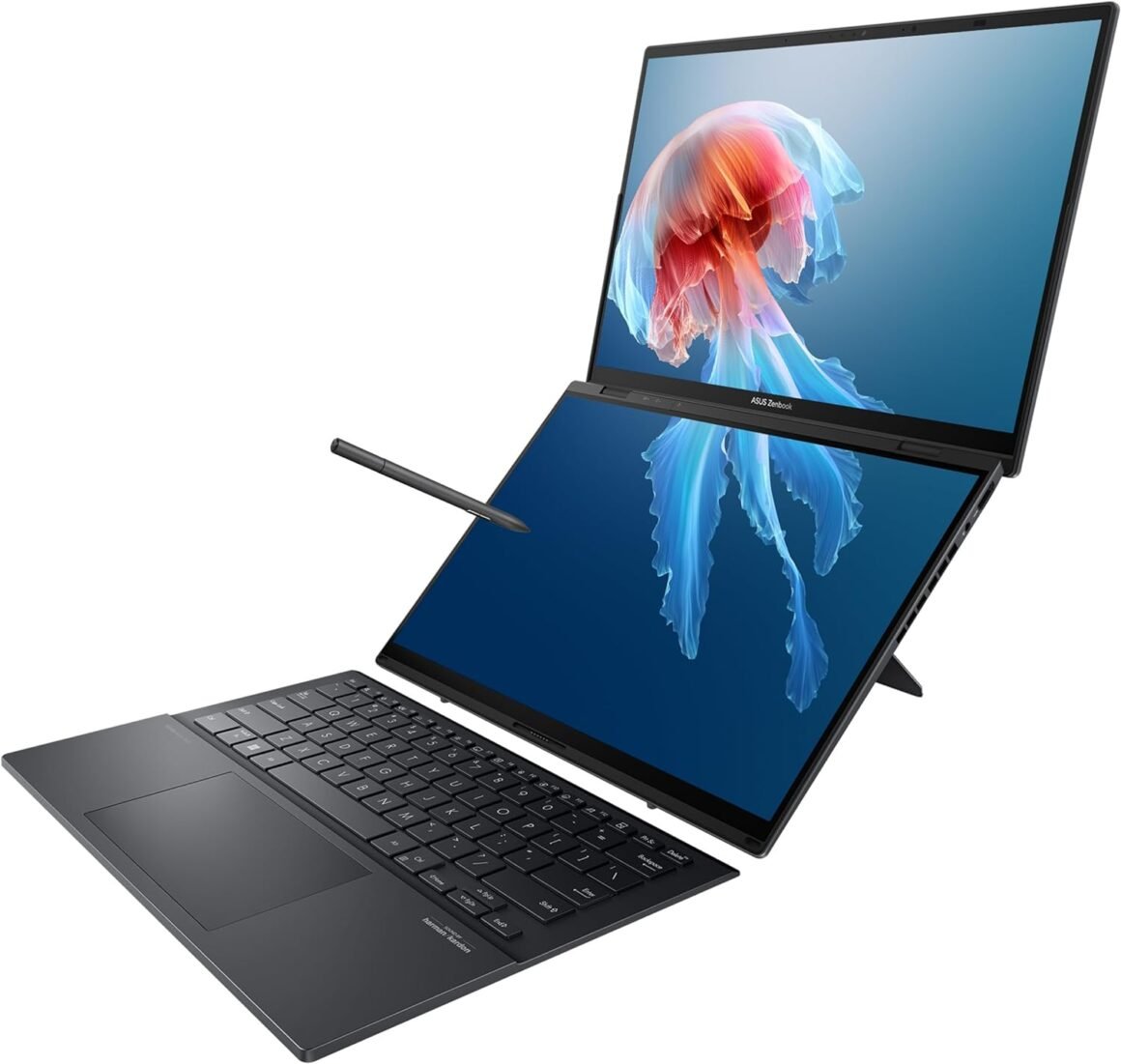
Multi-screen versatility – Find the mode that best suits your task and seamlessly switch between them. Expand your workspace with Dual Screen or Desktop Mode, share content effortlessly in Sharing Mode, or snap everything back into one for Laptop Mode.Everything-built-in portability – At 3.64 lbs and a mere 0.78” thin, the DUO elevates portable dual-screen setups to the next level. With a detachable Bluetooth keyboard and built-in kickstand, you can take the Zenbook DUO just as you would with any laptop.Powerfully productive – The Zenbook DUO delivers powerful performance and AI-ready features on Windows 11. The ultra-fast Intel Core Ultra 7-155H processor, paired with Intel Arc graphics, enhances tasks with AI capabilities. With 1TB SSD storage and 16GB LPDDR5x RAM, you can explore more seamlessly.Windows Copilot AI assistant – Meet Copilot in Windows – your AI-powered assistant for quick answers, creative inspiration, and focused tasks. Boost productivity with fast answers, image generation, and more.Dual 14” ASUS Lumina OLED displays – Immerse yourself in unparalleled visuals with the Zenbook DUO’s dual 16:10 touch displays boasting a 1920 x 1200 resolution, vibrant 500 -nit HDR peak brightness, smooth 60Hz refresh rate, and Pantone validated 100% DCI-P3 color accuracy.Military-grade durabilit y – Meeting MIL-STD 810H military standards, the Zenbook DUO ensures unmatched reliability in harsh conditions. Rigorous testing enhances longevity, guaranteeing that your laptop is ready for work, travel, or relaxation both today and in the future.All-day 75Wh battery* – Keep your stress levels low with an all-day battery that provides up to 13.5 hours of video playback in Laptop mode and 10.5 hours in Dual Screen mode*. It is equipped with Fast-Charge technology, accessible through its versatile Thunderbolt 4 USB-C ports.Full I/O ports – 1 x USB 3.2 Gen 1 Type-A 2 x Thunderbolt 4 supports display / power delivery 1 x HDMI 2.1 TMDS 1 x 3.5mm Combo Audio Jack.Bundle up – Included in the box, you’ll find a backpack, an ASUS Pen 2.0 SA203H with MPP 2.0 support, and a 65W USB-C charger, ensuring you’re ready to go.*Battery tests conducted by ASUS using the 1080p Video Playback scenario and PC MARK10. Test configuration: Zenbook UX8406MA, OLED panel, Intel Core Ultra 9-185H processor, 2 TB SSD, 32 GB RAM. Test settings: WiFi enabled but disconnected (not connected to any access point), Windows Power Plan set to Balanced, display brightness set to 150 cd/m2. Actual battery life may vary depending on product configuration, usage, operational conditions and power management settings. Battery life will decrease over the lifetime of the battery.

The Zenbook DUO offers multi-screen versatility, allowing users to switch between different modes such as Dual Screen, Desktop Mode, Sharing Mode, and Laptop Mode seamlessly. With a detachable Bluetooth keyboard and built-in kickstand, the DUO is lightweight and portable, making it easy to take on the go.

Powered by the Intel Core Ultra 7-155H processor and Intel Arc graphics, the Zenbook DUO delivers powerful performance and AI capabilities on Windows 11. The device also features a Windows Copilot AI assistant for quick answers and creative inspiration.

The Zenbook DUO boasts dual 14-inch ASUS Lumina OLED displays with vibrant visuals and Pantone validated color accuracy. It meets MIL-STD 810H military standards for durability, ensuring reliability in harsh conditions.

The laptop is equipped with a long-lasting 75Wh battery that provides up to 13.5 hours of video playback in Laptop mode and 10.5 hours in Dual Screen mode. It also features full I/O ports, including USB, Thunderbolt 4, HDMI, and a combo audio jack.

In the box, users will find a backpack, an ASUS Pen 2.0 with MPP 2.0 support, and a 65W USB-C charger. Battery tests conducted by ASUS show the device’s estimated battery life under certain scenarios, although actual battery life may vary depending on usage and settings.

Price: $1,391.04
(as of Aug 20, 2024 13:25:24 UTC – Details)


Related Posts
Read More

Upgraded Wireless Controller for Nintendo Switch, Lite, and OLED – Pro Gamepad with Wake-Up Feature, Gyroscope, Turbo Mode, Dual Vibration, and Screenshot Functionality

Product description 11

How to pair the controller?

Switch mode Bluetooth connection

Step 1:Turn on the Switch host, click the "System settings"menu button at the main page interface, click the “Airplane Mode” option after entering the next level menu option , then click Controller Connection (Bluetooth)option make its Bluetooth function in open state.Step 2: Enter the Switch host handle Bluetooth pairing mode, click the “Controllers” menu button at the main page interface of host, click the “Change Grip/Order” option after entering the next level menu option, the host will automatically searching and pairing the handle.Step 3:Press the HOME button for 3-5 seconds enter the Bluetooth searching and pairing mode, LED1-LED4 keep flickering quickly, the handle will vibrate for a moment and the corresponding channel indicator light will always on after connect successfully with host and being assigned automatically.

Switch mode wired connection:

Put SWITCH in the SWITCH base after open the PRO handle’s wired connection option on Switch host, then connect the handle with the data cable, handle will connect the SWITCH automatically, after pull the data cable out, handle will backconnect to the SWITCH host by Bluetooth automatically

Connect the controller to PC WITH THE INCLUDED USB CABLE.

PLEASE NOTE:

ONLY SUPPORT INCLUDED USB CABLE CONNECTION WITH PC, DOES NOT SUPPORT WIRELESS BLUETOOTH CONNECTION TO PC.

Handle on shutdown, connect the PC through USB cable, PC-side will install driver automatically, the light of LED2 on handle always on means that the connection is successful, NOTE: the name displayed: Xbox 360 controller for windows (wired connection)

11 11 11

Note of Wireless Controller for Switch

First time connection steps: When the product is off, press and hold the "H" button for about 5 seconds, the 1234 indicator light on the handle flashes at the same time, and the connection with the host will be successful in about 5 seconds. Automatic connection steps: The host and the controller can reconnect again after sleeping, just press and hold “H” for two seconds, and the 1234 indicator light flashes slowly for 5 seconds to automatically reconnect to the host. PC Connection steps: When the handle is turned off, directly insert the TYPE-C data cable, the indicator lights on the handle 2 and 4 will always be on, and the controller on the pc side will display XBOX 360 controller. At this time, press and hold "H" for about 3 seconds. The indicator light 2 is always on and automatically enters the PC normal mode. Vibration adjustment steps: The default vibration intensity is 100%, after connecting the host, press and hold the screenshot button and then press the minus sign. The vibration intensity is 70%. There are four vibration levels, 0, 40, 70, and 100. Pressing the plus sign increases vibration. 11

WARM AND USEFUL TIPS:

(1) What should I do if the controller cannot be charged?If the controller cannot be charged, please reset the controller.How to reset the controller: Use a paper clip to press the reset hole on the back of the controller twice.

(2)What should I do if the controller cannot connect to the switch host via Bluetooth?step1: please clear the switch console's bluetooth memorystep2: Restart the switch hoststep3: reset the controller: Use a paper clip to press the reset hole on the back of the controller twice.step4:plug out the power adapter of the controller ( please Do not charge while pairing.)

If you have any questions during the use of the product, please feel free to contact the seller through the Amazon order page and we will give you a satisfactory reply within 12 hours.

Add to Cart Add to Cart Add to Cart Add to Cart Customer Reviews 4.4 out of 5 stars 35,423 4.4 out of 5 stars 35,423 4.4 out of 5 stars 35,423 4.4 out of 5 stars 35,423 Price $27.99$27.99 $26.98$26.98 $27.99$27.99 $27.99$27.99 Features Support Dual Vibration, 6-Axis gyro sensor, Screenshot, Screen Recording, Fast Charging, Wake-up Support Dual Vibration, 6-Axis gyro sensor, Screenshot, Screen Recording, Fast Charging, Wake-up Support Dual Vibration, 6-Axis gyro sensor, Screenshot, Screen Recording, Fast Charging, Wake-up, Programmable Support Dual Vibration, 6-Axis gyro sensor, Screenshot, Screen Recording, Fast Charging, Wake-up Connector Type Type-C Type-C Type-C Type-C Connectivity Technology Wireless/Wired Wireless/Wired Wireless/Wired Wireless/Wired Charging Time Within 3 Hours Within 3 Hours Within 3 Hours Within 3 Hours Playing Time UP To 20 Hours UP To 20 Hours UP To 20 Hours UP To 20 Hours
UNIVERSAL COMPATIBILITY : Pro Controller is fully compatible with Switch 2/Switch/Switch Lite/Switch OLED , also compatible with Windows PC and Android Phone, and perfectly compatible with games. No need to install any driver. NOTE: ONLY SUPPORT INCLUDED USB CABLE CONNECTION WITH PC, DOES NOT SUPPORT WIRELESS BLUETOOTH CONNECTION TO PC. This controller only supports connect to switch consoles, PC and Phone , NOT Compatible with other other devices such as: Apple TV, Fire Stick TV, Tesla, Xbox and Playstation consoles.DOES NOT SUPPORT WAKE-UP SWITCH 2 AND AUDIO FUNCTIONS
UPGRADE HALL JOYSTICK, NON-DRIFF: Diswoe Switch controllers is designed with HALL EFFECT joystick, solving the common problem of joystick drift. Unlike ALPS joysticks, high-sensitivity Hall sensors use Electromagnetic Induction to etect the movement of the joystick, the internal parts have no contact with each other, the sensor part will not wear out, faster response speed, especially for FPS shooting games.
POWERFUL FUNCTION : Have dual vibration motors that provide you excellent vibration feedback to enhance the game immersion. With the 6-axis gyro sensor, this controller can detect the inclination of the controller and make a quick response, give you more fun while playing motion-sensing games. No NFC function.
LOW ENERGY CONSUMPTION, LONG BATTERY LIFE : This perfected controller has a high-performance rechargeable battery with automatic sleep, Charging prompt and low voltage warning. The high-performance built-in 550mAh battery can service for 8 hours after fully charged, make sure you can enjoy games longer without interruption.
EXCELLENT HAND FEELING : The wireless controller is built with ergonomic and lightweight construction, make it comfortable even for long hours of continuous play. The gamepad comes with non-slip design, which will never slip off even if your hand sweats during intense gameplay.
STABLE WIRELESS BLUETOOTH CONNECTION : It provides stable and reliable signal without delay or drop-off within EIGHT meters. Featured with strong anti-interference technology and won't be affected by other wireless devices. Please read the user manual first before pairing.
Read More

“Skytech Solenoid DIYAF-1000S Fireplace Compatibility”: Available now at [price_with_discount]

Fireplace Solenoid Compatible With Skytech On/Off Electric Fireplace AF-1000S. This solenoid is for use only with AF-LMF series gas valve kits fits Skytech. This can be either a replacement solenoid or an upgrade for the on off version of the spark to pilot valve systems. The solenoid shown here is also required with the LS Converter fits Skytech.
This is for 1 On/Off Solenoid
Solenoid for AF-LMF Series fits Skytech Gas Valve Ki
DIY AF-1000S.
This solenoid is for use only with AF-LMF fits Skytech series gas valve kits.
This can be either a replacement solenoid or an upgrade for the on off version of the spark to pilot valve systems
The solenoid shown here is also required with the LS Converter compatible with Skytech.
Read More

MSI PRO H610M-G WiFi DDR4 ProSeries Motherboard: Perfect for 12th-14th Gen Intel Core CPUs: Available now at [price_with_discount]

PRO series helps users work smarter by delivering an efficient and productive experience. Featuring stable functionality and high-quality assembly, PRO series motherboards provide not only optimized professional workflows but also less troubleshooting and longevity.
Supports 12th/13th/14th Gen Intel Core, Pentium Gold and Celeron processors for LGA 1700 socket
Supports DDR4 Memory, up to 3200(MAX) MHz
Core Boost : With premium layout and digital power design to support more cores and provide better performance
Memory Boost: Advanced technology to deliver pure data signals for the best performance, stability and compatibility
Lightning Fast Experience: PCIe 4.0
Read More

“FCN Machenike F57 Cooling Fan: Case Fans DFS551205WQ0T FH22 Review”: Available now at [price_with_discount]

New
Date First Available ‏ : ‎ June 26, 2021
Manufacturer ‏ : ‎ Generic
ASIN ‏ : ‎ B097ZW51LR

100% Brand new and High quality.
Excellent quality, fast delivery, simple after-sales. We make every effort to provide customers with satisfactory service.
We offer the best products and easy return policy
Interesting accessories will refresh your beloved . The product as described in the picture.