“Joso Game Controller: Turbo Joystick, RGB Bluetooth for iPhone, Android, PC – Play COD Mobile!”: Available now at [price_with_discount]

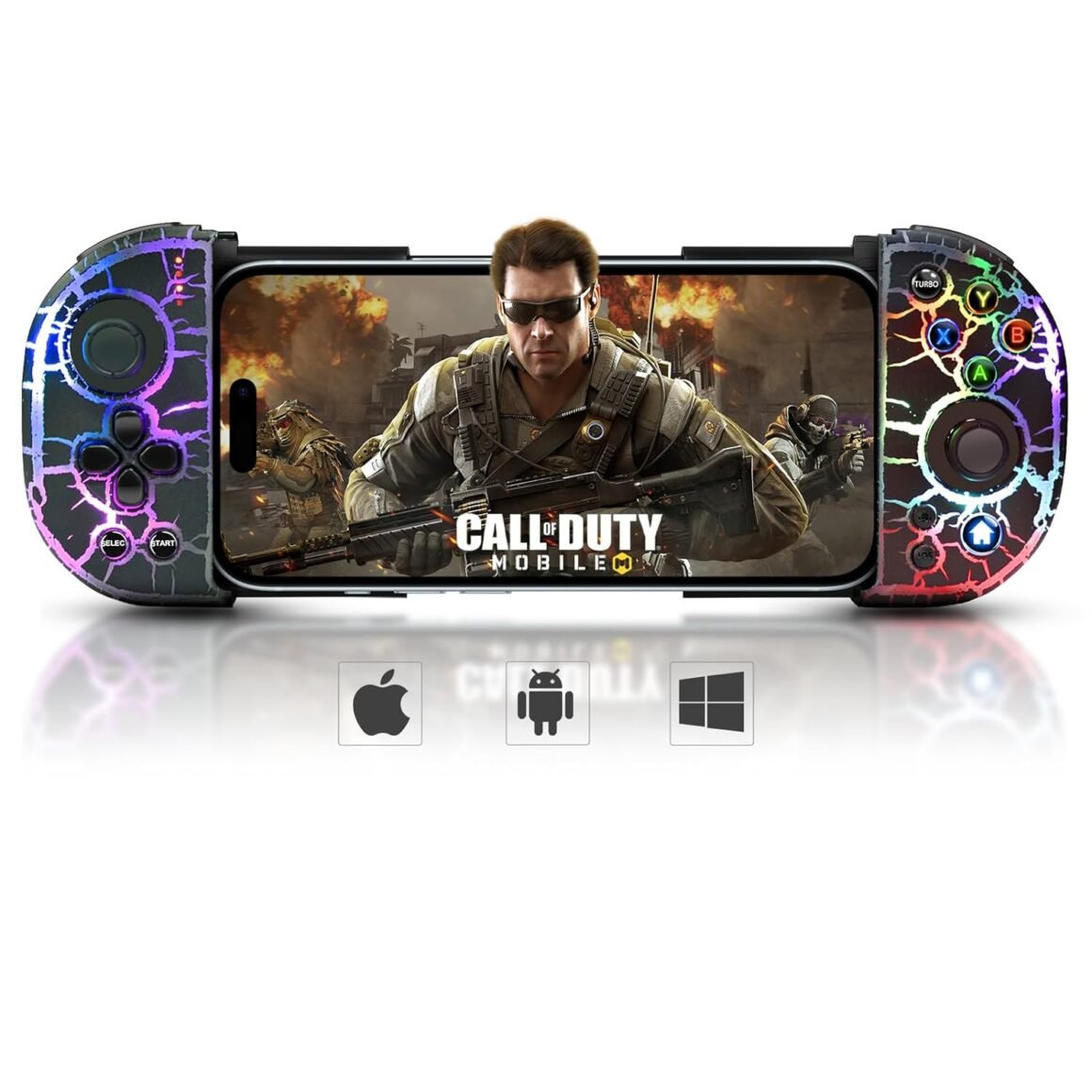
Product Description Joso Mobile Contorller for iPhone, Android, PC Support phone with case SUPPORTS PHONES UP TO 7.8″ Fits all iPhone Models & Most Android phone models. Support iOS, Android SUPPORT AUTO & MANUAL Press and hold the ‘A’ key, then press the ‘TURBO’ key to setting. For iOS/Android/Steam WORKS WITH ANY GAME THAT SUPPORTS GAME CONTROLLERS For more games not listed, ask us. RGB Lights Bolt Style 8 COLORS 4 adjustable light modes: mix light, single light, light breathing, and light fixed. Play your games everywhere you go. 1 Fits Most Phone Sizes 2 TURBO Function 3 Compatible with Games 4 Crack RGB 5 Pocket Size How to Connect the Joso Mobile Gaming Controller to the iPhone, Android Connect the Joso Mobile Controller to the iPhone Play directly on your iPhone 15/14/13/12/11/X/XR/XS/XS Max, and more. Tips for Boot the Controller: 1) Please fully charge the controller before first use. 2) Make sure the controller is off before Bluetooth pairing connection. Press the ‘iOS’ key to boot the controller.Turn on the Bluetooth connection ‘Xbox Wireless Controller’ on your iPhone.Start Playing. (After connection, you also can play cloud games via Cloud Gaming Apps.) Connect the Joso Phone Controller to the Android Play directly on your Galaxy S23/S22/S21/S20/S10/S9, and more Android phones. Tips: 1) Please fully charge the controller before first use. 2) Make sure the controller is off before Bluetooth pairing connection. Press the ‘Android’ key to boot the controller, then connect the ‘Xbox Wireless Controller’ on your Android.For different games, Android has a second controller boot mode: Press and hold the ‘R1’ key, then press the ‘HOME’ key to boot the controller. Connect the ‘KL-6108’ on your Android.After connection, you also can play cloud games via Cloud Gaming Apps. Connect the Joso Mobile Game Controller to the PC Play directly on your PC. Tips for Boot the Controller: 1) Please fully charge the controller before first use. 2) Make sure the controller is off before Bluetooth pairing connection. Wireless Mode: Press the ‘iOS’ key or ‘Android’ key to boot the controller, then connect the ‘Xbox Wireless Controller’ on your PC.Wired Mode: Connect the Type-C to USB cable to the controller’s Type-C port and the PC’s USB port, if the controller is successfully connected, the PC’s device list will show ‘Xbox 360 Controller for Windows’. Product Specification Color Black & Black Crackle with RGB Lights Style Small Size (6.61*3.34in/0.65lb), play your games everywhere you go. Support iOS 13.4+ iOS controller for iPhone 15, iPhone 15 Plus, iPhone 15 Pro, iPhone 15 Pro Max, iPhone 14, iPhone 14 Plus, iPhone 14Pro, iPhone 14 Pro Max, iPhone 13 mini, iPhone 13, iPhone 13 Pro, iPhone 13 Pro Max, iPhone 12, 12 Pro, 12 Pro Max, X, XR, XS, XS Max, 11 Pro, 11 Pro Max, 11, 7, 7Plus, 8, 8Plus, etc. Compatible with but not fit iPad, iPad mini, iPad Air, and iPad Pro. (Not for Apple TV&iPod and Fire TV) Support Android 6.0+ Android game controller compatible with Samsung Galaxy S23, Galaxy S23 Ultra, Galaxy S23+, Galaxy S22, Galaxy S22 Ultra, Galaxy S22+, Galaxy S21, Galaxy S21 Ultra, Galaxy S21+, Galaxy S20, Galaxy S9, S9 + , S10, S10+, oppo, vivo, LG, X-iaomi, O-nePlus, M-otorola, TCL and more Android phones. Tips for Boot the Controller 1) Please fully charge the controller before first use. 2) Make sure the controller is off before Bluetooth pairing connection. Specification Telescopic Holder: 85-200mm, Battery: 600mAh, Play Time: Approx. 10-15 hours, Charging Time: 2-3 hours, Charge Cable Type: Type-C USB Packing List 1 Mobile Game Controller, 1 Type-C USB Cable and 1 User Manual More Controllers From Joso Add to Cart Add to Cart Add to Cart Add to Cart Add to Cart Add to Cart Add to Cart Customer Reviews 3.7 out of 5 stars 26 3.6 out of 5 stars 168 3.3 out of 5 stars 96 3.2 out of 5 stars 13 3.8 out of 5 stars 776 4.5 out of 5 stars 4 3.4 out of 5 stars 799 Price $45.99$45.99 $45.99$45.99 $36.59$36.59 $45.99$45.99 $33.59$33.59 $35.99$35.99 $25.59$25.59 Compatible Platforms iOS/Android/PC iOS/Android/PC iOS/Android/PC/Switch/PS4 iOS/Android/PC iOS/Android/PC iOS/Android/PC/Cloud Gaming iOS/Android/PC Maximum Holdable Phone Size Up to 7.8 inches Up to 11 inches Up to 7.1 inches Up to 7.2 inches Up to 7.2 inches Up to 7.2 inches Up to 6.9 inches Support Phone with Case ✔ ✔ ✔ ✔ ✔ ✔ ✔ Programmable Back Button ✘ ✘ ✘ ✔ ✘ ✘ ✔ TURBO ✔ ✘ ✔ ✔ ✘ ✘ ✘ Dual Vibration ✘ ✘ ✔ ✔ ✘ ✘ ✘ 6-Axis Gyro ✘ ✘ ✔ ✔ ✘ ✘ ✘ RGB Light ✔ ✘ ✘ ✘ ✘ ✘ ✘ ✨🎮【8 Colors RGB Lights Bolt Style & 18 Light Mixes】 Joso’s cool lighting phone controller with bolt style pattern and 8 colors looks cool at night or in the dark. 4 adjustable light modes: mix light, single light, light breathing, and light fixed. If you are looking for a phone controller with a cool light-up effect, this is the one for you.🎮【Controller for any iPhone】 The Bluetooth controller for iPhone 15/15 Plus/15 Pro/15 Pro Max/iPhone 14/14 Plus/14 Pro/14 Pro Max/iPhone 13/13 mini/13 Pro/13 Pro Max/iPhone 12/12 Pro/12 Pro Max/iPhone X/XR/XS/XS Max/iPhone11/11 Pro/11 Pro Max/iPhone 7/7Plus/iPhone8/8Plus and etc. Works for iPad, iPad mini, iPad Pro (Not for Apple TV & iPod, Fire TV)🎮【Controller for Most Android Phones】 The Android gaming controller works for Samsung Galaxy S23/S23 Ultra/S23+/Galaxy S22/S22 Ultra/S22+/Galaxy S21/S21 Ultra/S21+/Galaxy S20/Galaxy S9 +/S10+/Galaxy Z Fold5/Galaxy Z Flip5/Galaxy Z Fold5/Galaxy Z Fold4/Galaxy Z Flip4/Galaxy Z Flip3 and more. Works for Google Pixel 6 5 Pro, Surface Duo, Asus ROG Phone 5, TCL, Huawei Mate 30, 30plus, P40, OPPO, VIVO, LG, X-iaomi, O-nePlus, M-otorola, Meizu, BlackBerry and more.🎮【Direct Play & Works with any Game that Supports Game Controllers 】Bluetooth 5.0 connection can be played directly, ultra-low latency, works with any game that supports game controllers, such as Call of Duty Mobile, Genshin Impact, Minecraft, Asphalt 9: Legends, Diablo Immortal, Sky: Children of Light, GTA: Liberty City Stories, Gangstar Vegas and more.🎮【TURBO & Hall Effect Joystick】Have turbo function that can make it easier to win an arcade or action game. Joso mobile controller is designed with Hall effect joystick, high precision, stable performance, faster response speed & long life. Whatsmore, Hall joystick solves the drift problem of joystick. Which means that you can enjoy a better overall gaming experience, especially for FPS shooter games.🎁🎮【Best Gamepad Gifts for Gamers】 Package includes 1 RGB mobile controller, 1 Type-C charging cable and 1 manual. Whether as a gift or as an ideal equipment for game lovers, I believe it is a good choice. (🎮 Please fully charge the controller before using it for the first time. After you receive the game controller, if you have any problem, ask us.)

The Joso Mobile Gaming Controller is a versatile Bluetooth controller designed for use with iPhones, Android phones, and PCs. It supports phones up to 7.8 inches and fits all iPhone models and most Android phone models. The controller features auto and manual settings, RGB lights with eight colors and four adjustable light modes. It works with any game that supports game controllers, including popular titles like Call of Duty Mobile, Genshin Impact, and Minecraft.

Connecting the Joso Mobile Gaming Controller to an iPhone involves pressing the ‘iOS’ key to boot the controller and connecting it via Bluetooth to the iPhone. For Android phones, the process is similar, with a specific ‘Android’ key to boot the controller and connect it to the phone. The controller can also be connected directly to a PC using either wireless or wired modes.

The controller has a telescopic holder that can accommodate phones with a size range of 85-200mm. It has a 600mAh battery with a playtime of approximately 10-15 hours and a charging time of 2-3 hours. The package includes the mobile game controller, a Type-C USB cable, and a user manual.

Overall, the Joso Mobile Gaming Controller offers a customizable gaming experience with features like turbo function, hall effect joystick for precise control, and cool RGB lighting effects. It is compatible with a wide range of devices and is suitable for various games across different platforms. It could be a great gift for gamers looking to enhance their gaming experience on mobile devices.

Price: $82.58 - $45.99
(as of Jul 24, 2024 01:08:17 UTC – Details)


Related Posts
Read More

Official Disney Wreck-it Ralph Vanellope Sugar Rush Skin for BENGOO G9000: Available now at [price_with_discount]

The Disney Wreck-it Ralph Vanellope Sugar Rush decal skin compatible with BENGOO G9000 offers an ideal solution to enhance your device's aesthetics. This Wreck-it Ralph Skin, designed to be compatible with BENGOO G9000, is adorned with 3D Vivid Print Technology, ensuring a flawless, high-gloss finish that is also resistant to scratches. Thanks to the 3M adhesive, our skins achieve a harmonious balance between durability, thinness, and lightweight design. Additionally, the application and removal process is made effortless and hassle-free.
Officially Licensed Wreck-it Ralph Disney Skin compatible with BENGOO G9000
Adorned with premium 3M vinyl wraps for a sleek and high-quality appearance
Cutting-edge Vivid Color Vinyl Print Technology for a striking and vibrant appearance
Completed with a glossy, scratch-resistant top layer
The 3M adhesive backing ensures a straightforward and residue-free application and removal process
Read More

“Unleash Your Gaming Potential: Discover the NPET CR108 RGB Mechanical Keyboard!”: Available now at [price_with_discount]

Product Description mechanical keyboardmechanical keyboard mechanical keyboardmechanical keyboard mechanical keyboardmechanical keyboard mechanical keyboardmechanical keyboard mechanical keyboardmechanical keyboard
Custom Keyboard DNA at Stock Price: Get ‌endgame-worthy features‌ (hot-swap sockets, pre-lubed stabilizers) without the boutique markup. This is the ‌gateway drug to custom keyboards‌—where your ‘budget’ board earns nods from r/MechanicalKeyboards elites
Red Switches: Silent Speed, Maximum Flex: 45g linear reds glide like ‌buttered keystrokes‌—perfect for ‌noise-sensitive offices‌ or ‌APM-crushing gaming marathons‌. Sound? Barely a whisper. Clout? Deafening
The Stealth Wealth of Keyboard Culture: ABS keycaps? Check. This board whispers ‌‘I know my stuff’‌ to fellow enthusiasts—while costing less than your teammate’s ‘gaming’ keyboard.
From Cubicle to LAN Party, Zero Compromises: By day: ‌silent productivity machine‌. By night: ‌tactile-free headshot dominator‌. Red switches ‌erase the line between work and play‌, all with ‌custom-tier smoothness‌
Your Entry Ticket to the Custom Club: Hot-swap means you ‌start simple‌ (reds for speed) and ‌ascend to god-tier‌. The modding journey begins here—‌no soldering, just street cred‌
Read More

Stay Ahead in Mobile Gaming: Mocagen MC2 Controller for iPhone & Android with Programmable Joysticks, Adjustable Lighting, and Turbo Features

Product description Mocagen Mobile Gaming Controller Cell Phone Slide Controller for Handheld Gaming Hall Effect Sticks, Handheld Gaming Phone Controller Mobile gaming Controller with Led Light, Upgraded Joysticks, Turbo, Thumb Grips Mocagen Wireless Mobile Gaming Controller, Phone Controller for iPhone/Android with Big Grip MC2 Phone Controller for iPhone/AndroidMC2 Phone Controller for iPhone/Android  Phone Controller for iPhone/Android Handheld Gaming with Programmable Phone Controller for iPhone/Android Handheld Gaming with Programmable Portable Bluetooth Controller for iPhonePortable Bluetooth Controller for iPhone Mocagen Mobile Controller for iPhone/Android Support Phone CaseMocagen Mobile Controller for iPhone/Android Support Phone Case
Programmable Buttons & Turbo Mode: With iphone controller for gaming, customize your gameplay with 2 programmable back buttons—assign complex combos for faster reactions. The adjustable Turbo function (5/12/20 presses per second) gives you an edge in fast-paced battles. The iphone controller is perfect for Call of Duty Mobile, roblox, Fortnite, and other competitive titles
Analog Triggers & Adjustable Light: Experience precision control with upgrade joysticks of iphone game controller —no drift, no wear, and ultra-responsive. Easy to perform movements during gameplay, especially for shooter, RPG games. With iphone gaming controller, the dynamic multi-color lighting enhances your gaming atmosphere, making every session immersive
Ergonomic Design & Phone Case Friendly: Designed for comfort with big grip, allowing you to enjoy long time to play without feeling your hands get tired. the Mocagen mobile gaming controller fits 3.9-7.5 inch devices without removing your case. Also the phone controller for iphone is the perfect solution to the phone camera bulge problem
Ultra-Compatible Cell Phone Game Controller: The Mocagen bluetooth controller for android seamlessly connects to both iPhone (including iPhone 16 models) and Android phones via bluetooth. No wires needed—protect your phone’s charging port while enjoying lag-free gameplay (Note: Cannot charge your phone Directly while using this phone controller)
Multi-Platform Support & Perfect Gift for Gamers: Play cloud and mobile handheld games effortlessly—compatible with Xbox Game Pass, Steam Link, GeForce NOW, Steam Link, etc (Exclude Ps Remote Play). Whether at home or on the go, the Mocagen controller for iphone keeps you in control. Ideal for gaming enthusiasts, holiday gifts, or multiplayer sessions
Dual Vibration & Long Battery Life: Feel every hit and explosion with dual vibration motors for realistic feedback. The game controller for android phone can be quickly fully charged within 2 hours and play15 hours -dominate all day without recharging. The controller for iphone enhances mobile gaming for kids, teens, and adults—making it a must-have accessory
Read More

Upgrade Your Gaming: SZDILONG Wireless Controller for PS4, Pro, Slim, and Windows PC – Features Touchpad, Headphone Jack, Six-Axis Motion Control, and Charging Cable

Product description The video showcases the product in use.The video guides you through product setup.The video compares multiple products.The video shows the product being unpacked. Wireless Controller for Ps4 Gamepad Compatible with Ps4/Pro/Slim/Windows PC ps4 controller, playstation 4 controller, ps4 controller dualshock 4,  dualshock 4, control ps4ps4 controller, playstation 4 controller, ps4 controller dualshock 4,  dualshock 4, control ps4 ps4 controller, playstation 4 controller, ps4 controller dualshock 4,  dualshock 4, control ps4ps4 controller, playstation 4 controller, ps4 controller dualshock 4,  dualshock 4, control ps4 ps4 controller, playstation 4 controller, ps4 controller dualshock 4,  dualshock 4, control ps4ps4 controller, playstation 4 controller, ps4 controller dualshock 4,  dualshock 4, control ps4 ps4 controller, playstation 4 controller, ps4 controller dualshock 4,  dualshock 4, control ps4ps4 controller, playstation 4 controller, ps4 controller dualshock 4,  dualshock 4, control ps4 ps4 controller, playstation 4 controller, ps4 controller dualshock 4,  dualshock 4, control ps4ps4 controller, playstation 4 controller, ps4 controller dualshock 4,  dualshock 4, control ps4

Compatible with gaming platforms

Compatible with gaming platforms PC:Devil May Cry 5 , Apex,WoLong,Fortnite,Resident Evil,Uncharted 4:A third's end,Marvel's Spider-Man: Miles Morales,Sons of the Forest,Like a Dragon: Ishin!, Hogwarts Legacy,ONE PIECE ODYSSEY IOS/Android: Asphalt 9: Legend, Minecraft, Terraria, Cellule Morte, Impato Genshin (iOS only), Call of Mission Mobile, Sky: Son of Light (iOS only needs games that support MFI protocol)

Connection method

Console Ps-4: First connection. Connect the handle to the Ps-4 console with a data cable. Wait for the host to recognize the Controller. Disconnect the data cable. Hold down the P key and share at the same time. Wait for the white light on the top of the handle to flash twice. Release the key. Wait for the Bluetooth Controller to match. The blue light on the top of the controller is always on after pairing is successful.

Computer: Wired connection. Connect the handle to the USB interface of your computer with a data cable. Wait for the computer to recognize the handle. You can view the device called wireless controller in your computer's device manager, which means that the connection was successful.

Bluetooth connection: Hold down the P button and share on the handle, wait for the white light on the top of the handle to flash twice, then release the button. The computer's Bluetooth interface opens Bluetooth - add device - find the device "wireless controller" and click to connect. After the connection is successful, the blue light on the top of the handle is always on, which means the connection is successful

If the game is played on the Steam platform, you must check the P-s handle configuration support in Settings - Controller - General Controller - in the upper left corner of Steam, exit the setup interface after the application and then start the game


(Super compatibility) - This wireless controller adopts bluetooth connection technology, which shows stable connection, fast transmission speed, no delay, and is widely compatible with Ps4/Pro/Slim/PC (Win7/8/8.1/10). This is a third-party product, an unofficial controller.
(Immersive Gameplay Experience) - With a built-in speaker of the controller for Ps4,it can increase player immersion by playing various sounds through the controller speaker rather than through the TV speakers.It also equipped with a 3.5mm stereo audio jack for headphones if you want a personal audio solution.
(High performance) - 360° joystick and the latest six-axis sensor enable the controller to receive signals keenly, accurately locate and freely control game characters, creating an impressive gaming experience.
(Special gift) - This controller adopts a personalized graffiti style, and the abstract pattern has a unique charm. It can be used as an ideal gift for birthdays, Valentine's Day, Christmas and Children's Day to make your family, friends or children happy every day!
(Best customer service) - We have a reliable professional after-sales service team. If you encounter any problems after receiving the product, or if you have any questions about the product, please feel free to contact our customer service team via Amazon email, and you will get an answer.