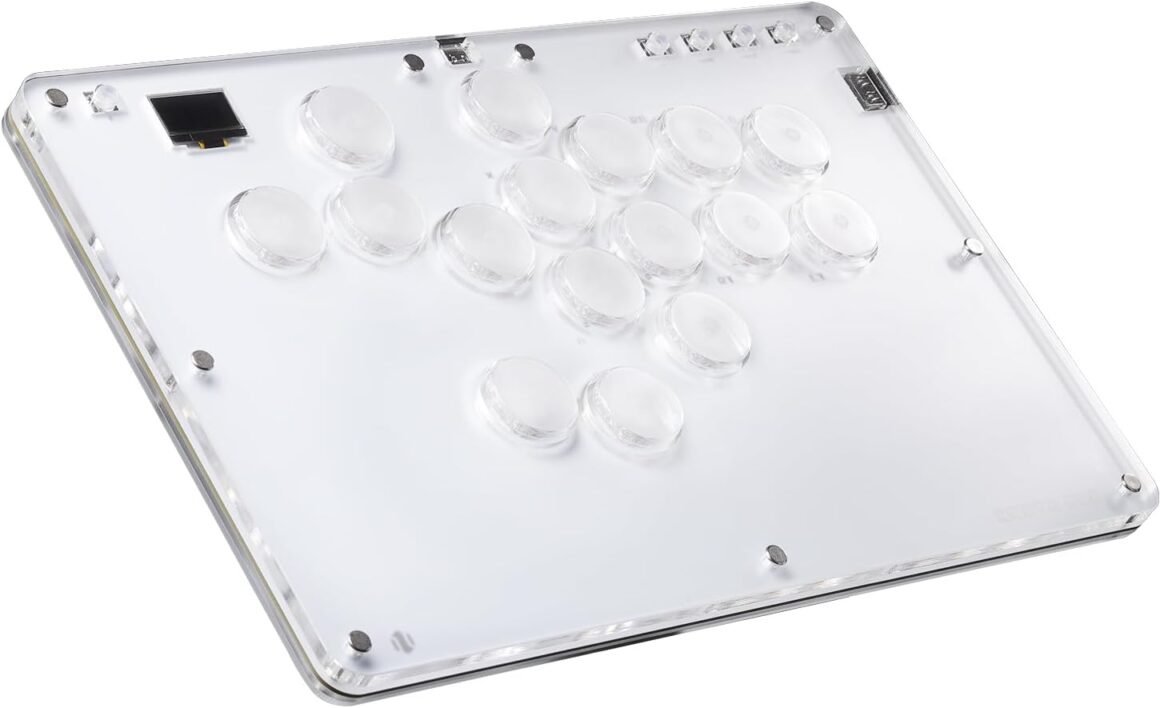
SIXSIR T16 Crystal Series: Leverless Arcade Stick Gaming Controller: Available now at [price_with_discount]

Product Description Kailh Crystal Low-profile Switch Better light transmission & More precise input feedback Excellent size(296*196*12.5mm) for big hand and lap use Support Playstation/Switch/XBOX/Windows/Mac/Android/Steam (PS5&XBOX need converter) Customizable RGB & Splash screen & DIY panel 1 Low-profile Switch 2 Bigger & Thinner 3 Versatile Compatibility 4 Unlock Your Artwork How do I get my device to work on PS4/PS5/XBOX? For Playstation 4 compatibility, you will need to use either the PS4 Mode or the PS Passthrough add-on. Pls refer to our official website link: cosmoxgaming.com/support/ For the PS5/XBOX, you need to purchase an additional converter. Why dose my controller stop responding after a while on PS4 or PS5? PS4 and PS5 use an authentication mechanism. If a device doesn’t implement this authentication mechanism the controller is subject to an 8-minute timeout.  Pls refer to our official website link: cosmoxgaming.com/support/ to set your device. Which input mode should I use? This will depend on the platform you will be playing on: XInput Mode – PC games, 3rd party console adapters PS4 Mode – PS4, PS5 systems Keyboard Mode – MAME cabinets, PC rhythm games Pls refer to official website: cosmoxgaming.com/support/ to set. SIXSIR Leverless Controller Customer Reviews 5.0 out of 5 stars 7 4.7 out of 5 stars 5 4.6 out of 5 stars 3 5.0 out of 5 stars 4 Price $75.99$75.99 $126.99$126.99 $53.99$53.99 $47.49$47.49 Material Acrylic Alloy Plastic Plastic Features Flagship acrylic sandwich Upgrade Metal Texture Tournament Level Simple & Stylish Firmware GP2040-CE GP2040-CE GP2040-CE GP2040-CE Switch Kailh low-profile switches Kailh low-profile switches Kailh low-profile switches LEOBOG Graywood V4 Switches Buttom 12/16 Keys 12/16 Keys 12 Keys 16 Keys Versatile Compatibility: Replacing a joystick with 4 movement buttons, bring you more precise input. Support PS5/PS4/PS3/Nintendo Switch/Windows 10 or above / Steam Deck/Raspberry Pi(Lakka, RetroPie, Recalbox, Batocera)/MiSTer/Android, Linux, iPadOS, macOS, Windows (Keyboard mode only). ATTENTION: The setting of PS4/PS5/XBOX should refer to the manual or official website link: cosmoxgaming.com/support/Upgraded T16 Crystal Series: Inherit flagship acrylic sandwich template, SIXSIR T16-crystal leverless controller upgrade to Kailh transparent low-profile switches with more accurate feedback. High transmittance of transparent switches provide more fantasy RGB lighting effect, and more possible artworksBigger & Thinner: Excellent size(296*196*12.5mm) for big hand and lap use, switch your battlefield from desk to sofa or bed with more comfort. 16 keys hot-swappable button layout, making your input more preciseFunction Enhancement: Thanks to GP2040-CE, the input latency

of the SIXSIR Leverless Controller is reduced, providing a better gaming experience. The customizable RGB lighting allows users to personalize their controller, while the splash screen adds a unique touch. Additionally, the DIY panel feature allows for further customization.

For compatibility with Playstation 4, users can utilize the PS4 Mode or the PS Passthrough add-on. For PS5/XBOX compatibility, an additional converter is required. It is important to note that PS4 and PS5 have authentication mechanisms that may cause the controller to stop responding after a while if not set up correctly. Users can refer to the official website for instructions on how to set up their device.

When selecting an input mode, users should consider the platform they will be playing on. XInput Mode is suitable for PC games and 3rd party console adapters, PS4 Mode is for PS4 and PS5 systems, and Keyboard Mode is ideal for MAME cabinets and PC rhythm games. Instructions for setting the input mode can be found on the official website.

Overall, the SIXSIR Leverless Controller offers versatile compatibility, enhanced functionality, and a customizable design. With positive customer reviews and competitive pricing, this controller is a popular option for gamers looking to elevate their gaming experience.

Price: $98.99 - $75.99
(as of Jul 16, 2024 11:04:50 UTC – Details)


Related Posts
Read More

MSI G271CP: 27″ FHD Gaming Monitor – 165Hz, FreeSync Premium, HDMI & Displayport: Available now at [price_with_discount]

MSI G271CP, 27" Gaming Monitor, 1920 x 1080 (FHD), VA, 165Hz, FreeSync Premium, HDMI, Displayport, Tilt, Swivel, Height Adjustable,Pivot
27" LCD panel LED backlight (1920 x 1080 FHD)
165Hz refresh rate - Display without after image.
1ms response time helps eliminate screen tearing and choppy frame rates
Gaming OSD App – Create the ultimate viewing settings for your game
1000R
Read More

“Soft Silicone Case for Miyoo Mini Retro Handheld Game Console: White”: Available now at [price_with_discount]

Product parameters:
Name: Protective cover
Applicable models:for Miyoo Mini
Size: 6.9x9.5x2cm
Colour:Black,White,Purple
Weight with package: 30.4g

Product list:
1*protective sleeve
1* Lanyard

Note:Protective case only, does not include the game console shown in the picture.

Silicone Case Specifically designed for Miyoo Mini console.
Made of high quality and environment-friendly silicone material, soft and durable in use.
It provides full protection for your device, anti-scratch, dust-proof and shockproof.
It protects the machine from dust, scratches, bumps and damage.
With lanyard, easy to carry.
Read More

RedThunder 60% Wireless Gaming Keyboard and Mouse Combo: Ultra-Compact RGB Mechanical Feel with 2500mAh Rechargeable Battery, Lightweight Honeycomb Optical Mouse for Gaming and Business – Stylish White Finish

Product description RedThunder LOGORedThunder LOGO 75% keyboard wireless mechanical tkl wired redthunder ps4 keyboard b097t276ql b07xvcp7f5 b07gqnl7xj75% keyboard wireless mechanical tkl wired redthunder ps4 keyboard b097t276ql b07xvcp7f5 b07gqnl7xj 60% xbox mini white tkl mechanical rgb redthunder compact b07zt61ltz b07vpvfjdd b07p6k5gmy60% xbox mini white tkl mechanical rgb redthunder compact b07zt61ltz b07vpvfjdd b07p6k5gmy

Membrane keys b07nbjvh4gMembrane keys b07nbjvh4g

Unique translucent built-in panel.

The wireless keyboard has been designed with a unique built-in transparency board, which will enhance the overall gaming lighting atmosphere.

Membrane KeysMembrane Keys

Mechanical Feel Keyboard

The closest mechanical feel to the crater structure and has a high quality conductive film that has been tested on 1,000,000 printing presses. Its 2ms response time is the fastest of any non-mechanical keyboard.

Tripod ErgonomicTripod Ergonomic

Upgrade Type-C Charging Port

The upgraded detachable Type-C interface is made of premium metal for enhanced texture. It has the characteristics of being more durable to use, plugging and unplugging at any time, and more convenient to carry.

Type-C charging CableType-C charging Cable

Type-C Rechargeable Wireless Mouse

The wireless RGB mouse and the keypad are charged with the same Type-C data cable, and the mouse wheel will be illuminated by the indicator light when charging. The charging port is not easy to damage, more durable to use, simple to plug and unplug, and easy to carry.

left mouse buttonleft mouse button

High-performance

The side of the mouse adopts a non-slip curve design, with two buttons, the fingers fit the mouse more, and the use is more flexible. Professional gaming mouse adopts optical sensor, 3600DPI, 12000 FPS scanning speed, 40G acceleration, and tracking speed up to 400 IPS.

Wireless RGB MouseWireless RGB Mouse

Excellent Honeycomb Shell Design

Taking creative design for lightweight honeycomb shell, owning the durable strength and excellecnt ventilation, meanwhile it keeps your palms cool and fresh, moving it more quickly and freely during your games, assures your long-session gaming without fatigue.

Wireless keyboard and wireless mouse comboWireless keyboard and wireless mouse combo

How to use the Fn function and RGB lighting?

1. FN+ "BACK" = DELETE ; 2. FN+ "`~" = ESC; 3. FN+ "1" = F1; FN+ "2" = F2; FN+ "3" = F3; FN+ "4" = F4; FN+ "5" = F5; FN+ "6" = F6; FN+ "7" = F7; FN+ "8" = F8; FN+ "9" = F9; FN+ "0" = F10; FN+ "-_" = F11; FN+ "=+" = F12; 4. FN+ "I" = Backlight ON/OFF; 5. FN+ "K" = Switch Mode;

6. FN+"O"/"L" = Adjust Brightnes; 7. FN + "U"/"J" = Adjust Speed; 8. FN + "W" = Switch Between WASD and ↑←↓→;

9. FN + "R" = Volume- ; 10. FN+"T" = Volume+ ; 11. FN+"Y" = Mut; 12. FN+"WIN" = Lock WIN and MENU.

Note

1. The keyboard and mouse share only one USB receiver to reduce the number of USB ports, which is located at the bottom of the mouse. (Only when the USB dongle is plugged in, the lights of the keyboard and mouse will light up).

2. Please fully charge it before the first use, otherwise it will not last as long as expected when it is not fully charged. (Because we didn't fully charge the keyboard/mouse before shipment to ensure transportation safety).

3. No software installation is required before the first use, just plug the USB receiver into the USB port, turn the switch at the bottom of the keyboard to the ON position, and turn the switch on the bottom of the mouse to the ON (no light) or LED (with light) position.

4. There will be a little delay or the lights will not turn on when the keyboard/mouse battery is too low, please charge the keyboard/mouse in time, the charging indicator will go off after full charge.

5. To protect battery life, please use a lower than DC:5V adapter to charge, preferably using the computer's USB port to charge directly. Due to the different currents of different computer USB charging ports, some users may need longer charging time to fully charge.

6. Turning off the keyboard light can extend the battery life of the keyboard moderately.

7. If you can't press "WASD" or "↑↓←→", don't worry, please check if the FN function key is enabled. FN+ "W" key can be used to switch between letter "WASD" keys and arrow "↑↓←→" keys at will.

8.If the keyboard/mouse is not working, they may lose connection with the USB receiver. Please try pairing with the USB receiver again. Pairing steps as following: Make sure the keyboard/mouse fully charged and re-pair with the USB receiver.

Mouse pairing steps: Step 1: Turn the switch at the bottom of the mouse to the switch position with the sun logo; Step 2: Press and hold the mouse wheel and right button, the mouse RGB lights start to flash; Step 3: Insert the USB receiver into the computer and the pairing is complete. Keyboard pairing steps: Step 1: Turn on the keyboard switch; Step 2: Press and hold the ESC key and the K key at the same time, the indicator light starts to flash; Step 3: Insert the USB receiver into the computer, and pairing is complete.

9. If you have any problem, please tell us at the first time, we will try our best to solve it.

Add to Cart Add to Cart Add to Cart Add to Cart Add to Cart Customer Reviews 4.3 out of 5 stars 2,077 4.0 out of 5 stars 997 4.2 out of 5 stars 135 3.9 out of 5 stars 162 4.0 out of 5 stars 2,553 4.5 out of 5 stars 1,296 Price $39.99$39.99 $39.99$39.99 $99.99$99.99 $39.99$39.99 $49.99$49.99 $39.99$39.99 Color Option White/Black White/Black/Black-White/White-Black White/Black/Black-White/White-Black White/Black White Pudding/Black Pudding/Black/White/Pink/White-Gray Black/White Connection Wireless Wireless Trip-Mode Wireless Wireless Wired Keyboard Keys 61 84 95 114 104 104 Backlight Mode ✓ ✓ ✓ ✓ ✓ ✓ Anti-Ghosting ✓ ✓ ✓ ✓ ✓ ✓ Mouse DPI 3200 3200 no data 4800 3200 7200 Keyboard Battery capacity 2000mAh 1850mAh 8000mAh 2000mAh 3000mAh no data Mouse Battery capacity 500mAh 500mAh no data 600mAh 800mAh no data
【High-performance 2.4G Wireless Keyboard and Mouse】Are you looking for a small wireless keyboard and mouse combo that can perfectly balance work and games? RedThunder K62 rechargeable wireless gaming keyboard and mouse combo will be your best choice. 2.4G high-speed and stable transmission, ensure that it can easily deal with even the most intense battles. Note: The keyboard and mouse share a USB receiver in the bottom of the mouse.
【Rechargeable & Long Battery Life】The keyboard is equipped with a 1850 mAh battery, and the mouse is equipped with an 500 mAh battery. The long battery life allows you to use them continuously for 8 hours with light. The keyboard and mouse are equipped with smart energy-saving functions. If there is no operation within 2 minutes, they will automatically go to sleep, press any key to wake them up. Please charge 8 hours before using.
【60% Compact Small Keyboard and Ultra-light Honeycomb Shell Mouse】The most delicate and cute keyboard keeps your desktop neat, more space for mouse movement and other desktop devices. The well-designed perforated honeycomb shell mouse is ergonomically designed and weighs only 65 (+-5) grams, making it more flexible and comfortable without fatigue.The small keyboard and mouse combo will be the best choice for gamers.
【Light Up Keyboard and Mouse】60 percent rgb gaming keyboard features 4 RGB backlight modes, 4 levels of brightness adjustment, 7 monochrome backlight modes and 1 full rainbow backlight. The luminous design of Letters and gaps makes it the best light up wireless mini keyboard on the market. The mouse has a built-in 7-color cyclic gradual lighting effect.
【Durable Ergonomic Keyboard and Mouse】The keys have a 10 000 000 keystrokes lifetime, so you can hold on to it for the next decade! ABS keycaps adopt two-color injection molding process, the letter of characters never fade. The mouse fits the palm perfectly, and the anti-sweat and non-slip design gives you complete control.
【Plug and Play 】The keyboard and mouse share only one USB receiver, and the code has been completed by default. You only need to insert the receiver and turn on the keyboard and mouse to use it. (Note: If the receiver and the keyboard/mouse lose connection and cannot be used for any reason, you only need to reset the code pairing or contact us in time, we will try our best to solve it)