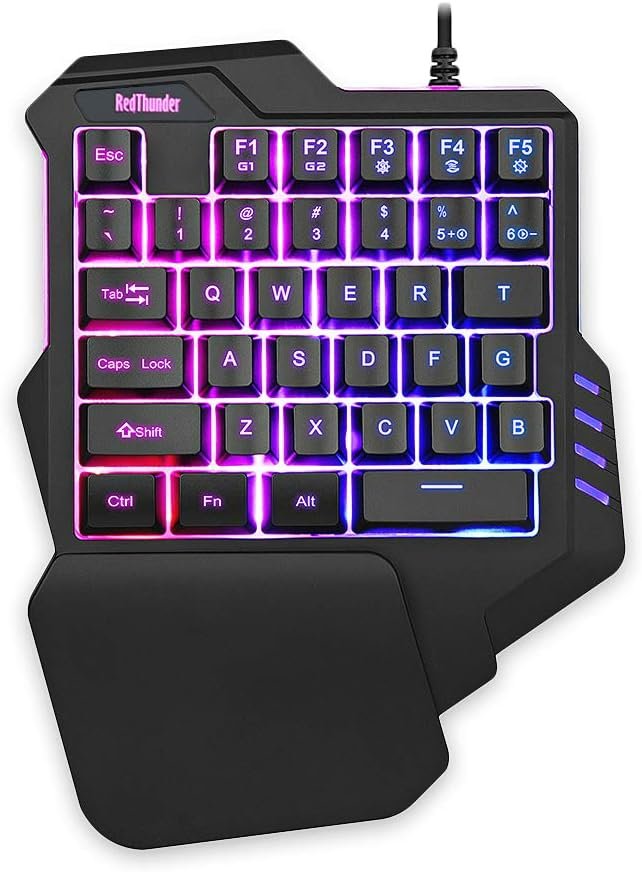
“RedThunder One-Handed Gaming Keyboard: Portable RGB Backlit Keypad for PC Gamers”: Available now at [price_with_discount]

Product Description RedThunder G92 is a very cost-effective one-handed gaming keyboard designed for the average gamer. Built-in game chip, all 35 keys anti-ghosting, suitable for almost all PC games. Two macro recording keys give you more possibilities for operation. The big wrist-rest and ergonomic design provide you with a relaxing gaming experience. Its small size design makes it not only easy to carry but also saves you space. The RGB backlit supports breath mode and static mode, there are 7 colors to choose, the cool lighting effect will bring you more fun for game. Note: This is not a mechanical keyboard, but a membrane keyboard with a very good feel. RGB BACKLIT Support a variety of super cool backlit effects: FN+F3: Cyclically switch 7 monochromatic light and 1 mixed color light; FN+F4: Switch the light change mode; FN+F5: Turn off/on the backlight; FN+5/6: Turn up/down the speed of light changes. ERGONOMIC DESIGN The big wrist-rest and ergonomic design provide you with a relaxing gaming experience. No matter how long you type or how intense your gaming marathons are, you are always comfortable. TWO-COLOR KEYCAP The keycap uses a two-color injection molding process, which not only feels more soft to touch, but also has better light transmission effect. ANTI-GHOSTING Built-in game chip, all 35 keys anti-ghosting, suitable for almost all PC games, bring you a smoother game experience PORTABLE The keyboard uses a portable design, its small size makes it not only easy to carry but also saves you space. Add to Cart Add to Cart Add to Cart Add to Cart Add to Cart Add to Cart Customer Reviews 4.4 out of 5 stars 3,245 4.3 out of 5 stars 472 4.0 out of 5 stars 474 3.8 out of 5 stars 329 4.1 out of 5 stars 1,607 3.6 out of 5 stars 432 Price $19.99$19.99 $27.69$27.69 $27.69$27.69 $39.99$39.99 $29.99$29.99 $35.99$35.99 Color Option Black Black Black Black Black White-Gray Connection Wired Wired Wireless Wireless Wireless Wireless Keyboard Keys 35 35 35 61 104 84 Backlight Mode ✓ ✓ ✓ ✓ ✓ ✓ Fn Function Key ✓ ✓ ✓ ✓ ✓ ✓ 【Professional Gaming Keyboard】Built-in game chip, with 3ms faster response speed, more fluent for playing games, perfect for game enthusiasts to fully enjoy the pleasure of games. All 35 keys anti-ghosting, suitable for almost all PC games.【Macro Recording Keys】’FN+F1′ and ‘FN+F2’ are two sets of macro recording keys. Macro recording method: 1.Press FN+ESC until the backlit flashes to start recording; 2.Enter what you need to record; 3.Press ‘FN+F1’ or ‘FN+F2’ to end recording. The macro recording has been completed, press ‘FN+F1’ or ‘FN+F2’, the corresponding content will be output. If you want to clear the recording, just press FN+ESC until the backlit flashes, then press ‘FN+F1’ or ‘FN+F2’.【Ergonomic Design】The keyboard uses a portable design, its small size makes it not only easy to carry but also saves you space. The big wrist-res t and ergonomic design provide you with a relaxing gaming experience.【RGB Backlit】The RGB backlit supports breath mode and static mode, there are 7 colors to choose, the cool lighting effect will bring you more fun for game.【Easy to Use】Driver Free, Plug&Play, Fully Compatible with: Win10/8/7/Vista/ME/Mac/Linux/IBM

The RedThunder G92 is a cost-effective one-handed gaming keyboard designed for the average gamer. It features a built-in game chip, 35 anti-ghosting keys, and two macro recording keys for enhanced functionality. The ergonomic design with a big wrist-rest ensures a comfortable gaming experience, and the RGB backlit supports various lighting effects. The keyboard is portable and space-saving, making it easy to carry around. With its professional gaming features, including faster response speed and macro recording keys, the RedThunder G92 is perfect for game enthusiasts looking to enhance their gaming experience. The keyboard is easy to use, driver-free, and plug-and-play compatible with various operating systems. Available in multiple colors and with positive customer reviews, the RedThunder G92 offers a great value for its price.

Price: $21.99 - $19.99
(as of Jul 13, 2024 17:02:59 UTC – Details)


Related Posts
Read More

Elevate Your Gaming Experience with the Premium Aluminum Alloy Wired Mechanical Keyboard: Programmable Gasket-Mounted Design, Hot Swappable Nimbus V3 Switches, RGB Lighting, and Mode-Switching Knob

Product description

EPOMAKER X LEOBOG HI75 Wired Aluminum Mechanical Keyboard in Gasket

The video showcases the product in use.The video guides you through product setup.The video compares multiple products.The video shows the product being unpacked.

Plug, Play, Perform! Experience the pinnacle of mechanical keyboard design with the EPOMAKER x LEOBOG Hi75 Aluminum Keyboard, the game-changer in both aesthetics and performance.

HI75 gaming keyboard HI75 HI75 HI75 HI75

The 75% Layout Gaming Keyboard for Multi-Platform Gamers

1 Gaming-Grade Chip 2 Anti-Ghosting 3 PC/Tablet/PS4/5/Xbox 4 Mac/WIN 5 Aluminum Alloy Functional & Stylish Aluminum HI75HI75 Detachable Type-C Cable

Package includes a USB-C cable for fast and reliable data transfer, ensures excellence in your gaming and daily work with HI75 Keyboard.

HI75HI75 Magnetic Metal

Removable magnetic piece with logo printed on one side and smooth sleek on the other, so you can flip it to accommodate your desktop design.

HI75HI75 Dual-function (long-press)

Turn the knob to control volume or keyboard brightness.

Tips: Knob can't wake PC from sleep. HI75HI75 Indicator Light

Indicator lights of CapsLock, Scroll Lock, WIN Lock

FN+WIN to lock/unlock). Thocky Typing, RGB lighting, Shortcuts & Software Sound-Damping Design for HiFi Thocky Typing Gasket Structure & Sandwiched Foams and Pads

Hi75's ingenious GASKET design, complemented by PORON gaskets, significantly minimizes cavity sound for ultimate thocky joys. It's the ideal choice for a satisfying, pure typing ASMR, despite the high investment it needed to fit in layers after layers of sound-damping foams and pads. The aluminum alloy case also levels up Hi75's acoustics performance, as well as contribute to the sophisticated flair of your desktop setting.

The video showcases the product in use.The video guides you through product setup.The video compares multiple products.The video shows the product being unpacked. Nimbus, Juggle V2, Greywood V3, IceCyan Aluminum Case & Pre-Lubed Switch

Crafted from top-tier aluminum alloy and finished with an exquisite spray process, the keyboard's case promises durability with a luxurious feel. This premium material choice not only ensures longevity but also significantly enhances Swiches's acoustics performance. Enjoy and compare the switch options available for the HI75 Keyboard!

The video showcases the product in use.The video guides you through product setup.The video compares multiple products.The video shows the product being unpacked. Per-Key Personalisable Backlight 16.8 Millions Colors of RGB and Singular Color Light Effects

Discover the array of fascinating light effects on your HI75 Mechanical Keyboard. Light up your typing journey with spectacular colors and dynamic effects. All default settings can be customized, such as color, speed, brightness, saturation, etc. What's more, you can personalize your unique light pattern from scratch on the Light page and set up Music Rhythm RGB to get the light to dance with music.

The video showcases the product in use.The video guides you through product setup.The video compares multiple products.The video shows the product being unpacked. Navigate your digital world with FN Shortcuts Achieve more, with less time.

With these helpful shortcuts, you get to complete your daily tasks, whether in real life or for your favorite game, in a much more productive style. To navigate your digital life across multiple devices, use FN+Q/W/E/R to switch to different OS modes. Discover more function keys with FN+F1-12 and personalize the backlight with FN+Tab or arrow keys.

Note: If the WIN key or Alt key stops working properly, use FN+Q/W/E/R to switch to the correct OS mode. The video showcases the product in use.The video guides you through product setup.The video compares multiple products.The video shows the product being unpacked. Remap Keys with On-board Memory Customising with HI75 Software

HI75 Keyboard is compatible with multiple OS systems such as WIN, macOS, Android, and iOS. With Win or macOS computer, you can use the Hi75 Software to customize the settings of your HI75, so it caters to your personal needs. On up to 3 layers of keymaps, you can rearrange or re-assign keys to have different functions. On the FN setting page, you can change some key FN shortcuts.

The video showcases the product in use.The video guides you through product setup.The video compares multiple products.The video shows the product being unpacked. HI75 gaming keyboard HI75 HI75

SOA Profile (Blueberry, MagicBear, HeartThrob, Astronaut)

HI75

MDA Profile (White Purple, White Green); Cherry Profile (White Purple)

1 Featured in Media 2 Hot-Swap 3 PBT Keycap (SOA) 4 PBT Keycap (MDA&Cherry)

Why does the WIN/Alt key stop working? Why can't I use command key on my Macbook?

It's possible your Hi75 is in the wrong mode. You may switch to WIN mode with FN+W, or switch to Mac Mode with FN+E.

Why the White Purple HI75 I get looks different from the picture?

There're two versions of White Purple HI75. Those with Nimbus and Juggle V2 switch has MDA profile, while those with Greywood or IceCyan switch has Cherry Profile.

Which Switches are quieter?

Linear switches usually is quieter, but not completely silent. You may check the videos under "Thocky Typing" section for how loud switches are. And if you want, you can hot-swap the switches to silent ones.

Is HI75 an Aluminum keyboard? And is it wireless?

Hi75 is made of Aluminum but it is NOT Wireless. Although, it is pre-lubed and ready for plug-in connection straight out of box.

What is Keycap Profile?

Profile defines height differences between each row of keycaps. Hi75 Keycap's Profile are: MDA (White Purple, White Green); Cherry (Whitge Purple); SOA (Blueberry, MagicBear, HeartThrob, Astronaut).

Graywood V3 Switch

Switch Option

Cherry Profile

Keycap Profile

Cherry Profile

Linear

Switch Type

Linear

40±3gf

Actuation Force

35±3gf

53gf±3g

Bottom-out Force

45±3gf

1.5±0.3mm

Actuation Travel

1.3±0.3mm

3.6±0.3mm

Total Travel

3.7±0.3mm

5-pin

Compatibility/Pin

5-pin

Cherry Profile

Keycap Profile

Cherry Profile

Linear

Switch Type

Clicky

40±3gf

Actuation Force

43±3gf

53gf±3g

Bottom-out Force

53gf±3g

1.5±0.3mm

Actuation Travel

1.5±0.3mm

3.6±0.3mm

Total Travel

3.5±0.3mm

5-pin

Compatibility/Pin

5-pin

Nimbus Switch HI75 wired gaming keyboard IceCyan Switch HI75 Wired gaming keyboard
【Revolutionary Mode-Switching and Enhanced Control】The EPOMAKER x LEOBOG Hi75 Aluminum keyboard introduces the innovative knob, an epitome of style meets functionality. This intuitive knob allows for smooth transitions between work and gaming modes, offering a constant RGB glow for a focused work environment and dynamic RGB flashing for an immersive gaming experience. It also provides refined control over volume and lighting, adding sophistication to every keystroke.
【Sleek 75% Layout, Gasket-Mounted Structure】The Hi75 features a sleek, 75% layout with 81 essential keys, striking an ideal balance between minimalistic design and full functionality. This layout ensures you have every key you need, without overwhelming your space. Its sophisticated look enhances any desk setup. Moreover, the ingenious GASKET design, complemented by PORON gaskets, significantly minimizes cavity sound, enhancing your typing sounds. It's the ideal choice for a satisfying, low-noise typing experience, whether in an office or gaming environment.
【Solid Aluminum Alloy Build】Crafted from top-tier aluminum alloy and finished with an exquisite spray process, the keyboard's case promises durability with a luxurious feel. This premium material choice not only ensures longevity but also adds a sophisticated flair to your setup.
【Advanced Gaming-Grade Chip】The Hi75 is equipped with a top-tier gaming chip, ensuring rapid and responsive keystroke registration. Tailor your experience with customizable delay settings for a swift, seamless gaming experience that keeps you ahead of the competition.
【Full Key Hot-Swap Capability】Customization at Your Fingertips. Every key on the Hi75 is hot-swappable, offering unparalleled freedom to modify switch types as per your preference. With compatibility for most 3/5-pin switches, it opens a world of possibilities for personalizing your keystroke feel and sound.
【Seamless Connectivity】Plug, Play, Perform: The Hi75 boasts a hassle-free Type-C interface, accompanied by an extendable spring data cable ranging from 1.8 to 2 meters. This design guarantees effortless setup and flexibility, allowing you to start typing immediately with no additional configuration. Experience the pinnacle of keyboard design with the EPOMAKER x LEOBOG Hi75. Crafted for the discerning user who demands both style and functionality, this keyboard kit is a game-changer in both aesthetics and performance.
Read More

“ASUS VivoBook Laptop: 14″ Full HD, Intel Core i3-1115G4, 8GB RAM, 128GB SSD, Windows 10 Home”: Available now at [price_with_discount]

Key Features and Benefits:
CPU: Intel Core i3-1115G4 Processor (2-Core, 4 Threads, 6MB Intel Smart Cache, Base Frequency at 3.0GHz, Up to 4.1GHz with Intel Turbo Boost Technology)
Memory: 8GB DDR4 RAM
Hard Drive: 128GB M.2 Solid State Drive
Operating System: Windows 10 Home
Display: 14-inch Full HD LED Non-touch display (1920 x 1080)
Touchscreen: No
Graphics: Intel UHD Graphics
Audio: SonicMaster Audio
Ports:
1 x USB 3.2 Gen 1
2 x USB 2.0 Type-A
1 x USB 3.2 Gen 1 Type C
1 x HDMI 1.4
1 x headphone/microphone combo
Optical Drive: None
Wireless Connectivity: Wi-Fi 5 802.11ac and Bluetooth
Backlit Keyboard: Yes
Webcam: VGA Webcam Front
Battery: 37 WHrs 2-cell lithium-ion
Dimensions: 12.81" x 8.50" x 0.78"
Weight: 3.42 Pounds
Color: Slate Grey
【High Speed RAM And Decent Space】8GB high-bandwidth RAM to smoothly run multiple applications and browser tabs all at once; 128GB Solid State Drive allows to fast bootup and data transfer.
【Processor】11th Gen Intel Core i3-1115G4 Processor (2-Core, 4 Threads, 6MB Intel Smart Cache, Base Frequency at 3.0GHz, Up to 4.1GHz with Intel Turbo Boost Technology)
【Display】14-inch Full HD LED Non-touch display (1920 x 1080)
【Tech Specs】Wi-Fi 5 802.11ac and Bluetooth; 1 x USB-A 3.2 Gen 1, 2 x USB 2.0 Type-A, 1 x USB 3.2 Gen 1 Type-C, 1 x HDMI 1.4 port, 1 x headphone/microphone combo; SonicMaster Audio; Backlit Keyboard.
【Operating System】Windows 10 Home - Beautiful, more consistent new design, Great window layout options, Better multi-monitor functionality, Improved performance features, New videogame selection and capabilities, Compatible with Android Apps
Read More

“Powerful Gaming Desktop: Acer Nitro 50 N50 with Intel Core i7-14700F Processor and NVIDIA GeForce RTX 4060”: Available now at [price_with_discount]

It Lies Within: The fiery-accented, black metal Nitro 50 gaming PC is all the fuel you need for those high frame, lag-free game sessions. Go on and switch settings to ultra with an injection of the latest Intel Core i7-14700F Processor and high-performance NVIDIA GeForce RTX 4060 graphics. Next, toss in its advanced cooling, stellar audio capabilities, and high-speed connectivity and you quickly see why the Nitro 50 delivers a knockout blow to the competition! (DG.E3VAA.004)
BUILT TO CONQUER: The fiery-accented, black metal Nitro 50 gaming PC is all the fuel you need for those high frame, lag-free game sessions. Go on and switch settings to ultra with an injection of the Intel Core i7-14700F Processor and NVIDIA GeForce RTX 4060 graphics.
Intel Core i7-14700F 20-Core Processor (Up to 5.4GHz) | 16GB DDR5 5600MHz Memory (expandable to 32GB) | 1 TB PCIe 4.0 NVMe SSD
NVIDIA GeForce RTX 4060 Graphics with 8GB of GDDR6 Video Memory (3 x Display Ports 1.4a & 1 x HDMI 2.1 Port)
DTS: X Ultra Audio | Intel Wireless Wi-Fi 6E AX211 (Gig+) 802.11ax supporting dual-stream 2.4GHz, 5GHz and 6GHz bands featuring 2x2 MU-MIMO technology | Realtek 8118AS Dragon Gigabit Ethernet
1 - USB 3.2 Gen2x2 20 Gbps, Type-C Port (Front) | 1 - USB 3.2 Gen2 10Gbps Type A Port (Front) | 2 - USB 3.2 Gen2 5Gbps Type A Ports (Rear) | 4 - USB 2.0 480Mbps Ports (Rear) | 2 - Audio Jacks (Front) | 3 - Audio Jacks (Rear) | 1 - RJ-45 Ethernet Port
USB Keyboard and Mouse Included | Windows 11 Home
Read More

CQCQ 7 Pin Battery Packs for Machenike and Shinelon Laptops: Available now at [price_with_discount]

Product Description 1111 NFSV151X-00-03-3S2P-0NFSV151X-00-03-3S2P-0

Within 2years, if the battery has any fault, please feel free to contactUs to replace it

Efficient and Reliable

Grade A Cells

FCC / CE / RoHS Certified

More Charging Cycles

Long Lasting Performance

11111111

Product description:

Battery Type: Li-ion

Voltage:10.8V

Capacity:47.52Wh/4400mAh

Battery Condition:100% Brand New

111111

Compatible Part Numbers:

7550830-1602017917603830-161409927BATRNFSV12-3100GE5SN-00-01-3S2P-1NFSV151X-00-03-3S2P-0GE5SN-03-12-3S2P-0NF5V151X-00-03-3S2P-0GE5SN-00-01-3S2P-1GE5SN-03-12-3S2P-1GI5KN-00-10-331P-0

Compatible Laptop/Notebook Models:

For Mechrevo Series

X6, X6Ti-E3, MR X6-M, X6-M,

MR X6Ti-M6, X6Ti-M6, X6TI, MR-X6TI,

X6Ti-M2, MR X6Ti-M2

X6Ti-M2 Pro, X6Ti-H, MR X6Ti-H, MR X6

For Machenike Series

F117-F1, F117-F1K, F117-F6K, F117-F3K,

F1, X6TI, F117, X6Ti-S, F117-F, F117-F2U, F117-F6C,

F2, X6TI-M2, F117-F6, X6Ti-Gold, F117-F1C, F117-F2K, F117-F2C,

F6

For Shinelon Series

T50TI, T50-781S1N, T50-58

NFSV151X-00-03-3S2P-0NFSV151X-00-03-3S2P-0

For Optimal Use battery:

New battery received, discharge the battery to 5% (not 0%) for the fist use, then charge and cycle 3-4 times to wake up the new battery.

The important point is to perform a full discharge and charge every other month to extend the battery life.

Do not connect adapter for a long time while using the battery. It may damage the battery.

Avoid artificial shocks, disassembly, crush or puncture. Do not dispose of it in fire or water.

How to install a new battery:

1.emove the old battery, carefully install the new battery on the battery box, tighten the screws, and then connect the wires of the new battery.

2. If you have questions about installing a new battery, you can search for the installation of laptop/tablet models on YouTube.

This method may help you.

NFSV151X-00-03-3S2P-0NFSV151X-00-03-3S2P-0

For Optimal Use battery:

Battery Installation is easy, but we also recommend you to learn related installation video on the web in advance, or just find a repair technician for help.

Please be careful when install battery.Any damage caused by improper operation will be your own responsibility, hope understand.

If the new battery is not recognized during the initial installation:

1. please reinstall and check if the interface is fully connected.

Please disconnect the old battery, and hold down the power button for 20 seconds, then connect the new battery. This drains the residual or flea power and once the laptop is reassembled the battery will function properly.

2. Battery cannot be identified by your laptop or it doesn't seem to work. That may be caused by different situations. Please check by yourself first as below steps.

Could be caused by battery loose. Remove the battery and try to reinstall more than once.

May be due to conductive material damaged which the laptop motherboard and battery anode and cathode contact position, you can try to confirm it with your original battery.

Check whether the battery drive is in normal condition, if not, download the corresponding driver software to update.

Take out the battery and press the power button for about 15 seconds to consume the internal residual power (Do not connect the power cord), and then reinstall the battery.

You can try several times.


💖2years, Exchange or Refund Guaranteed: If you receive defective batteries or quality issues, please feel free to contact us. We will contact you within 24 hours, we place a high value on customer experience
Compatible Part Numbers: 7550830-160201791,7603830-161409927,BATRNFSV12-3100,GE5SN-00-01-3S2P-1,NFSV151X-00-03-3S2P-0,GE5SN-03-12-3S2P-0,NF5V151X-00-03-3S2P-0,GE5SN-00-01-3S2P-1,GE5SN-03-12-3S2P-1,GI5KN-00-10-331P-0
Compatible Laptop/Notebook Models:: For Mechrevo: X6, X6Ti-E3, MR X6-M, X6-M, MR X6Ti-M6, X6Ti-M6, X6TI, MR-X6TI, X6Ti-M2, MR X6Ti-M2, X6Ti-M2 Pro, X6Ti-H, MR X6Ti-H, MR X6. For Machenike: F117-F1, F117-F1K, F117-F6K, F117-F3K, F1, X6TI, F117, X6Ti-S, F117-F, F117-F2U, F117-F6C, F2, X6TI-M2, F117-F6, X6Ti-Gold, F117-F1C, F117-F2K, F117-F2C, F6. For Shinelon : T50TI, T50-781S1N, T50-581S1N