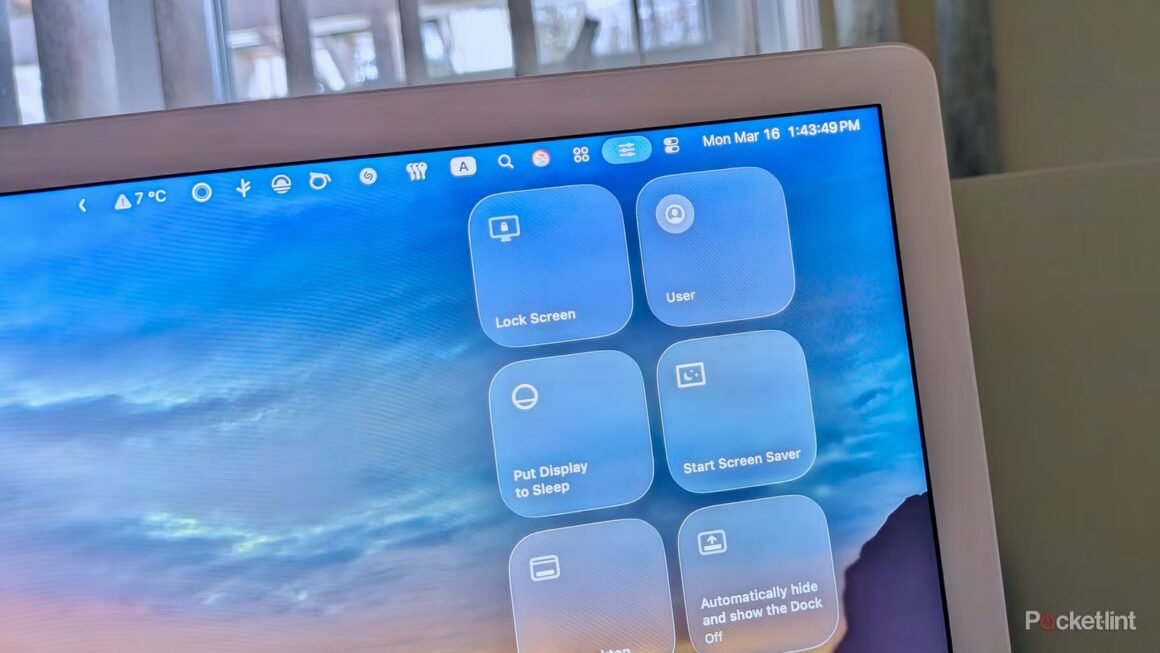

Apple’s macOS 26 Tahoe introduced a revamped Control Center interface, enhancing user experience with greater customization and improved functionality. Users can now arrange shortcuts, resize toggles, and access essential settings more conveniently than ever before. This update, which significantly alters how users interact with macOS, is available for free to existing macOS users, making it a noteworthy improvement in the Apple ecosystem.
This development is particularly relevant for users who rely on their Macs for daily tasks, whether for personal or professional use. With the new Control Center, macOS becomes more efficient for those accustomed to multitasking or needing quick access to tools like Bluetooth, media controls, and window management features. The ability to customize the Control Center to tailor it to individual workflows can be crucial for maximizing productivity, especially as remote work and digital collaboration become more prevalent.
In terms of market context, Apple’s macOS 26 Control Center is part of a broader trend of enhancing user interfaces across platforms. Competing operating systems, such as Windows and Linux, continue to evolve their interfaces as well. For instance, Windows 11 includes a centered taskbar and customizable widgets, while many Linux distributions offer extensive configuration options. Alternatives to macOS also include various laptops with different operating systems, such as Dell’s XPS series running Windows or Lenovo’s ThinkPad, which offer solid performance but might lack the same level of integration with Apple’s ecosystem. Price points vary widely, with premium devices often exceeding $1,000, while more budget-friendly options can be found starting around $500.
The updated Control Center is a considerable enhancement for Mac users, especially those who value customization and efficiency in their computing experience. However, those who prefer a more streamlined, less customizable interface might find the changes overwhelming or unnecessary. Additionally, users who primarily need basic functionalities without advanced customization may be better served by a straightforward setup of their existing tools. For these users, sticking with their current operating system or exploring simpler alternatives might be a more effective choice.
Source:
www.pocket-lint.com