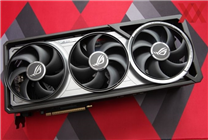

Unlocking Extra Power: How to Flash ROG Matrix 5090 BIOS into Astral Cards
Summary:
- A new BIOS modification allows ROG Matrix RTX 5090 graphics cards to unlock an additional 200W power consumption.
- The flashing process is especially relevant for enthusiasts using ASUS ROG Astral and ROG Astral LC models.
- Specific hardware adjustments may be necessary for optimal compatibility with different designs.
In a remarkable shift within the gaming community, recent developments involving the ASUS 30th Anniversary ROG Matrix RTX 5090 have generated considerable excitement among tech enthusiasts. Launched with an official BIOS power consumption limit reaching a staggering 800W, the ROG Matrix RTX 5090 stands far above standard graphics card offerings. This captivating increase has ignited a fervent interest in BIOS flashing among users seeking optimized performance.
The Flashing Phenomenon
Recently, the tech community was abuzz with insights shared by a forum user, known as Turbogear, who successfully demonstrated how to flash the ROG Matrix BIOS into ROG Astral graphics cards. The outcome? An impressive unlock of an additional 200W power consumption. This process has become a talking point in enthusiast circles, with many eager to explore the potential enhancements to their existing setups.
Compatibility Concerns
While the ROG Matrix’s 800W BIOS seamlessly integrates with RTX 5090s from brands like Gigabyte and MSI, users have encountered compatibility issues when attempting to flash it onto ASUS’s own ROG Astral models, particularly the ROG Astral and ROG Astral LC versions. A notable design difference between the black and white variants of the ROG Astral RTX 5090 introduces complexities that users should navigate carefully.
Specifically, the black ROG Astral’s fourth fan is tied to the main fan in front, whereas the white version features a standalone connection for its fourth fan. This distinction can lead to challenges when utilizing the Matrix VBIOS, especially if users retain the original air cooling system.
Addressing Compatibility Issues
To tackle these complications, Turbogear proposed a hardware modification approach. By adjusting the serial interface (SI) signal line on the EEPROM and transforming a small resistor from a low to a high pull, users can effectively enhance compatibility with the Matrix BIOS.
For those utilizing the white version of the ROG Astral RTX 5090, users have reported no major issues when operating with the standard air cooling setup. In contrast, the black variant may necessitate specific adjustments post-flashing to ensure optimal functionality.
Practical Testing and Results
Preliminary testing of this modification involved three black ROG Astral GeForce RTX 5090 cards, all equipped with water cooling systems. These tests have yielded positive results, paving the way for more enthusiasts to consider undertaking similar BIOS modifications in pursuit of increased power utilization.
Conclusion
The potential unlocked by flashing the ROG Matrix 5090 BIOS into Astral models offers a tantalizing prospect for dedicated gamers and tech enthusiasts. As the boundaries of graphical performance continue to expand, these advances reflect a thriving community eager to push the envelope. However, users should proceed with caution, ensuring all necessary hardware and compatibility considerations are met before attempting to implement these modifications.
In summary, the ROG Matrix RTX 5090 BIOS modification stands as a testament to the innovative spirit within the gaming community, opening doors to higher performance and deeper customization options for avid users looking to amplify their gaming experiences.
By understanding these intricate dynamics, enthusiasts can better navigate the world of GPU modifications while maximizing the potential of their systems.