Unleash Gaming Potential with Nintendo Joy-Con (L/R) – Neon Red/Neon Blue: Your Ultimate Guide

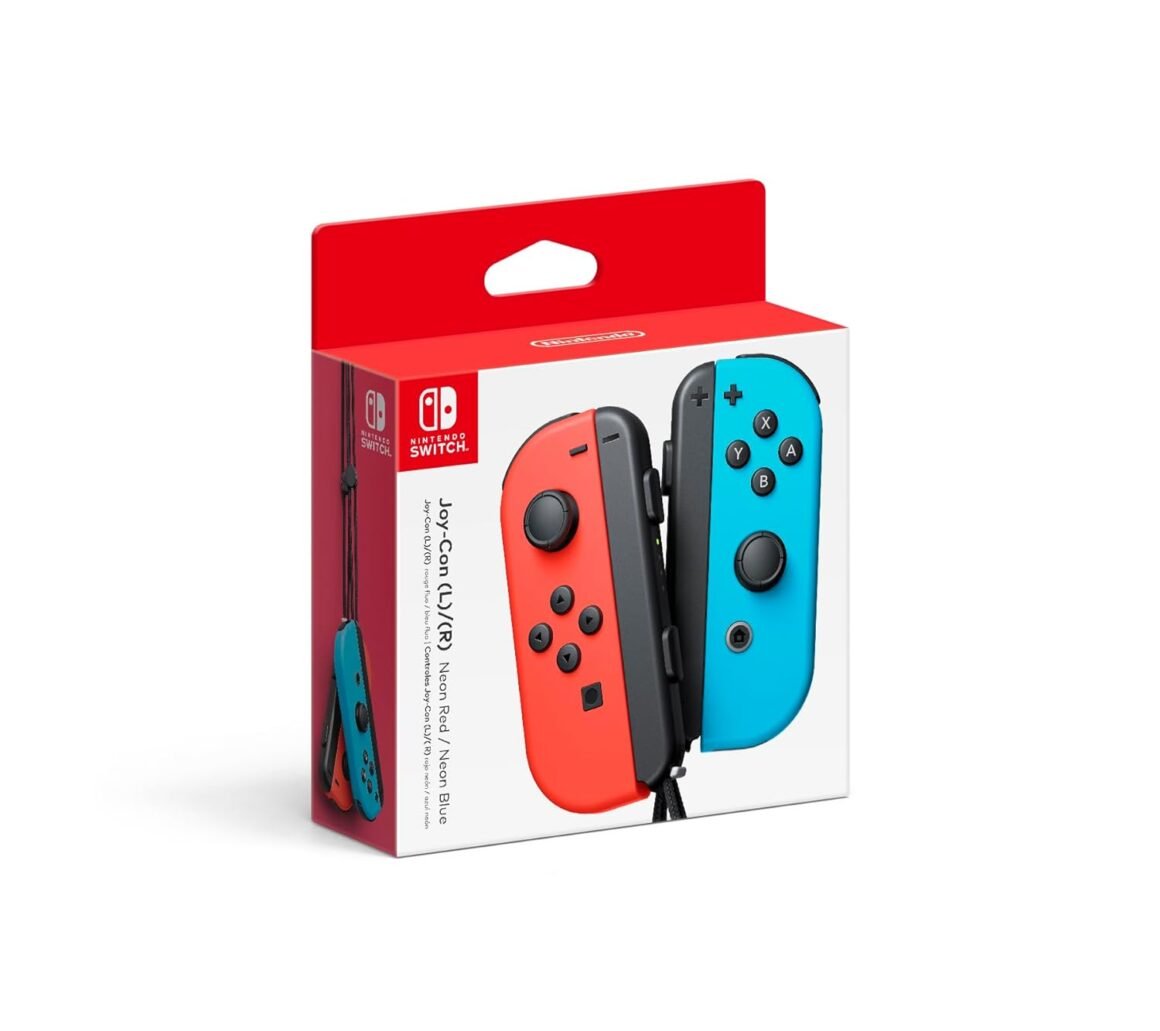
Introducing Joy-Con, controllers that make new kinds of gaming possible, for use with Nintendo Switch. The versatile Joy-Con offer multiple surprising new ways for players to have fun. Two Joy-Con can be used independently in each hand, or together as one game controller when attached to the Joy-Con grip. They can also attach to the main console for use in handheld mode, or be shared with friends to enjoy two-player action in supported games. Each Joy-Con has a full set of buttons and can act as a standalone controller, and each includes an accelerometer and gyro-sensor, making independent left and right motion control possible. Connectivity Joy-Con (L):Bluetooth 3.0 Joy-Con (R):Bluetooth 3.0, NFC (near-field communication)Buttons Joy-Con (L):Left Stick (pressable)Directional/L/ZL/SL/SR/− ButtonsCapture ButtonRelease buttonSYNC Button Joy-Con (R):Right Stick (pressable)A/B/X/Y/R/ZR/SL/SR/+ ButtonsHOME ButtonRelease ButtonSYNC ButtonSensors Joy-Con (L):Accelerometer, Gyroscope Joy-Con (R):Accelerometer, Gyroscope, IR Motion CameraBattery Type Built-in rechargeable lithium-ionBattery Capacity 525 mAhBattery Life (approx.) 20 hoursRecharge Time 3.5 hoursCompatibility Nintendo SwitchWeight Joy-Con (L): 1.73 oz (49 g)Joy-Con (R): 1.84 oz (52.1 g).Introducing Joy-Con, controllers that make new kinds of gaming possible, for use with Nintendo Switch.The versatile Joy-Con offer multiple surprising new ways for players to have fun.Two Joy-Con can be used independently in each hand, or together as one game controller when attached to the Joy-Con grip.They can also attach to the main console for use in handheld mode, or be shared with friends to enjoy two-player action in supported games.Each Joy-Con has a full set of buttons and can act as a standalone controller, and each includes an accelerometer and gyro-sensor, making independent left and right motion control possible.

Discover the Joy-Con: Redefining Gaming with Nintendo Switch

In the landscape of modern gaming, versatility and innovation are paramount. Enter the Joy-Con, Nintendo’s groundbreaking controllers designed for the Nintendo Switch. With the ability to transform gameplay dynamics, the Joy-Con introduces players to unprecedented levels of interaction and fun, making it a must-have accessory for both casual and hardcore gamers.

Innovative Design and Functionality

The Joy-Con controllers are engineered with flexibility at their core. Sold as a pair, they can be used independently or combined into a single controller via the Joy-Con grip. Whether you’re battling friends in a two-player showdown or diving into a solo campaign, the Joy-Con adapts effortlessly to your gaming style. You can even attach them to the main console for portable action, ensuring you’re never limited by your surroundings.

Each Joy-Con is equipped with a comprehensive set of buttons, including directional controls, triggers, and motion sensors, allowing for a truly immersive experience. The Joy-Con (L) features an accelerometer and gyroscope that enable nuanced motion controls, while the Joy-Con (R) adds an IR motion camera for even more dynamic gameplay mechanics. This level of detail is fundamental in bringing games to life, providing intuitive controls that respond to your every movement.

Technical Specifications and Performance

  • Connectivity: Both Joy-Con controllers use Bluetooth 3.0, ensuring a stable, wireless connection.
  • Battery: The built-in rechargeable lithium-ion battery boasts a capacity of 525 mAh, providing an impressive battery life of approximately 20 hours on a single charge. It only takes about 3.5 hours to recharge fully.
  • Weight: Lightweight and ergonomic, the Joy-Con (L) weighs 1.73 oz (49 g) and the Joy-Con (R) weighs 1.84 oz (52.1 g), making them comfortable for extended play.

Additionally, each controller is compatible with a broad range of games on the Nintendo Switch, enhancing everything from platformers to party games. Their seamless integration into various gameplay styles delivers not only adaptability but also durability, fostering hours of gameplay without fatigue.

A Trusted Choice in Gaming

Holding an impressive rating of 4.5 out of 5 stars, the Joy-Con has garnered widespread acclaim from gamers worldwide. Users appreciate their ergonomic design, intuitive motion controls, and versatility across genres, enhancing the gaming experience in ways that traditional controllers simply can’t.

Closing Thoughts

With the Joy-Con, Nintendo continues to lead the gaming industry in innovation, offering a controller that not only enhances gameplay but also invites creativity and collaboration. The versatility of the Joy-Con makes it an essential part of the Nintendo Switch ecosystem, allowing players to explore new worlds with friends and family alike.

About Nintendo: Founded in 1889, Nintendo has a storied history of providing exceptional entertainment experiences. Known for iconic franchises like Super Mario, The Legend of Zelda, and Pokémon, Nintendo continues to push the boundaries of gaming with innovative hardware and unforgettable adventures. The Joy-Con is testament to this commitment, featuring technology that connects players in exciting new ways.

Price: $89.00
(as of Sep 06, 2025 08:43:14 UTC – Details)

Related Posts
Read More

Acer Nitro V Gaming Laptop: Core i9-13900H, RTX 4060 GPU, 144Hz Display, 32GB DDR5, 1TB SSD, WiFi 6, Backlit KB: Available now at [price_with_discount]

Live For Victory: Elevate your gaming adventure with the Acer Nitro V 15, your gateway to an adrenaline-charged journey. This laptop is the perfect blend of power and style, pushing the boundaries of what’s possible on a laptop. Powered by a 13th Gen Intel Core i9-13900H processor and NVIDIA GeForce RTX 4060 laptop graphics and showcasing a crystal-clear 15.6” Full HD display with a 144Hz IPS panel - you can see why the Nitro V 15 is a knockout hit for gamers of every level. (NH.QQEAA.00A)
Beyond Performance: Empower your gaming and creativity with the Nitro V 15, combining a 13th Gen Intel Core i9-13900H processor with the NVIDIA GeForce RTX 4060 Laptop GPU.
AI-Driven Graphics: Experience lifelike visuals and unparalleled performance with the cutting-edge NVIDIA GeForce RTX 4060 laptop graphics. The integration of DLSS 3.5 technology takes your gaming to new heights, enhancing beauty, immersion, and realism. This innovative AI-powered technique elevates the quality of ray tracing, providing an even more captivating gaming experience.
Picture-Perfect. Furiously Fast: See your digital conquests unfold in vibrant Full HD on a 15.6" screen, perfectly timed at a quick 144Hz refresh rate and a wide 16:9 aspect ratio providing 82.64% screen-to-body ratio. Now you can land those reflexive shots with pinpoint accuracy and minimal ghosting. It's like having a portal to the gaming universe right on your lap.
Internal Specifications: 32GB DDR5 Memory (2 DDR5 Slots Total, Maximum 32GB); 1TB PCIe Gen 4 SSD (2 x PCIe M.2 Slots)
Thunderbolt 4: With the powerful Thunderbolt 4 port, you have the trifecta of power charging and data transfer with bidirectional movement and video display in one interface.
Stay Connected: Your gaming sanctuary is wherever you are. On the couch? Settle in with fast and stable Wi-Fi 6. Gaming Cafe? Get an edge online with Gigabit Ethernet. No matter your location, Nitro V 16 ensures you're always in the driver's seat.
Keep Your Cool: Keep your cool amidst the fiercest gaming galaxies, thanks to Nitro V 15's innovative dual fans and effective exhaust system. As you navigate interstellar conflicts, your laptop stays serene as deep space. Its gradient design mirrors the neon hues of a futuristic cityscape, immersing you deeper into your gaming universe.
Always Be Heard and Seen: Experience crystal clear communication with AI-powered Acer PurifiedView and PurifiedVoice noise reduction technology. You'll feel like you're in the command center of a spaceship, with pinpoint sound accuracy giving you the edge in your gaming skirmishes.
Ports For All Your Accessories: 1 - USB Type-C Port USB 3.2 Gen 2 (up to 10 Gbps) DisplayPort over USB Type-C, Thunderbolt 4 & USB Charging, 1 - USB 3.2 Gen 1 Port (Featuring Power-off Charging), 2 - USB 3.2 Gen 1 ports, 1 - HDMI 2.1 Port with HDCP support, 1 - Headphone/Speaker/Line-out Jack, 1 - Ethernet (RJ-45), DC-in for AC adapter, 1 - Kensington Lock Slot
The Right Fit: 14.26" W x 9.44" D x 0.93/1.06" H; 4.66 lbs.; One-Year International Travelers Limited Warranty (ITW)
Read More

“ASUS ZenDrive Ultra Slim 8X DVD Optical Drive with M-Disc Support for Windows, Mac, and Android (SDRW-08U7M)”: Available now at [price_with_discount]

ASUS ZenDrive U7M is an external DVD Writer, ultra-slim 13mm form factor and a Zen-inspired design with a concentric-circle hairline finish that adds sophisticated aesthetics. M-DISC burning technology engraves recorded data into a patented rock-like layer that is resistant to extreme conditions, allowing you to save your lifetime memories.
8X DVD write speed, ASUS ZenDrive U7M provides a complete, easy-to-use backup solution.
ASUS ZenDrive U7M has an ultra-slim, 13mm form factor, making it the perfect companion to thin and light laptops.
M-disc is designed to protect your memories from degradation and data loss for 1, 000 years or more.
Nero backup full back up solution for Android devices.Operating temperature : 5 ℃ to 40 ℃
Windows and Mac compatible
Read More

Upgraded Wireless Controller for Nintendo Switch, Lite, and OLED – Pro Gamepad with Wake-Up Feature, Gyroscope, Turbo Mode, Dual Vibration, and Screenshot Functionality

Product description 11

How to pair the controller?

Switch mode Bluetooth connection

Step 1:Turn on the Switch host, click the "System settings"menu button at the main page interface, click the “Airplane Mode” option after entering the next level menu option , then click Controller Connection (Bluetooth)option make its Bluetooth function in open state.Step 2: Enter the Switch host handle Bluetooth pairing mode, click the “Controllers” menu button at the main page interface of host, click the “Change Grip/Order” option after entering the next level menu option, the host will automatically searching and pairing the handle.Step 3:Press the HOME button for 3-5 seconds enter the Bluetooth searching and pairing mode, LED1-LED4 keep flickering quickly, the handle will vibrate for a moment and the corresponding channel indicator light will always on after connect successfully with host and being assigned automatically.

Switch mode wired connection:

Put SWITCH in the SWITCH base after open the PRO handle’s wired connection option on Switch host, then connect the handle with the data cable, handle will connect the SWITCH automatically, after pull the data cable out, handle will backconnect to the SWITCH host by Bluetooth automatically

Connect the controller to PC WITH THE INCLUDED USB CABLE.

PLEASE NOTE:

ONLY SUPPORT INCLUDED USB CABLE CONNECTION WITH PC, DOES NOT SUPPORT WIRELESS BLUETOOTH CONNECTION TO PC.

Handle on shutdown, connect the PC through USB cable, PC-side will install driver automatically, the light of LED2 on handle always on means that the connection is successful, NOTE: the name displayed: Xbox 360 controller for windows (wired connection)

11 11 11

Note of Wireless Controller for Switch

First time connection steps: When the product is off, press and hold the "H" button for about 5 seconds, the 1234 indicator light on the handle flashes at the same time, and the connection with the host will be successful in about 5 seconds. Automatic connection steps: The host and the controller can reconnect again after sleeping, just press and hold “H” for two seconds, and the 1234 indicator light flashes slowly for 5 seconds to automatically reconnect to the host. PC Connection steps: When the handle is turned off, directly insert the TYPE-C data cable, the indicator lights on the handle 2 and 4 will always be on, and the controller on the pc side will display XBOX 360 controller. At this time, press and hold "H" for about 3 seconds. The indicator light 2 is always on and automatically enters the PC normal mode. Vibration adjustment steps: The default vibration intensity is 100%, after connecting the host, press and hold the screenshot button and then press the minus sign. The vibration intensity is 70%. There are four vibration levels, 0, 40, 70, and 100. Pressing the plus sign increases vibration. 11

WARM AND USEFUL TIPS:

(1) What should I do if the controller cannot be charged?If the controller cannot be charged, please reset the controller.How to reset the controller: Use a paper clip to press the reset hole on the back of the controller twice.

(2)What should I do if the controller cannot connect to the switch host via Bluetooth?step1: please clear the switch console's bluetooth memorystep2: Restart the switch hoststep3: reset the controller: Use a paper clip to press the reset hole on the back of the controller twice.step4:plug out the power adapter of the controller ( please Do not charge while pairing.)

If you have any questions during the use of the product, please feel free to contact the seller through the Amazon order page and we will give you a satisfactory reply within 12 hours.

Add to Cart Add to Cart Add to Cart Add to Cart Customer Reviews 4.4 out of 5 stars 35,423 4.4 out of 5 stars 35,423 4.4 out of 5 stars 35,423 4.4 out of 5 stars 35,423 Price $27.99$27.99 $26.98$26.98 $27.99$27.99 $27.99$27.99 Features Support Dual Vibration, 6-Axis gyro sensor, Screenshot, Screen Recording, Fast Charging, Wake-up Support Dual Vibration, 6-Axis gyro sensor, Screenshot, Screen Recording, Fast Charging, Wake-up Support Dual Vibration, 6-Axis gyro sensor, Screenshot, Screen Recording, Fast Charging, Wake-up, Programmable Support Dual Vibration, 6-Axis gyro sensor, Screenshot, Screen Recording, Fast Charging, Wake-up Connector Type Type-C Type-C Type-C Type-C Connectivity Technology Wireless/Wired Wireless/Wired Wireless/Wired Wireless/Wired Charging Time Within 3 Hours Within 3 Hours Within 3 Hours Within 3 Hours Playing Time UP To 20 Hours UP To 20 Hours UP To 20 Hours UP To 20 Hours
UNIVERSAL COMPATIBILITY : Pro Controller is fully compatible with Switch 2/Switch/Switch Lite/Switch OLED , also compatible with Windows PC and Android Phone, and perfectly compatible with games. No need to install any driver. NOTE: ONLY SUPPORT INCLUDED USB CABLE CONNECTION WITH PC, DOES NOT SUPPORT WIRELESS BLUETOOTH CONNECTION TO PC. This controller only supports connect to switch consoles, PC and Phone , NOT Compatible with other other devices such as: Apple TV, Fire Stick TV, Tesla, Xbox and Playstation consoles.DOES NOT SUPPORT WAKE-UP SWITCH 2 AND AUDIO FUNCTIONS
UPGRADE HALL JOYSTICK, NON-DRIFF: Diswoe Switch controllers is designed with HALL EFFECT joystick, solving the common problem of joystick drift. Unlike ALPS joysticks, high-sensitivity Hall sensors use Electromagnetic Induction to etect the movement of the joystick, the internal parts have no contact with each other, the sensor part will not wear out, faster response speed, especially for FPS shooting games.
POWERFUL FUNCTION : Have dual vibration motors that provide you excellent vibration feedback to enhance the game immersion. With the 6-axis gyro sensor, this controller can detect the inclination of the controller and make a quick response, give you more fun while playing motion-sensing games. No NFC function.
LOW ENERGY CONSUMPTION, LONG BATTERY LIFE : This perfected controller has a high-performance rechargeable battery with automatic sleep, Charging prompt and low voltage warning. The high-performance built-in 550mAh battery can service for 8 hours after fully charged, make sure you can enjoy games longer without interruption.
EXCELLENT HAND FEELING : The wireless controller is built with ergonomic and lightweight construction, make it comfortable even for long hours of continuous play. The gamepad comes with non-slip design, which will never slip off even if your hand sweats during intense gameplay.
STABLE WIRELESS BLUETOOTH CONNECTION : It provides stable and reliable signal without delay or drop-off within EIGHT meters. Featured with strong anti-interference technology and won't be affected by other wireless devices. Please read the user manual first before pairing.
Read More

“Privacy Lite 2-Way Anti-Glare Screen Protector for Machenike F117-7 Plus Gen 11 (17)”: Available now at [price_with_discount]

Confidentiality is a human nature; however, our laptops expose this when in public. Curiosity from wandering eyes is undoubtedly uncontrollable. People sitting beside you or passing by tend to intentionally and unintentionally take a quick peek at your screen for many reasons. Celicious Privacy Lite for Machenike F117-7 Plus Gen 11 (17) is a 2-way privacy protector that helps protect sensitive information from prying eyes by narrowing the viewing angle so that the screen is only visible to individuals directly in front of the screen. This is achieved via the embedded micro-louver technology that blacks out the screen at an angle of 30 degrees either side of the lit display when the laptop is in landscape orientation without blurring or image distortion. Celicious Privacy Lite adheres firmly to the screen with its advanced silicone based adhesive backing offering an exceptional matte surface that reduces glare from ambient light. The pack includes a privacy screen protector for Machenike F117-7 Plus Gen 11 (17) and an application kit.
2-way landscape mode privacy screen protector film designed specifically for the Machenike F117-7 Plus Gen 11 (17)
Helps protect confidential data by narrowing the viewing angle to 30 degrees either side of the screen when the laptop is in landscape orientation
Matte surface offering an anti-glare feature and seamless touchscreen interaction when swiping and typing
Advanced silicone based adhesive backing bonds firmly to the surface of the screen without any air bubbles
Pack includes: 1 x Machenike F117-7 Plus Gen 11 (17) screen protector and application kit