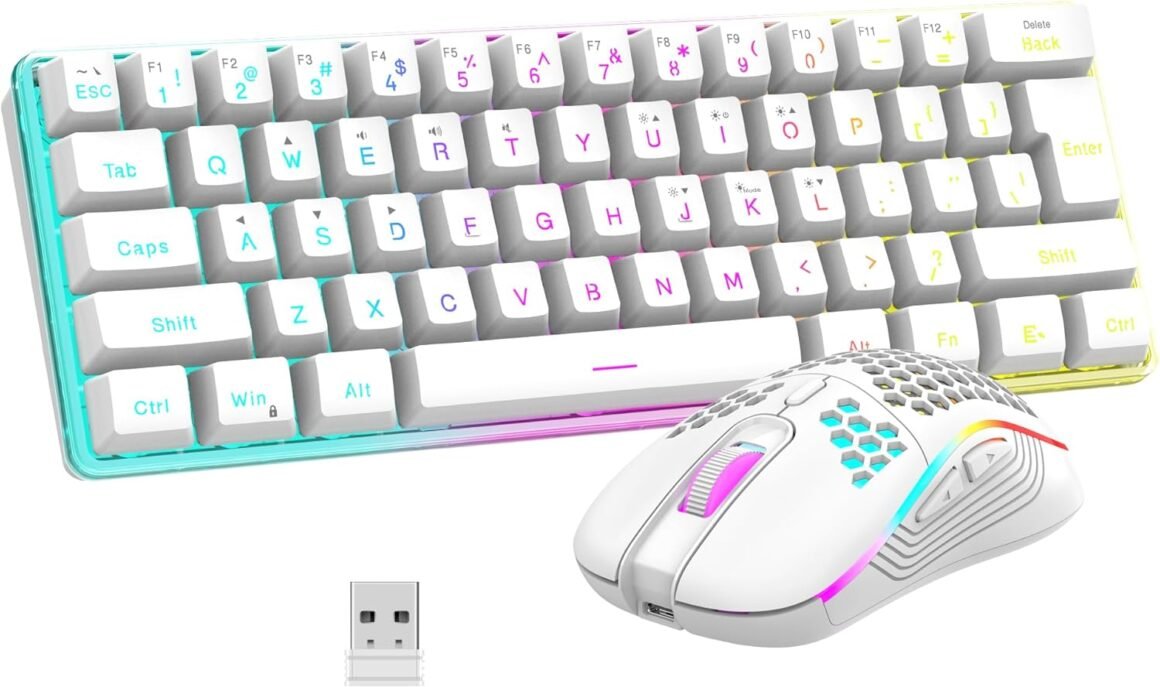
RedThunder 60% Wireless Gaming Keyboard and Mouse Combo: Ultra-Compact RGB Mechanical Feel with 2500mAh Rechargeable Battery, Lightweight Honeycomb Optical Mouse for Gaming and Business – Stylish White Finish

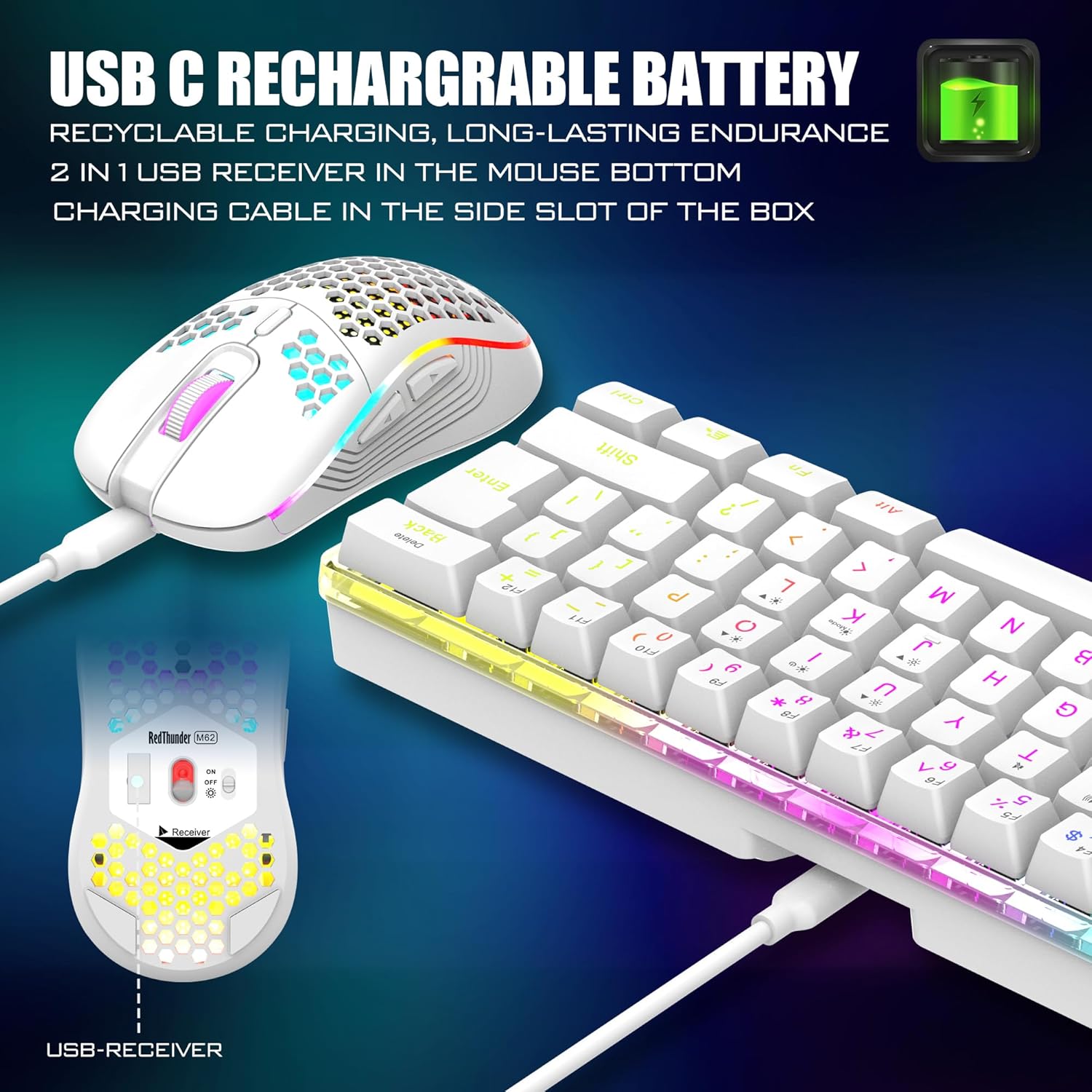
Product description Unique translucent built-in panel. The wireless keyboard has been designed with a unique built-in transparency board, which will enhance the overall gaming lighting atmosphere. Mechanical Feel Keyboard The closest mechanical feel to the crater structure and has a high quality conductive film that has been tested on 1,000,000 printing presses. Its 2ms response time is the fastest of any non-mechanical keyboard. Upgrade Type-C Charging Port The upgraded detachable Type-C interface is made of premium metal for enhanced texture. It has the characteristics of being more durable to use, plugging and unplugging at any time, and more convenient to carry. Type-C Rechargeable Wireless Mouse The wireless RGB mouse and the keypad are charged with the same Type-C data cable, and the mouse wheel will be illuminated by the indicator light when charging. The charging port is not easy to damage, more durable to use, simple to plug and unplug, and easy to carry. High-performance The side of the mouse adopts a non-slip curve design, with two buttons, the fingers fit the mouse more, and the use is more flexible. Professional gaming mouse adopts optical sensor, 3600DPI, 12000 FPS scanning speed, 40G acceleration, and tracking speed up to 400 IPS. Excellent Honeycomb Shell Design Taking creative design for lightweight honeycomb shell, owning the durable strength and excellecnt ventilation, meanwhile it keeps your palms cool and fresh, moving it more quickly and freely during your games, assures your long-session gaming without fatigue. How to use the Fn function and RGB lighting? 1. FN+ “BACK” = DELETE ; 2. FN+ “`~” = ESC; 3. FN+ “1” = F1; FN+ “2” = F2; FN+ “3” = F3; FN+ “4” = F4; FN+ “5” = F5; FN+ “6” = F6; FN+ “7” = F7; FN+ “8” = F8; FN+ “9” = F9; FN+ “0” = F10; FN+ “-_” = F11; FN+ “=+” = F12; 4. FN+ “I” = Backlight ON/OFF; 5. FN+ “K” = Switch Mode; 6. FN+”O”/”L” = Adjust Brightnes; 7. FN + “U”/”J” = Adjust Speed; 8. FN + “W” = Switch Between WASD and ↑←↓→; 9. FN + “R” = Volume- ; 10. FN+”T” = Volume+ ; 11. FN+”Y” = Mut; 12. FN+”WIN” = Lock WIN and MENU. Note 1. The keyboard and mouse share only one USB receiver to reduce the number of USB ports, which is located at the bottom of the mouse. (Only when the USB dongle is plugged in, the lights of the keyboard and mouse will light up). 2. Please fully charge it before the first use, otherwise it will not last as long as expected when it is not fully charged. (Because we didn’t fully charge the keyboard/mouse before shipment to ensure transportation safety). 3. No software installation is required before the first use, just plug the USB receiver into the USB port, turn the switch at the bottom of the keyboard to the ON position, and turn the switch on the bottom of the mouse to the ON (no light) or LED (with light) position. 4. There will be a little delay or the lights will not turn on when the keyboard/mouse battery is too low, please charge the keyboard/mouse in time, the charging indicator will go off after full charge. 5. To protect battery life, please use a lower than DC:5V adapter to charge, preferably using the computer’s USB port to charge directly. Due to the different currents of different computer USB charging ports, some users may need longer charging time to fully charge. 6. Turning off the keyboard light can extend the battery life of the keyboard moderately. 7. If you can’t press “WASD” or “↑↓←→”, don’t worry, please check if the FN function key is enabled. FN+ “W” key can be used to switch between letter “WASD” keys and arrow “↑↓←→” keys at will. 8.If the keyboard/mouse is not working, they may lose connection with the USB receiver. Please try pairing with the USB receiver again. Pairing steps as following: Make sure the keyboard/mouse fully charged and re-pair with the USB receiver. Mouse pairing steps: Step 1: Turn the switch at the bottom of the mouse to the switch position with the sun logo; Step 2: Press and hold the mouse wheel and right button, the mouse RGB lights start to flash; Step 3: Insert the USB receiver into the computer and the pairing is complete. Keyboard pairing steps: Step 1: Turn on the keyboard switch; Step 2: Press and hold the ESC key and the K key at the same time, the indicator light starts to flash; Step 3: Insert the USB receiver into the computer, and pairing is complete. 9. If you have any problem, please tell us at the first time, we will try our best to solve it. Add to Cart Add to Cart Add to Cart Add to Cart Add to Cart Customer Reviews 4.3 out of 5 stars 2,077 4.0 out of 5 stars 997 4.2 out of 5 stars 135 3.9 out of 5 stars 162 4.0 out of 5 stars 2,553 4.5 out of 5 stars 1,296 Price $39.99$39.99 $39.99$39.99 $99.99$99.99 $39.99$39.99 $49.99$49.99 $39.99$39.99 Color Option White/Black White/Black/Black-White/White-Black White/Black/Black-White/White-Black White/Black White Pudding/Black Pudding/Black/White/Pink/White-Gray Black/White Connection Wireless Wireless Trip-Mode Wireless Wireless Wired Keyboard Keys 61 84 95 114 104 104 Backlight Mode ✓ ✓ ✓ ✓ ✓ ✓ Anti-Ghosting ✓ ✓ ✓ ✓ ✓ ✓ Mouse DPI 3200 3200 no data 4800 3200 7200 Keyboard Battery capacity 2000mAh 1850mAh 8000mAh 2000mAh 3000mAh no data Mouse Battery capacity 500mAh 500mAh no data 600mAh 800mAh no data 【High-performance 2.4G Wireless Keyboard and Mouse】Are you looking for a small wireless keyboard and mouse combo that can perfectly balance work and games? RedThunder K62 rechargeable wireless gaming keyboard and mouse combo will be your best choice. 2.4G high-speed and stable transmission, ensure that it can easily deal with even the most intense battles. Note: The keyboard and mouse share a USB receiver in the bottom of the mouse.【Rechargeable & Long Battery Life】The keyboard is equipped with a 1850 mAh battery, and the mouse is equipped with an 500 mAh battery. The long battery life allows you to use them continuously for 8 hours with light. The keyboard and mouse are equipped with smart energy-saving functions. If there is no operation within 2 minutes, they will automatically go to sleep, press any key to wake them up. Please charge 8 hours before using.【60% Compact Small Keyboard and Ultra-light Honeycomb Shell Mouse】The most delicate and cute keyboard keeps your desktop neat, more space for mouse movement and other desktop devices. The well-designed perforated honeycomb shell mouse is ergonomically designed and weighs only 65 (+-5) grams, making it more flexible and comfortable without fatigue.The small keyboard and mouse combo will be the best choice for gamers.【Light Up Keyboard and Mouse】60 percent rgb gaming keyboard features 4 RGB backlight modes, 4 levels of brightness adjustment, 7 monochrome backlight modes and 1 full rainbow backlight. The luminous design of Letters and gaps makes it the best light up wireless mini keyboard on the market. The mouse has a built-in 7-color cyclic gradual lighting effect.【Durable Ergonomic Keyboard and Mouse】The keys have a 10 000 000 keystrokes lifetime, so you can hold on to it for the next decade! ABS keycaps adopt two-color injection molding process, the letter of characters never fade. The mouse fits the palm perfectly, and the anti-sweat and non-slip design gives you complete control.【Plug and Play 】The keyboard and mouse share only one USB receiver, and the code has been completed by default. You only need to insert the receiver and turn on the keyboard and mouse to use it. (Note: If the receiver and the keyboard/mouse lose connection and cannot be used for any reason, you only need to reset the code pairing or contact us in time, we will try our best to solve it)

Unleashing Your Gaming Potential: The RedThunder K62 Wireless Keyboard and Mouse Combo

In an era where precision and performance are pivotal for gamers and professionals alike, the RedThunder K62 Wireless Keyboard and Mouse Combo emerges as a game-changer. This innovative set combines functionality and aesthetics, making it an ideal choice for both work and gaming environments.

Key Features of the K62 Combo

  1. High-performance 2.4G Wireless Connection: The K62 utilizes a 2.4G wireless transmission technology that promises both speed and stability. Bid farewell to lag during crucial moments in your games. Plus, the convenience of having a single USB receiver, tucked neatly beneath the mouse, minimizes clutter and eases the hassle of connectivity.

  2. Rechargeable with Long Battery Life: Efficiency is at the core of this combo. The keyboard features a robust 1850 mAh battery, while the mouse is paired with a 500 mAh battery. Expect up to 8 hours of continuous use, even with RGB lights. Moreover, the smart energy-saving function allows the devices to sleep after 2 minutes of inactivity, ensuring you’re not frequently scrambling for a charger.

  3. Compact Design and Ultra-light Mouse: This 60% compact keyboard design maximizes your workspace while maintaining essential keys for effortless typing and gaming. Weighing only 65 grams, the honeycomb shell mouse is engineered for agility, giving your hand comfort during long sessions without causing fatigue.

  4. Dynamic RGB Lighting: The backlit keyboard offers 4 RGB modes, allowing for a customizable ambiance that can elevate your gaming experience. Ghosting issues are tackled effectively thanks to the anti-ghosting feature, ensuring your commands are executed flawlessly.

  5. Durability Meets Comfort: With a lifespan of 10 million keystrokes, the K62 is not just a temporary tool but a long-term investment in your gaming arsenal. The anti-sweat and non-slip designs on the mouse provide an ergonomic experience while maintaining perfect control—even during intense gameplay.

Final Thoughts

In conclusion, the RedThunder K62 Wireless Keyboard and Mouse Combo harmonizes cutting-edge technology with user-friendly features, making it a must-have for every gaming setup. With its solid battery life, sleek design, and vibrant RGB lighting, this combo accentuates not only the functionality but also the aesthetic appeal of your gaming station.

About RedThunder

RedThunder is a renowned brand dedicated to providing gamers with high-performance gear tailored for superior gameplay. Focused on innovation and quality, RedThunder continues to excite users with ergonomic designs and advanced technology. Join the community of satisfied gamers who trust RedThunder to enhance their gaming experiences. The K62 combo, rated an impressive 4.5 out of 5 stars, is a testament to the brand’s commitment to excellence. Don’t miss the chance to elevate your gaming with this remarkable keyboard and mouse combo.

Price: $45.99 - $39.99
(as of Sep 05, 2025 11:36:50 UTC – Details)

Related Posts
Read More

Redragon K734B Wireless Mechanical Keyboard: 3-Modes Bluetooth TKL with Hot-Swappable Pre-Lubed Switches, RGB Customization, PBT Keycaps, and South-Facing LED Sockets

Product description gaming keyboardgaming keyboard gaming keyboardgaming keyboard gaming keyboard gaming keyboard gaming keyboard gaming keyboard gaming keyboard gaming keyboard gaming keyboard gaming keyboard gaming keyboard gaming keyboard gaming keyboardgaming keyboard 2 Stage Adjustable Feet Stand

Anti-slip and two-stage adjustable tilt outriggers, available in two different heights according to different needs.

gaming keyboardgaming keyboard Packing List

1 x mechanical keyboard

1 x USB Cable + 1 x 2.4GHz Receiver

4 x Replace Switch

1 x 2 in 1 Keycap & Switch Puller

1 x User Manual

gaming keyboardgaming keyboard Equipped with Type C cable

Equipped with Type C cable

gaming keyboardgaming keyboard Strong Compatibility

for Windows for Mac


【Tri-Mode】 Connect via Type-C wired, Bluetooth (3.0/5.0), or 2.4GHz. Enjoy seamless connectivity up to 10 meters and easily switch between modes with top-side buttons for efficient multitasking.
【87-Key TKL Layout】 With full key rollover, K734WCG gaming keyboard balances practicality and functionality. It has dedicated arrow, FN multimedia, and control keys, providing more space for mouse movement than a traditional 104-key layout, all while ensuring gaming-grade performance.
【Custom hick-lubed Switch】 The K734BWG features thick-lubed custom linear switches with a gasket design, offering cushioned travel and smooth typing feedback.The upgraded socket is compatible with nearly all switches (3/5 pins) for hot swappable replace.
【Gasket Structure】The K734BWG has a five-layer noise cancellation system with a gasket design for a custom experience. Its single-piece slotted PC board and PCBA enhance rigidity and softness, reducing resonance noise for better consistency
【Pro Software Supported】Utilize available software to create custom modes and effects from redragon website. Set macros with varying keybindings or shortcuts for improved work and gaming efficiency.
【South-Facing RGB Backlight】 Upgrade your desk with the Backlit keyboard, featuring south-facing LEDs for optimal brightness. Customizable per-key RGB lets gamers personalize colors and effects. Durable dye-subbed PBT keycaps ensure clear, vivid legends over time.
【New Color Scheme】Discover a distinctive black, green, and white color scheme that enhances your desktop aesthetics and elevates your gaming experience!
Read More

“61 Key RGB Gaming Mechanical Keyboard: Compact Size, Red Switches, Pro Driver Support”: Available now at [price_with_discount]

The OUPARY 61-Key Mechanical Keyboard represents a blend of exquisite craftsmanship and
cutting-edge technology. Available in both black and white variants, it showcases a perfect fusion
of style and elegance. The mechanical red switches offer a linear and smooth key feel with minimal
tactile resistance, catering to users who prioritize efficient operation. Enhanced by a vibrant RGB
backlight, supporting a variety of colorful effects, users can easily customize colors, speed, and
brightness via convenient shortcut keys, adding an element of joy to typing and gaming.


Designed with a full anti-ghosting mechanism, this keyboard ensures that every keypress is registered
accurately, even during intense gaming sessions or high-speed typing, providing a smooth and reliable
experience. The considerate design of a detachable USB-C cable adds portability to the keyboard, offering
users greater flexibility.


In summary, the OUPARY 61-Key Mechanical Keyboard is an ideal choice for those seeking a stylish
appearance coupled with outstanding performance. Suitable for a diverse range of users, from professional
gamers to office professionals, it delivers a satisfying and immersive typing experience.
OUPARY 61-Key Black Mechanical Keyboard: Compact and portable, featuring 61 keys for efficient operation and space-saving design.
OUPARY 61-Key White Mechanical Keyboard: Elegant white exterior with 61 keys, delivering an outstanding mechanical keyboard experience suitable for various scenarios.
OUPARY Mechanical Red Switch Keyboard: Utilizing mechanical red switches for a linear and smooth key feel, minimal resistance, and ideal for users seeking rapid response and comfortable typing.
OUPARY 61-Key RGB Mechanical Keyboard: Vibrant RGB backlight with support for multiple lighting effects. Easily adjust colors, speed, and brightness through shortcut keys for an immersive typing and gaming experience.
OUPARY 61-Key Mechanical Keyboard: Incorporates full anti-ghosting design to prevent key conflicts, ensuring a seamless typing and gaming experience. The detachable USB-C cable adds convenience for portability and customization.
Read More

“Skytech Gaming Blaze II PC: Core-i5, GTX 1660 Super, 500GB SSD, RGB, Windows 10”: Available now at [price_with_discount]

From the manufacturer Skytech Blaze II Skytech Blaze II

Skytech Gaming Logo Skytech Gaming Logo Revolutionizing Prebuilt PC Gaming

Forget the shoddy workmanship, bad service and expensive no-name components. A Skytech is made by gamers, built and supported in the United States and uses high quality brand name components without the upcharge. At Skytech we only build what we would game on ourselves.

American Built & Supported Designed by Gamers for Gamers

Skytech Blaze II

Future Proof Gaming Performance

Designed for Esports and online multiplayer games like Fortnite, CS:GO and Valorant, a Skytech Blaze II was made for competitive gamers. Featuring completely upgradable components and designed with excellent cooling capability with 4 fans to move massive amounts of air. Blaze II is a great choice for mid-range performance and first time PC gamers.

Mid-Sized Tower fits Most Normal Desktops Achieves High graphics settings at 60fps/1080p Designed for Esports and online competitive gaming Excellent Airflow RGB Lighting fan(s) installed

No Dropped Frames No Dropped Frames

Nvidia Turing Architecture Nvidia Turing Architecture

PC Gamer PC Gamer

Say Goodbye to Dropped Frames While Streaming

Maintain high frame rates even while live streaming your game. Build a following by starting your own livestream and confidently deliver a beautifully smooth viewing experience for your fans. Uncompromising features and smooth performance are finally the standard for every gamer and artist.

High Quality Visuals Using Less Power

By intelligently adding more detail to objects as they appear closer, Nvidia's new Turing GPU architecture is able to render more complex scenes without needing more power. Explosions feature more debris, asteroid fields become more detailed and gaze further into the horizon of open world games.

Outcompete Your Rivals—Reign Victorious

Always be ready for your teammates! Able to achieve well above the PC standard of 60 frames per second in today's top competitive games like Fortnite, Valorant and Rainbow Six: Siege a Skytech gaming PC is the easiest way to achieve victory on a budget. Excellent for first time PC buyers.

Benchmark Test Results Benchmark Test Results

Rainbow Six Siege: 140 FPS Call of Duty Warzone: 70 FPS Fortnite Chapter 2: 120 FPS Valorant: 110 FPS The Witcher III: 80 FPS

Skytech Gaming - Start your journey, be the hero of your story

HQS HQS

FPS FPS

Expert Expert

Support Support

All New & Branded Parts Best Gaming Experience Ready to work & play Excellent USA support

888-370-8882 (M-F 9AM - 5PM PT)


✔ Intel Core-i5 10400F 2.9GHz (4.3GHz Max Boost) CPU Processor | 500GB SSD – Up to 30x Faster Than Traditional HDD
✔ NVIDIA GeForce GTX 1660 Super 6GB Video Card | 16 GB Gaming Memory DDR4 3200 with Heat Spreader | Windows 11 Home 64-bit
✔ 802.11 AC Wi-Fi | No bloatware | USB Ports including 2.0, 3.0, and 3.2 Gen 1 | 1 x HDMI or 1 x DisplayPort Guaranteed, additional ports may vary | Free RGB Keyboard & Mouse
✔ 3 x RGB RING Fans for Maximum Air Flow | Skytech mATX Mid-Tower Tempered Glass Case | 1 Year Warranty on Parts and Labor | Lifetime Free Technical Support | Assembled in the USA
✔ This powerful gaming PC is capable of running all your favorite games such as Call of Duty Warzone, Fortnite, Escape from Tarkov, Grand Theft Auto V, World of Warcraft, League of Legends, Apex Legends, Roblox, PLAYERUNKNOWN’s Battlegrounds, Overwatch 2, Counter-Strike 2, Battlefield V, Minecraft, Baldur's Gate 3, Dota 2, HELLDIVERS 2, Monster Hunter, Palworld, Terraria, Rainbow Six Siege, Dragon's Dogma 2, and more at High to Ultra settings, crisp 1080p FHD resolution and smooth 60+ FPS game play.
Read More

MACHENIKE F117-V Laptop GPU Fan: 1323-01AU000 DC5V 0.5A: Available now at [price_with_discount]

Laptop GPU FAN For MACHENIKE F117-V VB VC VD VR VG VB2S FN0575-S1084L4AL 1323-01AU000 DC5V 0.5A
Product Dimensions ‏ : ‎ 11.81 x 7.87 x 3.94 inches; 1.32 Pounds
Item model number ‏ : ‎ FN0575-S1084L4AL 1323-01AU000
Date First Available ‏ : ‎ September 12, 2023
Manufacturer ‏ : ‎ GAOCHENG
ASIN ‏ : ‎ B0CHVQ7SKS
Country of Origin ‏ : ‎ China

Item Description:Laptop Parts
Warranty:90 days
To make sure that you get the right goods, please check your register E-mail after your payment.