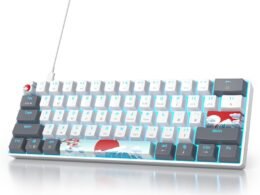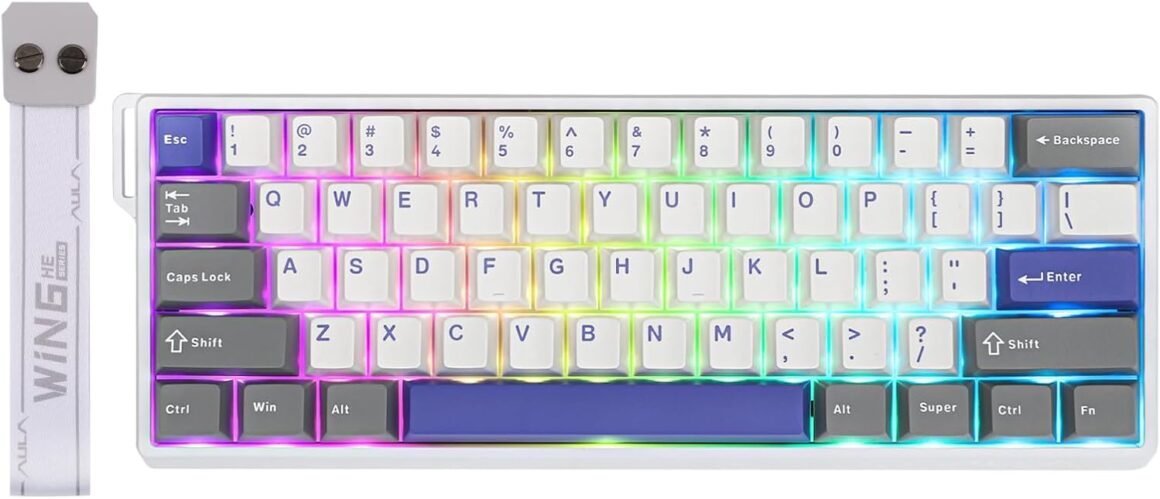
EPOMAKER Aula WIN60 HE 60% Wired Magnetic Keyboard: Adjustable Actuation, 8000 Hz Polling Rate, Hall Effect Switches, Hot-Swap – Ideal for FPS Gaming (Grey, White, Blue)

Product description High-Performance Magnetic Gaming Keyboard with Unmatched Precision and Control SOCD (Similar to Snap Tap) No more halting in the heat of battle. With SOCD, only latter key is prioritized and activated when two opposing directions are pressed simultaneously DKS (Dynamic Keystroke) The current key can be modified to bind 1 to 4 functions based on the degree of pressing and releasing. Toggle Key (TGL) Set “hold” or “double-click” as the trigger for continuous input and “tap” as termination. Release your finger for operation elsewhere. Mod Tap(MT) 2 different actions on a single key based on press behavior. Hold the key down for the first action or tap the key for the second action. N-key Rollover Every keystroke is accurately registered when multiple keys are pressed at the same time. Compatible with multiple operating systems Easily switch to the corresponding operating system by the shortcut keys “FN + Z/X”. 60% Compact Layout Perfect for users seeking a compact keyboard without sacrificing essential functions 1 Precision&Speed 2 Hall Effect Switch 3 Anti-Ghosting 4 For Win/Mac/Linux 5 Size&Weight Premium Details: Online Software, RGB Backlit, Magnetic Switch, and Package AULA Online Driver (Chrome) How to connect software Visit the official “AULA” website.On the “Downloads” page, click on “Driver.”Locate the link for “WIN60/68 Magnetic Switch Keyboard Website Driver” and select “MAX/ PRO Edition.”Click “连接键盘(connect keyboard),” choose your device, and then click to connect. The video showcases the product in use.The video guides you through product setup.The video compares multiple products.The video shows the product being unpacked. WIN60HE MAX Magnetic Gaming Keyboard Merchant Video Dynamic RGB Backlight Multiple effects for preference Experience stunning, customizable RGB effects that enhance your gaming environment, complemented by an ergonomic layout designed for comfort during extended sessions, and superior heat dissipation properties. FN+Backspace: Turn On/Off LightFN+TAB: Change Light Effect; FN+|: Change Light ColorFN+F/J/R_ALT/L_ALT: Change Light Brightness/Speed Hall Effect Magnetic Switch Trigger precision up to 0.02mm, ensuring every keypress is accurate Experience the unmatched speed of a mechanical keyboard with the wired version, boasting 8x faster response times. Powered by Hall sensor technology, it ensures millisecond-level precision for quicker and more accurate inputs. Plus, with fully customizable key actuation, you can adjust the trigger distance from 0.1mm to 3.4mm to suit your unique preferences. Wing Chun Magnetic Switch: Force: 36gf; Bottom-out Force: 49gf; Stroke: 3.4±0.1mm; Accuracy: 0.02mm Keyboard Structure Tray Mounted Structure&Aluminum Alloy Plate This hall effect keyboard features a tray-mounted design that delivers exceptional stability and acoustic properties. The Poron sandwich foam, along with the Poron base within the frame, contributes to a satisfying “thocky” sound, while the aluminum alloy plate and pre-lubricated stabilizers enhance typing stability and consistency. Double-Shot PBT Keycap Cherry Profile The WIN60 HE MAX keyboard features a hot-swappable design, making it easy to replace keycaps and switches with the included 2-in-1 keycap and switch puller. The keycaps are crafted from high-quality PBT material and employ an MX stem design, ensuring compatibility with most magnetic keyboard switches. Package Content 1*WIN60 HE MAX Magnetic Gaming Keyboard1*Detachable USB-A to C Cable1* 2-in-1 Keycap Switch Puller1*Detachable Ribbon; 2*Extra Magnetic Switch Why do keys keep triggering? Due to the special triggering principle of the magnetic axis keyboard, the bumpy movement during shipment may affect the triggering accuracy of the keyboard. Calibrating all the keyboard keys via WIN60 HE web driver can solve this problem. How durable are magnetic key switches compared to others? Magnetic key switches provide superior durability compared to other switch types, primarily in the following aspects: longer lifespan, resistance to dust and liquids, consistent tactile feedback, and reduced actuation force. How is WIN60 HE and WIN60 HE Max differ in polling rate, keycap, trigger distance, chips carried and sound-dampening? WIN60 HE: 8kHz polling rate, ABS OEM Keycap, 0.08-3.4mm per 0.02mm adjustable trigger, 1 Chip. 2 Foams.. WIN60 HE Max: 125 to 8K Hz, PBT Cherry Keycap, 0.1-3.4mm per 0,01mm adjustable trigger, multi-chips. 2 Foams+Spacebar foam. Why is my browser unable to recognize the WIN60 HE keyboard and why can’t I use the Aula online driver? WIN60 HE’s driver is only compatible with Chrome and browsers that use the Chromium-based, such as IE Edge or Google. Compact Layout Gaming/Office Magnetic Keyboard from EPOMAKER Add to Cart Add to Cart Add to Cart Customer Reviews 4.2 out of 5 stars 262 4.2 out of 5 stars 118 4.6 out of 5 stars 111 2.9 out of 5 stars 4 4.4 out of 5 stars 85 Price $36.99$36.99 $39.99$39.99 $47.99$47.99 $159.99$159.99 $79.99$79.99 Material & Color Plastic&Black/Blue/Yellow/Red Plastic&Black/Blue/Yellow/Red Plastic&Black/White Aluminum&Black Plastic&Black Purple Switch Types Linear (Magnetic) Linear (Magnetic) Linear (Magnetic) Linear (Magnetic) Linear (Magnetic) Layout 60% ANSI, QWERTY US 65% ANSI, QWERTY US 65% ANSI, QWERTY US 65% ANSI, QWERTY US 75% ANSI, QWERTY US Keys+Knob 61 Keys 68 Keys 67 Keys 68 Keys 81 Keys + 1 Knob/2 keys Keycap Profile & Material Cherry/OEM Profile. PBT/ABS Cherry/OEM Profile. PBT/ABS Cherry Profile. PBT Cherry Profile. PBT Cherry Profile. PBT Connectivity USB A-C USB A-C USB A-C USB A-C 2.4Ghz/Bluetooth/USB A-C Battery X X X X 4000mAh Hot-Swappable Aula Magnetic Switch Aula Magnetic Switch EP Magnetic Pink Switch Gateron Magnetic Jade Pro Gateron Magnetic White Switch Backlight Per-Key RGB Per-Key RGB Per-Key RGB Per-Key RGB Per-Key RGB OS System Win/Mac/Android/iOS/Linux Win/Mac/Android/iOS/Linux Win/Mac/Android/iOS Win/Mac/Android/iOS/Linux Win/Mac/Android/iOS Software AULA Web Driver (Chrome) AULA Web Driver (Chrome) EPOMAKER Software (WIN/Mac) EPOMAKER Online Software EPOMAKER Software (WIN/Mac) Special Feature Adjustable 125 to 8k Polling Adjustable 125 to 8k Polling 0.125ms Latency & 8k Polling CNC Aluminum Alloy Shell 1ms Latency in 2.4G Wireless Up to 0.01mm RT Sensitivity: Ready to dominate every move? With just 0.01mm of break on Max and a mere 0.02mm on Standard version, the WIN60 responds instantly, executing commands with precision. Experience this rapid fast keyboard, as WIN60 handles even the most complex manoeuvres effortlessly, becoming a seamless extension of your reflexes.0.3ms Latency Tested, 8000Hz Polling Rate: The WIN60 keyboard is a magnetic powerhouse, featuring both 8000Hz polling and 32KHz scan rates. Its ultra-low latency outperforms most 8000Hz magnetic switch keyboards, delivering a game-changing 8x faster response than traditional gaming keyboards.60% Ultra-compact Layout: The 60% layout of the WIN60 combines a sleek, space-saving design with enhanced typing efficiency. Its compact form allows for faster mouse movements and improved ergonomics, making it perfect for gamers and professionals alike.Snap Tap & Dynamic Keystroke: Snap Tap ensures lightning-fast directional changes in FPS games by prioritizing the latest input between two keys. Dynamic Keystroke introduces true analog input, enabling up to 4 actions in a single stroke for seamless combos and macros.Adjustable Actuation Point: The WIN60 features fully adjustable Hall magnetic switches, allowing you to customize each key’s actuation point from 0.08mm to 3.4mm in 0.02mm increments, with Max version upgraded to 0.1mm to 3.4mm per 0.01mm. Take full control for rapid keypresses or ultra-precise typing tailored to your needs.Double-shot Durable Keycaps: Crafted with advanced dual-shot injection molding, the WIN60’s custom keycaps boast vibrant, durable legends that resist fading over time. This process not only enhances the keyboard’s sleek, minimalist design but also ensures a premium, long-lasting feel.Stunning RGB Backlighting: The WIN60 HE RGB keyboard offers 20+ lighting modes and up to 16.8 million of colours available with online driver. With intuitive driver software, you can easily customize lighting effects and colours to match your unique style. Elevate your setup with a personalized and vibrant typing experience!Online WEB Driver: The WIN60 HE’s web driver simplifies settings and parameter adjustments for users of all levels. All system performance parameters are fully customizable, with real-time visual feedback, including per-key rapid-trigger and sensitivity adjustments on the keyboard preview.

Unleash Your Gaming Potential with the WIN60 HE MAX Magnetic Gaming Keyboard

In the ever-evolving world of gaming peripherals, the WIN60 HE MAX Magnetic Gaming Keyboard stands out with its cutting-edge features designed to elevate your gaming experience. This keyboard integrates Hall Effect magnetic switches, which allow for incredible precision and speed, responding in mere milliseconds for a truly responsive gameplay experience.

Key Features

1. Hall Effect Magnetic Switches: At the heart of the WIN60 HE MAX is its innovative Hall Effect technology, providing a trigger precision of up to 0.02mm. This not only ensures exceptional accuracy but also significantly reduces actuation force, delivering a faster response time. Enjoy the advantage of a tactile feel without compromising on speed.

2. Adjustable Actuation Points: Gamers now have the power to customize their experience! The keyboard allows users to set the actuation point from 0.1mm to 3.4mm, tailored to your unique gaming style. Whether fast key presses or precision typing, the WIN60 adapts to your needs, enhancing your performance in every match.

3. SOCD and DKS Features: With Dual Direction Control (SOCD), only the latter key pressed is prioritized. The Dynamic Keystroke (DKS) feature enables a single key to perform up to four different functions based on the pressure applied, making it a powerhouse for combos and macros during intense gameplay.

4. Vibrant RGB Backlighting: Personalize your gaming setup with over 20 lighting modes and 16.8 million colors. The intuitive online driver allows for easy customization, ensuring that your keyboard matches your gaming rig and aesthetic.

5. N-Key Rollover and Anti-Ghosting: Press multiple keys simultaneously without missing a single input; this feature is essential for fast-paced gaming. Enjoy the freedom to execute complex maneuvers flawlessly, as every command is accurately registered.

6. Compact Layout: The 60% layout is designed for maximum space efficiency without sacrificing essential functionalities. This compact design optimizes your desk space, providing easy access to your mouse and enhancing overall ergonomics.

The WIN60 HE MAX isn’t just a keyboard; it’s a versatile tool that bridges the gap between gaming and productivity. Compatibility with Windows, Mac, and Linux ensures you can seamlessly switch between systems as needed.

Customer Trust: 4.5/5 Stars
With stellar reviews highlighting its performance and reliability, the WIN60 HE MAX has received a consistent rating of 4.5 stars from users impressed with its speed and ergonomics. Gamers are praising its unmatched responsiveness, while typists appreciate its customizable features and build quality.

Brand Introduction: EPOMAKER

EPOMAKER is dedicated to revolutionizing the keyboard experience by combining premium materials, cutting-edge technology, and user-centric designs to create products that elevate both gaming and work environments. With a focus on innovation and quality, EPOMAKER continually sets new standards in keyboard technology.

In summary, the WIN60 HE MAX Magnetic Gaming Keyboard is not merely a tool; it’s an upgrade to your entire gaming experience. With its exceptional design, customizable options, and advanced technology, it caters to the needs of gamers and professionals alike, transforming the way you interact with your digital world. Allow the WIN60 HE MAX to unlock your true potential.

Price: $59.99 - $49.99
(as of Sep 05, 2025 04:13:50 UTC – Details)

Related Posts
Read More

Elevate Your Gaming Experience: EasySMX X05 2.4G Wireless Gaming Controller for PC, Steam, iPhone, Android, and Switch – Featuring Hall Effect Technology, RGB Lights, Turbo Function, and Anti-Drift Design

Product description The video showcases the product in use.The video guides you through product setup.The video compares multiple products.The video shows the product being unpacked. EasySMX X05 Merchant Video pc controllerpc controller pc controllerpc controller pc controller One Button Shutdown pc controller Enhanced Stability pc controller Turbo Function pc controller Adjustable Vibration pc controller Enlarged Battery pc controller Anti Slip pc controllerpc controller pc controllerpc controller
🎮 EasySMX X05 controller compatible with Black Myth: Wukong. 🎁 Includes a pair of thumb grips 🎁
🎮【RGB Lights】 The X05 game controller features RGB lighting effects, allowing you to change the lighting to your preferences and creating an immersive gaming experience.
🎮【Hall Effect Joysticks and Triggers】Enjoy enhanced joystick control with our four hall effect sensors. These sensors provide precise and reliable input detection, allowing for smoother and more accurate movement in-game. Whether you're navigating through virtual worlds or aiming with precision, our hall effect technology ensures a seamless gaming experience.
🎮【Ceramic Charging Cable】 Your X05 PC controller's ceramic charging cable ensures a stable and reliable wireless connection, minimizing signal interference and providing a seamless gaming experience. It also offers low power consumption, extending the usage time.
🎮【750mAh NMC Lithium-ion Battery】Compared to traditional polymer lithium-ion batteries, the NMC lithium-ion battery in the game controller offers 1.5 times longer lifespan.
🎮【Multi-Platform Compatibility】Our controller is designed to be compatible with PC, Switch, iPhone and Android. This versatility ensures that users can enjoy the same controller across various devices, providing a consistent gaming experience. 💔NOT Compatible with Xbox One, Xbox 360, FireTV 💔
🎮【Free Switching】The game controller offers a mode switch key, allowing you to seamlessly switch between different modes or configurations to suit their gaming preferences.
📧📧Customers may encounter problems due to incorrect use of the item. Please contact the seller in advance if you have any questions before returning it.
Read More

Upgraded Wireless Controller for Nintendo Switch, Lite, and OLED – Pro Gamepad with Wake-Up Feature, Gyroscope, Turbo Mode, Dual Vibration, and Screenshot Functionality

Product description 11

How to pair the controller?

Switch mode Bluetooth connection

Step 1:Turn on the Switch host, click the "System settings"menu button at the main page interface, click the “Airplane Mode” option after entering the next level menu option , then click Controller Connection (Bluetooth)option make its Bluetooth function in open state.Step 2: Enter the Switch host handle Bluetooth pairing mode, click the “Controllers” menu button at the main page interface of host, click the “Change Grip/Order” option after entering the next level menu option, the host will automatically searching and pairing the handle.Step 3:Press the HOME button for 3-5 seconds enter the Bluetooth searching and pairing mode, LED1-LED4 keep flickering quickly, the handle will vibrate for a moment and the corresponding channel indicator light will always on after connect successfully with host and being assigned automatically.

Switch mode wired connection:

Put SWITCH in the SWITCH base after open the PRO handle’s wired connection option on Switch host, then connect the handle with the data cable, handle will connect the SWITCH automatically, after pull the data cable out, handle will backconnect to the SWITCH host by Bluetooth automatically

Connect the controller to PC WITH THE INCLUDED USB CABLE.

PLEASE NOTE:

ONLY SUPPORT INCLUDED USB CABLE CONNECTION WITH PC, DOES NOT SUPPORT WIRELESS BLUETOOTH CONNECTION TO PC.

Handle on shutdown, connect the PC through USB cable, PC-side will install driver automatically, the light of LED2 on handle always on means that the connection is successful, NOTE: the name displayed: Xbox 360 controller for windows (wired connection)

11 11 11

Note of Wireless Controller for Switch

First time connection steps: When the product is off, press and hold the "H" button for about 5 seconds, the 1234 indicator light on the handle flashes at the same time, and the connection with the host will be successful in about 5 seconds. Automatic connection steps: The host and the controller can reconnect again after sleeping, just press and hold “H” for two seconds, and the 1234 indicator light flashes slowly for 5 seconds to automatically reconnect to the host. PC Connection steps: When the handle is turned off, directly insert the TYPE-C data cable, the indicator lights on the handle 2 and 4 will always be on, and the controller on the pc side will display XBOX 360 controller. At this time, press and hold "H" for about 3 seconds. The indicator light 2 is always on and automatically enters the PC normal mode. Vibration adjustment steps: The default vibration intensity is 100%, after connecting the host, press and hold the screenshot button and then press the minus sign. The vibration intensity is 70%. There are four vibration levels, 0, 40, 70, and 100. Pressing the plus sign increases vibration. 11

WARM AND USEFUL TIPS:

(1) What should I do if the controller cannot be charged?If the controller cannot be charged, please reset the controller.How to reset the controller: Use a paper clip to press the reset hole on the back of the controller twice.

(2)What should I do if the controller cannot connect to the switch host via Bluetooth?step1: please clear the switch console's bluetooth memorystep2: Restart the switch hoststep3: reset the controller: Use a paper clip to press the reset hole on the back of the controller twice.step4:plug out the power adapter of the controller ( please Do not charge while pairing.)

If you have any questions during the use of the product, please feel free to contact the seller through the Amazon order page and we will give you a satisfactory reply within 12 hours.

Add to Cart Add to Cart Add to Cart Add to Cart Customer Reviews 4.4 out of 5 stars 35,423 4.4 out of 5 stars 35,423 4.4 out of 5 stars 35,423 4.4 out of 5 stars 35,423 Price $27.99$27.99 $26.98$26.98 $27.99$27.99 $27.99$27.99 Features Support Dual Vibration, 6-Axis gyro sensor, Screenshot, Screen Recording, Fast Charging, Wake-up Support Dual Vibration, 6-Axis gyro sensor, Screenshot, Screen Recording, Fast Charging, Wake-up Support Dual Vibration, 6-Axis gyro sensor, Screenshot, Screen Recording, Fast Charging, Wake-up, Programmable Support Dual Vibration, 6-Axis gyro sensor, Screenshot, Screen Recording, Fast Charging, Wake-up Connector Type Type-C Type-C Type-C Type-C Connectivity Technology Wireless/Wired Wireless/Wired Wireless/Wired Wireless/Wired Charging Time Within 3 Hours Within 3 Hours Within 3 Hours Within 3 Hours Playing Time UP To 20 Hours UP To 20 Hours UP To 20 Hours UP To 20 Hours
UNIVERSAL COMPATIBILITY : Pro Controller is fully compatible with Switch 2/Switch/Switch Lite/Switch OLED , also compatible with Windows PC and Android Phone, and perfectly compatible with games. No need to install any driver. NOTE: ONLY SUPPORT INCLUDED USB CABLE CONNECTION WITH PC, DOES NOT SUPPORT WIRELESS BLUETOOTH CONNECTION TO PC. This controller only supports connect to switch consoles, PC and Phone , NOT Compatible with other other devices such as: Apple TV, Fire Stick TV, Tesla, Xbox and Playstation consoles.DOES NOT SUPPORT WAKE-UP SWITCH 2 AND AUDIO FUNCTIONS
UPGRADE HALL JOYSTICK, NON-DRIFF: Diswoe Switch controllers is designed with HALL EFFECT joystick, solving the common problem of joystick drift. Unlike ALPS joysticks, high-sensitivity Hall sensors use Electromagnetic Induction to etect the movement of the joystick, the internal parts have no contact with each other, the sensor part will not wear out, faster response speed, especially for FPS shooting games.
POWERFUL FUNCTION : Have dual vibration motors that provide you excellent vibration feedback to enhance the game immersion. With the 6-axis gyro sensor, this controller can detect the inclination of the controller and make a quick response, give you more fun while playing motion-sensing games. No NFC function.
LOW ENERGY CONSUMPTION, LONG BATTERY LIFE : This perfected controller has a high-performance rechargeable battery with automatic sleep, Charging prompt and low voltage warning. The high-performance built-in 550mAh battery can service for 8 hours after fully charged, make sure you can enjoy games longer without interruption.
EXCELLENT HAND FEELING : The wireless controller is built with ergonomic and lightweight construction, make it comfortable even for long hours of continuous play. The gamepad comes with non-slip design, which will never slip off even if your hand sweats during intense gameplay.
STABLE WIRELESS BLUETOOTH CONNECTION : It provides stable and reliable signal without delay or drop-off within EIGHT meters. Featured with strong anti-interference technology and won't be affected by other wireless devices. Please read the user manual first before pairing.
Read More

Thunderobot G50S Wireless Gaming Controller: 1000Hz Ultra-Low Latency Bluetooth for PC, Switch, and Android – Featuring Hall Effect Joysticks, Gyroscope, and 6 Programmable Buttons

Product description The video showcases the product in use.The video guides you through product setup.The video compares multiple products.The video shows the product being unpacked. pc controller controller for pc pc gaming controller pc game controllers pc gamepad bluetooth controller pcbluetooth controller pc hall effect controllerhall effect controller pc controller wirelesspc controller wireless

Question about turbo keys plus bursts

This gamepad's turbo button plus the button you need to fire in bursts will cycle through three modes, one for manual bursts, one for auto bursts, and finally off bursts.

If you accidentally trigger the turbo button and burst mode of the game controller, how do you turn it off?

To turn it off, just press the turbo button and the burst button again, but it only turns off the automatic burst state. If you want to turn off this mode, you need to press the turbo button and the burst button again.

A note on activating the manual burst on this gamepad

For manual burst, press the turbo key and the key you want to burst. After turning on the manual burst mode, you need to hold down the key to burst to fire.

A note on activating the automatic burst on this gamepad

For automatic burst, press the turbo key and the key you want to burst. You only need to press the key to burst and the key will remain in the trigger state.

Name Thunderobot G50S Gaming Controller Dimension 152mm×106mm×56mm(5.98inch×4.17inch×2.2inch) Power Supply DC 5V,530mA(MAX) Battery 600mAh Polling Rate 1000Hz-Wired Connection Weight 208g(±5%) <0.46lb(±5%)> Charging Time ≤3 Hours Battery Life Approximately 10 hours (depending on the gaming environment) Compability For PC,Switch,Android Smart TVs,Android TV boxes,Android native smartphones and tablets, Android projectors,iOS devices(MFIl games), open-source handheld consoles,and in-car entertainment systems,etc. Supported Platforms For PC/NS/TV/Android/Laptop ( PLEASE NOTICE NOT support For xbox and ps so far)
💟Note: Supported Multi-Platform: Switch/Switch 2/iOS/Android/Windows PC 💔Not compatible with Xbox, PlayStation or GeForce Now, For game platforms not mentioned, please consult customer service before buying.
🎮【Hall Effect Sensing Sticks】🎮 Thunderobot G50S pc gaming controller features Hall-effect sensing sticks. The durable sticks provides accurate anti-drift glide, provides gamers with an exceptional level of control and precision.
🎮【Hall Effect Analog Triggers】🎮It revolutionize your gaming experience, offering lightning-fast response times, seamless gameplay, and extended pc gamepad longevity. Whether you're immersed in first-person shooters, racing simulations, or any gaming genre, our controller for pc with Hall Effect triggers empower you to conquer the competition with unmatched precision and speed.
🎮【6 Programmable Back Buttons】🎮Experience superior control with our hall effect controller, featuring 6 programmable, easy-to-map buttons. Quick start with one-button combos makes this tool a must-have for any serious gamer. Elevate your gaming experience today.
🎮【Built-In 6-AXIS GYRO】🎮Immerse yourself in the world of gaming with our cutting-edge 6-axis gyro technology. Experience unparalleled control as you tilt and rotate the pc controller wireless, seamlessly guiding your character or vehicle through the game. Elevate your gaming experience and feel like you're truly a part of the action.
🎮【Tri-mode Connectivity】🎮The G50S wireless gaming controller Supports wired,Bluetooth,and 2.4G triple-mode connection.Compatible with PC,wired connection to Switch,Android TV/projector,native mobile games,and most car platforms.Not compatible with Android virtual touch controls and PS ,XBOX.
Read More

“PS4 Wireless Controllers: Backlit, Dual Shock, 6-Axis, 2-Pack”: Available now at [price_with_discount]

Product Description ps4 controller LED light Gaming Together Relaxing time  Family Game Time Joyful Gaming 1 Customize Color 2 Gaming Together 3 Relaxing Time 4 Family Game Time 5 Joyful Gaming playstation 4 controller LED lightplaystation 4 controller LED light DualShock 4DualShock 4 Ergonomic DesignErgonomic Design Ergonomic Design

The handle is designed to fit the palm more comfortably for a more comfortable grip to enhance your gaming experience.

charging cablecharging cable Attached Charging Cable

Allows you to comfortably play while charging during an emergency game.

How to connect a controller to PS4, PC, Laptop, iPad, Steam, Android, or Mac.
How to switch LED Backlit modes and turn off the lights.

How to connect PC, mobile phone, iPad, iPhone, Mac, and Android?

Press and hold the SHARE button, then press the pairing button in the middle. At this time, the Light Bar will flash twice continuously. Then, use Bluetooth to connect to a device named 'DOUBLE SHOCK 4 Wireless Controller'.

How to connect your console?

You can use the USB cable to connect your console for the first time and then press and hold the home button for 3 seconds on controller.

How to turn on/off ?

The wireless remote will turn on when you press the round button or connect with the computer by data cable. It will turn off when it has been disconnected for 5 minutes.

What is inside the package?

1 x USB cable

1 x User Manual

1 x Wireless Controller

Tips:

1.Our wireless controllers for Playstation 4 have an automatic sleep function, so please pay attention to it.

2.Do not use the cellphone's charger to charge it, since the cellphone's voltage is higher, which may damage the controller.


【Compatibility with Sony PlayStation 4 Series】This wireless controller is compatible with PlayStation 4/Pro/Slim, as well as PC/iPad/iPhone/Steam/Android/MacOS. It can meet the gaming needs of multiple platforms with just one controller, eliminating the need to purchase multiple controllers for different platforms. It offers great value for money. When pairing and connecting for the first time, please use a USB cable to activate the device.
【Ultimate Aesthetic Design】With revolutionary features such as a touchpad, built-in speaker, 3.5mm audio jack, and light bar, this wireless game controller takes gaming experience to the next level, creating an immersive gaming experience. The share button allows for easy sharing of your greatest gaming moments.
【Immersive Gaming Experience】With built-in dual motors and a 6-axis gyroscope, you will experience realistic gaming sensations, feeling the impact, explosions, collisions, and turns in intense moments. Various games such as racing, sports, and shooting automatically adjust the intensity of vibration effects based on the game's state and scene.
【User-friendly Design】Upgraded joysticks and trigger buttons provide players with absolute control over all games. With a built-in 1000mAh battery, it provides 8-10 hours of gameplay time. The improved grip feels more comfortable, even during long gaming sessions without fatigue.
【Perfect Gift Choice】With a unique glacial crack design and adjustable 7-color LED backlight, the Boowen wireless controller is suitable for all types of gamers. It makes an excellent gift for birthdays, Christmas, and Children's Day, bringing joy to your family, friends, and children every day.