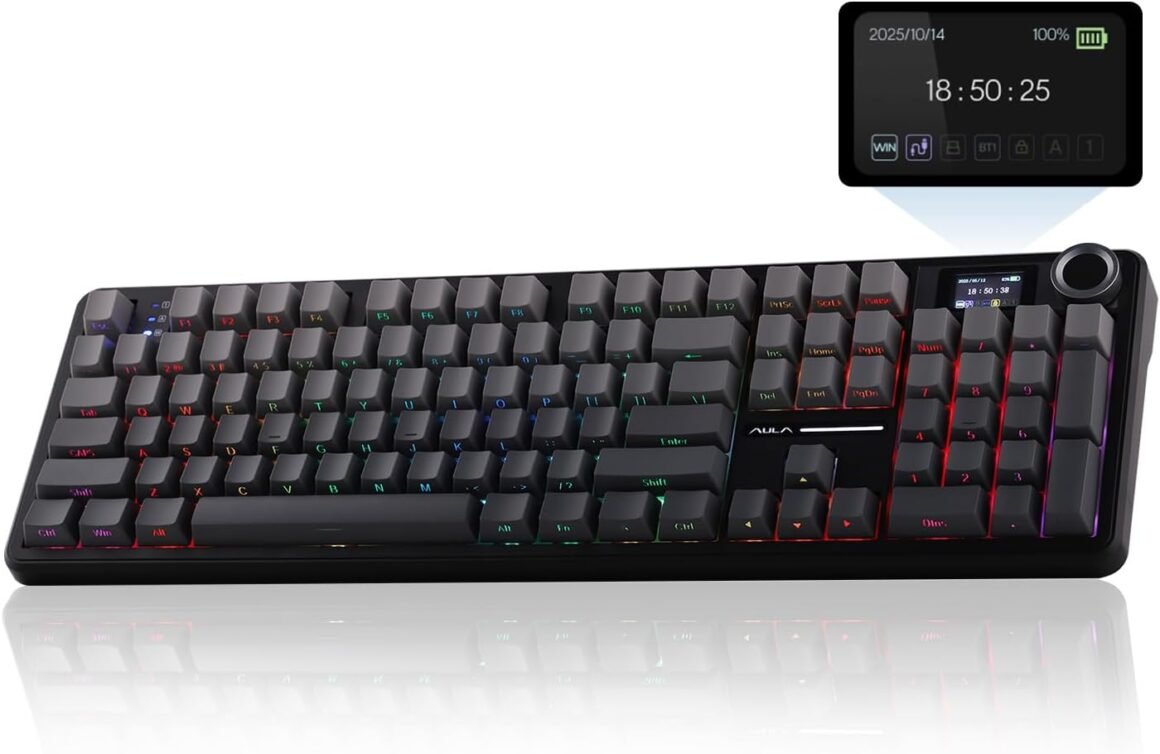
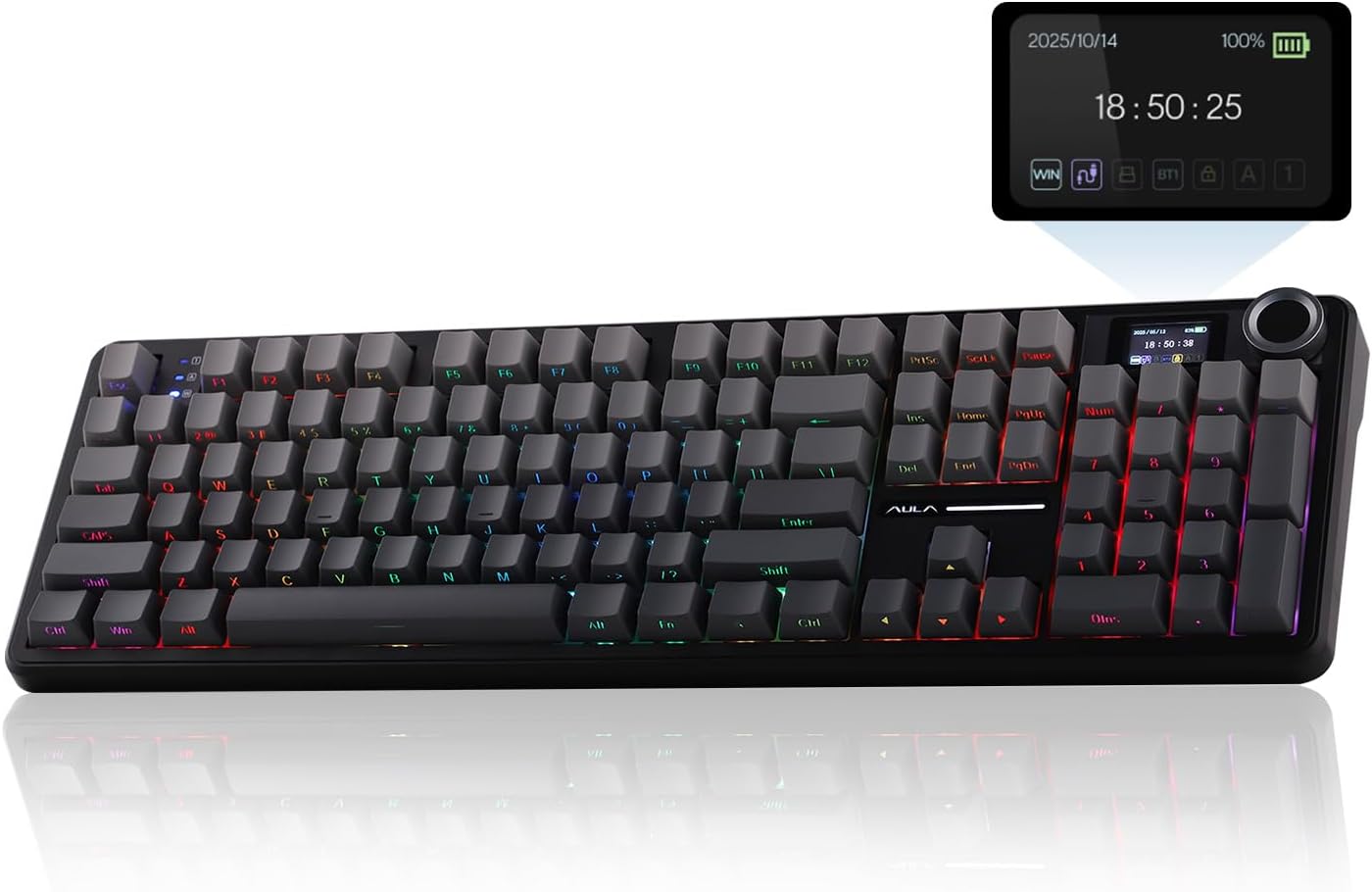
EPOMAKER X Aula F108 PRO Wireless Gaming Keyboard: 8000mAh Battery, 104 Hot-Swappable Keys, RGB Backlight, and Programmable Knob for Mac/PC/Android – Black Gradient

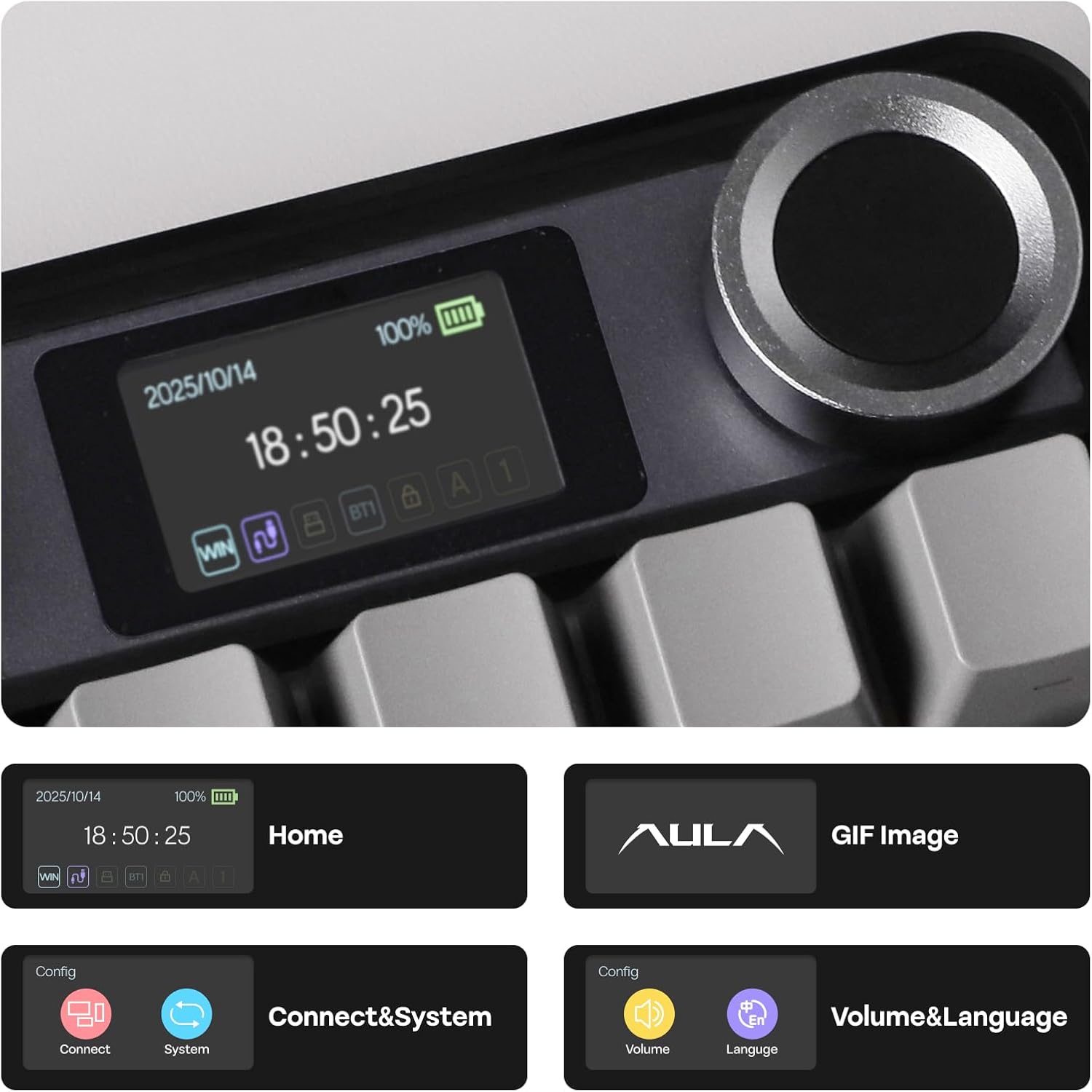
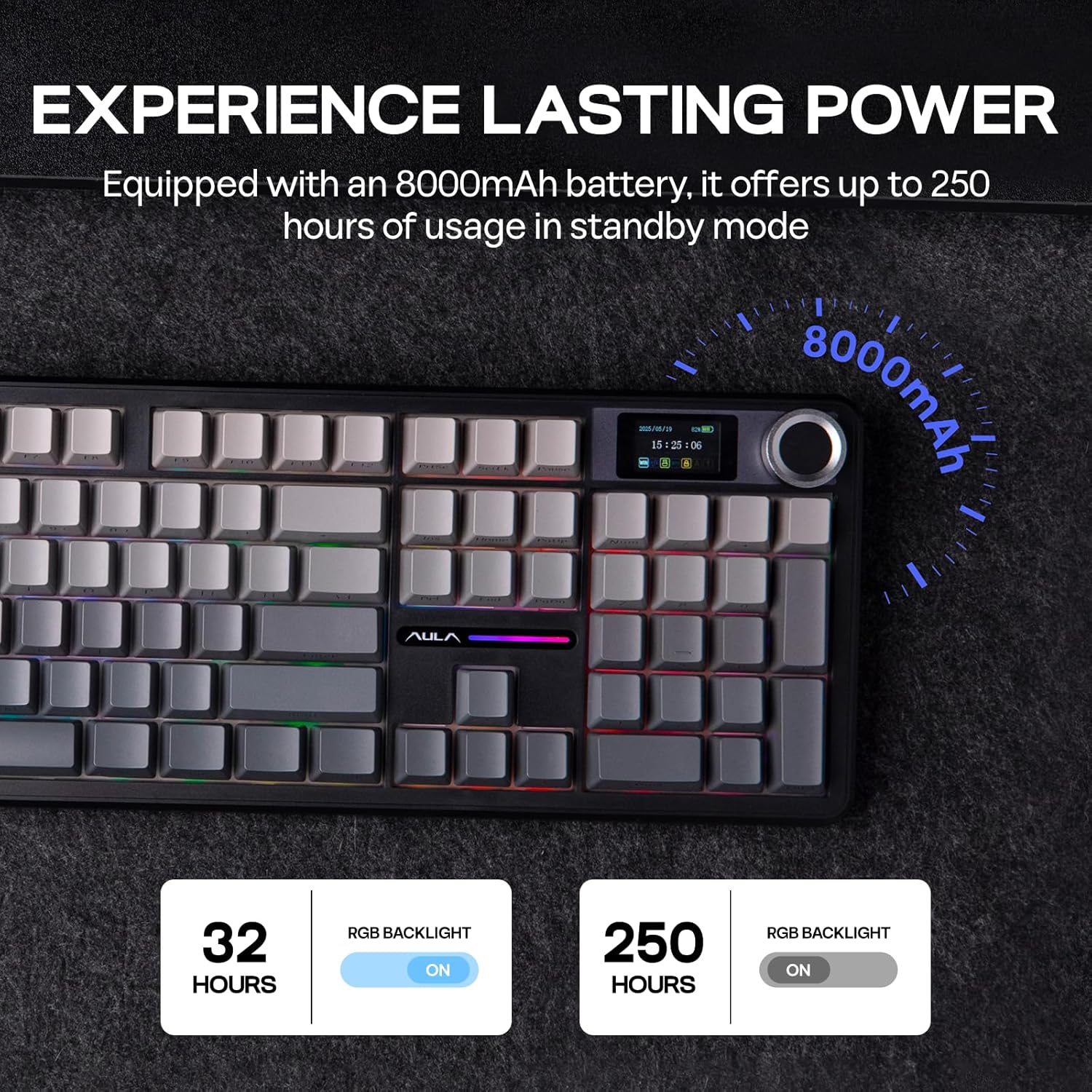
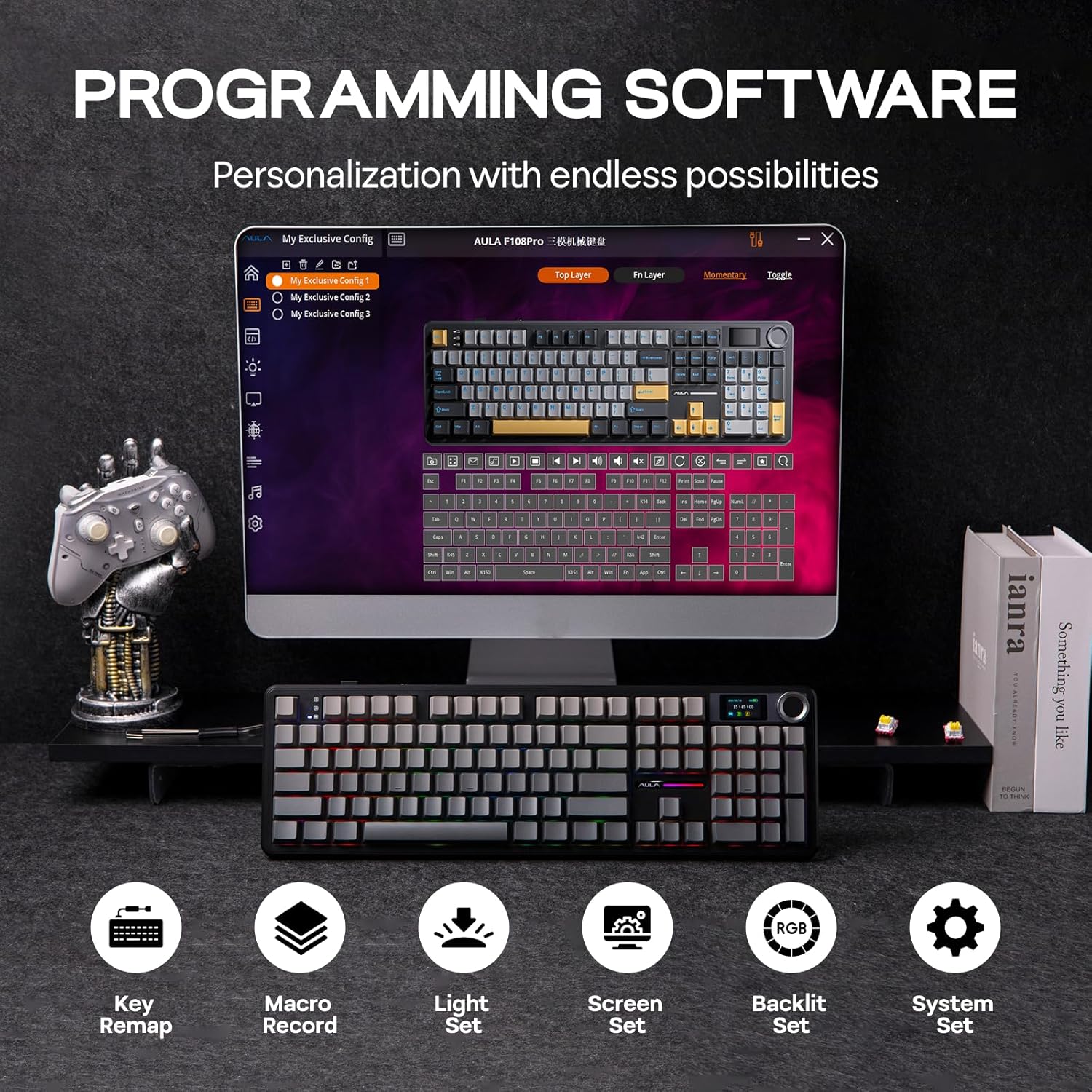
Product description EPOMAKER X AULA F108 PRO Full Size Wireless Mechanical Keyboard with LCD Screen The video showcases the product in use.The video guides you through product setup.The video compares multiple products.The video shows the product being unpacked. F108 PRO Full Size Wireless Mechanical Keyboard Merchant Video 1 Extended Battery Life 2 Multi-Device Flexibility 3 N-Key Rollover 4 Win/Mac 360° Showcasing On Thocky Sound, RGB Backlit, Package & Size The video showcases the product in use.The video guides you through product setup.The video compares multiple products.The video shows the product being unpacked. F108 PRO Wireless Gaming Keyboard Merchant Video Sound-Dampening & Lubed for Silky Acoustics Pre-Lubed LEOBOG Nimbus Switch The F108 PRO features an integrated Gasket Structure, delivering a relatively quiet, creamy sound profile along with a soft and flexible typing feel. The plate-mount stabilizers and linear switches have been meticulously lubricated and fine-tuned, ensuring a smooth and tactile typing experience. LEOBOG Reaper Switch: 5-pin Mechanical Linear SwitchTrigger Force: 45±3gf (55±3gf)Trigger & Total Travel: 1.8±0.3mm (3.6±0.3mm) Dynamic RGB & Single Color Immersive Gaming Atmosphere The RGB backlighting of the F108 PRO mechanical keyboard creates a mesmerizing and dynamic display. Colors flow and shift seamlessly across the keys, like a river of light. You can choose from a variety of lighting effects, such as breathing, cycling, and chasing, which add a sense of movement and energy to the keyboard. FN+|= Change Light Effect (on/off/different effects)FN+Tab= Change Light ColorsFN+↑↓←→: Adjust Brightness/Speed Length*Width=44.5*13.8cm. Weight=1.1kg Package Content What’s in the package: 1* F108 PRO Mechanical Gaming Keyboard1* 2-in-1 Switch & Keycap Puller. 1*Multilingual Manual (EN/DE/ES/FR/IT/JP/CN)1*Detachable USB A to C Cable. 1*Wireless 2.4Ghz Receiver (stored on the keyboard) 1 Custom Software 2 Gasket Structure 3 Significant Creativity How to adjust the time, date, and upload GIF images on the screen? You can find the download link for the driver on the “EPOMAKER” website. Adjust the time, date, and upload GIF images on the screen through the driver. Note: The F108 PRO driver currently only supports Windows systems. Why does the keyboard backlight light up but the keys don’t respond when I plug it in? It’s possible that the keyboard is not in the correct connection mode. You can press and hold the ‘FN’ key to check the connection system and OS of the keyboard. The symbols” ~`, 1, 2, 3, 4″ correspond to “Wireless 2.4GHz, BT 1/2/3, and USB-C wired”. How to switch the keyboard operating system? You can switch to the corresponding operating system using the key combinations “FN+Q/W/E/R”. To check the current status, simply press and hold the “FN” key. The keys Q, W, E, and R correspond to Android, Windows, Mac, and iOS, respectively. 96% 1800 Layout Mechanical Keyboard from EPOMAKER Add to Cart Add to Cart Customer Reviews 4.8 out of 5 stars 292 4.4 out of 5 stars 98 4.9 out of 5 stars 21 4.6 out of 5 stars 1,277 4.6 out of 5 stars 397 4.4 out of 5 stars 65 4.4 out of 5 stars 424 Price $66.39$66.39 $76.49$76.49 $79.99$79.99 $66.38$66.38 $76.49$76.49 $67.49$67.49 $93.49$93.49 Special Features 1800 Layout (9 function keys) Full Size, Quiet Keyboard Full 108-key Layout Low Latency (2ms-USB) Low Latency (2ms-USB) LCD calculator screen CNC Aluminum Shell Layout & Keys 96% ANSI US, 102 keys 100% ANSI US, 108 keys 100% ANSI US, 108 keys 96% ANSI US, 99 keys 96% ANSI US, 99 keys 96% ANSI US, 96 keys 96% ANSI US, 101 keys Keycap Material & Profile PBT Plastic. Cherry Profile PBT Plastic. Cherry Profile PBT Plastic. Cherry Profile PBT Plastic. Cherry Profile PBT Plastic. Cherry Profile PBT Plastic. Cherry Profile PBT. Cherry/MDA Profile Knob Function X X X X Volume & Brightness X Volume & Programmable Screen X X X X X LCD calculator screen X Connectivity Bluetooth/2.4Ghz/USB-C Wired Bluetooth/2.4Ghz/USB-C Wired Bluetooth/2.4Ghz/USB-C Wired Bluetooth/2.4Ghz/USB-C Wired Bluetooth/2.4Ghz/USB-C Wired Bluetooth/2.4Ghz/USB-C Wired Bluetooth/2.4Ghz/USB-C Wired Battery Capacity 8000mAh 8000mAh 4000mAh 8000mAh 8000mAh 8000mAh 8000mAh Custom Software TH99 Software (WIN only) TH108 Software (WIN only) F108 Software (WIN only) F99 Software (WIN only) F99 PRO Software (WIN only) Epomaker Software VIA Software Hot Swappable 3/5-pin Mechanical Switches 3/5-pin Mechanical Switches 3/5-pin Mechanical Switches 3/5-pin Mechanical Switches 3/5-pin Mechanical Switches 3/5-pin Mechanical Switches 3/5-pin Mechanical Switches Backlight RGB (Keycap not Shine-Through) RGB (Keycap not Shine-Through) RGB (Keycap not Shine-Through) RGB (Keycap not Shine-Through) RGB (Shine-Through & Not) RGB (Keycap not Shine-Through) RGB (Keycap not Shine-Through) Per-Key LEDs South-Facing South-Facing South-Facing North-Facing South-Facing South-Facing South-Facing Size & Weight 41.8*15*4.2cm. 1.14kg 44.5*14*4.2cm.1.2kg 44.5*13.8*4.1cm. 1.5kg 39×14.7x3cm. 1.16kg 40.5×13.6x3x1.9cm. 1.2kg 39.4*14.5*4.3cm. 1kg 40.5*13.78*3.23cm. 2kg 100% in Size, Performance and Comfort: Meet the 100% full size variation of the EPOMAKER X AULA F75 Max, the F108 PRO Mechanical keyboard that offers the same creamy sound and unparalleled performance as F75 Max but in upgraded full-size layout with customizable Screen. The 104 anti-ghosting keys deliver accuracy and greater possibilities in configuration and controlling, ideal for multitasking and fast response in gaming and office. While the 2-stage kickstand, low front height and cherry profile keycaps rid you of finger fatigue and wrist strain for a pain-free day of workCustomizable Screen & Volume Knob: Perfect for work with a dedicated numpad and premium ergonomic typing experience, the F108 PRO features a customizable screen and convenient knob that get the keyboard stands out among other gasket mechanical keyboards. Not just for show, this 1.14-inch LCD screen works as an intuitive control hub for RGB adjustment, displaying keyboard’s vital information, and double as the space for you to bring out your uniqueness with powerful software. Whether you’re crunching numbers, typing reports, engaging in group chat discussions, the F108 PRO keyboard elevates your workspace efficiency and aesthetics with productivity, comfort and creativityWireless Keyboard with Limitless Compatibility: Packed with an incredible 8000mAh rechargeable batteries, double the power average gaming keyboard offers, F108 PRO Wireless Keyboard grants up to 76 hours of continuous gameplay at peak performance with screen displaying at full brightness. Its versatile Bluetooth mode offers swift transaction from PC, Mac Laptop to Android Tablet, while the 2.4GHz wireless and USB Cable mode promise competitive-level stability and responsiveness with 1000Hz polling rateAcoustic Mastery with Satisfying Creamy Sound: Boasts a five-layer sound and shock-enhancement internal design, the F108 PRO keyboard brings the satisfying tranquil switch asmr to your desk. The sophisticated interior layer design features PO Sandwich Foam, PO Switch Pad, PET Sound-Enhancement Pad, PO Bottom Foam and Bottom Silicone as shock absorber and muffler, reducing typing noise and resonance for hushed and quiet switch sound, exceptional for focused tasks at office and immersive gaming at homeHot-Swappable Custom Keyboard: Customize each keystroke’s touch, acoustic feedback and the function it triggers, as the F108 PRO custom keyboard supplies with its formidable setup. Test out the various typing feel of mainstream 3/5-pin mechanical switches with the F108 PRO hot-swappable keyboard, and bask in the smooth and tactile touch of our pre-lubed Reaper Linear switch that sounds creamy and satisfying, credit to the keyboard’s sound-dampening design. Experimenting the powerful programming software for key remapping, macro assigning and sensitivity adjustments, to step up your input speed, gaming competitiveness and accessibilitySleek and Modern with South-Facing RGB Lights: Equipped with 104 keycaps of PBT Plastic in long-lasting vivid colors that are resilient to greasy and deterioration, the F108 PRO Keyboard balances performance and aesthetics excellently. With 104 per-key LEDs and light diffusers on Reaper switch for maximum brightness, you can fully express your playful spirit and personal style with countless RGB modes, all adjustable in colors, saturations, brightness and dynamic patterns; and immerse yourself in the stable typing given by the non-slip rubber feet and solid 1.2kg weight that embodies quality and durability

EPOMAKER X AULA F108 PRO Full Size Wireless Mechanical Keyboard with LCD Screen: The Ultimate Typing Experience

The EPOMAKER X AULA F108 PRO is a game-changer in the world of mechanical keyboards. Merging a full-size layout with a customizable LCD screen, this keyboard is designed for both avid gamers and productivity enthusiasts alike. The F108 PRO packs advanced features, ensuring a top-notch typing and gaming experience while maintaining impressive aesthetics.

Key Features & Performance

One of the standout features of the F108 PRO is its extended battery life. With a powerful 8000mAh rechargeable battery, users can enjoy up to 76 hours of continuous gameplay at peak performance, even with the screen displaying at full brightness. This longevity is a significant advantage for gamers who hate disruptions.

The multi-device flexibility allows seamless switching between devices. Whether you’re gaming on a PC, working on a Mac, or utilizing an Android tablet, the F108 PRO has you covered. With Bluetooth connectivity, a 2.4GHz wireless mode, and USB-C wired options, this keyboard promises unparalleled versatility.

The design also boasts N-key rollover, ensuring that every keypress is registered, no matter how fast you type. This feature is especially beneficial for fast-paced gaming, allowing for complex inputs without the fear of missed keystrokes.

Acoustic Mastery and Customization

Acoustically, the F108 PRO shines with its sound-dampening features and the pre-lubed Reaper linear switches. The keyboard’s five-layer internal design minimizes typing noise and enhances the tactile feedback of each keystroke. It’s perfect for concentrated office work or immersive gaming sessions without disturbing your environment.

Additionally, the customizable LCD screen adds a unique touch. Through user-friendly software, you can adjust RGB settings, display vital information, or even upload personal GIFs to express your individuality. This feature, accompanied by a convenient volume knob, enhances user experience and amplifies productivity.

Aesthetic Appeal

The F108 PRO doesn’t just perform well; it looks great too. The dynamic RGB lighting allows users to personalize their keyboard with various colors and lighting effects. The PBT keycaps are durable and resistant to wear, maintaining their vibrant hues over time. Weighing 1.2 kg, the solid build ensures stability during intense gaming sessions.

User Trustworthy Feedback

Rated 4.6 out of 5 stars, user reviews consistently emphasize the exceptional build quality, responsive keys, and stunning visuals. Customers appreciate the ability to customize their typing experience, noting it as a worthy investment for both gaming and daily tasks.

In conclusion, the EPOMAKER X AULA F108 PRO has set a new standard for mechanical keyboards. With its robust features, stunning aesthetics, and exceptional performance, it meets the diverse needs of gamers and professionals alike.

About EPOMAKER

Founded to push the boundaries of mechanical keyboard technology, EPOMAKER is dedicated to creating products that enhance user experience. With an eye for design and a commitment to quality, EPOMAKER continues to revolutionize the keyboard market, making them a trusted name among tech enthusiasts. The F108 PRO exemplifies this commitment to excellence, merging functionality with style to cater to the modern user.

Price: $105.99 - $90.09
(as of Sep 05, 2025 01:05:34 UTC – Details)

Related Posts
Read More

X1 Wireless Gaming Headset: Ultimate Compatibility and Long Battery Life: Available now at [price_with_discount]

Product Description Gaming headset XboxGaming headset Xbox xbox headset xbox headset wireless xbox one headset

1. Plug the Receiver to Xbox Controller directly. (Extra Microsoft Adapter needed (Not Included) when connect to old version controller)

2. Low battery of the controller can cause insufficient power supply to the receiver, the headset might not work. Please ensure sufficient power of the controller.

The video showcases the product in use.The video guides you through product setup.The video compares multiple products.The video shows the product being unpacked.

Troubleshootings for X1 Gaming Headset

Detailed demonstration for the X1 operations

1. Why can't I connect the headset with controller?

2. No sound from the microphone? Microphone sound too low?/Why can't my teammates hear me?

3. Echo from the microphone?

4. Why is there a lot of noise?/Headset volume too low?

The video showcases the product in use.The video guides you through product setup.The video compares multiple products.The video shows the product being unpacked.

Plug the dongle tightly and fully

How to plug the dongle to controller correctly?

× The dongle not plugged in tightly (there is a gap) It may cause noise, static, low volume, or no sound in the headphones.

√ The dongle plugged in tightly and fully (no gap) Please plug the dongle fully and tightly,so that could avoid noise, static, low volume, or no sound in the headphones.

The video showcases the product in use.The video guides you through product setup.The video compares multiple products.The video shows the product being unpacked.

Plug the X1 Dongle to the Xbox Controller directly

How to connect the Headset to Xbox Controller?

1. Plug the X1 Dongle to the Xbox Controller directly. (Not support the 3rd parties' controller)

2. While the Leds of the dongle flashing, please turn the headset power on.

3. Please keep the headset on 2.4GHz mode. (You could hold the Light Button to swith it to 2.4GHz or BT Mode)

4. Click the 'Xbox Accessories' option on your xbox device, makes the headset connect to it. Choose the 'Volume' option and enter into the 'Audio and Music' interface to turn the headset volume and mic on.

wireless headset headset gaming headset xbox one ps5 headset ps4 headset gaming headphones xbox headset with mic wirelessxbox headset with mic wireless

Please confirm the receiver is inserted to the controller or devices tightly and fully, to avoid the noise or echoes caused by the poor contact.

xbox pc headset computer headset

Why can't I connect the headset with controller?/Headset doesn’t work?

Confirm if you are in Bluetooth Mode or 2.4GHz Mode. The 2.4GHz dongle cannot be connected in Bluetooth mode. You need to switch to 2.4GHz mode.

No sound from the microphone? Microphone sound too low?Mic doesn’t work?

Confirm the settings on the Xbox console, whether the microphone sound is turned up to the maximum at the (Headset chat mixer)? Adjust the game sound and chat sound to the center to make them be balanced. Assure the microphone is properly plugged in

Why the volume is low while connect to the Xbox?

Make sure the (Headset Volume) on the Xbox console is set to maximum. When using the headset for the first time, the default volume on the console is 80%. And please insert the dongle tightly and fully.

Echo from the microphone?

Turn off monitoring mode in the Xbox console settings.

While connecting, headset sound got noise or echoes?

Make sure the transmitter is fully inserted into the controller. If the transmitter is not fully inserted, there will be significant electrical noise in the headset.


Wide Compatibility: Our wireless gaming headphones are equipped with both Bluetooth and 2.4G dual modes: ①. Allowing for wireless connection to Xbox controllers (Please note that the X1 Receiver only support the Official Controllers instead of the 3rd parties, and you need an extra Microsoft Adapter (Not Included) when connecting with an old version Xbox One controller) ②. as well as seamless compatibility with PC, PS5, laptops via a 2.4GHz receiver. ③. Mac and Switch supported by Bluetooth mode. Just plug and play for instant gaming immersion.
Superior Sound Quality: Immerse yourself in the game with our 50mm speakers and 3D surround sound technology. Hear every detail and experience realistic game sound effects. The noise-canceling microphone ensures clear communication with your teammates, enhancing teamwork during intense gaming sessions.
Extended Battery Life and Low Latency: Enjoy uninterrupted gaming with up to 40 hours of continuous playtime on a single charge, fully charge only need 2 hrs. Our wireless headphones feature low latency technology(<20ms ), providing instant audio feedback without any noticeable delays, allowing for faster reactions and better gameplay.
Comfortable and Durable Design: Designed for long gaming sessions, our headphones prioritize comfort and durability. The adjustable headband and memory foam ear cushions provide a customized fit, ensuring hours of comfortable gameplay. The durable construction ensures longevity, making these headphones a reliable companion for avid gamers.
Convenient Controls: Take control of your gaming experience with easy-to-reach buttons on our headphones. Adjust the volume, mute the microphone, or control other settings directly from the headset, allowing for a seamless and effortless gaming experience.
How to activate the mic function on Xbox: ①.Connecting to the controller, enter to the interface - Click the Choose the - Click the - See the and choose the
Read More

MSI Raider GE78HX: Ultimate Gaming Laptop with Intel Core i9, RTX 4070, and Win 11: Available now at [price_with_discount]

MSI Raider GE78HX 17” 240Hz QHD+ Gaming Laptop:  Intel Core i9-13950HX, NVIDIA Geforce RTX 4070, 32GB DDR5, 2TB NVMe SSD, Cooler Boost 5, Win 11: Black 13VG-020US
Supercharged Process: The 13th Gen. Intel Core i9 processor delivers the ultimate immersive experience in gameplay, multi-task work and productivity.
Simplistic Design: Enjoy the latest generation of Windows 11 Home for your everyday needs. *MSI recommends Windows 11 Pro for business use.
Beyond Fast: The NVIDIA GeForce RTX 4070 GPU powered by the Ada architecture unleashes the full glory of ray tracing, which simulates how light behaves in the real world.
QHD Display: The 17” 240Hz display delivers fast refresh rate for better immersive experience.
High-Speed Data: Thunderbolt 4 and DDR5 memory for the fastest data transfer, system speed and responsiveness.
Read More

“Redragon K605 Alien Giant Mechanical Gaming Keyboard: Super Big 61 Keys, RGB LED Backlit, Outemu Blue Switch”: Available now at [price_with_discount]

Product Description Add to Cart Add to Cart Customer Reviews 4.7 out of 5 stars 32 4.4 out of 5 stars 53 4.4 out of 5 stars 53 3.9 out of 5 stars 12 4.1 out of 5 stars 47 4.6 out of 5 stars 42 Price $19.99$19.99 — — — — $59.99$59.99 HOT SWAPPABLE ✓ ✓ ✓ ✓ Rgb ✓ ✓ ✓ Per-key customizable Per-key customizable Keys 87 104 68+10 94 Switches no no no Red Switches Red Switches Redragon K605 Alien Giant Mechanical Gaming Keyboard Super Big 61 Keys Outemu Blue SwitchRedragon K605 Alien Giant Mechanical Gaming Keyboard Super Big 61 Keys Outemu Blue Switch Redragon K605 Alien Giant Mechanical Gaming Keyboard Super Big 61 Keys Outemu Blue SwitchRedragon K605 Alien Giant Mechanical Gaming Keyboard Super Big 61 Keys Outemu Blue Switch SPECIFICATIONS: Product: Redragon K605 Giant Mechanical Gaming Keyboard Keyboard Design: Gaming Keyboard Color: Black Backlit Keyboard: RGB Illuminated Switch Type: OUTEMU Blue Switches Keyboard Features: Anti-Ghosting, 60% Keyboard Number of Keys: 61 Interface: USB Type-C Notes

If you received a returned item that does not work well or missing something, please let us know for a solution.

Support 11 RGB Lighting Effects

Support total 11 effects (Default Wave, Ripple, Trigger, Neon, Stars, Flows, Changing, Normal ON, Breathing, Single key ON, Single key OFF)

FN+INS to switch effectsFN+ALT_R to switch main area light effectFN+M to adjust brightness levelFN+< to set the color you wantFN+Space to set the color you want Support 4 Edge Lighting Effects

Support total 4 effects (Default Wave, mixed color, Neon, Normal ON (in Red/blue/green/purple/yellow/cyan), OFF)

Redragon K605 Alien Giant Mechanical Gaming Keyboard Super Big 61 Keys Outemu Blue SwitchRedragon K605 Alien Giant Mechanical Gaming Keyboard Super Big 61 Keys Outemu Blue Switch

Metal + ABS Construction

This Redragon K605 giant gaming keyboard is constructed of aluminum alloy plate and ABS keycaps covered with a matte and switches that stand up to tough gaming. conditions, designed for longevity with greater durability and responsiveness.

Redragon K605 Alien Giant Mechanical Gaming Keyboard Super Big 61 Keys Outemu Blue SwitchRedragon K605 Alien Giant Mechanical Gaming Keyboard Super Big 61 Keys Outemu Blue Switch

Iconic Tactile Feedback

Blue switch will remind you with the first feeling about mechanical keyboard, incomparable click feedback and refreshing tactile feel. It deliver accurate, responsive commands for typing and gaming with incredible 50-million-keystroke lifespan, proven in testing.

Redragon K605 Alien Giant Mechanical Gaming Keyboard Super Big 61 Keys Outemu Blue SwitchRedragon K605 Alien Giant Mechanical Gaming Keyboard Super Big 61 Keys Outemu Blue Switch

Ergonomical Design

The ergonomic slight arcuate keyboard panel & cambered keycap design make our body as comfortable as possible. It is not easy to fatigue after long-term use.

Redragon K605 Alien Giant Mechanical Gaming Keyboard Super Big 61 Keys Outemu Blue SwitchRedragon K605 Alien Giant Mechanical Gaming Keyboard Super Big 61 Keys Outemu Blue Switch

Wired Type-C USB Connection

180cm(70.86 inch) Type-C long golden plated Spill Resistant design USB cable widely compatible with PC devices, more general and convenient charging method, more solid data transmission.

Redragon K605 Alien Giant Mechanical Gaming Keyboard Super Big 61 Keys Outemu Blue SwitchRedragon K605 Alien Giant Mechanical Gaming Keyboard Super Big 61 Keys Outemu Blue Switch

Metal + ABS Construction

Redragon K605 Alien Giant Mechanical Gaming Keyboard Super Big 61 Keys Outemu Blue SwitchRedragon K605 Alien Giant Mechanical Gaming Keyboard Super Big 61 Keys Outemu Blue Switch

Iconic Tactile Feedback

Redragon K605 Alien Giant Mechanical Gaming Keyboard Super Big 61 Keys Outemu Blue SwitchRedragon K605 Alien Giant Mechanical Gaming Keyboard Super Big 61 Keys Outemu Blue Switch

Ergonomical Design

Redragon K605 Alien Giant Mechanical Gaming Keyboard Super Big 61 Keys Outemu Blue SwitchRedragon K605 Alien Giant Mechanical Gaming Keyboard Super Big 61 Keys Outemu Blue Switch

Wired Type-C USB Connection


EXCLUSIVE SUPER BIG 61 KEYS 60% KEYBOARD - With oversized 23.00" width *7.95" depth *2.33" height 5.34lb weight, Redragon K605 keyboards likes monster, 200% size than regular keyboards, with extra big outemu blue switch, keycaps and print. Concise design with 61 keys total. Wired type-C USB connection, Plug & Play, no drivers needed. Good for gaming editing typing
EXTRA BIG OUTEMU BLUE SWITCH - The mechanical keys offer medium resistance, crisp sound, tactile bump and louder high-pitched audible clicking, sensitive response, brings you comfortable typing feeling & stable clicking touch, designed for longevity, durability, delivering precise tactile feedback. For Fast Typing and Gaming
RGB LED BACKLIT GAMING KEYBOARD - With 11 different RGB Lighting modes & effects, 5 backlight brightness levels and adjustable breathing speed. Full n-key rollover, full keys conflict free and anti ghosting, improve your game experience
ERGONOMIC DESIGN- The ergonomic slight arcuate keyboard panel & cambered keycap design make our body as comfortable as possible and to reduce the risk of injury while you type . The precision engineered ABS keycaps offering crystal clear uniform backlighting, non-slip & strong durability
GAMING KEYBOARD COMPATIBILITY: Windows 10, Windows 8, Windows 7, Windows Vista, or Windows XP, Mac operating system supported: Mac OS X 10.10, Mac OS X 10.11, Mac OS X 10.12, Mac OS X 10.13, Mac OS X 10.14. Works well with all major Computers Brands and Gaming PCs
Read More

“Unleash Your Gaming Experience: The Ajazz AK820 Mechanical Keyboard with CNC Knob Control”: Available now at [price_with_discount]

Product Description hk gaming gk61hk gaming gk61 yunzii b75 epomaker th80 attack shark 1 CNC Metal Knob 2 Gasket Mount 3 Layout

What's the knob function?

The functional knob is for adjuting the RGB and volume quickly. Press the knob means mute. Spin left/right the knob can decrease /increase volume.

What swicthes I can use for this keyboard?

The keyboard is compatible with almost all the mechanical switches with 3 or 5 pins.

OTHER TYPE OF THE KEYBOARD

Add to Cart Add to Cart Add to Cart Add to Cart Add to Cart Customer Reviews 4.5 out of 5 stars 137 4.5 out of 5 stars 137 4.5 out of 5 stars 137 4.5 out of 5 stars 137 4.5 out of 5 stars 137 Price $38.24$38.24 $39.09$39.09 $42.49$42.49 $72.99$72.99 $68.99$68.99 Layout 75% 75% 75% 75% 75% CNC Metal Knob ✔ ✔ ✔ ✔ ✔ Connection Mode Type-C Wired Type-C Wired Type-C Wired Bt 5.1/2.4G/Type-C Wired Bt 5.1/2.4G/Type-C Wired TFT Smart Dispaly ✘ ✘ ✘ ✔ ✔ Backlit Blue Light White Light RGB RGB RGB Battery - - - 4000mAh 4000mAh Mounting Type Gasket Gasket Gasket Gasket Gasket PBT Keycap ✘ ✘ ✔ ✔ ✔ Foam Material Poron Poron Poron Poron Poron Hot Swappable ✔ ✔ ✔ ✔ ✔ South-facing Lights ✔ ✔ ✔ ✔ ✔ N-key Rollover ✔ ✔ ✔ ✔ ✔
【75% Percent Keyboard】:The 82 keys pc gaming keyboards adoption of 75% layout, it retains essential arrow and function keys while freeing up desk space. With N-key rollover, the computer keyboard can respond to the simultaneous press of multiple keys, helpful for using hotkeys or in a highly exciting real-time games.USB wired, plug and play!
【Multi-Functionality Metal Knob】: The rgb keyboard with control knob, volume level and mute can be controlled independently, and compatible Mac and Windows operating systems. The mac mechanical keyboard features 18 multi-function keys can convenient multimedia control according to your keypad and computer system.
【Hot-swappable & The pre-lubed Clicky Blue Switch】:High-quality PCB supports 3/5-pin hot-swappable so you can enjoy the fun of making your own unique pc gaming keyboard ality PCB supports 3/5without soldering.Blue switches give you a clicky and tactile feedback,it provides great tactile feel,sensitive and responsive.50 million times keystroke test,perfect for professional gamers and typists
【Gasket Mounted Mechanical Keyboard】The 75% mechanical keyboard uses a gasket-mounted design coupled with a Flex-cut PC plate, built-in 5 layers of sound insulation cotton, Poron sandwich cotton, IXPE under-axis pad, PET premium sound pad and bottom cotton.Noise is maximally reduced, The 1.2 mm PCB board slot and the PC positioning board slot optimize resilience and stability,making the hand feel softer and more elastic.
【Cool Ice BlueLight】:Illuminate your setup with AK820 Pro's vibrant LED backlighting. The Blue light key board have 20 backlight effects. 5 brightness levels and 5 lighting speeds. Press FN+| to change the light effects, Press FN+1! /2@/3# to custom 3 sets of gaming lighting effects, choose light recording mode and save lighting profiles. PBT keycaps featured with wear-resistant, waterproof and high light transmittance make the characters more clearly visible in backlight mode.